

Your Browsing History

- Free 30-day Returns
$144.99

Meet Your Seller


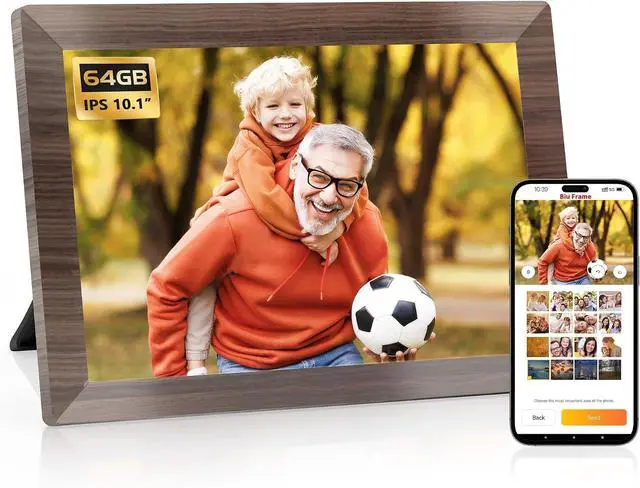

10.1 Inch Smart Digital Picture Frame,1280x800 HD IPS Touch Screen,64GB Large Storage,2GB RAM, WiFi Digital Photo Frame Load from Phone, Motion Sensor, Auto-Rotate, Digital Frame
- A Perfect Gift to Keep Everyone Connected: The HAOVM WiFi digital picture frame keeps everyone connected. Share photos and videos instantly on the 10-inch IPS HD screen of the photo frame, inviting friends and family to share memories wherever they are. This photo frame is a thoughtful gift for grandparents, new parents, newlyweds, college kids, or far-flung families
- Instantly Share and Display Your Moments: Share life's moments instantly with Biuframe, a free, secure, and private app for Android and iOS. Snap and share wedding, toddler memories, and more with friends and family through the app or email. New moments will show on the HAOVM digital picture frame in seconds. Store 100,000+ photos (about double space than those of 32GB) with 64 GB built-in storage, expandable up to 512 GB with a TF card or USB-C drive. Use TF cards and USB drives to upload, back up, and restore files (TF card and USB drive sold separately)
- Interactive 10-inch IPS HD Screen: Experience a gorgeous and res
+
+
Overview
Reviews

Any questions? Our AI mode will help you find out quickly.
Try me now
Display frame orientation and auto-rotate
Touch to setup, browse, slideshow, or delete
Support up to 20 multi-senders
Detects and awakens frame when you're in the room
How to set the frame as photo frame not calendar frame as the default Launcher?
Touch the Assistive Icon-- Launcher, and select ''Use as Photo Frame Only''.
Can I play photos on my USB drive or microsd card on this digital photo frame?
Yes, the HAOVM digital picture frame has slots for microSD card and USB C drive. Just insert your microSD card or USB C drive and play your memory on it.
Can I connect it to my 5G WiFi?
No, it connects to 2.4G WiFi only.
How to set up the time and date?
Go to Settings--Frame--Date & Time, turn on the option 'Use network time zone, date and time. The time and date will automatically show your local date and time after you connect the frame to WiFi.
How to change the play effect?
Touch the screen when your digital picture frame is playing pictures or videos. Choose Play Effect in the menu, then choose ''Full Screen'' or ''Fit to View'' as the play effect. It will zoom in and out as the default play effect is ''Full View''.
Auto Orientation HD Touch Screen Display All Motion Sensor How to set the frame as photo frame not calendar frame as the default Launcher?
Can I play photos on my USB drive or microsd card on this digital photo frame?
Can I connect it to my 5G WiFi?
How to set up the time and date?
How to change the play effect?
Warranty & Returns
Warranty, Returns, And Additional Information
Warranty
- Please contact the Seller directly for warranty information. Warranty information may also be found on the Manufacturer's website.
- CONTACT
Return Policies
- Return for refund within: 30 days
- Return for replacement within: 30 days
- This item is covered by Deep Source Trading Shop Return Policy
Manufacturer Contact Info
- For a directory of all our manufacturers, please click below.
- Manufacturers Directory
LOADING...