Your Browsing History
- Free 30-day Returns
$87.99
Meet Your Seller
USB-C Docking Station Dual Monitor, 9-in-1 Laptop Dock with 2 HDMI Laptop Docking Station with 4K@60Hz HDMI, USB A&C 3.0, SD/Micro SD, 100W PD Compatible with /Dell XPS/HP/Mac (0.65FT)
- [9-in-1 USB-C Docking Station] This laptop docking station contains 2 HDMI ports (4K@60Hz), 3 USB-A ports (5Gbps), 1 USB-C port (5Gbps), 100W PD charging, and SD/MicroSD slots (104Mbps). Note: Your laptop's USB-C port must support video output via DisplayPort Alt Mode. [Dual 4K@60Hz Displays] Connect two monitors through the 2 HDMI ports for screen extension or mirroring at 4K@60Hz. Note: For 4K@60Hz, ensure your laptop, cables, and monitors support HDMI 2.0 or higher. On Mac, dual display output supports only A-AA or A-BB modes. A-BC is not supported. [Fast Data Transfer and Easy Access] Transfer files via 1 USB-C port (5Gbps), 3 USB-A ports (5Gbps), and SD/MicroSD slots (up to 104Mbps). [100W PD Charging] The hub supports up to 100W input and supplies up to 90W to your laptop while the dock is in use. Note: Your device's USB-C port must support Power Delivery (PD). Use a 100W+ power adapter (not included). [Design and Lock Button] The docking station features a 0.65 ft built-in cable, an aluminum alloy body, and a lock button. Press the button once to lock a Windows device, or press and hold it for 3 seconds to lock a Mac. [Compatibility] Designed for laptops with full-featured USB-C ports that support display output, charging, and data transfer. Compatible devices include Dell, Lenovo, and Surface devices that meet these requirements. On macOS, the dock can only mirror the same content across all external monitors. [Setup Guide] Mac: Go to System Settings > Privacy & Sec
+
+
Overview
Specs
Reviews
Any questions? Ask CelesteSM will help you find out quickly.
Try me now
[9-in-1 USB-C Docking Station] This laptop docking station contains 2 HDMI ports (4K@60Hz), 3 USB-A ports (5Gbps), 1 USB-C port (5Gbps), 100W PD charging, and SD/MicroSD slots (104Mbps).
Note: Your laptop's USB-C port must support video output via DisplayPort Alt Mode. [Dual 4K@60Hz Displays] Connect two monitors through the 2 HDMI ports for screen extension or mirroring at 4K@60Hz.
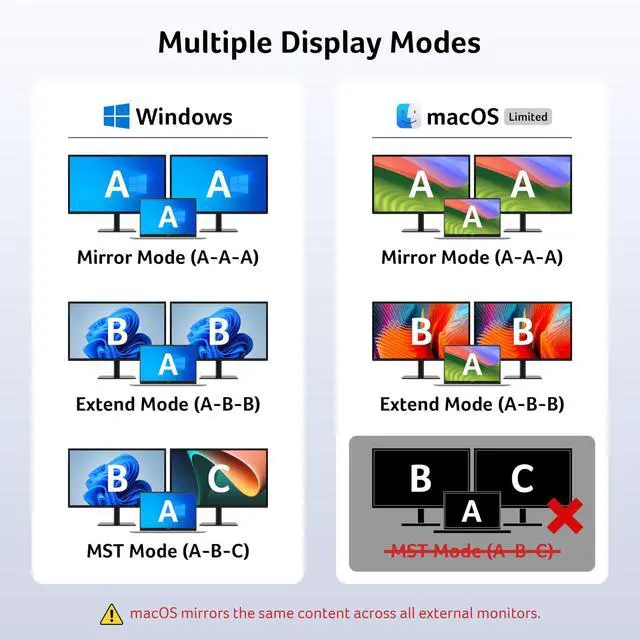
Note: For 4K@60Hz, ensure your laptop, cables, and monitors support HDMI 2.0 or higher. On Mac, dual display output supports only A-AA or A-BB modes. A-BC is not supported. [Fast Data Transfer and Easy Access] Transfer files via 1 USB-C port (5Gbps), 3 USB-A ports (5Gbps), and SD/MicroSD slots (up to 104Mbps). [100W PD Charging] The hub supports up to 100W input and supplies up to 90W to your laptop while the dock is in use.
Note: Your device's USB-C port must support Power Delivery (PD). Use a 100W+ power adapter (not included). [Design and Lock Button] The docking station features a 0.65 ft built-in cable, an aluminum alloy body, and a lock button. Press the button once to lock a Windows device, or press and hold it for 3 seconds to lock a Mac. [Compatibility] Designed for laptops with full-featured USB-C ports that support display output, charging, and data transfer. Compatible devices include Dell, Lenovo, and Surface devices that meet these requirements. On macOS, the dock can only mirror the same content across all external monitors.
[Setup Guide] Mac: Go to System Settings > Privacy & Security > Accessories and select Always Allow.
Windows: The dock is plug-and-play. Enable external devices in Settings > Devices. After setup, reconnect the docking station and wait for your computer to recognize it
Note: Your laptop's USB-C port must support video output via DisplayPort Alt Mode. [Dual 4K@60Hz Displays] Connect two monitors through the 2 HDMI ports for screen extension or mirroring at 4K@60Hz.
Note: For 4K@60Hz, ensure your laptop, cables, and monitors support HDMI 2.0 or higher. On Mac, dual display output supports only A-AA or A-BB modes. A-BC is not supported. [Fast Data Transfer and Easy Access] Transfer files via 1 USB-C port (5Gbps), 3 USB-A ports (5Gbps), and SD/MicroSD slots (up to 104Mbps). [100W PD Charging] The hub supports up to 100W input and supplies up to 90W to your laptop while the dock is in use.
Note: Your device's USB-C port must support Power Delivery (PD). Use a 100W+ power adapter (not included). [Design and Lock Button] The docking station features a 0.65 ft built-in cable, an aluminum alloy body, and a lock button. Press the button once to lock a Windows device, or press and hold it for 3 seconds to lock a Mac. [Compatibility] Designed for laptops with full-featured USB-C ports that support display output, charging, and data transfer. Compatible devices include Dell, Lenovo, and Surface devices that meet these requirements. On macOS, the dock can only mirror the same content across all external monitors.
[Setup Guide] Mac: Go to System Settings > Privacy & Security > Accessories and select Always Allow.
Windows: The dock is plug-and-play. Enable external devices in Settings > Devices. After setup, reconnect the docking station and wait for your computer to recognize it
Warranty & Returns
Warranty, Returns, And Additional Information
Warranty
- Please contact the Seller directly for warranty information. Warranty information may also be found on the Manufacturer's website.
- CONTACT
Return Policies
- Return for refund within: 30 days
- Return for replacement within: 30 days
- This item is covered by EpicTransTrade Return Policy
Manufacturer Contact Info
- For a directory of all our manufacturers, please click below.
- Manufacturers Directory
LOADING...