Your Browsing History
- Free 30-day Returns
$199.99
Ships from China.
Meet Your Seller
Visit RIITOP Store
FOLLOW
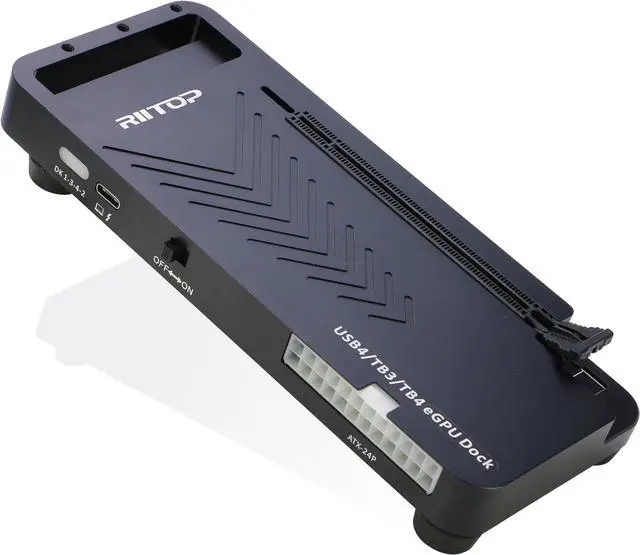
RIITOP External GPU Docking Station, 40Gpbs eGPU Enclosure USB4.0 Compatible with Thunderbolt 4/3 External GPU Dock for PCIe 4.0 X16 Graphics Card
Limited time offer, ends 07/13 By RIITOP
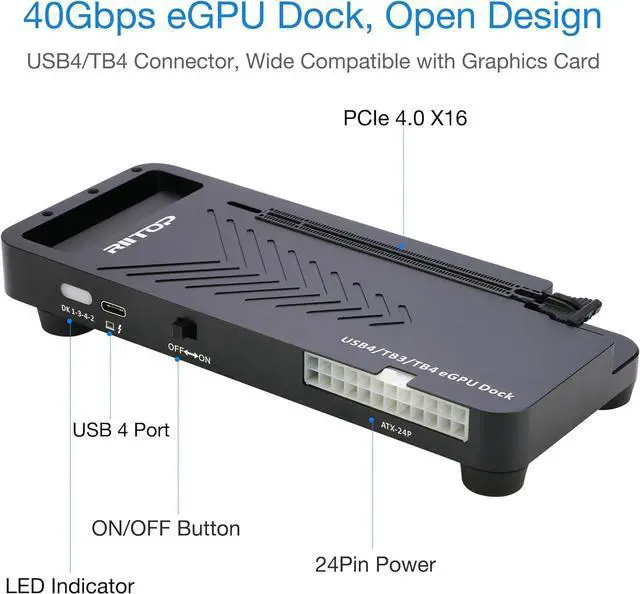
- RIITOP USB4.0 / Thunderbolt4 External GPU Docking Station Compensates for the performance limitations of graphics card on thin/ light or older laptops, gaming rigs and NUCs, comes with Thunderbolt 3/4 or USB4-equipped devices.
- Supports the latest NVIDIA (RTX 50 Series: 5090 D/5080/5070 Ti/5070) and AMD (RX 7000 Series) GPUs, delivering high-performance graphics for AI Computing, cinematic experiences, large-scale rendering, video editing, gaming and creative workloads.
- Hardware Requirement: 1x Available Thunderbolt 4 or Thunderbolt 3 or USB 4 Port on your laptop or any other device you want to connect, otherwise it can not be used; 1x ATX/SFX Power Supply; 1x PCIe 4.0 x16 Graphics card.
- Please Note: 1. Please make sure your laptop owns Thunderbolt 4/3 or USB4 interface in bandwidth of 40Gbps. Otherwise, the eGPU Docking Station can not work 2. Compatible with Mac OS 10.13.4 and above, but can only support AMD Graphics Card, no driver need. Not support NVIDIA on Mac OS.
+
+
Overview
Specs
Reviews
Any questions? Our AI beta will help you find out quickly.
Try me now
Please Note:
1. Please make sure your laptop owns Thunderbolt 4/3 or USB4 interface in bandwidth of 40Gbps. Otherwise, the eGPU Docking Station can not work.
2. Compatible with Mac OS 10.13.4 and above, but can only support AMD Graphics Card, no driver need.
3. Not support NVIDIA on Mac OS.
Features:
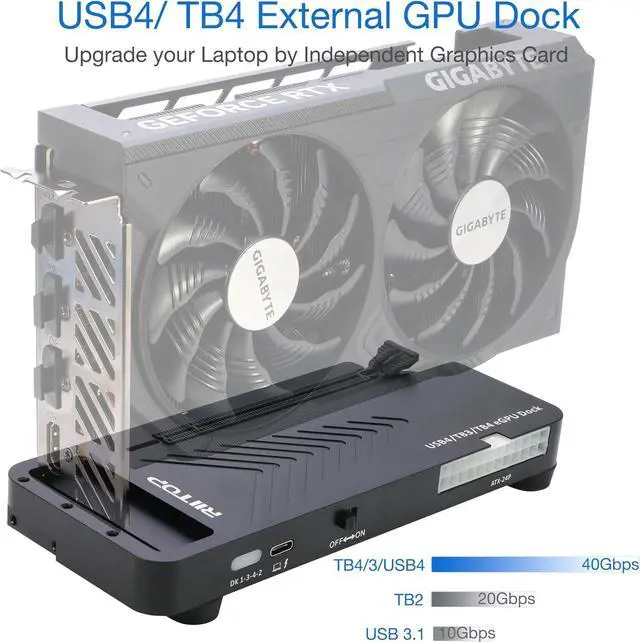
40Gpbs USB4/TB4 eGPU Dock: RIITOP USB4.0 eGPU Docking Station Compensates for the performance limitations of graphics card on thin/ light or older laptops, gaming rigs and NUCs, which comes with Thunderbolt 3/4 or USB4-equipped devices.
Supports the latest NVIDIA (RTX 50 Series: 5090 D/5080/5070 Ti/5070) and AMD (RX 7000 Series) GPUs, delivering high-performance graphics for AI Computing, cinematic experiences, large-scale rendering, video editing, gaming and creative workloads.
Hardware Requirement:
1x Available Thunderbolt 4 or Thunderbolt 3 or USB 4 Port on your laptop or any other device you want to connect, otherwise it can not be used;
1x ATX/SFX Power Supply.
1x PCIe 4.0 x16 Graphics card.
Easy to install:
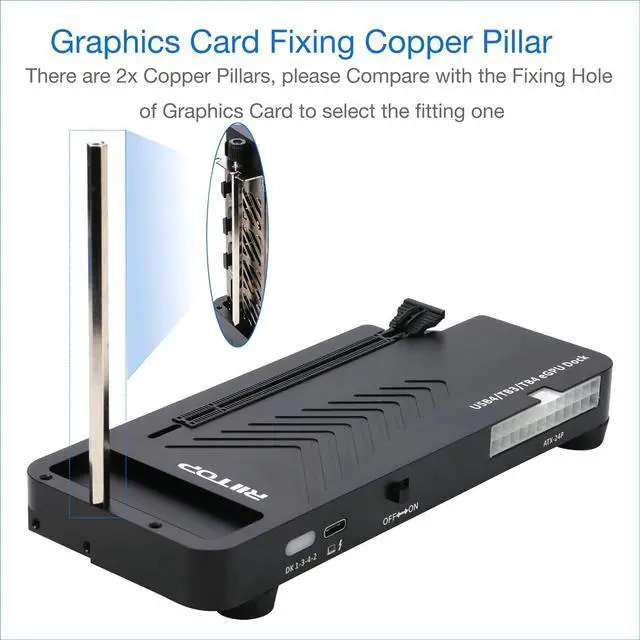
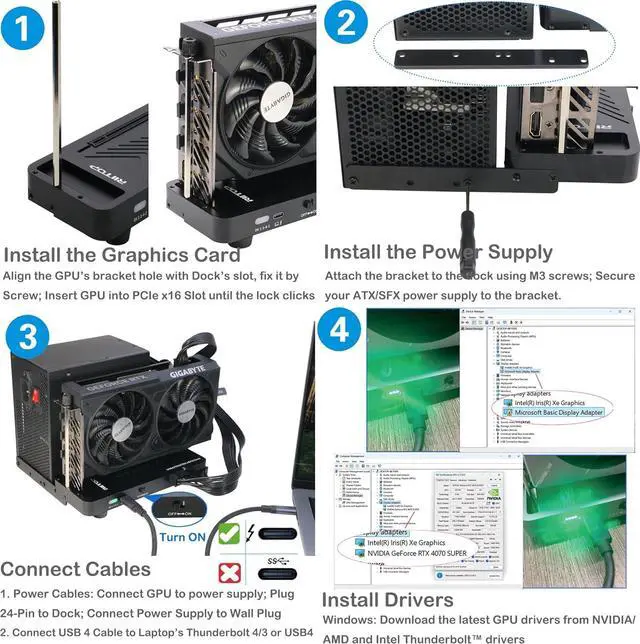
1. Install Graphics Card, and Fix it by the copper Pillar for Graphics Card.
2. Fix Power Supply by black Bracket.
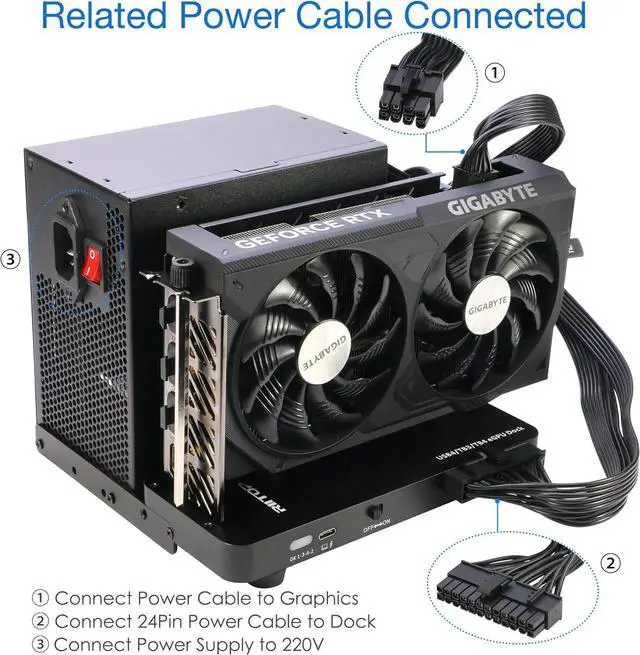
3. Connect the related cables: 24 Pin ATX Cable, USB 4 Cable and Video Cable for Monitor.
4. Turn on the "ON/OFF Button.
5. Install driver for the Graphics Card(Please Note: Windows os also need to install the Thunderbolt controller Driver).
Wide Compatibility:
Open design, No restrictions on graphics card size, Supports the most latest graphics card, such as NVIDIA (RTX 50 Series: 5090 D/5080/5070 Ti/5070) and AMD (RX 7000 Series) GPU; Compatible with Windows 10/11 64-bit, Linux, and Mac OS.
Packing Including:
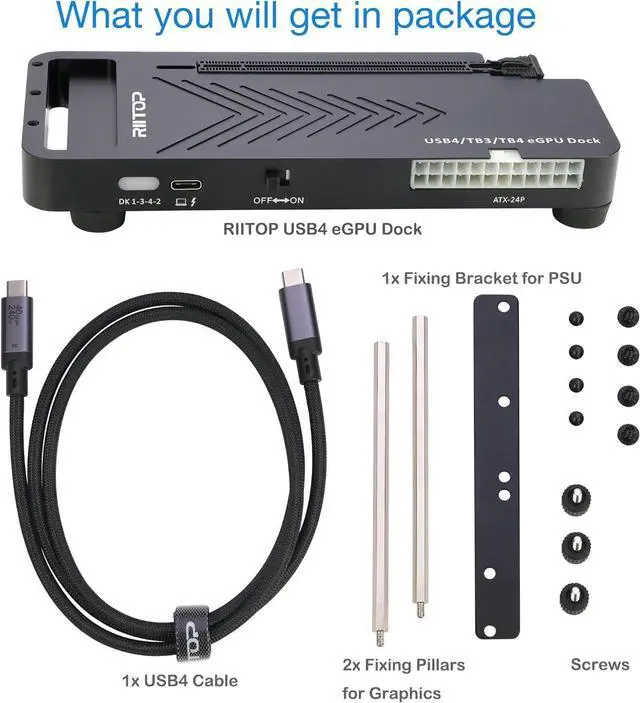
1x RIITOP 40Gpbs GPU Dock (Graphics Card and Power supply not included);
1x USB 4 cable;
2x Fixing Cooper Pillar for Graphics;
1x Fixing bracket for power supply;
1 x User Manual;
Screws.

1. Please make sure your laptop owns Thunderbolt 4/3 or USB4 interface in bandwidth of 40Gbps. Otherwise, the eGPU Docking Station can not work.
2. Compatible with Mac OS 10.13.4 and above, but can only support AMD Graphics Card, no driver need.
3. Not support NVIDIA on Mac OS.
Features:
40Gpbs USB4/TB4 eGPU Dock: RIITOP USB4.0 eGPU Docking Station Compensates for the performance limitations of graphics card on thin/ light or older laptops, gaming rigs and NUCs, which comes with Thunderbolt 3/4 or USB4-equipped devices.
Supports the latest NVIDIA (RTX 50 Series: 5090 D/5080/5070 Ti/5070) and AMD (RX 7000 Series) GPUs, delivering high-performance graphics for AI Computing, cinematic experiences, large-scale rendering, video editing, gaming and creative workloads.
Hardware Requirement:
1x Available Thunderbolt 4 or Thunderbolt 3 or USB 4 Port on your laptop or any other device you want to connect, otherwise it can not be used;
1x ATX/SFX Power Supply.
1x PCIe 4.0 x16 Graphics card.
Easy to install:
1. Install Graphics Card, and Fix it by the copper Pillar for Graphics Card.
2. Fix Power Supply by black Bracket.
3. Connect the related cables: 24 Pin ATX Cable, USB 4 Cable and Video Cable for Monitor.
4. Turn on the "ON/OFF Button.
5. Install driver for the Graphics Card(Please Note: Windows os also need to install the Thunderbolt controller Driver).
Wide Compatibility:
Open design, No restrictions on graphics card size, Supports the most latest graphics card, such as NVIDIA (RTX 50 Series: 5090 D/5080/5070 Ti/5070) and AMD (RX 7000 Series) GPU; Compatible with Windows 10/11 64-bit, Linux, and Mac OS.
Packing Including:
1x RIITOP 40Gpbs GPU Dock (Graphics Card and Power supply not included);
1x USB 4 cable;
2x Fixing Cooper Pillar for Graphics;
1x Fixing bracket for power supply;
1 x User Manual;
Screws.
Warranty & Returns
Warranty, Returns, And Additional Information
Warranty
- Please contact the Seller directly for warranty information. Warranty information may also be found on the Manufacturer's website.
- CONTACT
Return Policies
- Return for refund within: 30 days
- Return for replacement within: 30 days
- This item is covered by RIITOP Return Policy
Manufacturer Contact Info
- For a directory of all our manufacturers, please click below.
- Manufacturers Directory
LOADING...