You’re seeing this ad based on the product’s relevance to your search query. If you are a seller and want to participate in this program click here to learn more.
USB C Laptop Docking Station Dual Monitor HDMI USB C Hub Multiport Adapter USB C Dongle Dock 14 in 1 USB C to 2 HDMI 4K+DisplayPort+Ethernet+4USB+2USB C+100W PD Charger+SD/TF for Dell/Lenovo/HP Laptop
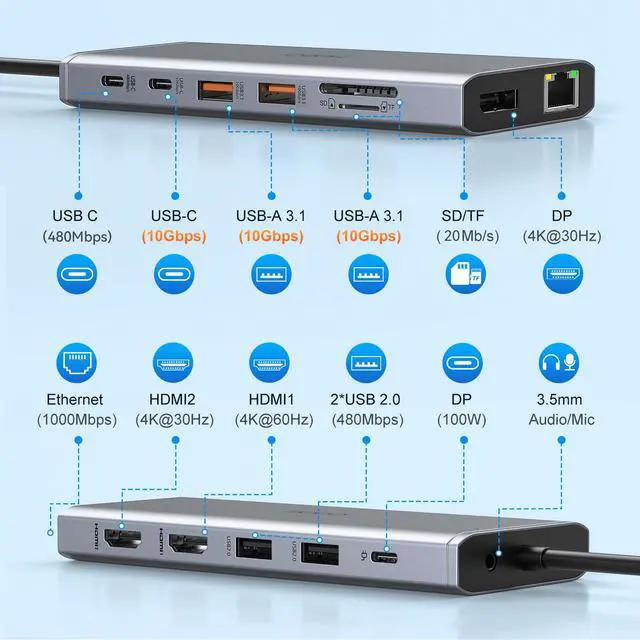
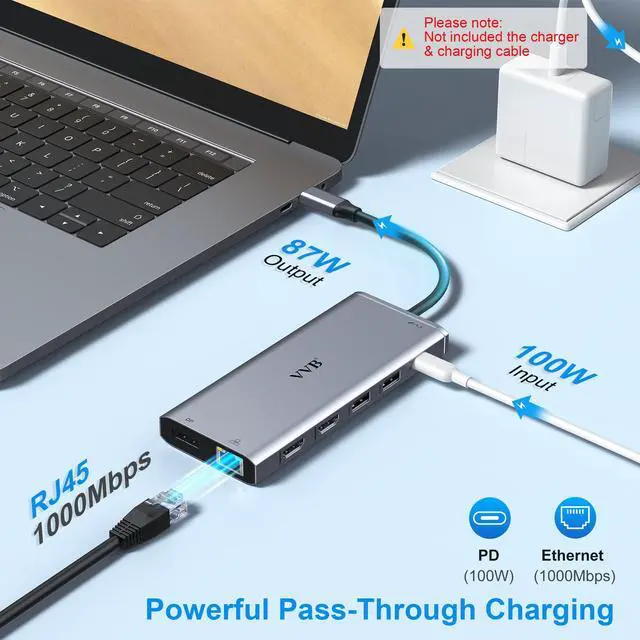
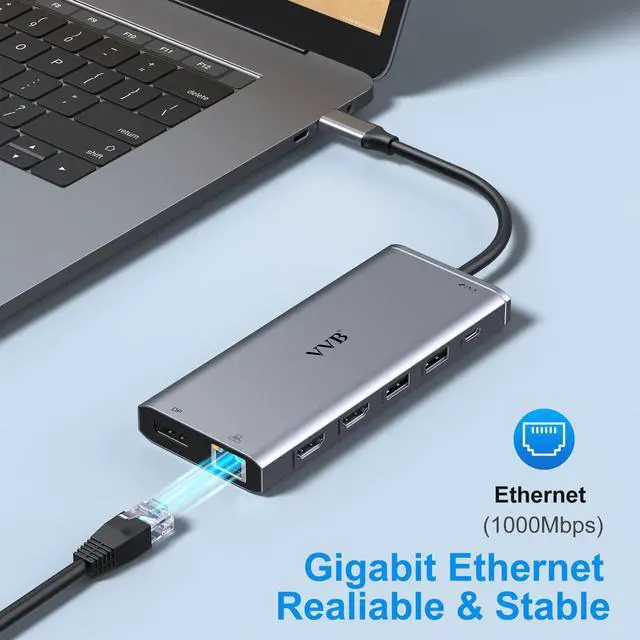
Docking Station 14 in 1:This usb c docking station could extend your laptop from one usb c/thunderbolt 3/4/type c port into 14 ports:2 HDMI port(4K),Display Port(4K),100W USB C Power Delivery port,Ethernet(1Gbps), 1 USB C port and 2 USB A 3.1 ports(10Gbps), 1 USB C 2.0 and 2 USB 2.0(480Mbps),SD/Micro SD card reader,and 3.5mm Mic/audio.NOTE: Not all USB-C device is compatible with the hub,the incompatible device cannot use theHDMI orDP of this usb c dock
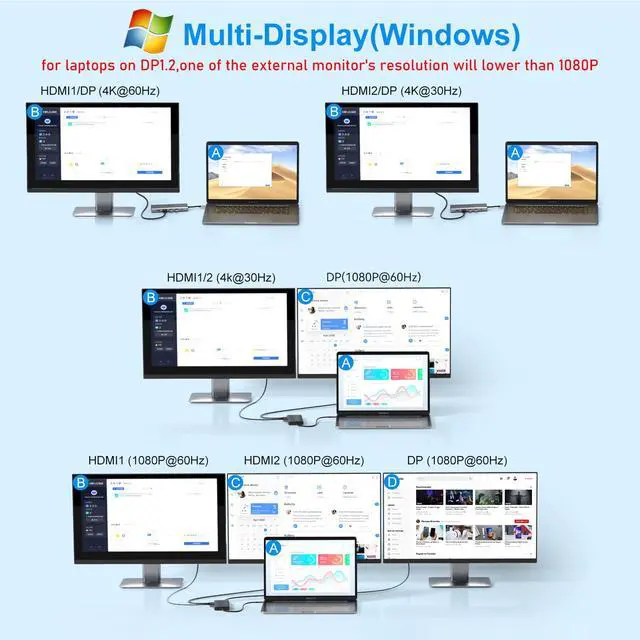
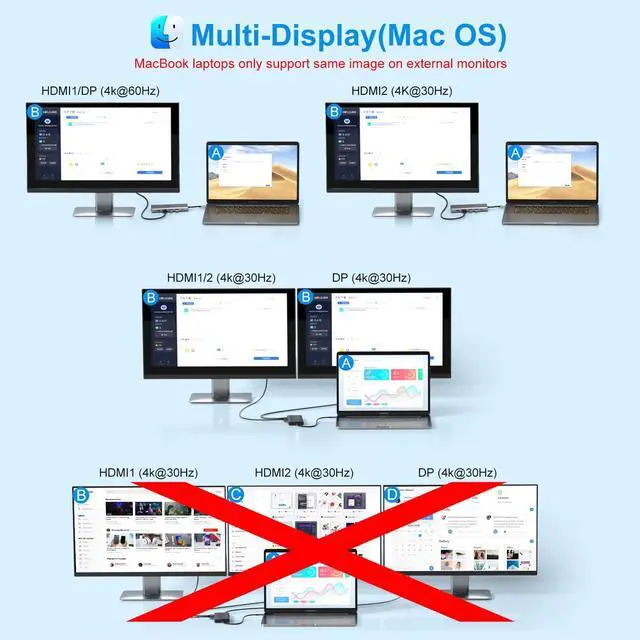
Ultra High-definition 4K Dual Monitor Output and Triple Displays: This docking station dual monitor support dual monitor and triple displays for Windows. While single use HDMI 1 port or displayport resolution up to 4K@60Hz, single use HDMI2 resolution up to 4K@30Hz. Dual monitors will be 4K@30Hz and 1080P@60Hz(DP1.4). Triple monitors will be 1080P(DP1.4). :
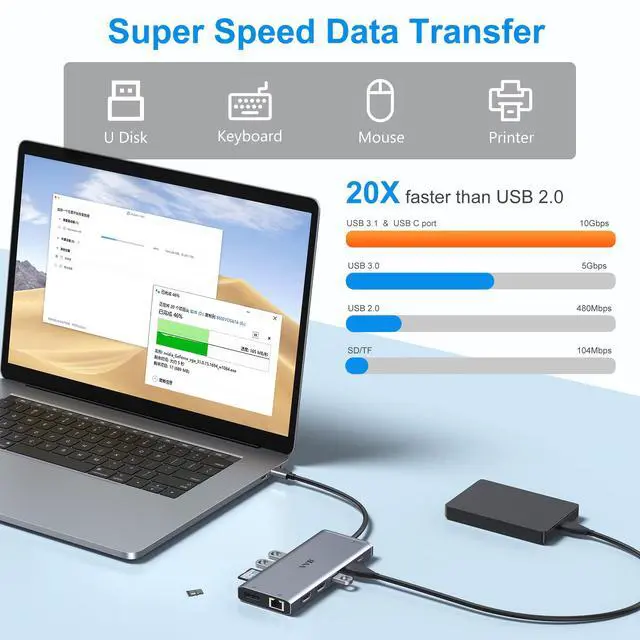
Super Speed Data Transfer: Laptop docking station equipped with USB C port & 2USB A 3.1 ports(speed up to 10Gbps) that allows you transfer files in seconds from your usb flash driver,usb/usb c hard disks.Provide USB C 2.0 and 2 USB A 2.0 ports(speed up to 480Mbps),USB A 2.0 special for connecting to mouse without any lags.And USB C to SD/TF card reader for you conveniently browse photos or videos on your USB-C devices and transfer photos in seconds to your laptop
Sponsored
You’re seeing this ad based on the product’s relevance to your search query. If you are a seller and want to participate in this program click here to learn more.
Any questions? Ask CelesteSM will help you find out quickly.
Try me now
Triple Display Docking Station
USB C to Dual Monitor Adapter
Expand Your Laptop Connection
Docking Station 3 Monitors
Expand Your Laptop Connection
USB C Docking Station Dual Monitor
Please read carefully before purchasing
his computer docking station compatible with many laptops with a Full-featured USB Type-C port (support DisplayPort,charging,data transfer protocol), such as the thunderbolt 3/4/5, USB-C 3.2 Gen 1&Gen 2 with Power Delivery& DisplayPort functions ports. But NOT all USB-C devices are compatible with this docking station, the incompatible device cannot use the (HDMI&DP&VGA) of this Dock.
You can check with VVB if you are not sure
The final resolution of external displays depends on the laptop's specs and bandwidth,HDMI cable, external monitors and the "Displayport" protocol of the laptop usb c port.
Power charger and charging cable are not included, PD (charging port) only supports power supply, does not support the screen extension function.
Please use at least 65W power adapter to charge your laptop via this hub,using lower power charger may cause a low charging warning.
When charging the laptop with the hub, about 8W of power will allocated to the hub to keep its ports work, so please plug the Laptop's power adapter to the USB-C Power Delivery port before using multiple displays or connect hard driver.
Only applicable to laptops with built-in usb c port, can't be used with converter
The hub temperature will heat up when it works. 0? - 50 ? is the normal and reasonable range. It's a normal situation for all hubs, not a quality problem.
his computer docking station compatible with many laptops with a Full-featured USB Type-C port (support DisplayPort,charging,data transfer protocol), such as the thunderbolt 3/4/5, USB-C 3.2 Gen 1&Gen 2 with Power Delivery& DisplayPort functions ports. But NOT all USB-C devices are compatible with this docking station, the incompatible device cannot use the (HDMI&DP&VGA) of this Dock.
You can check with VVB if you are not sure
The final resolution of external displays depends on the laptop's specs and bandwidth,HDMI cable, external monitors and the "Displayport" protocol of the laptop usb c port.
Power charger and charging cable are not included, PD (charging port) only supports power supply, does not support the screen extension function.
Please use at least 65W power adapter to charge your laptop via this hub,using lower power charger may cause a low charging warning.
When charging the laptop with the hub, about 8W of power will allocated to the hub to keep its ports work, so please plug the Laptop's power adapter to the USB-C Power Delivery port before using multiple displays or connect hard driver.
Only applicable to laptops with built-in usb c port, can't be used with converter
The hub temperature will heat up when it works. 0? - 50 ? is the normal and reasonable range. It's a normal situation for all hubs, not a quality problem.
USB C Laptop Docking Station Dual Monitor HDMI USB C Hub Multiport Adapter USB C Dongle Dock 14 in 1 USB C to 2 HDMI 4K+DisplayPort+Ethernet+4USB+2USB C+100W PD Charger+SD/TF for Dell/Lenovo/HP Laptop
Learn more about the Detailed Specifications
Model
Brand
VVB
Series
VVB
Details
Color
Gray
Compatibility
Dell, HP, Lenovo
Thunderbolt
ethernet
Ports Spec
hdmi, usb2.0, usb3.0, usb_c, ethernet, 5, 14
Dimensions & Weight
Dimension
50 Inches
Features
Function
Dell, HP, Lenovo
Additional Information
First Listed on Newegg
October 19, 2026
There are no reviews yet.
Do you own this product?
Warranty & Returns
Warranty, Returns, And Additional Information
Warranty
Please contact the Seller directly for warranty information. Warranty information may also be found on the Manufacturer's website.





 here!
here!