

Your Browsing History


Meet Your Seller

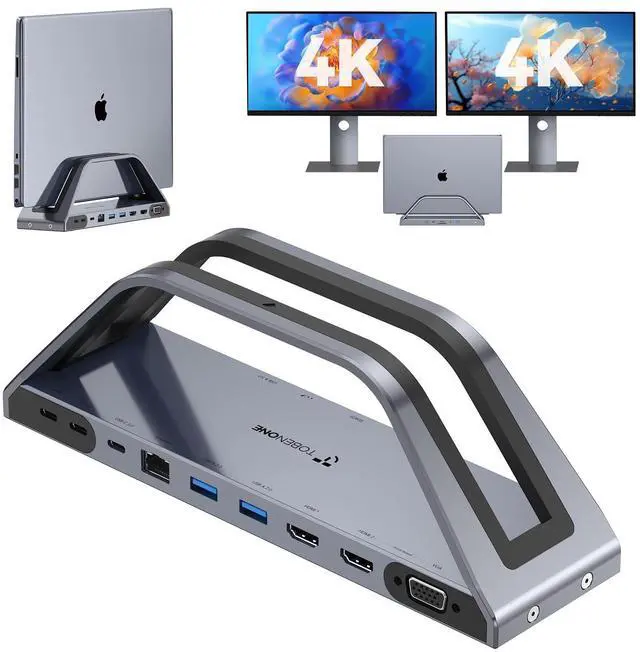


14-in-1 MacBook Pro/Air Docking Station Dual 4K Monitor, Laptop Docking Station Stand for MacBook M1-M5/Neo, Driver-Based, USB C Dock with 65W Power Adapter, 2 HDMI,VGA, 5Gbps USB, RJ45
Limited time offer, ends 07/22 By Jeronrtion
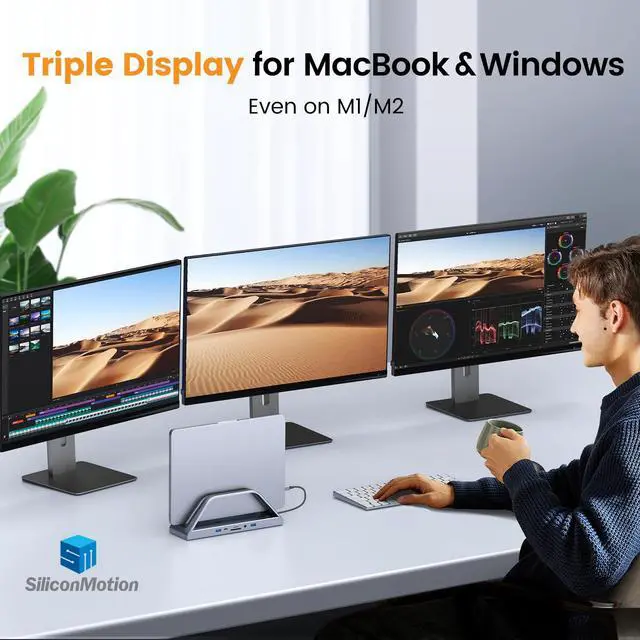
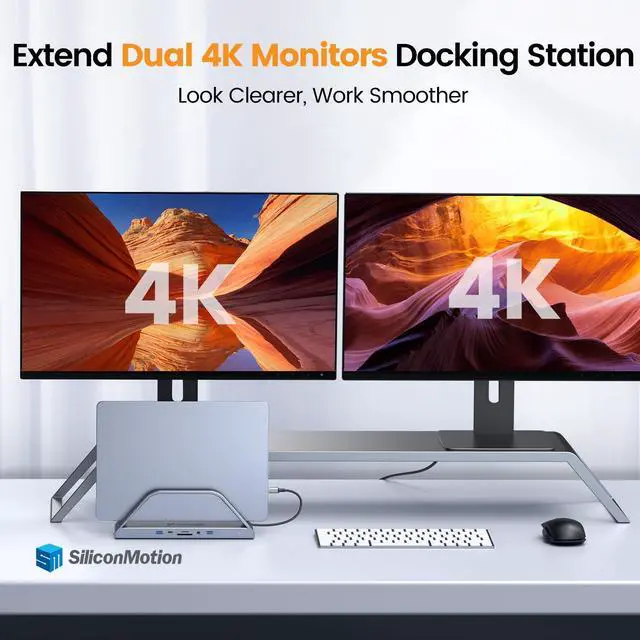
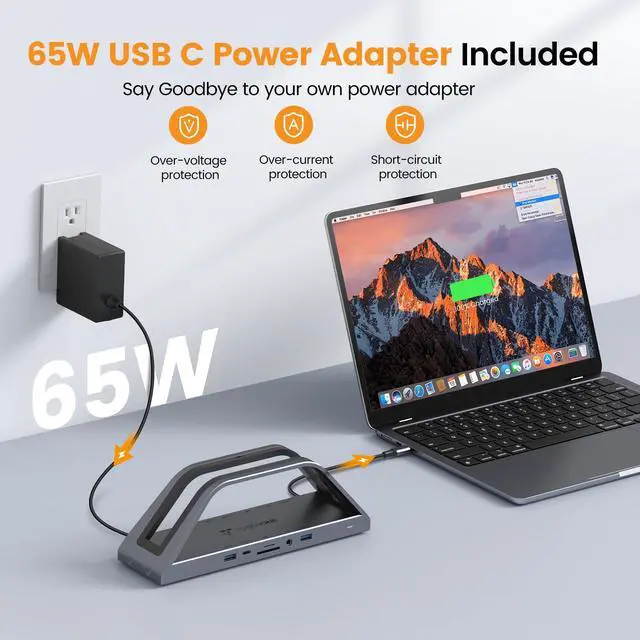
- 14-in-1 All-in-One MacBook Docking Station Stand: This 14-in-1 USB C hub is a versatile addition to your deskfeaturing 2 HDMI, VGA, 2×5Gbps USB-C/A 3.0, 2×USB 2.0, Gigabit Ethernet, SD/Micro SD, 3.5mm audio, and a 65W USB-C power port! More robust, stable, and efficient at heat dissipation than basic Mac docks, with a 9×2×3 vertical stand that saves space and supports most laptops. Note: Install the latest Instantview SM76X driver first for complete functionality. Break through the multi-screen limitations of MacBook M1/M2/M3: This Mac docking station finally addresses the multi-screen display challenge for MacBook Pro/Air models M1/M2/M3/M4/M5 and the latest MacBook Neo! This docking station utilizes SiliconMotion InstantView drivers and can extend to up to 3 displayssimply install the drivers to bid farewell to single-screen constraints and enjoy a seamless multi-screen workflow, ideally suited for demanding workdays and intensive multitasking. Please note that you need to download the latest SM76x driver as of February 2026! Triple Display or Dual 4K Monitor Laptop Docking Station: This laptop docking station stand can provide more screen space and enhance productivity! 2 HDMI ports deliver 4K@30Hz, 1 VGA does 1080p@60Hz for macOS/Windowsextend to 2 or 3 monitors for spreadsheets, presentations, or creative projects. Quick note: If your laptops USB-C lacks Display Alt Mode, use HDMI 2 + VGA for dual monitors only. 6 USB Ports for Rapid Transfers & Device Connection: T
+
+
Overview
Specs
Reviews

Any questions? Our AI beta will help you find out quickly.
Try me now
14-in-1 All-in-One MacBook Docking Station Stand: This 14-in-1 USB C hub is a versatile addition to your deskfeaturing 2 HDMI, VGA, 2×5Gbps USB-C/A 3.0, 2×USB 2.0, Gigabit Ethernet, SD/Micro SD, 3.5mm audio, and a 65W USB-C power port! More robust, stable, and efficient at heat dissipation than basic Mac docks, with a 9×2×3 vertical stand that saves space and supports most laptops. Note: Install the latest Instantview SM76X driver first for complete functionality. Break through the multi-screen limitations of MacBook M1/M2/M3: This Mac docking station finally addresses the multi-screen display challenge for MacBook Pro/Air models M1/M2/M3/M4/M5 and the latest MacBook Neo! This docking station utilizes SiliconMotion InstantView drivers and can extend to up to 3 displayssimply install the drivers to bid farewell to single-screen constraints and enjoy a seamless multi-screen workflow, ideally suited for demanding workdays and intensive multitasking. Please note that you need to download the latest SM76x driver as of February 2026! Triple Display or Dual 4K Monitor Laptop Docking Station: This laptop docking station stand can provide more screen space and enhance productivity! 2 HDMI ports deliver 4K@30Hz, 1 VGA does 1080p@60Hz for macOS/Windowsextend to 2 or 3 monitors for spreadsheets, presentations, or creative projects. Quick note: If your laptops USB-C lacks Display Alt Mode, use HDMI 2 + VGA for dual monitors only. 6 USB Ports for Rapid Transfers & Device Connection: The docking station dual monitor for Macbook is equipped with 2×5Gbps USB-C 3.0 + 2×5Gbps USB-A 3.0 to transfer 1GB files in seconds - perfect for phones, flash drives, and SSDs. 2×USB 2.0 ports connect mice/keyboards without radio interference. Connect up to 6 external devices simultaneously, fulfilling all your daily transfer and expansion requirements. Compatible with Mac and Windows laptops: This MacBook Pro docking station is fully compatible with most full-featured USB-C laptops, including MacBook Intel Series (2016-2020), MacBook M1 Pro/Max, MacBook M2 Pro/Max, MacBook M3 Pro/Max, MacBook M4 Series, MacBook M5 Series, and the latest MacBook Neo. It is also broadly compatible with other Mac devices: Mac Mini M1-M4, Mac Studio, Mac Pro, etc. Other common Windows laptops include: Dell XPS/Latitude, HP Elitebook/Spectre, Lenovo Yoga/ThinkPad, Surface Pro/Book, etc
Warranty & Returns
Warranty, Returns, And Additional Information
Warranty
- Please contact the Seller directly for warranty information. Warranty information may also be found on the Manufacturer's website.
- CONTACT
Return Policies
- Return for refund within: 30 days
- Return for replacement within: 30 days
- This item is covered by Jeronrtion Return Policy
Manufacturer Contact Info
- For a directory of all our manufacturers, please click below.
- Manufacturers Directory
LOADING...