

Your Browsing History

- $119.99
- Free 30-day Returns

Meet Your Seller

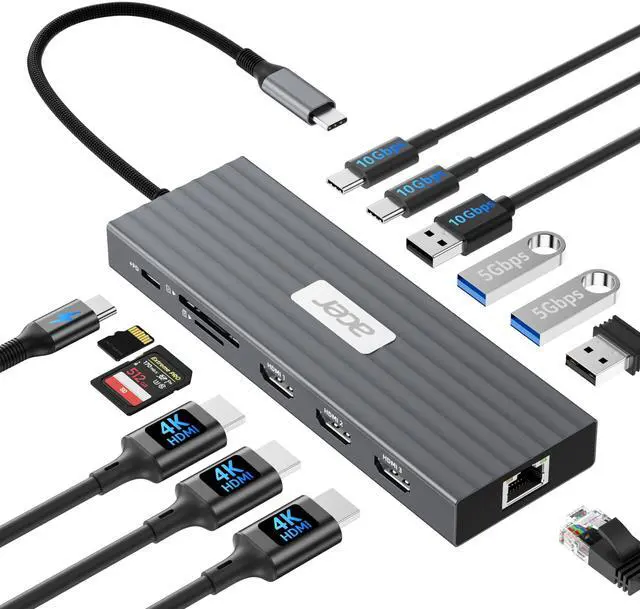


Docking Station 3 Monitors with 3 HDMI, 13-in-1 USB C Hub for Laptop with 4K@60Hz HDMI, 1 Gbps Ethernet, 10Gbps Data, 100W PD, SD/TF, Laptop Dock for, XPS, Spectre, Surface, Mac
Limited time offer, ends 10/05 By Fornierwoly
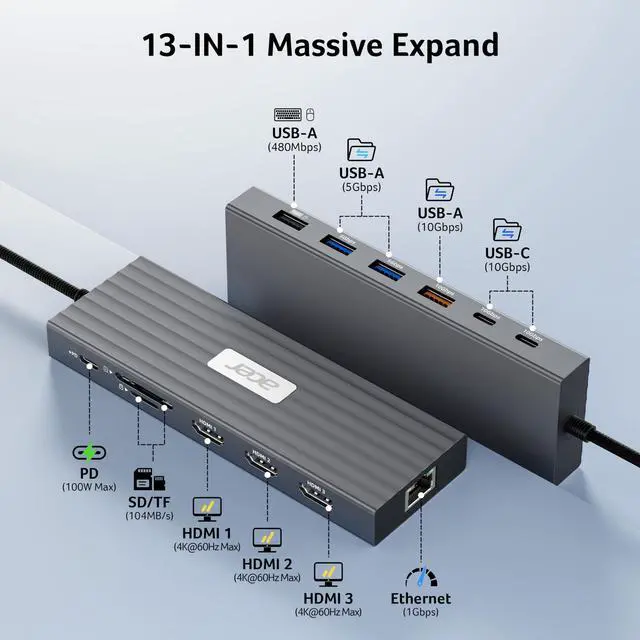
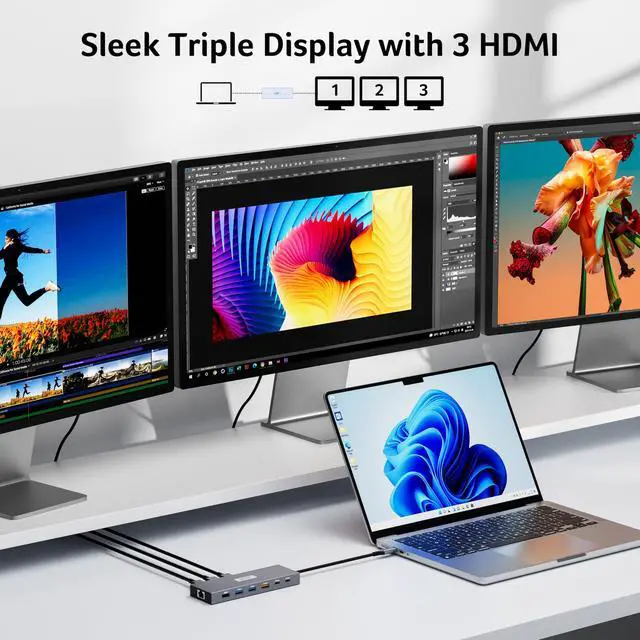
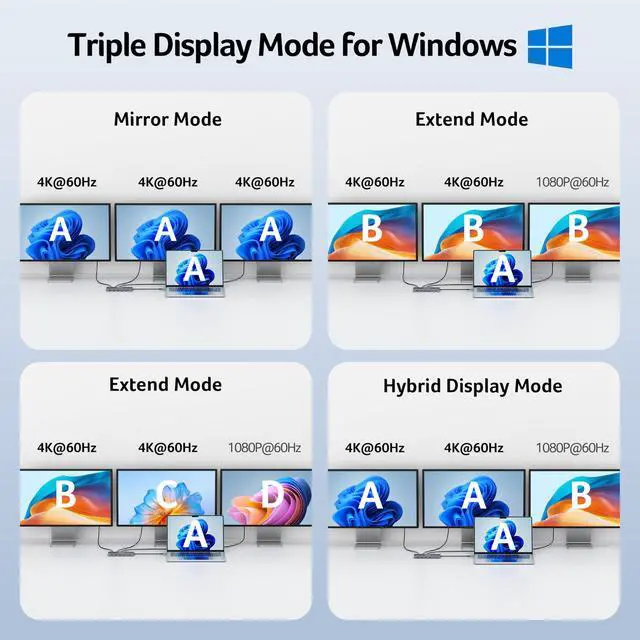
- Versatile Docking Station This USB-C docking station is equipped with 3 HDMI ports (4K@60Hz), 2 USB-C ports (10Gbps), 1 USB-A port (10Gbps), 2 USB-A ports (5Gbps), 1 USB-A port (480Mbps), 1Gbps Ethernet, PD 100W, and SD/MicroSD card readers (104Mbps), creating a robust all-in-one connection hub for work, creativity, and entertainment. Please verify that your laptop has a USB-C port with video output (DisplayPort Alt Mode) support. Flexible Display Modes This docking station supports a single display up to 4K@60Hz on HDMI and dual displays at 4K@60Hz each, making it perfect for a dual-monitor setup. Triple displays are supported, with resolutions automatically allocated based on each monitor's capabilities (EDID) and the total bandwidth available. A typical configuration is 4K@60Hz + 4K@60Hz + 1080P@60Hz, delivering smooth and high-quality visuals for multi-tasking. For best performance, please ensure your device's HDMI version is 2.0 or higher. 10Gbps Fast Data Transfer This USB-C hub contains 2× USB-C ports (10Gbps), 1× USB-A port (10Gbps), 2× USB-A ports (5Gbps), 1× USB-A port (480Mbps), and an SD/MicroSD slot (104Mbps) for rapid access to media, documents, and project files. All USB ports are designed for data transfer only and do not support charging external devices. Continuous Power with 100W PD With support for 100W input and 85W laptop output, this docking station maintains your device's charge even under heavy load, making it suitable for long work sessions. A 100W+
+
+
Overview
Specs
Reviews

Any questions? Our AI mode will help you find out quickly.
Try me now
Versatile Docking Station This USB-C docking station is equipped with 3 HDMI ports (4K@60Hz), 2 USB-C ports (10Gbps), 1 USB-A port (10Gbps), 2 USB-A ports (5Gbps), 1 USB-A port (480Mbps), 1Gbps Ethernet, PD 100W, and SD/MicroSD card readers (104Mbps), creating a robust all-in-one connection hub for work, creativity, and entertainment. Please verify that your laptop has a USB-C port with video output (DisplayPort Alt Mode) support. Flexible Display Modes This docking station supports a single display up to 4K@60Hz on HDMI and dual displays at 4K@60Hz each, making it perfect for a dual-monitor setup. Triple displays are supported, with resolutions automatically allocated based on each monitor's capabilities (EDID) and the total bandwidth available. A typical configuration is 4K@60Hz + 4K@60Hz + 1080P@60Hz, delivering smooth and high-quality visuals for multi-tasking. For best performance, please ensure your device's HDMI version is 2.0 or higher. 10Gbps Fast Data Transfer This USB-C hub contains 2× USB-C ports (10Gbps), 1× USB-A port (10Gbps), 2× USB-A ports (5Gbps), 1× USB-A port (480Mbps), and an SD/MicroSD slot (104Mbps) for rapid access to media, documents, and project files. All USB ports are designed for data transfer only and do not support charging external devices. Continuous Power with 100W PD With support for 100W input and 85W laptop output, this docking station maintains your device's charge even under heavy load, making it suitable for long work sessions. A 100W+ USB-C charger and cable are required (not included). The laptop's USB-C port must support PD charging. Reliable Gigabit Ethernet Connection Featuring a 1000Mbps RJ45 Ethernet port, this docking station offers a fast, stable, and low-latency wired network connection, ensuring smooth online work, streaming, and video calls without Wi-Fi interruptions. Fully Compatible with DisplayPort Alt Mode This triple monitor docking station is compatible with Windows and macOS devices that have DisplayPort Alternate Mode (DP Alt Mode), enabling high-quality display output, fast data transfer, and device charging. Note for Mac Users: macOS can only mirror the same content across all external monitors
Warranty & Returns
Warranty, Returns, And Additional Information
Warranty
- Please contact the Seller directly for warranty information. Warranty information may also be found on the Manufacturer's website.
- CONTACT
Return Policies
- Return for refund within: 30 days
- Return for replacement within: 30 days
- This item is covered by Fornierwoly Return Policy
Manufacturer Contact Info
- For a directory of all our manufacturers, please click below.
- Manufacturers Directory
LOADING...