

Your Browsing History

- Free 30-day Returns
$98.65


Meet Your Seller




USB C Docking Station Dual Monitor, Selore 13-in-1 Triple Monitor with Dual HDMI, DP, 100W PD, Gigabit Ethernet, 10Gbps USB A/C Ports -Laptop Docking Stations for Dell, HP, Lenovo, MacBook
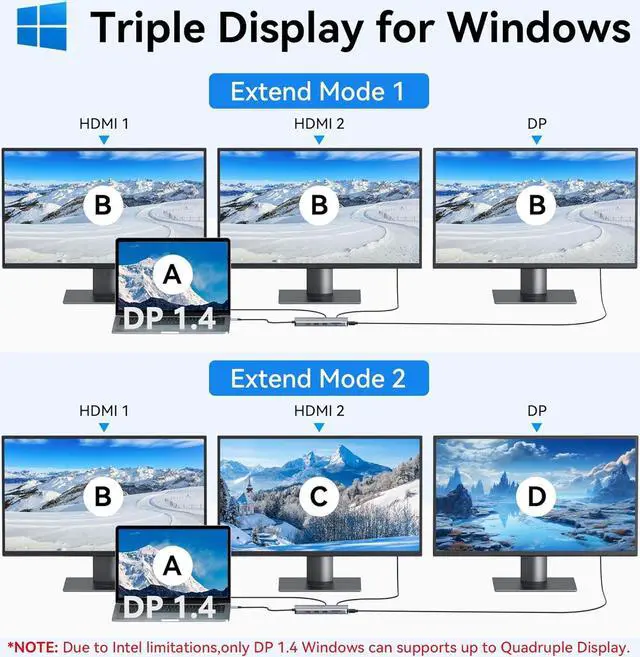
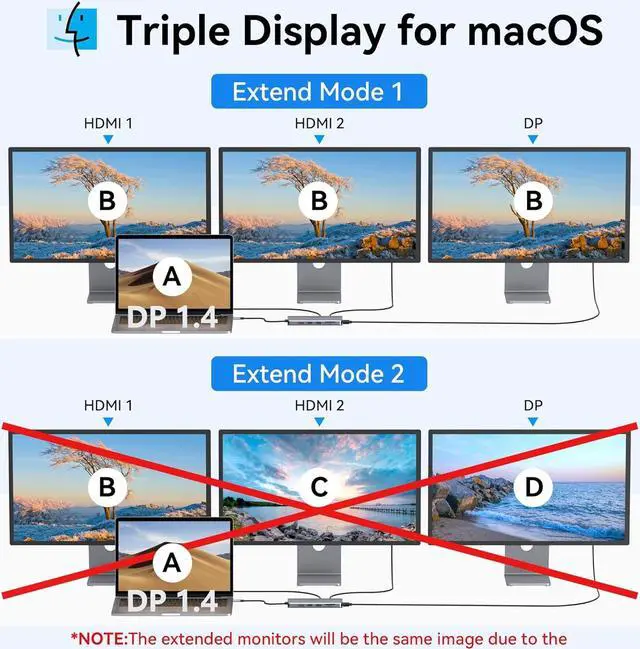
- 13-in-1 USB C Docking Station Triple MonitorThis USB-C docking station connects via a single USB-C/Thunderbolt 3 port to drive 3 external displays (2x HDMI + 1x DisplayPort). Single HDMI supports 4K@60Hz, dual HDMI delivers 4K@30Hz, with all three displays running at 1080p. As a 3-monitor docking station solution, Windows supports extended mode via MST/SST, while macOS offers mirroring only. Ideal for students and professionals who need expanded screen real estate for multitasking, online classes, or data analysis. Critical: Verify your device's USB-C port supports DisplayPort Alt Mode before purchase
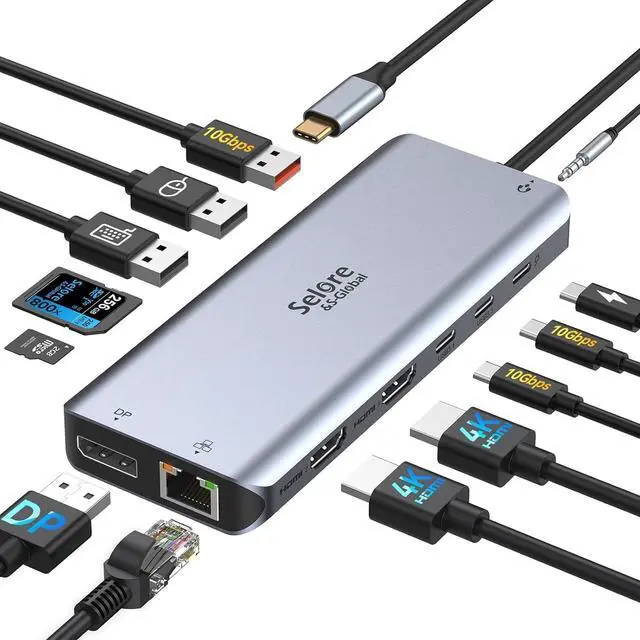
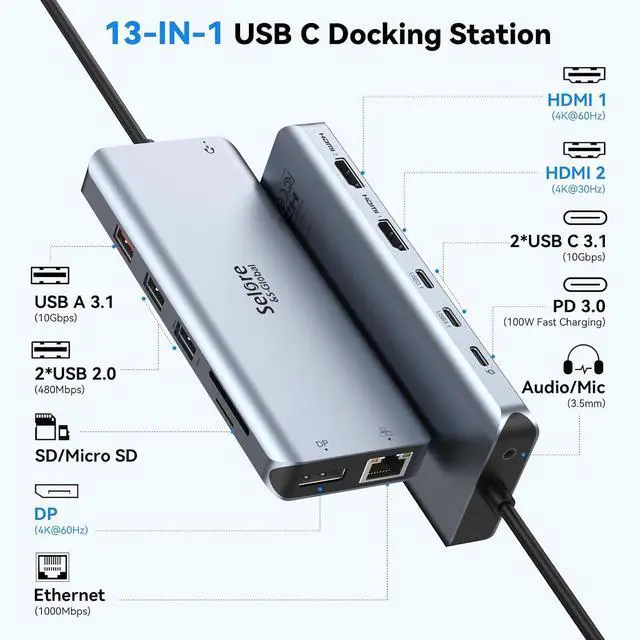
- 13 Ports USB-C Hub Multiport AdapterThis USB-C docking station features: 2x HDMI ports + 1x DisplayPort + Gigabit Ethernet + SD/TF card reader + 3.5mm audio jack + 3x Fast USB ports (up to 10Gbps) + 2x USB 2.0 ports + 100W Power Delivery port. This plug-and-play laptop docking station requires no drivers for most devicessimply connect to transform your laptop into a full workstation. Perfect for office and school settings, reducing cable clutter and increasing productivity.
+
+
Overview
Reviews

Any questions? Our AI mode will help you find out quickly.
Try me now
13-in-1 USB C Docking Station Triple MonitorThis USB-C docking station connects via a single USB-C/Thunderbolt 3 port to drive 3 external displays (2x HDMI + 1x DisplayPort). Single HDMI supports 4K@60Hz, dual HDMI delivers 4K@30Hz, with all three displays running at 1080p. As a 3-monitor docking station solution, Windows supports extended mode via MST/SST, while macOS offers mirroring only. Ideal for students and professionals who need expanded screen real estate for multitasking, online classes, or data analysis.
Critical: Verify your device' s USB-C port supports DisplayPort Alt Mode before purchase
13 Ports USB-C Hub Multiport AdapterThis USB-C docking station features: 2x HDMI ports + 1x DisplayPort + Gigabit Ethernet + SD/TF card reader + 3.5 mm audio jack + 3x Fast USB ports (up to 10Gbps) + 2x USB 2.0 ports + 100W Power Delivery port. This plug-and-play laptop docking station requires no drivers for most devicessimply connect to transform your laptop into a full workstation. Perfect for office and school settings, reducing cable clutter and increasing productivity.
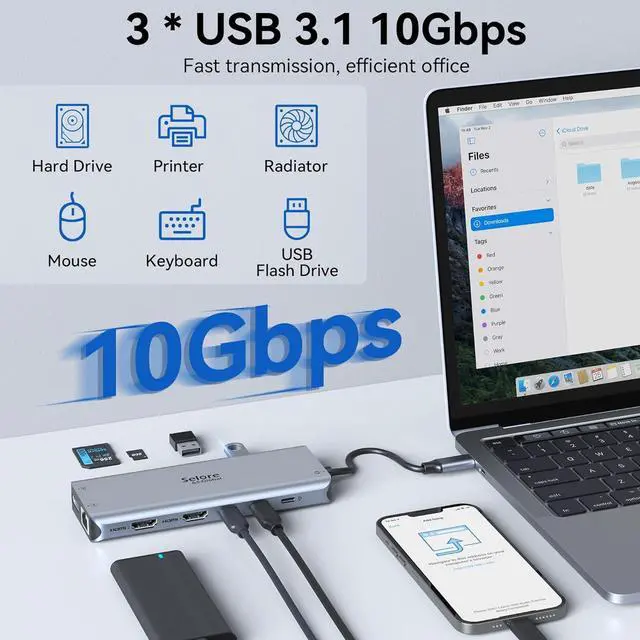
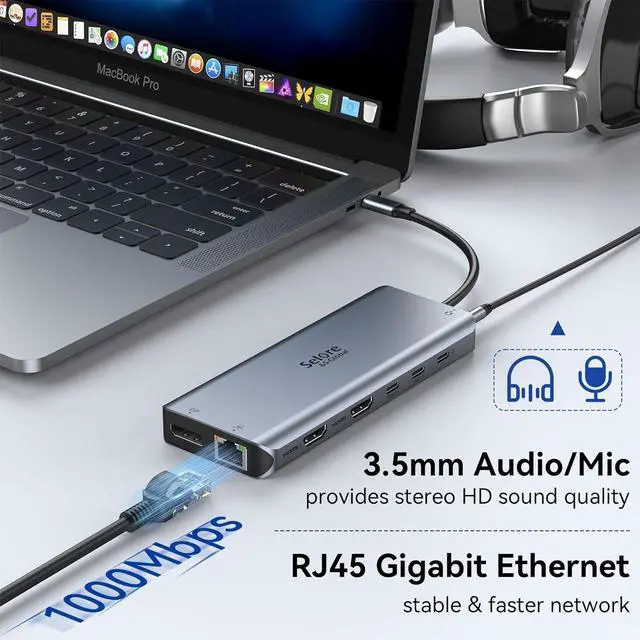
Fast 10Gbps Data TransferThis docking station, equipped with USB-C and USB-A ports, achieves transfer speeds up to 10Gbps, allowing you to move large files quickly. Dedicated USB 2.0 ports ensure reliable connectivity for peripherals. A built-in SD/TF card reader provides convenient access to media files. This laptop dock also has a 3.5 mm Mic/Audio jack for your wired headset
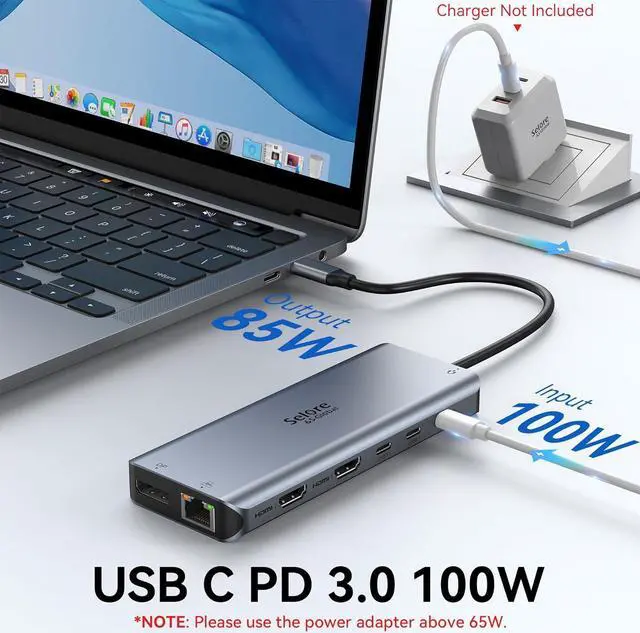
Gigabit Ethernet & 100W Power DeliveryThe integrated Gigabit Ethernet port provides a stable, wired network connection suitable for video conferencing, large file downloads, and online teaching. This USB-C docking station supports up to 100W power input and 85W output, enabling simultaneous laptop charging while using all dock features. Ensure uninterrupted work and study sessions with reliable power and network connectivity
Wide Compatibility Docking StationThis docking station works with Thunderbolt 3 or USB-C port devices that support DisplayPort Alt Mode, including MacBook Pro (2016 and later), MacBook Air (2018 and later), iPad Pro (2018 and later), Lenovo Yoga 720/910/920/930, Microsoft Surface Book 2/Laptop 3, Dell XPS 13/15, Dell Latitude 13 7000/E7370, and more. Also compatible with Chromebooks and other USB-C laptops commonly used in schools and offices.
Note: Video output requires that your device' s USB-C port supports Thunderbolt 3 or DisplayPort Alternate Mode
Critical: Verify your device' s USB-C port supports DisplayPort Alt Mode before purchase
13 Ports USB-C Hub Multiport AdapterThis USB-C docking station features: 2x HDMI ports + 1x DisplayPort + Gigabit Ethernet + SD/TF card reader + 3.5 mm audio jack + 3x Fast USB ports (up to 10Gbps) + 2x USB 2.0 ports + 100W Power Delivery port. This plug-and-play laptop docking station requires no drivers for most devicessimply connect to transform your laptop into a full workstation. Perfect for office and school settings, reducing cable clutter and increasing productivity.
Fast 10Gbps Data TransferThis docking station, equipped with USB-C and USB-A ports, achieves transfer speeds up to 10Gbps, allowing you to move large files quickly. Dedicated USB 2.0 ports ensure reliable connectivity for peripherals. A built-in SD/TF card reader provides convenient access to media files. This laptop dock also has a 3.5 mm Mic/Audio jack for your wired headset
Gigabit Ethernet & 100W Power DeliveryThe integrated Gigabit Ethernet port provides a stable, wired network connection suitable for video conferencing, large file downloads, and online teaching. This USB-C docking station supports up to 100W power input and 85W output, enabling simultaneous laptop charging while using all dock features. Ensure uninterrupted work and study sessions with reliable power and network connectivity
Wide Compatibility Docking StationThis docking station works with Thunderbolt 3 or USB-C port devices that support DisplayPort Alt Mode, including MacBook Pro (2016 and later), MacBook Air (2018 and later), iPad Pro (2018 and later), Lenovo Yoga 720/910/920/930, Microsoft Surface Book 2/Laptop 3, Dell XPS 13/15, Dell Latitude 13 7000/E7370, and more. Also compatible with Chromebooks and other USB-C laptops commonly used in schools and offices.
Note: Video output requires that your device' s USB-C port supports Thunderbolt 3 or DisplayPort Alternate Mode
Warranty & Returns
Warranty, Returns, And Additional Information
Warranty
- Please contact the Seller directly for warranty information. Warranty information may also be found on the Manufacturer's website.
- CONTACT
Return Policies
- Return for refund within: 30 days
- Return for replacement within: 30 days
- This item is covered by DHKtechnologies Return Policy
Manufacturer Contact Info
- For a directory of all our manufacturers, please click below.
- Manufacturers Directory
LOADING...