




 here!
I’m your shopping assistant for PC builds, upgrades, and everything tech.
Got questions? Ask away!
Start a conversation
here!
I’m your shopping assistant for PC builds, upgrades, and everything tech.
Got questions? Ask away!
Start a conversation





Any questions? Ask CelesteSM will help you find out quickly.


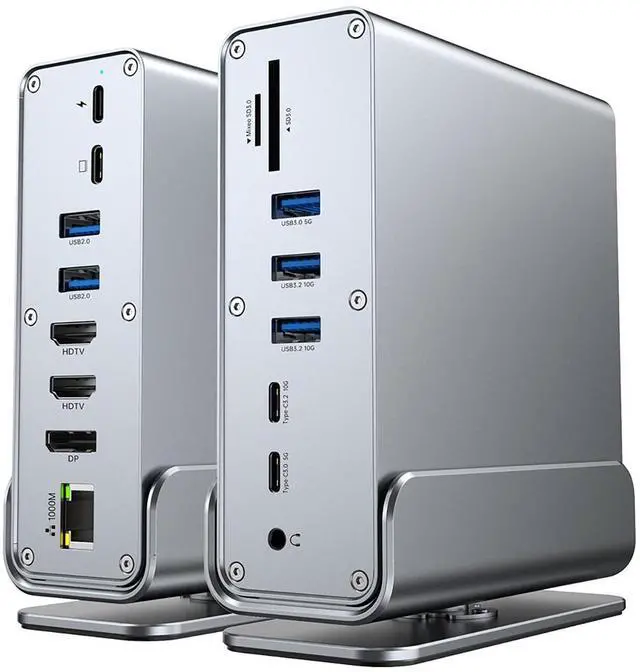
15 in 1 Vertical Docking Station: Say goodbye to cable clutter and embrace simplicity with our all-in-one usb c docking station! Featuring 3x 4K outputs, 7 USB ports, and more, this powerhouse consolidates your workspace while unlocking seamless connectivity for all your devices.
Huge Expansion: Equipped with an 100W (87W Safety) laptop-charging USB-C PD port, an USB-C PC host, 2x USB-C data port (10Gbps & 5Gbps), 5x USB-A ports(2x USB 3.2 10Gbps, 1xUSB 3.0 5Gbps, 2x USB2.0 480Mbps), 2x 4K HDMI(HDTV) ports, 1x DP Display Port, an Ethernet port, SD/Micro SD TF card slots, a 3.5mm AUX port.
4K HDMI Triple Monitor: The Docking Station Triple Display can easily to achieve triple-monitor displays for Windows OS, using different monitors to do different projects will make your work/life more efficient. When Single monitor, support max up to 4K@60Hz or 2K@60Hz. When connect 2 or 3 displays, then just about 4K@30Hz+2K@30Hz.
Compatibility: Supports Thunderbolt, USB-A, USB-C, USB4 connections. Compatible with Windows 10 and 11, Chrome OS, (NOT Linux), Note: For mac OS, it ONLY supports mirror mode, Single-Stream Transport (SST) mode, which means all connected monitors will show the same content.
Notice: All of the above mode is based on DP1.4 laptop and monitor. If you use several USB device at the same time to transfer the data, the speed will be slower.
The TOPWOLF 15-in-1 vertical USB-C docking station is designed for Windows users who need triple-monitor support, 100W laptop charging, fast USB data transfer, Ethernet, card readers, and audio connectivity in one desktop setup. It supports up to 4K at 60Hz with a single display and approximately 4K+2K at 30Hz across multiple displays.
| Attribute | Value |
|---|---|
| Best For | Windows users who need a vertical USB-C docking station for multi-monitor workspaces and connecting multiple peripherals |
| Product Details | TOPWOLF docking station in silver |
Q: Is this TOPWOLF dock better than a dual-monitor USB-C hub for a Windows laptop?
A: Choose the TOPWOLF dock when you need three independent external displays, Ethernet, SD and microSD readers, audio, and multiple USB ports from one desktop connection. A dual-monitor USB-C hub is the better fit when two displays are sufficient and you prioritize simpler setup or higher refresh rates; this dock’s advertised triple-display configuration is limited to about 4K@30Hz plus 2K@30Hz when two or three displays are connected.
Q: Should I buy this dock or a premium Thunderbolt 4 dock?
A: Choose the TOPWOLF dock for a broad mix of connectivity, including three display outputs, seven USB ports, Ethernet, SD and microSD readers, audio, and advertised laptop charging up to 100W. Choose a premium Thunderbolt 4 dock when display performance and sustained high-speed bandwidth matter more; comparable Thunderbolt 4 docks can support configurations such as dual 4K at 60Hz, while this dock is specified for reduced refresh rates when multiple displays are active.
Q: Does this dock work well with a MacBook for three separate monitors?
A: No. Based on the product listing, macOS is limited to mirror or SST mode, so the connected monitors show the same content rather than three separate extended desktops. For a MacBook multi-monitor workspace, choose a dock that explicitly supports the Mac’s display limit or uses a compatible DisplayLink solution; DisplayLink extended mode requires its software and macOS screen-recording permission.
Q: Is this dock better for a permanent desk setup than a compact USB-C travel hub?
A: Choose the TOPWOLF dock for a fixed workstation where you want one USB-C connection to handle three displays, wired networking, storage cards, audio, charging, and several peripherals. Choose a compact travel hub when portability, fewer cables, and basic HDMI, USB, and charging access are more important than triple-monitor support and the larger port selection.
Q: Is this dock suitable for gaming or high-refresh-rate monitors?
A: Choose this dock mainly for productivity, office applications, and multi-window workflows. Its advertised single-monitor mode reaches up to 4K@60Hz, but two- or three-monitor use is specified at about 30Hz, so a direct laptop connection or a performance-focused Thunderbolt/USB4 dock is more appropriate for high-refresh gaming, fast animation, or competitive monitor use.
Q: Can this dock run three extended monitors from a Windows laptop?
A: Yes. With a compatible Windows laptop, the dock supports three external displays through two HDMI ports and one DisplayPort connection. When two or three monitors are connected, the stated output is approximately 4K at 30Hz plus 2K at 30Hz, so it is better suited to office work, documents, web browsing, and productivity than high-refresh gaming.
Q: Will this dock provide extended displays on a MacBook?
A: No. According to the provided product information, macOS supports only mirror mode through this dock, meaning connected monitors show the same content rather than separate extended desktops. It is therefore more suitable for Windows users who need independent multi-monitor workspaces.
Q: Can it charge my laptop while connecting monitors and USB devices?
A: Yes. The dock includes a USB-C Power Delivery input rated up to 100W, with 87W listed as the safety-rated output for the laptop. Actual charging speed depends on the laptop's USB-C Power Delivery support, the connected power adapter, and the power used by attached peripherals.
Q: Are all three monitor outputs capable of 4K at 60Hz at the same time?
A: No. The dock supports up to 4K at 60Hz when used with a single monitor. With two or three displays connected, the stated configuration is approximately 4K at 30Hz plus 2K at 30Hz. Buyers who need three simultaneous 4K 60Hz displays should choose a dock with specifications that explicitly support that bandwidth.
Q: Who is this vertical docking station best suited for?
A: It is best suited for Windows laptop users who want a permanent or semi-permanent desk setup with up to three monitors, wired Ethernet, multiple USB accessories, SD and microSD card readers, audio, and one-cable laptop charging. It is also useful for office work, meetings, note-taking, content review, and multitasking. It is not suitable for Linux users, and macOS users should expect mirrored rather than independently extended displays.
Q: Can this dock reliably run three extended monitors on any laptop?
A: No. Three independent external displays depend on the laptop's USB-C, Thunderbolt, USB4, graphics, and DisplayPort capabilities. With a compatible Windows laptop, this dock supports three displays at approximately 4K@30Hz plus 2K@30Hz; it is not a universal three-monitor solution.
Q: Is this dock suitable for a MacBook with three monitors?
A: It is not suitable if you need three separate extended desktops on macOS. The product specification states that macOS supports mirror mode only, so connected monitors show the same content. Windows 10/11 and Chrome OS are the better-supported platforms.
Q: Is this a good choice for a permanent work-from-home or office setup?
A: It can be a practical choice for a Windows desk setup that needs multiple displays, Ethernet, card readers, audio, USB peripherals, and laptop charging through one host connection. The main trade-off is that multi-monitor performance depends on the laptop and may be limited to lower refresh rates when two or three displays are connected.
Q: Can this dock replace a premium business or workstation dock?
A: It can replace a basic desk dock for compatible Windows laptops, but it should not be treated as an equivalent to a certified business or workstation dock. Its advantages are the 15-in-1 port selection, vertical form factor, and up to 100W PD input; compatibility, display behavior, and sustained performance may be less predictable than with a laptop-specific dock.


