

Your Browsing History
Most customers receive within 4 days.


Meet Your Seller

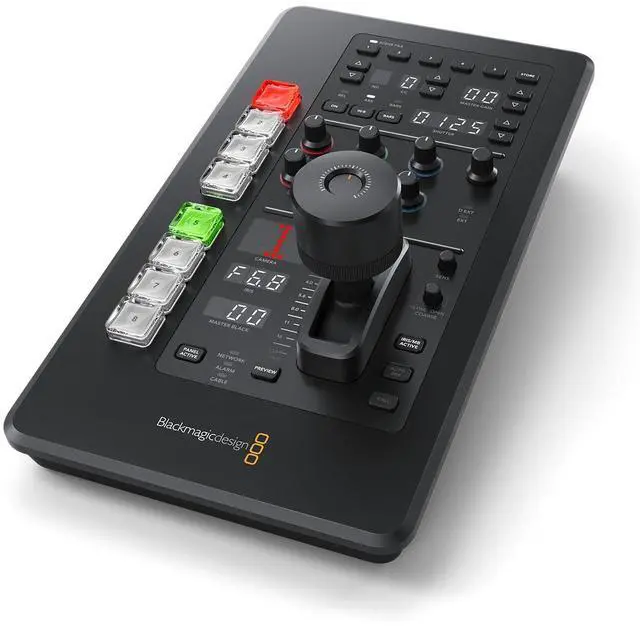
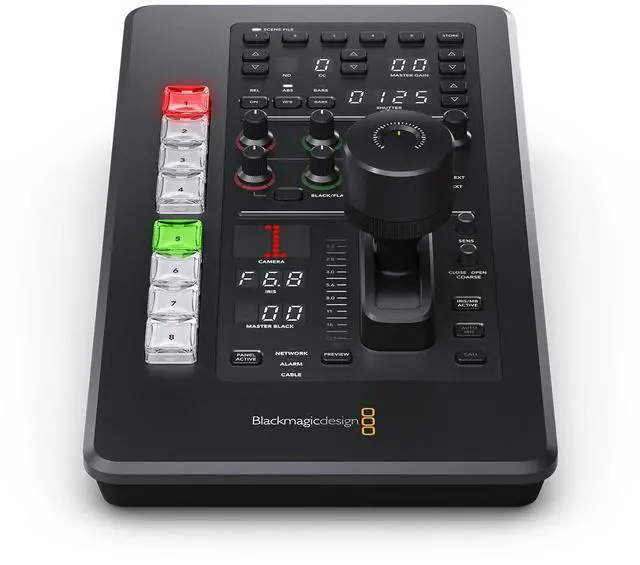


Blackmagic Design ATEM Micro Camera Panel
- PRECISE CAMERA CONTROL - Features 8 NKK buttons for quick camera selection, assignable via setup utility, ensuring seamless switching during live productions for a professional broadcast experience.
- INTUITIVE JOYSTICK OPERATION - Equipped with a 3-axis joystick, offering precise control over iris, gain, and pedestal adjustments, enhancing your ability to fine-tune camera settings in real-time.
- ENHANCED VISUAL FEEDBACK - The camera number display shows green for off-air and red for on-air status, providing clear visual cues for live broadcasting, minimizing errors during critical moments.
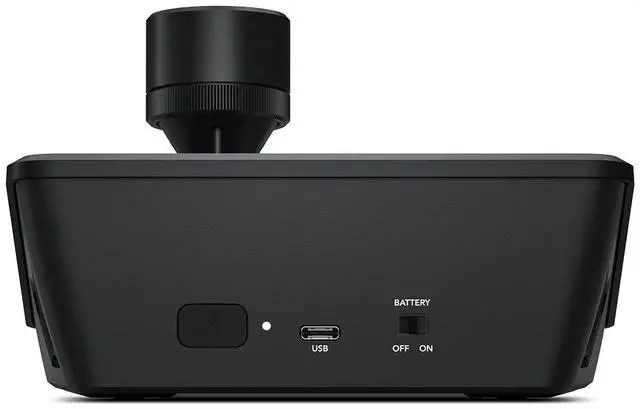
- VERSATILE CONNECTIVITY OPTIONS - Includes USB-C for computer interface and firmware updates, plus Bluetooth 5.1 LE for wireless control, offering flexible integration with your existing setup.
Overview
Specs
Reviews

Any questions? Our AI mode will help you find out quickly.
Try me now
Remotely control up to eight cameras, all from a single control panel! ATEM Camera Control Panels are professionally designed broadcast camera control units that extends the software features in ATEM Software Control to add high quality physical hardware controls that are much nicer to use. All ATEM Mini models support camera control when used with the Blackmagic Pocket Cinema Camera 4K and 6K models for amazing professional broadcast workflows. The control panel lets a single person monitor and adjust a wide range of camera parameters such as black levels, gain, color balance, shutter speed and more.
This leaves your camera operators free to focus on more important tasks such as framing and shot composition. Plus it works with all ATEM switcher models! Portable camera panel with high end broadcast CCU controls, including battery, Bluetooth, and 8 camera select buttons for iris, pedestal, shutter, white balance, master gain, RGB balance and more. Works with Blackmagic Pocket Cinema CameraATEM Mini works with the latest Blackmagic Pocket Cinema Cameras to add studio features that you can remotely control! Pocket Cinema Cameras make great studio cameras because they feature a large bright 5" viewfinder, remote camera control, tally indicators and phantom powered microphone connections.
All video and control is via a simple HDMI connection that lets you connect to your ATEM Mini with a single cable! That means you can remotely control any setting in the camera plus focus, iris and zoom on supported lenses. Pocket Cinema Cameras include a DaVinci primary color corrector so you get much more than simple CCU controls as you can also do a full color grade in the camera! Control Blackmagic Pocket Cinema CamerasScene and Camera ControlsThe top section on each camera control has settings for changing camera settings, plus it lets you save and recall scene presets.
Getting remote access to important camera settings is vital when you are working in conditions where the light can change during your job such as daylight, and with these settings you can quickly adjust cameras based on changes in the scene. Controls in this section include master gain, white balance, shutter speed and more! White BalanceQuickly get the perfect white balance by triggering the camera's automatic white balance feature. Load ScenesSave and recall scene presets, perfect when you do regular work with the same conditions each day. Master GainBoost sensitivity of the sensor as conditions become darker or when more depth of field is needed.
ND FiltersChange the density of the electronic ND filter on compatible cameras. Shutter SpeedSet the shutter speed of the camera and a slower shutter speed can also boost brightness in dark conditions. Color BarsSelect to output color bars for the selected camera. Color bars are very useful when setting up for a new job! Gain and Pedestal ControlsThe center section features independent RGB controls for adjusting the camera color for the white and black parts of the image. Because the Blackmagic Pocket Cinema Camera 4K and 6K models have a full DaVinci Resolve primary color corrector built in, you have amazing control over the color in the camera.
These red, green and blue controls for adjusting blacks and whites mean you can accurately match multiple cameras, which is vital for cutting seamlessly without color shifts. One trick experienced camera control operators use is to only adjust the red and blue channels, so you can add and remove red and blue tint without getting too far away from accurate color! White BalanceIndependent RGB controls for adjusting the white part of the image. Black BalanceIndependent RGB controls for adjusting the black part of the image
This leaves your camera operators free to focus on more important tasks such as framing and shot composition. Plus it works with all ATEM switcher models! Portable camera panel with high end broadcast CCU controls, including battery, Bluetooth, and 8 camera select buttons for iris, pedestal, shutter, white balance, master gain, RGB balance and more. Works with Blackmagic Pocket Cinema CameraATEM Mini works with the latest Blackmagic Pocket Cinema Cameras to add studio features that you can remotely control! Pocket Cinema Cameras make great studio cameras because they feature a large bright 5" viewfinder, remote camera control, tally indicators and phantom powered microphone connections.
All video and control is via a simple HDMI connection that lets you connect to your ATEM Mini with a single cable! That means you can remotely control any setting in the camera plus focus, iris and zoom on supported lenses. Pocket Cinema Cameras include a DaVinci primary color corrector so you get much more than simple CCU controls as you can also do a full color grade in the camera! Control Blackmagic Pocket Cinema CamerasScene and Camera ControlsThe top section on each camera control has settings for changing camera settings, plus it lets you save and recall scene presets.
Getting remote access to important camera settings is vital when you are working in conditions where the light can change during your job such as daylight, and with these settings you can quickly adjust cameras based on changes in the scene. Controls in this section include master gain, white balance, shutter speed and more! White BalanceQuickly get the perfect white balance by triggering the camera's automatic white balance feature. Load ScenesSave and recall scene presets, perfect when you do regular work with the same conditions each day. Master GainBoost sensitivity of the sensor as conditions become darker or when more depth of field is needed.
ND FiltersChange the density of the electronic ND filter on compatible cameras. Shutter SpeedSet the shutter speed of the camera and a slower shutter speed can also boost brightness in dark conditions. Color BarsSelect to output color bars for the selected camera. Color bars are very useful when setting up for a new job! Gain and Pedestal ControlsThe center section features independent RGB controls for adjusting the camera color for the white and black parts of the image. Because the Blackmagic Pocket Cinema Camera 4K and 6K models have a full DaVinci Resolve primary color corrector built in, you have amazing control over the color in the camera.
These red, green and blue controls for adjusting blacks and whites mean you can accurately match multiple cameras, which is vital for cutting seamlessly without color shifts. One trick experienced camera control operators use is to only adjust the red and blue channels, so you can add and remove red and blue tint without getting too far away from accurate color! White BalanceIndependent RGB controls for adjusting the white part of the image. Black BalanceIndependent RGB controls for adjusting the black part of the image
Warranty & Returns
Warranty, Returns, And Additional Information
Warranty
- Please contact the Seller directly for warranty information. Warranty information may also be found on the Manufacturer's website.
- Read full details
- CONTACT
Return Policies
- Return for refund within: 30 days
- Return for replacement within: non-replaceable
- This item is covered by Adorama Return Policy
Manufacturer Contact Info
- For a directory of all our manufacturers, please click below.
- Manufacturers Directory
LOADING...