Your Browsing History
- Free 30-day Returns
$88.99
Meet Your Seller
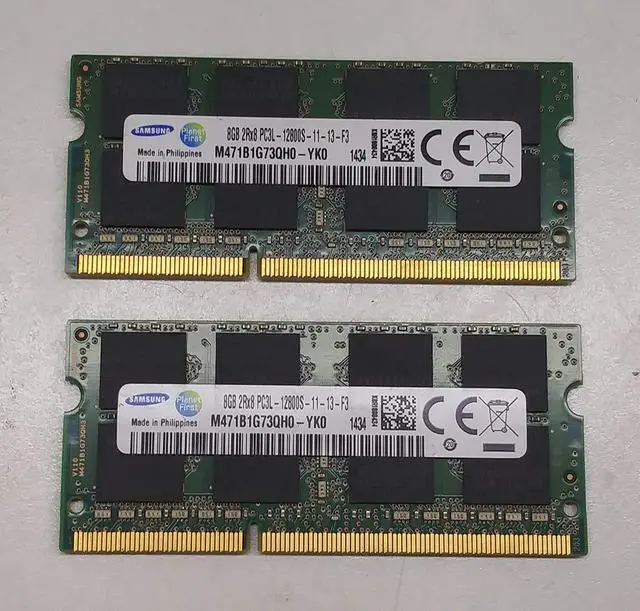
Samsung RAM Memory Upgrade DDR3 PC3 12800, 1600MHz, 204 PIN, SODIMM for 2012 Apple MacBook Pro's, 2012 iMac's, and 2011/2012 Mac Mini's (16GB Kit (2 x 8GB))
- Module Size: 16GB Kit (2 x 8GB)
- Box contents: 204 pin SODIMM
- Features: DDR3 PC3L 12800
- Specifications: DDR3 PC3L 12800, CL 11, Unbuffered, Non-ECC, DDR3 1600MHz, 1.35V
- International products have separate terms, are sold from abroad and may differ from local products, including fit, age ratings, and language of product, labeling or instructions.
+
+
Overview
Specs
Reviews
Any questions? Our AI beta will help you find out quickly.
Try me now
Compatible with: MacBook Pro 2.3GH z Intel Core i7 (15" DDR3) Mid 2012 MacBook Pro 2.5GH z Intel Core i5 (13" DDR3) Mid 2012 MacBook Pro 2.6GH z Intel Core i7 (15" DDR3) Mid 2012 MacBook Pro 2.7GH z Intel Core i7 Core i7 ( 38.1 ) DDR3) Mid 2012 MacBook Pro 2.9GH z Intel Core i7 (13" DDR3) Mid 2012 iMac 2.9GH z Quad-Core Intel Core i5 (27", Late 2012) iMac 3.2GH z Quad-Core Intel Core i5 (27", Late 2012) iMac 3. 4GHz quad-core Intel Core i7 (27-inch, Late 2012) iMac 3.4GH z Quad-Core Intel Core i5 (27-inch, Late 2013) iMac 3.5GH z Quad-Core Intel Core i7 (27-inch, Late 2013) Mac Mini (Late 2012) Mac Mini 2.3GH z Quad-Core Intel Core i7 - Late 2012 Mac Mini 2.5GH z Dual-Core Intel Core i5 - Late 2012 Mac Mini 2.6GH z Quad-Core Intel Core i7 - Late 2012 Mac Mini (Intel Core i5 2.3GH z) DDR3 - Mid 2011 Mac Mini (Intel Core i5 2.5 GHz) DDR3 DDR3 3 - Mid 20 011 Mac Mini (Intel Core i7 2.0G hz) DDR3 - Mid 2011 Server Mac Mini (Intel Core i7 2.7G hz) DDR3 - Mid 2011 The profile shows you what kind of memory and how much memory is in your system.
Open the Apple menu and then select from this Mac. The About this Mac screen opens. Click on the "More Info... " button.
Hardware Overview: The system profile screen opens and shows the hardware overview.
Current Storage Information: In the "Content" section on the left side of the screen, click "MEMORY". The memory space information will appear and show your current memory configuration (make sure your DDR3 is 1600 MHz). This information will help you determine which slots are filled with what type of memory, and how many slots are still available to install a new RAM memory.

Open the Apple menu and then select from this Mac. The About this Mac screen opens. Click on the "More Info... " button.
Hardware Overview: The system profile screen opens and shows the hardware overview.
Current Storage Information: In the "Content" section on the left side of the screen, click "MEMORY". The memory space information will appear and show your current memory configuration (make sure your DDR3 is 1600 MHz). This information will help you determine which slots are filled with what type of memory, and how many slots are still available to install a new RAM memory.
Warranty & Returns
Warranty, Returns, And Additional Information
Warranty
- Please contact the Seller directly for warranty information. Warranty information may also be found on the Manufacturer's website.
- CONTACT
Return Policies
- Return for refund within: 30 days
- Return for replacement within: 30 days
- This item is covered by Riveira Store Return Policy
Manufacturer Contact Info
- For a directory of all our manufacturers, please click below.
- Manufacturers Directory
LOADING...