

Your Browsing History

- Free 30-day Returns
$93.99


Meet Your Seller

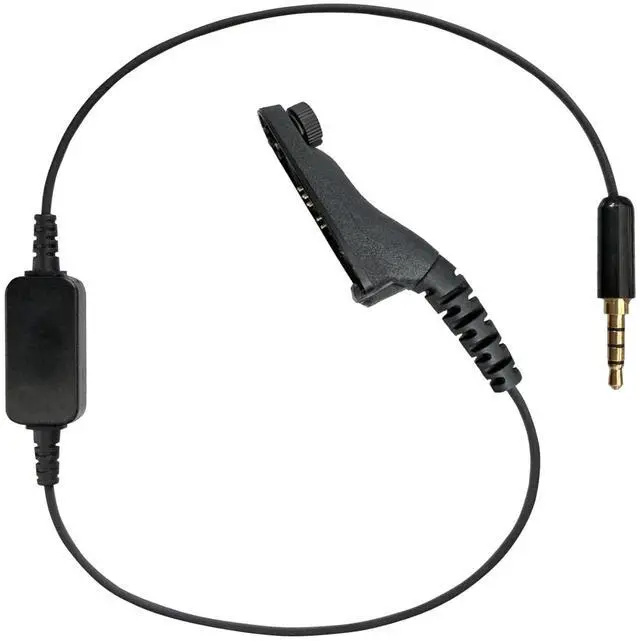


PRYME Link PoC/MCPTT Gateway Cable, Fits: Motorola TRBO (XPR6xxx/7xxx) Radios (LNK-83-ZU)
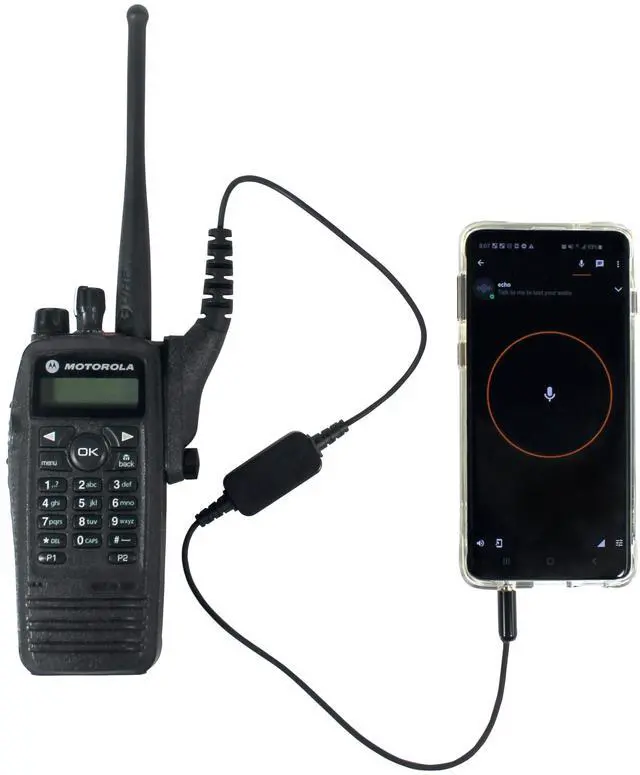
- Turn the radio off and plug in the LNK Gateway cable. Then plug the other end of the cable into any Android device that has a 3.5mm, 4 conductor jack
- Turn on the radio and make sure it is set on a channel with VOX programmed and enabled
- Still in ZELLO App, navigate to the Contact or Channel list and choose the one you want for Gateway operation. Make sure "VOX" icon is highlighted in blue
- If done correctly you should be ready to use. Calls received on the Two-way radio will be broadcast on the ZELLO App. Calls received on the Android device will be broadcast on the two-way radio. You may have to adjust the phone and radio volumes for best audio quality
- Mobile Radio & Cell Phone are NOT includ
+
+
Overview
Specs
Reviews

Any questions? Our AI beta will help you find out quickly.
Try me now
Turn the radio off and plug in the LNK Gateway cable. Then plug the other end of the cable into any Android device that has a 3.5 mm, 4 conductor jack ^^ Turn on the radio and make sure it is set on a channel with VOX programmed and enabled ^^ Still in ZELLO App, navigate to the Contact or Channel list and choose the one you want for Gateway operation. Make sure "VOX" icon is highlighted in blue ^^ If done correctly you should be ready to use. Calls received on the Two-way radio will be broadcast on the ZELLO App.
Calls received on the Android device will be broadcast on the two-way radio. You may have to adjust the phone and radio volumes for best audio quality ^^ Mobile Radio & Cell Phone are NOT includ
Calls received on the Android device will be broadcast on the two-way radio. You may have to adjust the phone and radio volumes for best audio quality ^^ Mobile Radio & Cell Phone are NOT includ
Warranty & Returns
Warranty, Returns, And Additional Information
Warranty
- Please contact the Seller directly for warranty information. Warranty information may also be found on the Manufacturer's website.
- CONTACT
Return Policies
- Return for refund within: 30 days
- Return for replacement within: 30 days
- This item is covered by HAIZHILANSTORE Return Policy
Manufacturer Contact Info
- For a directory of all our manufacturers, please click below.
- Manufacturers Directory
LOADING...