

Your Browsing History

- Free 30-day Returns
$532.99

Meet Your Seller

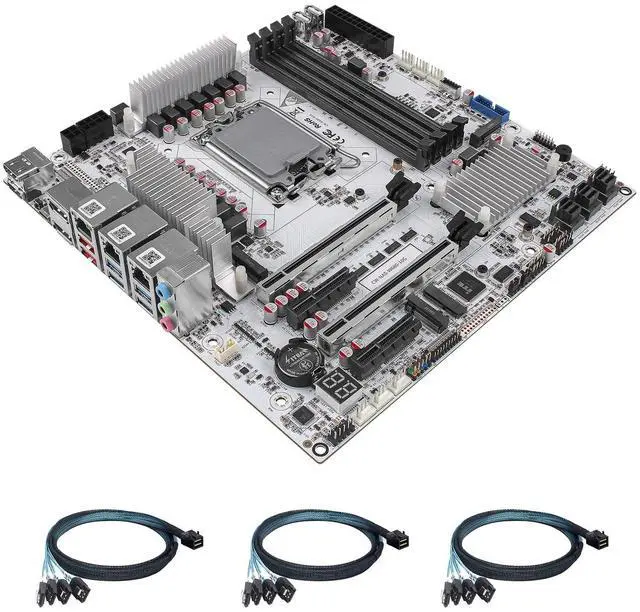


StoneStorm W680 12-Bay NAS Server M-ATX Motherboard(LGA1700, 12th/13th/14th Gen. Desktop Processor), 4* U-DIMM DDR5 MAX 128GB, 3* M.2 NVMe, 12* SATA 3.0, 10G RJ45, PCI-E x16, Type-C 10Gbps, 8K Display
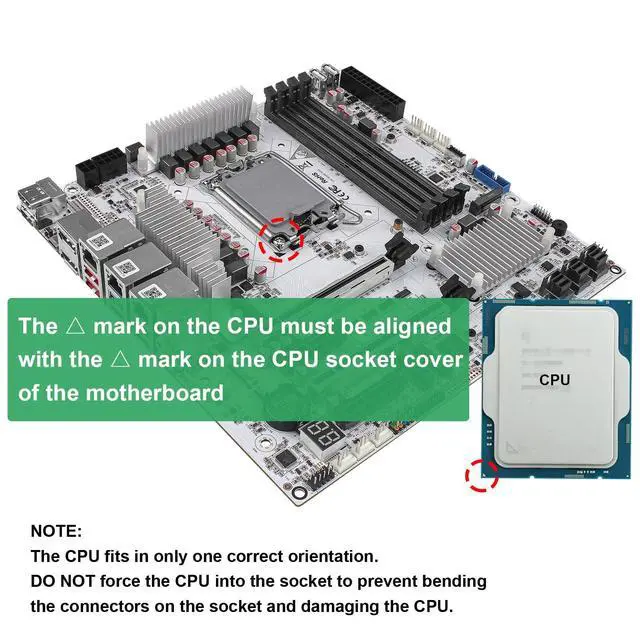
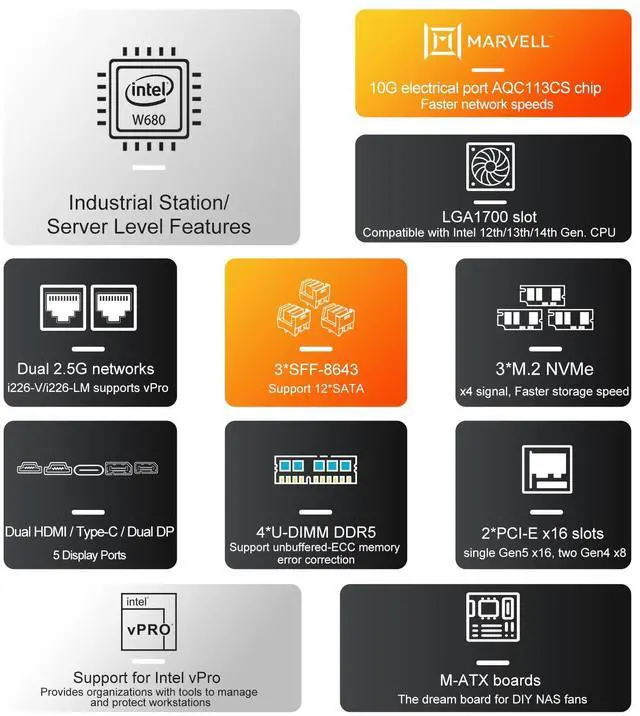
- LGA1700 Socket: W680 12-Bay NAS board is compatible with Intel Core i3/i5/i7 12th/13th/14th Gen. desktop processors, and we recommend the T-Series desktop processors, which are more energy efficient. It's 9.6" x 9.6" Micro ATX form factor, basic TDP is 125W, and it supports Windows 10/11, Linux
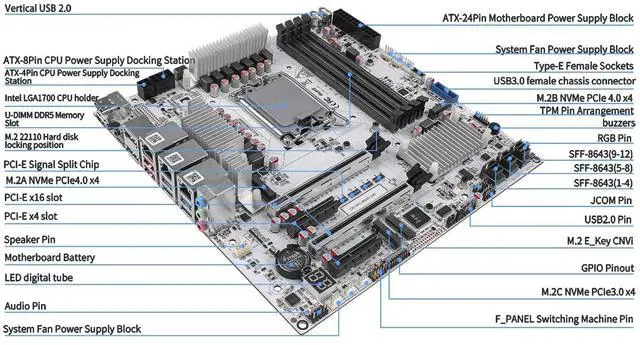
- High Productivity: 4* desktop U-DIMM DDR5 RAM (it supports non-ECC and unbuffered-ECC memorry), MAX 128GB, 3* M.2 NVMe 2280/22110 size. Expandable to 12* SATA via 3* SFF-8643 cable we supplied, stable and ultra-fast transfer speed. 1* Type-C (USB3.2 10Gbps, Supports data transfer only), 4* USB3.2, 2* USB2.0
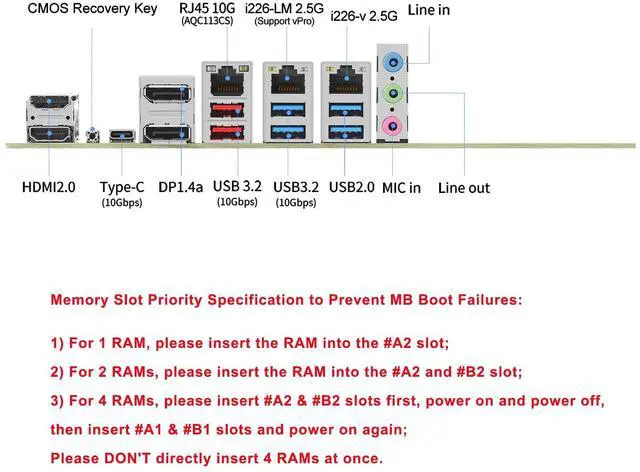
- 2.5G i226-LM & 10G Network Port: This W680 NAS motherboard has 1* 10GB AQC113CS network chip on board (Since some systems are not compatible with this AQC113CS 10GbE NIC chip, please confirm or consult with the seller about whether the system you will use is compatible with this NIC before purchasing), 1* i226-v 2.5GbE port and 1* i226-LM 2.5GbE port. i226-LM port supports vPro function
+
+
Overview
Specs
Reviews

Any questions? Our AI mode will help you find out quickly.
Try me now
LGA1700 Socket: W680 12-Bay NAS board is compatible with Intel Core i3/i5/i7 12th/13th/14th Gen. desktop processors, and we recommend the T-Series desktop processors, which are more energy efficient. It's 9.6" x 9.6" Micro ATX form factor, basic TDP is 125W, and it supports Windows 10/11, Linux ^^
High Productivity: 4* desktop U-DIMM DDR5 RAM (it supports non-ECC and unbuffered-ECC memorry), MAX 128GB, 3* M. 2 NVMe 2280/22110 size. Expandable to 12* SATA via 3* SFF-8643 cable we supplied, stable and ultra-fast transfer speed. 1* Type-C (USB 3.2 10Gbps, Supports data transfer only), 4* USB 3.2, 2* USB 2.0 ^^ 2.5G i226-LM & 10G
Network Port: This W680 NAS motherboard has 1* 10GB AQC113CS network chip on board (Since some systems are not compatible with this AQC113CS 10GbE NIC chip, please confirm or consult with the seller about whether the system you will use is compatible with this NIC before purchasing), 1* i226-v 2.5G bE port and 1* i226-LM 2.5G bE port. i226-LM port supports vPro function, but it requires the processor is integrated graphics and setting in BIOS. The vPro is essential for remotely repairing a malfunctioning computer that is unable to access the system ^^ 5
Display: This micro ATX board has 2* HDMI 2.0 (4K 4096x2160@60Hz) and 2* DP 1.4 ports (8K 7680x4320@60Hz) and 1* Type-C (8K 7680x4320@60Hz), and it has PCIe x16 slots and 2* PCIe 3.0 x4 slots which can be expanded to graphics cards, PCI-E network cards, support for various types of PCI-E protocol expansion accessories ^^
Heat Dissipation: It is compatible with LGA1700 series processors cooling fan. Package includes 1x W680 12-Bay NAS M-ATX motherboard, 3x SFF-8643 cable, 1x I/O Shield, some screws, 1x warranty card ^^
NOTE: The motherboard requires both 24PIN + 8PIN power connections to power up (There is also a 4PIN connector on the board to reinforce the power supply to the CPU. ). It will take a few minutes for the motherboard to read the memory information when you first turn on it, please be patient. If you need to go to the BIOS page, keep pressing "DEL" while booting up.
High Productivity: 4* desktop U-DIMM DDR5 RAM (it supports non-ECC and unbuffered-ECC memorry), MAX 128GB, 3* M. 2 NVMe 2280/22110 size. Expandable to 12* SATA via 3* SFF-8643 cable we supplied, stable and ultra-fast transfer speed. 1* Type-C (USB 3.2 10Gbps, Supports data transfer only), 4* USB 3.2, 2* USB 2.0 ^^ 2.5G i226-LM & 10G
Network Port: This W680 NAS motherboard has 1* 10GB AQC113CS network chip on board (Since some systems are not compatible with this AQC113CS 10GbE NIC chip, please confirm or consult with the seller about whether the system you will use is compatible with this NIC before purchasing), 1* i226-v 2.5G bE port and 1* i226-LM 2.5G bE port. i226-LM port supports vPro function, but it requires the processor is integrated graphics and setting in BIOS. The vPro is essential for remotely repairing a malfunctioning computer that is unable to access the system ^^ 5
Display: This micro ATX board has 2* HDMI 2.0 (4K 4096x2160@60Hz) and 2* DP 1.4 ports (8K 7680x4320@60Hz) and 1* Type-C (8K 7680x4320@60Hz), and it has PCIe x16 slots and 2* PCIe 3.0 x4 slots which can be expanded to graphics cards, PCI-E network cards, support for various types of PCI-E protocol expansion accessories ^^
Heat Dissipation: It is compatible with LGA1700 series processors cooling fan. Package includes 1x W680 12-Bay NAS M-ATX motherboard, 3x SFF-8643 cable, 1x I/O Shield, some screws, 1x warranty card ^^
NOTE: The motherboard requires both 24PIN + 8PIN power connections to power up (There is also a 4PIN connector on the board to reinforce the power supply to the CPU. ). It will take a few minutes for the motherboard to read the memory information when you first turn on it, please be patient. If you need to go to the BIOS page, keep pressing "DEL" while booting up.
Warranty & Returns
Warranty, Returns, And Additional Information
Warranty
- Please contact the Seller directly for warranty information. Warranty information may also be found on the Manufacturer's website.
- CONTACT
Return Policies
- Return for refund within: 30 days
- Return for replacement within: 30 days
- This item is covered by StarDragon Return Policy
Manufacturer Contact Info
- For a directory of all our manufacturers, please click below.
- Manufacturers Directory
LOADING...