

Your Browsing History

- Free 30-day Returns
$65.99
Best Sellers
- $52.59
- + FREE SHIPPING
 Top Rated
- $51.59
- + FREE SHIPPING
 Hot Seller
- $51.49
- + FREE SHIPPING

Meet Your Seller

Sponsored Products
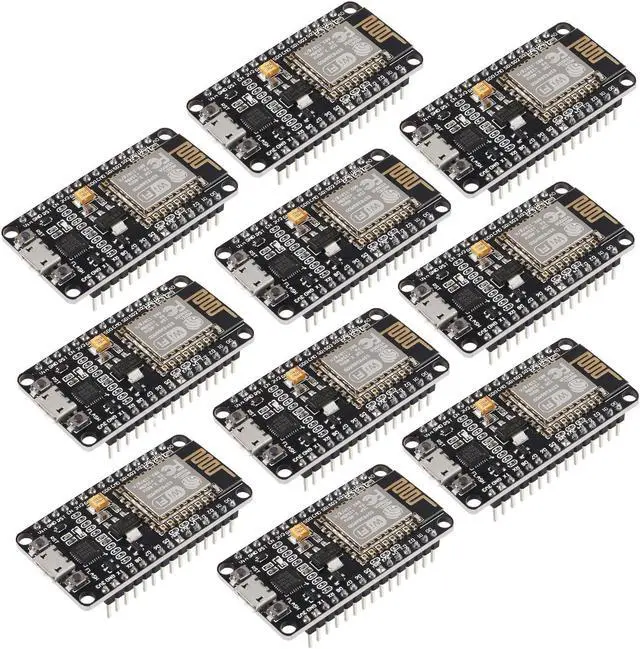
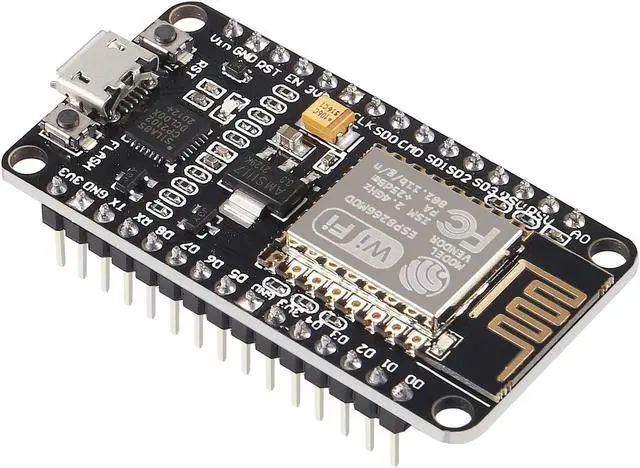
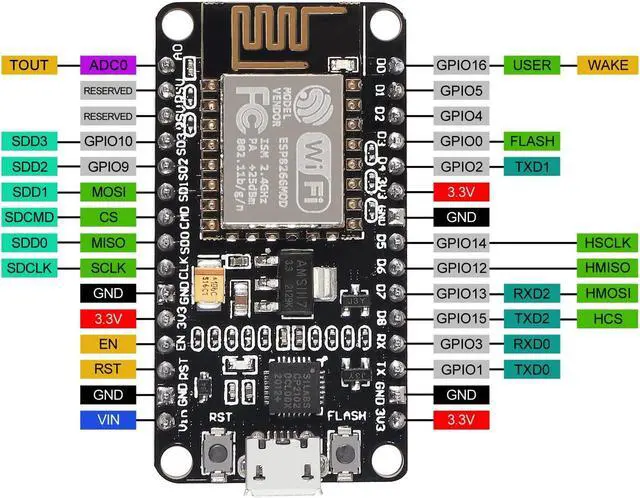
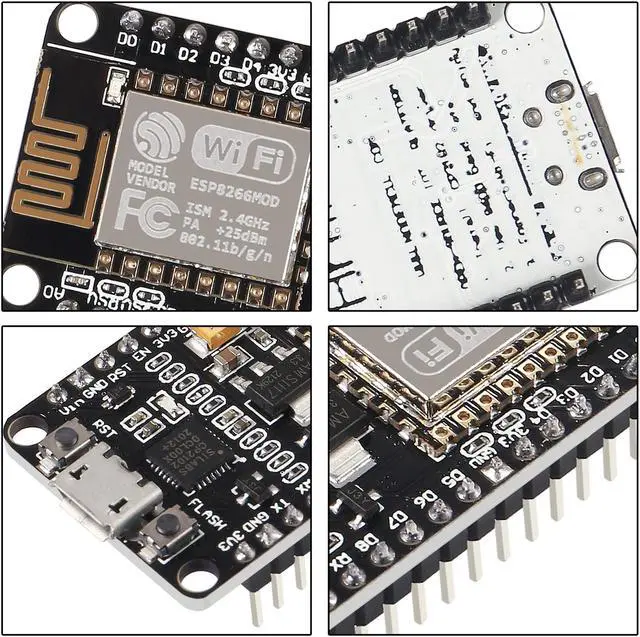
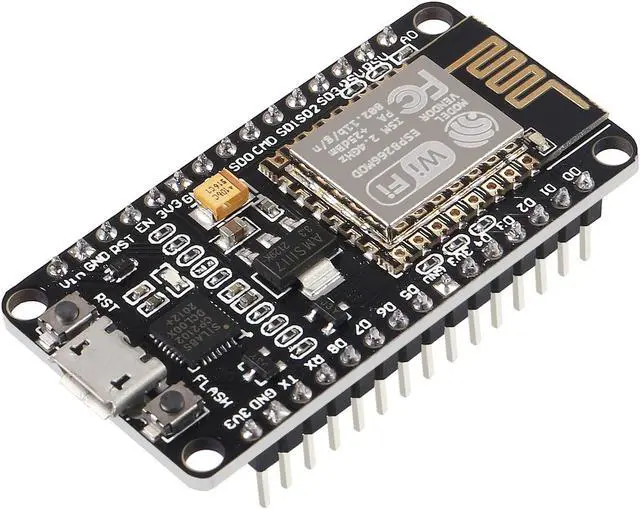


10Pcs ESP8266 CP2102 ESP-12E NodeMcu LUA Internet WiFi Development Board Open Source Serial Internet Wireless Module for IDE Micropython
- ESP8266 is a highly integrated chip designed for the needs of a new connected world.It offers a complete and self-contained Wi-Fi networking solution, allowing it to either host the application or to offload all Wi-Fi networking functions from another application processor.
- The CP2102 ESP-12E controllers are easy to program by using the CP2102-USB interface without having to press the flash and reset buttons before each flash operation. Full I/O port and Wireless 802.11supported, direct download without resetting.
- The ESP8266 development board has integrating GPIO, PWM, IIC, 1-Wire and ADC all in one board. Support smart link smart networking. The fast and affordable technology for WiFi. Make your development the fastest way combined with firmware for NodeMcu.
- It is an integrated unit with all available resources on board. It's very easy for Arduino projects or any development board with I / O pins. Modern Internet development tools can use the built-in API to instan
+
+
Overview
Specs
Reviews

Any questions? Our AI beta will help you find out quickly.
Try me now
Support wireless 802.11 b/g/n standard
Support three working modes of STA/AP/STA+AP
Built-in TCP/IP protocol stack, supports multiple TCP Client connections (5MAX)
D0~D8,
SD1~SD3: used as GPIO, PWM, I2C, etc., port drive capability 15mA
AD 0: 1 channel ADC
Power input: 4.5V ~7V, support USB power supply
Working current: continuous
transmission: approximately equal to 70mA (200mA MAX), standby <200uA
Transmission rate: 110-460800bps
Support UART/GPIO data communication interface
How to use:
1. Download the board IDE, the latest version.
2. Install the IDE
3. Set up your board
IDE as: Go to File->Preferences and copy the URL below to get the
ESP board manager extensions: for arduino. esp8266. com/stable/package_esp8266com_index. json
4. Go to Tools > Board > Board Manager> Type """"esp8266"""" and download the Community esp8266 and install.
5.
Set up your chip as: Tools -> Board -> NodeMCU 1.0 (ESP-12E Module) Tools -> Flash Size -> 4M (3M SPIFFS) Tools -> CPU Frequency -> 80 Mhz Tools -> Upload Speed -> 921600 ToolsPort (whatever it is)
6. Download and run the 32 bit flasher exe at Github(Search for nodemcu/nodemcu-flasher/tree/master/ at Github) github. com/nodemcu/nodemcu-flasher/tree/master/Win32/Release Or download and run the 64 bit flasher exe at: github. com/nodemcu/nodemcu-flasher/tree/master/Win64/Release.
7. In board IDE, look for the old fashioned Blink program. Load, compile and upload.
8. Go to FILE> EXAMPLES> ESP8266> BLINK, it will start blinking.
Data download access to the website:
http: //www. nodemcu. com/index_en. html
Firmware link:
https: //github. com/nodemcu/nodemcu-firmware
Package included:
10 x ESP8266 NodeMCU LUA CP2102 development board
Support three working modes of STA/AP/STA+AP
Built-in TCP/IP protocol stack, supports multiple TCP Client connections (5MAX)
D0~D8,
SD1~SD3: used as GPIO, PWM, I2C, etc., port drive capability 15mA
AD 0: 1 channel ADC
Power input: 4.5V ~7V, support USB power supply
Working current: continuous
transmission: approximately equal to 70mA (200mA MAX), standby <200uA
Transmission rate: 110-460800bps
Support UART/GPIO data communication interface
How to use:
1. Download the board IDE, the latest version.
2. Install the IDE
3. Set up your board
IDE as: Go to File->Preferences and copy the URL below to get the
ESP board manager extensions: for arduino. esp8266. com/stable/package_esp8266com_index. json
4. Go to Tools > Board > Board Manager> Type """"esp8266"""" and download the Community esp8266 and install.
5.
Set up your chip as: Tools -> Board -> NodeMCU 1.0 (ESP-12E Module) Tools -> Flash Size -> 4M (3M SPIFFS) Tools -> CPU Frequency -> 80 Mhz Tools -> Upload Speed -> 921600 ToolsPort (whatever it is)
6. Download and run the 32 bit flasher exe at Github(Search for nodemcu/nodemcu-flasher/tree/master/ at Github) github. com/nodemcu/nodemcu-flasher/tree/master/Win32/Release Or download and run the 64 bit flasher exe at: github. com/nodemcu/nodemcu-flasher/tree/master/Win64/Release.
7. In board IDE, look for the old fashioned Blink program. Load, compile and upload.
8. Go to FILE> EXAMPLES> ESP8266> BLINK, it will start blinking.
Data download access to the website:
http: //www. nodemcu. com/index_en. html
Firmware link:
https: //github. com/nodemcu/nodemcu-firmware
Package included:
10 x ESP8266 NodeMCU LUA CP2102 development board
Warranty & Returns
Warranty, Returns, And Additional Information
Warranty
- Please contact the Seller directly for warranty information. Warranty information may also be found on the Manufacturer's website.
- CONTACT
Return Policies
- Return for refund within: 30 days
- Return for replacement within: 30 days
- This item is covered by To the Internet media Return Policy
Manufacturer Contact Info
- For a directory of all our manufacturers, please click below.
- Manufacturers Directory
LOADING...
LOADING...