be quiet! Power Zone 2 1000W ATX 12V 3.1 Power Supply | 80 Plus Platinum and Cybenetics Platinum Efficiency | BP008US
  •  
  • $149.90 
  • Save: 6%
  • $73.99
  • Price alert
    Shop it at NeweggBusiness.

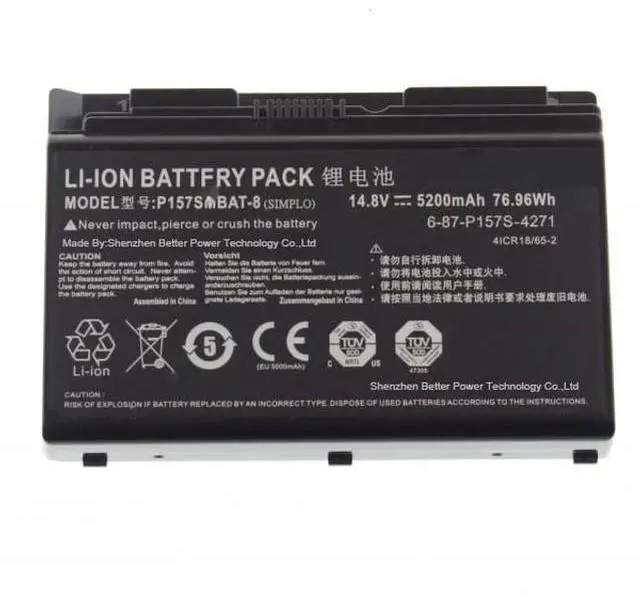
    YXXM P157SMBAT-8 5200mAh Battery 6-87-P157S-4271 6-87-P157S-4272 for Clevo Hasee K780E K780G-i7 Terransforce P177 P157SM P177SM-A

    • P157SMBAT-8 Laptop Battery Capacity: 76.96Wh; Voltage: 14.8 V; Cell:8; Battery Type: Li-ion.
    • Compatible Part Numbers: P157SMBAT-8 6-87-P157S-4271 6-87-P157S-4272 6-87-P157S-4273 4ICR18/65-2 P157SMBAT-8 Notebook Battery for Clevo.
    • Compatible Laptop Models: Clevo Terransforce P157S P157SM P177SM-A Hasee K780S-i7 K780E Series Laptop Battery.
    • P157SMBAT-8 Battery Quality Control:Up to 500 charging cycles over the battery life, state-of-the-art technology and safety precautions ensure that this battery works just as reliably as the original, CE certification, RoHs certification, EMC and EC tests passed.
    • Perfect Aftermarket: 6-87-P157S-4271 laptop battery offer 60 day money back or replacement, 1 year warranty, 24/7 email support, we promise to help you solve any problems within 24 hours including refund.
    +
    +
    Overview
    Specs
    Reviews
    avatar

    Any questions? Our AI beta will help you find out quickly.

    Battery type:
    Li-ionVoltage: 14.8VC
    apacity: 5200mAh
    / 76.96WHC ells: 8
    cellsWarranty: 1 year warrantyCompatible
    Part Numbers: P157SMBAT-8 6-87-P157S-4271 6-87-P157S-4272 6-87-P157S-4273 4ICR18/65-2 P157SMBAT-8 Notebook Battery For Clevo. P157SMBAT-8 Laptop
    Battery Compatible Models: For Clevo Terransforce P157S P157SM P177SM-A Hasee K780S-i7 K780E Series series laptop batteryInstalling New Battery Frequently Asked Question Solution:
    Q: Why my computer didn't recognize this battery or I install this battery and it doesn't seem to work?
    A: The reason is residual power stored in the laptop components that was preventing the battery from working properly. Please disconnecting the old battery, and holding down the power button for 20 seconds, then connect the new battery. This drains the residual or flea power and once the laptop is reassembled the battery will function properly.

    Warranty & Returns

    Warranty, Returns, And Additional Information

    Warranty

    • Please contact the Seller directly for warranty information. Warranty information may also be found on the Manufacturer's website.
    • CONTACT

    Return Policies

    Manufacturer Contact Info

    LOADING...