

Your Browsing History

- Free 30-day Returns
$116.99

Meet Your Seller

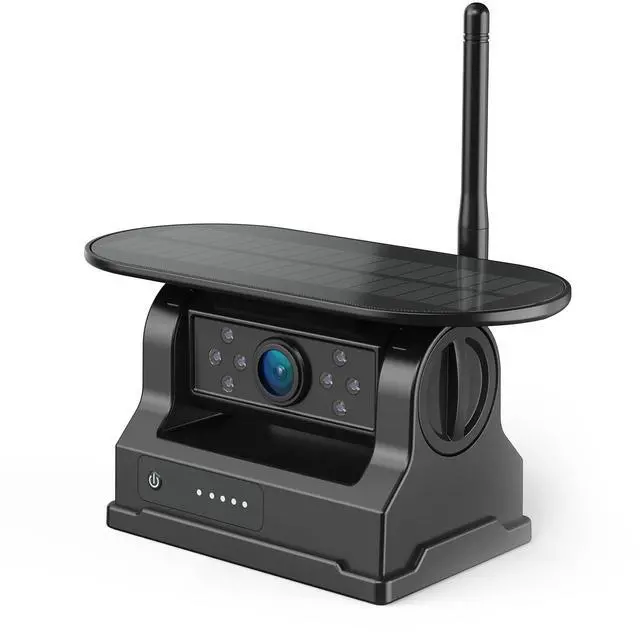

eRapta Magnetic Solar Wireless Backup Camera: Compatible for AWTCM701/AWTCM702
- eRapta Magnetic Solar Wireless Backup Camera: Compatible for AWTCM701/AWTCM702
- Way to Add the Second Camera for AWTCM701/AWTCM702: 1.Please shut off the factroy-paired camera before the second one paring and install the antenna to the camera; 2. Continuous click the screen at the far right twice to enter the full-channel views (4 CH in default), choose one of unpaired channel and click it; 3. Long press to turn on the camera you want to pair, you will see blue lights on to show its battery level; 4. Click the screen to enter the menu (the first icon) and select the "PARING" icon to start paring, before the counting ends, the image will show on the screen.
- Camera Details: The adjustable angle for up and down is around 45 degree from the horizon. and the view angle of it is 150 degree.
- Package List: 1x Magnetic Solar Wireless Backup Camera with Antenna, not charger included. This is a camera-only listing for eRapta AWTCM701/AWTCM702. If you have needs for the camer
+
+
Overview
Specs
Reviews

Any questions? Our AI mode will help you find out quickly.
Try me now
eRapta Magnetic Solar
Wireless Backup Camera: Compatible for AWTCM701/AWTCM702 ^^ Way to Add the Second Camera for AWTCM701/AWTCM 702: 1. Please shut off the factroy-paired camera before the second one paring and install the antenna to the camera; 2. Continuous click the screen at the far right twice to enter the full-channel views (4 CH in default), choose one of unpaired channel and click it; 3. Long press to turn on the camera you want to pair, you will see blue lights on to show its battery level; 4. Click the screen to enter the menu (the first icon) and select the "PARING" icon to start paring, before the counting ends, the image will show on the screen.
^^ Camera
^^ Package List: 1x Magnetic Solar Wireless Backup Camera with Antenna, not charger included. This is a camera-only listing for eRapta AWTCM701/AWTCM702. If you have needs for the camera charger, please get it from our store to find the charger sold separately
Wireless Backup Camera: Compatible for AWTCM701/AWTCM702 ^^ Way to Add the Second Camera for AWTCM701/AWTCM 702: 1. Please shut off the factroy-paired camera before the second one paring and install the antenna to the camera; 2. Continuous click the screen at the far right twice to enter the full-channel views (4 CH in default), choose one of unpaired channel and click it; 3. Long press to turn on the camera you want to pair, you will see blue lights on to show its battery level; 4. Click the screen to enter the menu (the first icon) and select the "PARING" icon to start paring, before the counting ends, the image will show on the screen.
^^ Camera
Details
: The adjustable angle for up and down is around 45 degree from the horizon. and the view angle of it is 150 degree.^^ Package List: 1x Magnetic Solar Wireless Backup Camera with Antenna, not charger included. This is a camera-only listing for eRapta AWTCM701/AWTCM702. If you have needs for the camera charger, please get it from our store to find the charger sold separately
Warranty & Returns
Warranty, Returns, And Additional Information
Warranty
- Please contact the Seller directly for warranty information. Warranty information may also be found on the Manufacturer's website.
- CONTACT
Return Policies
- Return for refund within: 30 days
- Return for replacement within: 30 days
- This item is covered by DuronTechnologies Return Policy
Manufacturer Contact Info
- For a directory of all our manufacturers, please click below.
- Manufacturers Directory
LOADING...