




 here!
I’m your shopping assistant for PC builds, upgrades, and everything tech.
Got questions? Ask away!
Start a conversation
here!
I’m your shopping assistant for PC builds, upgrades, and everything tech.
Got questions? Ask away!
Start a conversation Hot Seller







Any questions? Ask CelesteSM will help you find out quickly.
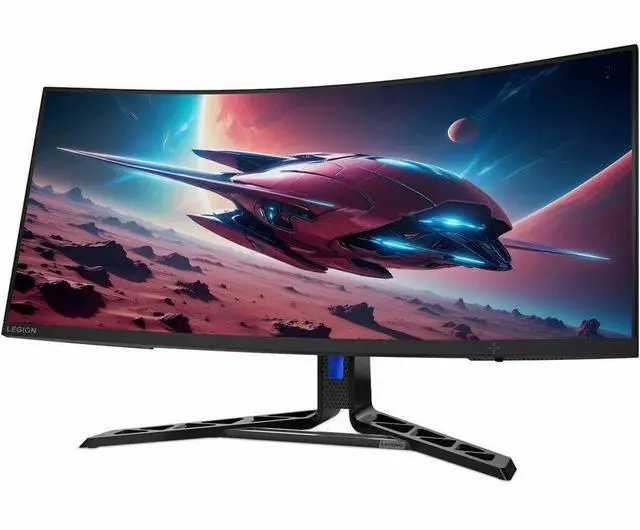
The Lenovo Legion R34w-30 is a 34-inch curved WQHD ultrawide gaming monitor with a 180Hz refresh rate, suited to gamers who want a wide, smooth view for immersive PC gameplay.
| Attribute | Value |
|---|---|
| Best For | Gaming and desktop use with an ultrawide curved display |
| Panel And Resolution | 34-inch curved VA LED panel with a 3440 × 1440 UWQHD resolution, 21:9 aspect ratio, anti-glare finish, 350 cd/㎡ brightness, 3,000:1 contrast ratio, 114° viewing angle, 99% sRGB gamut, and 0.2318 mm pixel pitch |
| Refresh Rate And Response | 170 Hz refresh rate and 5 ms response time |
| Display Features | AMD FreeSync Premium adaptive sync, HDR, Eyesafe Certified 2.0, low-blue-light and eye-care features, VESA ClearMR 8000, and 16.7 million colors |
| Ports And Connectivity | 1 HDMI port and DisplayPort connectivity; no USB or Thunderbolt ports |
| Stand And Ergonomics | Height-, swivel-, and tilt-adjustable stand; 100 × 100 mm VESA mounting pattern with a compatible mount weight of 12.79 lb |
| Audio And Webcam | No built-in speakers or webcam |
| Physical Details | Raven Black/black finish; 31.8 in wide × 14.5 in high × 4.4 in deep; 23.65 lb item weight |
| Power | 43 W power consumption |
| Included Accessories | DisplayPort cable |
| Model Identifiers | Lenovo Legion R34w-30; model and part number 67C7GACBUS |
Q: Lenovo Legion R34w-30 or G34w-30: which should I choose for 34-inch ultrawide gaming?
A: Choose the Legion R34w-30 if you want a 34-inch, 3440 × 1440, 1500R-curved VA display with refresh rates up to 180Hz. The G34w-30 offers the same screen size, resolution, curve, and panel type, with DisplayPort refresh rates up to 165Hz or 170Hz when overclocked. The R34w-30 fits buyers prioritizing the higher listed refresh-rate ceiling; the G34w-30 fits buyers comparing the earlier Lenovo model’s closely matched ultrawide format.
Q: Should I choose the Legion R34w-30 or the Legion Y34wz-30 for HDR gaming?
A: Choose the Legion Y34wz-30 if HDR brightness and Mini-LED local dimming are priorities: Lenovo lists a Mini-LED backlight, 384 local-dimming zones, up to 1,200 cd/m² brightness, and 10-bit color. Choose the Legion R34w-30 for a 34-inch, 3440 × 1440 VA gaming display with up to 180Hz refresh and a 1500R curve. Both models share the same resolution, screen size, curve, and listed maximum refresh rate.
Q: Legion R34w-30 or R45w-30: which Lenovo monitor gives me more ultrawide screen space?
A: Choose the Legion R45w-30 for a larger 44.5-inch, 32:9 display with 5120 × 1440 resolution, suited to a wider gaming or multi-window desktop layout. Choose the Legion R34w-30 for a 34-inch, 21:9 display with 3440 × 1440 resolution and refresh rates up to 180Hz. The R45w-30 supports refresh rates up to 170Hz when overclocked.
Q: Is this monitor suitable for both gaming and multitasking?
A: It can suit both uses: its 34-inch 21:9 screen has a 3440 × 1440 resolution for a wide desktop, and its refresh rate reaches 180Hz for gaming. The actual refresh rate depends on the connected device and setup.
Q: Does it support 180Hz at its full resolution?
A: Lenovo lists the monitor’s refresh-rate range as 48–180Hz and its resolution as 3440 × 1440. Reaching 180Hz requires a compatible graphics device and connection; check your device’s output support and cable setup.
Q: Can this monitor be mounted on a wall?
A: Yes. Lenovo lists support for a 100 × 100 mm VESA mount, so it can be used with a compatible wall-mount bracket.
Q: Does it have built-in speakers?
A: Lenovo’s PSREF lists two integrated 3W speakers. The supplied product data says there are no built-in speakers, so the listing information conflicts; confirm the specifications for the exact SKU with the seller before relying on them.
Q: Is this a 4K monitor?
A: No. It is a 3440 × 1440 ultrawide monitor with a 21:9 aspect ratio, not a 4K display.
Q: Is the Legion R34w-30 suitable for both work and gaming?
A: It may suit someone who wants a single 34-inch, 21:9 display for work and gaming. A Reddit post specifically considered it for that combination, but the discussion does not establish how well it performs for every type of work. It has no built-in speakers.
Q: What are the main trade-offs of its VA panel?
A: Community feedback is mixed: one owner reported noticeable color and brightness changes toward the sides, while another reported no viewing-angle problems. If you are sensitive to off-angle image changes, check the display in person or buy from a retailer with a suitable return policy.
Q: Does it work with an Nvidia graphics card?
A: One Reddit owner reported using the monitor with an RTX 3060 without noticing tearing or ghosting. The discussion also raised uncertainty about G-SYNC support, so confirm the monitor’s adaptive-sync behavior with your specific GPU and connection before buying.
Q: Is it a good choice for sim racing?
A: It is a 34-inch curved 21:9 monitor, and one Reddit owner reported using the R34w-30 for sim racing without issues. That is a single user report, so consider whether your games and setup support ultrawide resolution before choosing it.


