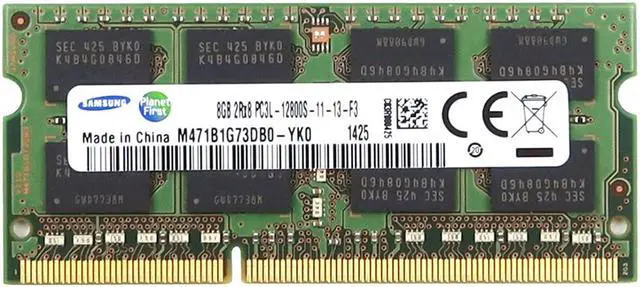
The Samsung M471B1G73DB0-YK0_UA is an 8GB DDR3-1600 (PC3-12800) SO-DIMM laptop memory module for upgrading or replacing memory in compatible laptops that use 204-pin DDR3 SO-DIMMs.
Recommended For
- Owners of a compatible DDR3L laptop with a free memory slot who want to add 8GB; confirm the laptop’s supported module size and total memory limit first.
- People repairing or keeping an older laptop in service who need an 8GB replacement for a failed or lower-capacity DDR3L SO-DIMM, rather than a newer memory standard.
- Users of a compatible older laptop who are short on memory during everyday multitasking and want to move to an 8GB module; the benefit depends on the laptop’s supported configuration and workload.
- Laptop owners planning a two-module upgrade who need one 8GB stick to pair with another compatible 8GB module, provided the laptop supports that capacity and configuration.
Real-World Use Scenarios
- When a compatible older laptop has only 4GB of memory, replacing a smaller module with this 8GB stick can give everyday browsing, document editing, and light multitasking more room before the system has to rely on storage as temporary memory. The laptop must support an 8GB DDR3L SO-DIMM.
- For a laptop with a free memory slot, adding this module can increase installed RAM for users who keep more browser tabs and apps open at once. The resulting total depends on the existing memory, and the laptop’s slot, capacity, and module compatibility limits should be checked first.
- If an existing 8GB module has failed, this can serve as a like-for-like replacement in a compatible laptop, restoring the laptop’s memory capacity once the module is installed and recognized. A Dell community post identifies this exact part number in an Inspiron memory-upgrade discussion.
- In a compatible two-slot laptop, pairing this 8GB stick with a matching 8GB DDR3L module can provide 16GB total for heavier multitasking. The laptop must support 16GB and the configuration; using a matched pair does not guarantee a noticeable speed increase in every task.
Spec Summary
| Attribute | Value |
|---|
| Best For | Laptop memory upgrades |
|---|




 here!