




 here!
I’m your shopping assistant for PC builds, upgrades, and everything tech.
Got questions? Ask away!
Start a conversation
here!
I’m your shopping assistant for PC builds, upgrades, and everything tech.
Got questions? Ask away!
Start a conversation








Any questions? Ask CelesteSM will help you find out quickly.
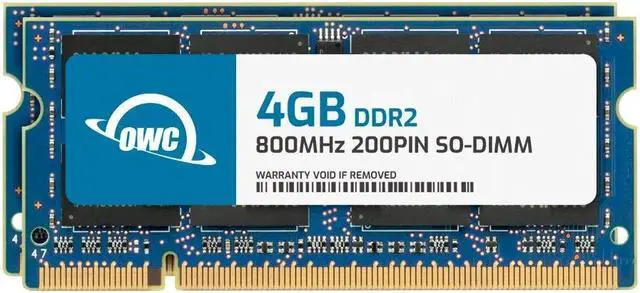
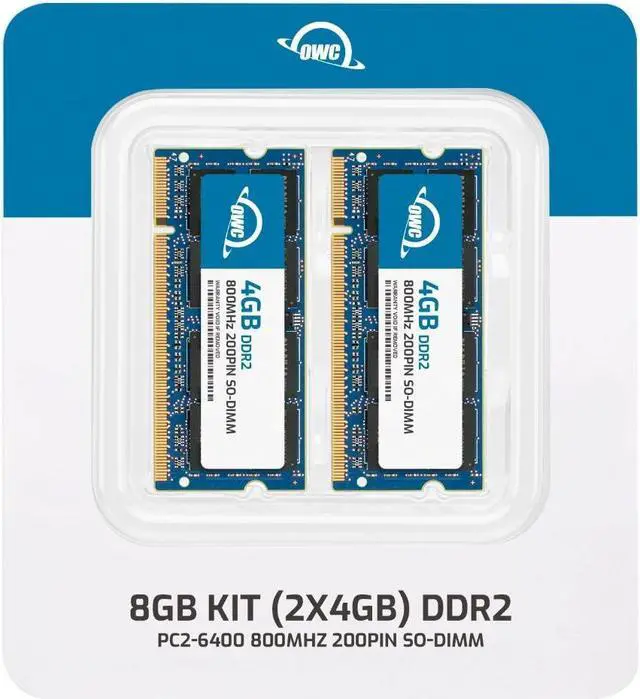
The OWC 8GB DDR2 800 dual-channel kit includes two 4GB, 200-pin SO-DIMMs for compatible laptops, all-in-one systems, or NAS devices that support DDR2 PC2-6400 memory.
| Attribute | Value |
|---|---|
| Best For | Upgrading compatible laptops, all-in-one systems, and NAS systems with an 8GB dual-channel memory kit |
| Capacity And Kit Configuration | 8GB total as 2 x 4GB modules in a dual-channel kit |
| Memory Type And Performance | 200-pin DDR2 SO-DIMM, DDR2-800 (PC2-6400), CL6 |
| Electrical And Error Correction | 1.8V, non-ECC, unbuffered |
| Physical Design | Black chips with no heat spreader |
| Model Identifiers | OWC; part number 6S4D22R8008P; model number OWC6S4D22R8008P-B962-SF |
Q: Should I choose OWC 8GB (2x4GB) DDR2-800 or the OWC 4GB (2x2GB) kit?
A: Choose the OWC 8GB kit when your system supports 8GB and you want twice the total memory in the same two-module configuration. Choose the 4GB kit when 4GB matches your system’s capacity target. Both kits are 200-pin DDR2-800 SO-DIMMs; check your computer’s supported memory capacity before choosing.
Q: OWC 8GB DDR2-800 (2x4GB) or 8GB DDR2-800 (4x2GB): which kit should I get?
A: Both OWC kits provide 8GB of DDR2-800 memory. Choose the 2x4GB kit when your system’s supported configuration calls for two 4GB modules; choose the 4x2GB kit when it calls for four 2GB modules. Confirm the number of memory slots and per-slot capacity supported by your computer.
Q: Is the OWC 8GB DDR2-800 kit a better match than OWC 8GB DDR2-667?
A: Choose the OWC DDR2-800 kit when your computer supports DDR2-800; it is rated at 800MHz (PC2-6400). The OWC DDR2-667 kit is rated at 667MHz (PC2-5300) and is the matching option for systems specified for that speed. Match the memory to your computer’s supported DDR2 speed and module configuration.
Q: Should I get this OWC 8GB kit or an OWC 16GB DDR2-800 kit?
A: Choose this 8GB (2x4GB) kit when 8GB is your target capacity and your system supports two 4GB DDR2-800 modules. Consider OWC’s 16GB (8x2GB) DDR2-800 kit when you need 16GB and your computer supports that total capacity and eight modules. Check the system’s memory limits and slot configuration before ordering.
Q: Will this RAM work in my laptop?
A: It is suitable only if the laptop uses 200-pin DDR2 SO-DIMM memory and supports two 4GB modules, 8GB total, at 1.8V. Check the laptop’s service manual or manufacturer specifications for its maximum memory capacity and supported module configuration before buying; a matching pin count alone does not guarantee compatibility.
Q: Will adding this RAM make my laptop run faster?
A: It may improve responsiveness when the laptop is slowing down because it is short on memory, such as during multitasking or when switching between programs. It will not necessarily make the laptop faster if memory is not the bottleneck, and it does not upgrade the processor or storage.
Q: Can I use this memory if my laptop supports a lower DDR2 speed?
A: The kit is rated DDR2-800 (PC2-6400). Whether it can run at a lower supported DDR2 speed depends on the laptop’s memory controller and configuration, so confirm compatibility in the laptop documentation rather than relying on the speed rating alone.
Q: Does this kit include two 4GB memory sticks?
A: Yes. The kit contains two 4GB DDR2 800 SO-DIMM modules, for 8GB total. The laptop must support both the 4GB module size and the 8GB total capacity for the full kit to work as intended.


