Acer Nitro V16 16.0" WUXGA 180Hz Gaming Laptop, Intel Core 7 240H, GeForce RTX 5060, 32GB DDR5, 512GB PCIe Gen 4 SSD, Windows 11 Home ANV16-72-73C7
  •  
  • $1,349.99 –
  • Save: 20%
  • $199.86
  • Free 30-day Returns
  • Price alert
    Shop it at NeweggBusiness.

    Meet Your Seller

    Wavlink DisplayLink Laptop Docking Station Triple Monitor 4K@60Hz, 100W Charging For Thunderbolt 3/4, New MacBook Neo, M1 M2 M3 Mac/Windows/Chrome, 3 HDMI, 2 DP, 6 USB Ports, 160W Power, LAN,Audio

    Limited time offer, ends 10/31 By WavlinkOffical

    (108)(16) Write a Review
    • Dual Monitor - 4K DP + 4K HDMI + Gbe
    • 65W
    • 100W
    • Triple Monitor - 3 x HDMI + 2 x DP - 100W Charging
    • Dual Monitor - 4K / 5K 2XDP+2XHDMI- 65W Charging
    • Dual Monitor - 4K HDMI/DP+100W PD
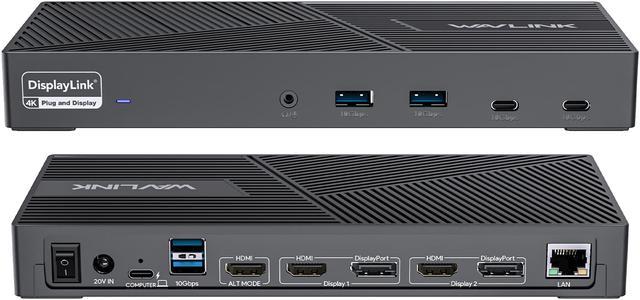
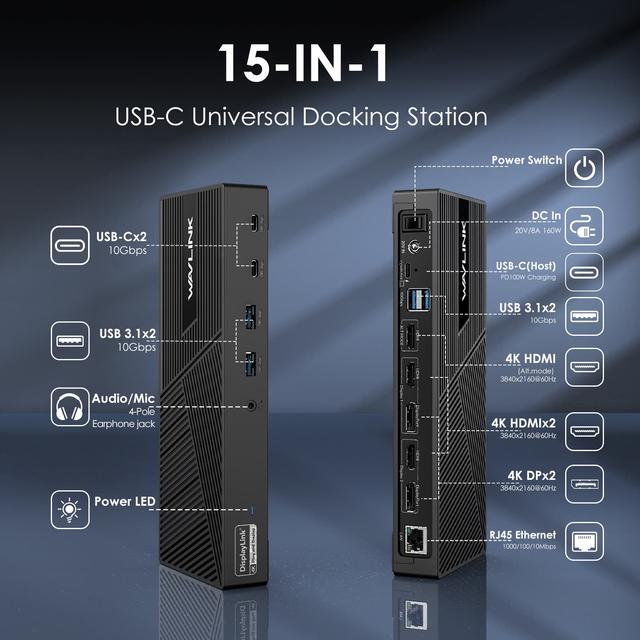
    • 15 Ports Expand Your Options: All through a single USB C-C connection, the dock easily turns your laptop's type-c port into 3 HDMI ports, 2 DisplayPort, a 100W Power Delivery USB-C port (Host), a DC Jack, 2xUSB 3.1-C ports, 4xUSB 3.1-A ports, an RJ45 Ethernet port, and a 4-Pole Phone Jack. A perfect solution for your home or office workstation.
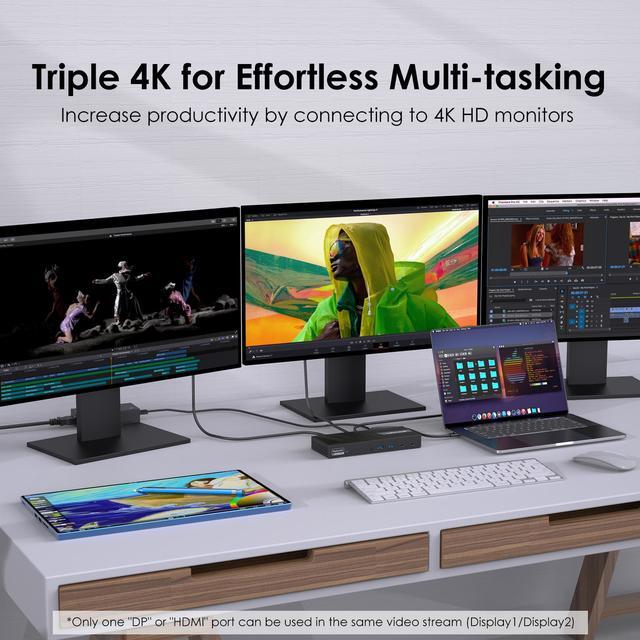
    • Triple Displays 4K@60Hz: Thanks to five video interfaces (2 DisplayPort+2 HDMI+HDMI (Alt Mode)), three external monitors can be displayed at the same time, and each screen can display different content to make multitasking a breeze. Support triple display resolution up to 3840x2160@60Hz under the DP1.4 source. *Note: HDMI (Alt Mode) port requires your laptop's type-c port to support video output.
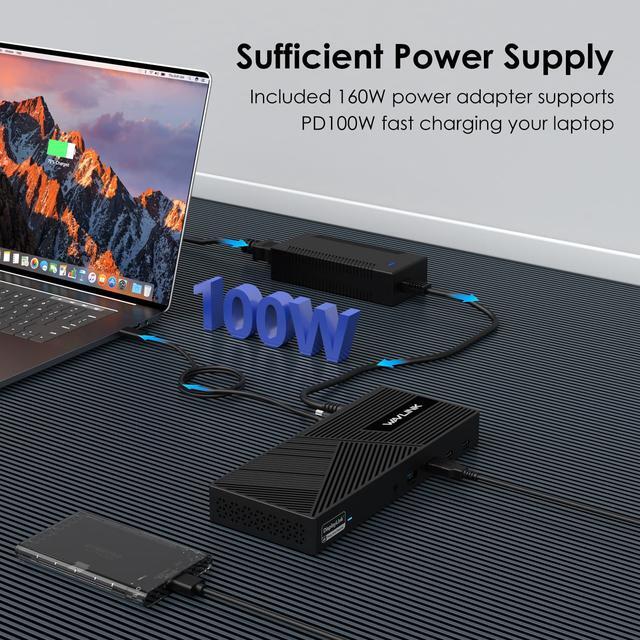
    • Sufficient 100W Power Supply: Comes with a powerful 160W power adapter, the USB-C (host) charges your laptop with max.100W to keep it running all day, as well as powering your connected peripherals while displaying or transferring data.
    • Perfect for MacBook Neo Multi-Monitor Setup Fully optimized for the latest MacBook Neo. While the native system may limit external displays, our DisplayLink-powered Dock breaks the boundary, allowing you to extend dual or triple monitors seamlessly. As recommended by AppleInsider, its the ultimate productivity solution for the new MacBook Neo era.
    +
    +
    Overview
    Specs
    Reviews (108)
    See all Q & A

    Any questions? Ask CelesteSM will help you find out quickly.

    docking station
    Wavlink 15-In-1 Triple 4K Display Universal DisplayLink Docking Station with Elegant Shell Design

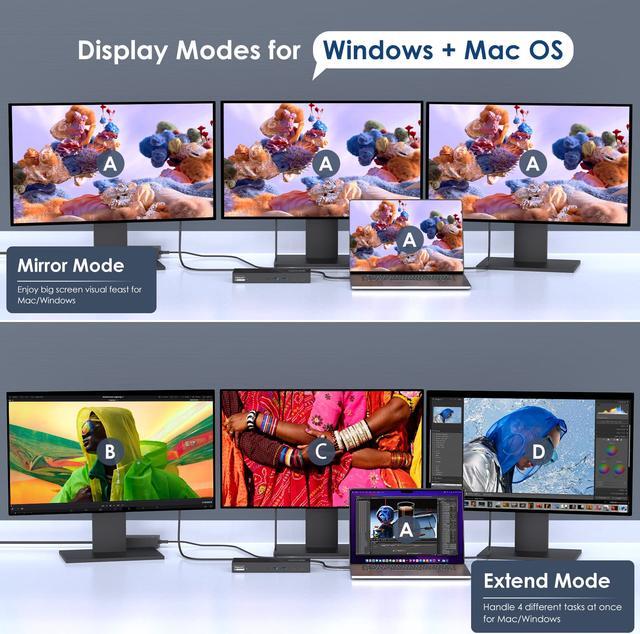
    This Universal Displaylink Triple 4K Display Docking Station works seamlessly with your full-function type-c laptops, supports mirroring/expanding up to three external displays, and enables connectivity to your wired network and other accessories. 

    You can easily add triple 4K@60Hz displays with 2x DisplayPort and 3x HDMI ports. Supports 100W charging your laptop and features full 6xUSB3.1 Gen2 ports which support high speed up to 10Gbps. 

    Thanks to a 160W power adapter that can be fully sufficient for docking and laptop charging, you can reduce the clutter of your workstation and no longer need to carry an extra power adapter when traveling or in the office.


    usb c docking station
    Super-Speed USB 3.1 & Stable Network

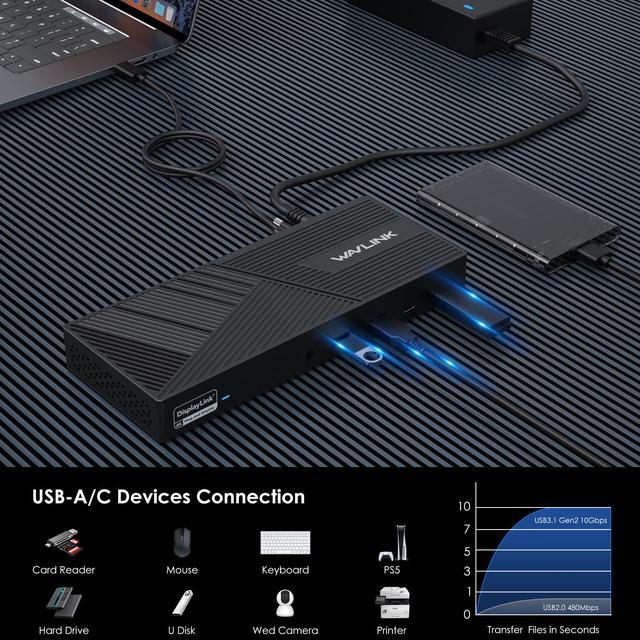
    4 USB-A 3.1 and 2 USB-C 3.1 ports can reach a maximum 10Gbps data transfer speed with no delay and support extend more connectivity to USB devices, like external hard drives, U disk and more. A Gigabit Ethernet port ensures a secure and stable wired network performance, backwards compatible with 10/100/1000Mbps.

    laptop dock

    Multiple video interfaces make the dock a versatile and powerful tool for users in various industries. Whether you're working with graphics-intensive applications or simply need a reliable docking station for day-to-day computing tasks, the Wavlink docking station is an excellent choice:

    1.  HDMI( Alt.Mode) Port for Video Editing/ Online Gaming: 
    --The HDMI(Alt.Mode) allows for high-intensive tasks processing, is particularly well-suited for video editing and online gaming, making it ideal for large software applications.

    2. Display 1/2(Chipset: DisplayLink 6950): HDMI /Displayport for Document Processing & Web Browsing

    --For document processing and web browsing, DisplayLink 6950 chipset-based interfaces, such as HDMI 1/Displayport 1 and HDMI 2/Displayport 2, are recommended. These interfaces provide high-quality graphics and a smooth user experience, even when working with multiple windows or applications simultaneously.
     

    thunderbolt 3 4 dock
    Game-Changer For Multitasking

    With three-group video output ports, you can connect triple monitors with ease. The HDMI (Alt Mode) port supports up to 4K@60Hz output under DP1.4 source, making it perfect for task-intensive activities like video editing and gaming.

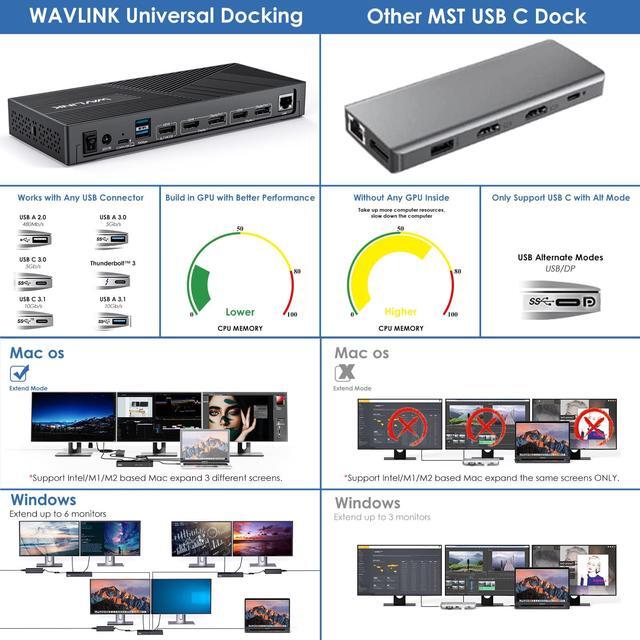
    The DISPLAY 1/2 (HDMI/DP) ports supported by DisplayLink-6950 chipset, output dual 4K@60Hz display, which makes it the perfect solution for expanding multiple displays with different content on even M1/M2-based Macs. Use the DISPLAY 1/2 ports with web and productivity software applications; not recommended for gaming. 
     

    Perfect for laptops with USB 3.1 full-function type c port or thunderbolt 3/4 port. Support Windows 11/10/8.1/8/7/XP/Vista, Mac OS 10.14-13.x and latest, Chrome OS, Ubuntu, Android and Harmony OS. 

    Unsupported with Unix systems, Linux and iPad OS. (Follow the instructions to download the latest DisplayLink drivers before use.)

    triple 4k monitor docking station
    USB-C Power Delivery
    With included 160W power adapter

    USB-C(host) supports up to 100W charging your laptop and 60W for powering all downstream devices as well as other peripherals.

    powered usb hub
    1000/100/10Mbps Ethernet

    RJ45 Gigabit Ethernet port provides high-speed and stable wired networks, backwards compatible with 10/100/1000Mbps, allowing you to connect to faster networks, routers, and NAS devices.

    docking station 3 monitors
    Transfer Files in Seconds
    support file transfer speed at up to 10Gbps

    Connect to either of the USB 3.1Gen2 Type-A ports and Type-C ports for different needs, support file transfer speed at up to 10Gbps, ultra time-saving and efficient for data transmission.

    displaylink docking station
    2-In-1 Audio & Mic

    Connect a microphone, headphones or mini stereo to this audio out & mic in port when accessing audio files or needing to speak, which can make listening, talking or recording a breeze.

    universal docking station
    Security Lock Hole
    Anti-slip Pads Protection

    Supports the connection of Kensington lock, which secures the devices and important data from theft to keep your properties/date safe. (Kensington lock is not included).

    The non-slip rubber pads on the bottom help the docking station stay stable in place and free from any sliding effects, quite thoughtful to provide you with a better experience.

    charging station usb c
    In the Box

    1x USB-C Triple 4K Display Universal Docking Station
    1x USB-C to C Cable (E-Mark Chip)
    1 x 20V/8A 160W Power Adapter
    1 x Quick Start Guide
    1 x Driver Link Card

    docking station for mac hp dell laptop
    Multiple Display Resolution

    1, Single Display(Max. Resolution)

    Under DP1.2 Source: HDMI(Alt Mode): 3840x2160@30Hz ; Display1/2(HDMI/DisplayPort): 3840x2160@60Hz;
    Under DP1.4 Source: HDMI(Alt Mode): 3840x2160@60Hz ; Display1/2(HDMI/DisplayPort): 3840x2160@60Hz.

    2, Dual Display(Max. Resolution)

    a. HDMI(Alt Mode)+ Display1/2(HDMI/DisplayPort): 
    Under DP1.2 Source: 3840x2160@30Hz+ 3840x2160@60Hz; 
    Under DP1.4 Source: 3840x2160@60Hz + 3840x2160@60Hz.

    b. Display1(HDMI/DisplayPort)+Display2(HDMI/DisplayPort): 
    Under DP1.2/1.4 Source: 3840x2160@60Hz+ 3840x2160@60Hz.

    3, Triple Display(Max. Resolution)

    HDMI(Alt Mode) + Display1(HDMI/DisplayPort) + Display2(HDMI/DisplayPort): 
    Under DP1.2 Source: 3840x2160@30Hz+ 3840x2160@60Hz+3840x2160@60Hz;
    Under DP1.4 Source: 3840x2160@60Hz+ 3840x2160@60Hz+3840x2160@60Hz.

    hdmi/displayport docking station
    Warm Tips

    - Please confirm that the type-c port of your laptop supports charging and video output, or the docking station's host charging function and HDMI (Alt. Mode) port may not work.

    - Please follow the instructions to download the latest DisplayLink driver from the official website before use. ONLY plug and play for Chrome OS, Windows 10/11.

    - Please keep connected to the power supply when using this docking station (power adapter included in the package).

    - Only one video port can be used in the same video stream (Display1/Display2), either a "DisplayPort" or a "HDMI". 

    docking station
    Wavlink 15-In-1 Triple 4K Display Docking Station with Elegant Shell Design
    This USB-C Triple 4K Display Docking Station works seamlessly with your full-function type-c laptops, supports mirroring/expanding up to three external displays, and enables connectivity to your wired network and other accessories. You can easily add triple 4K@60Hz displays with 2x DisplayPort and 3x HDMI ports. Supports 100W charging your laptop and features full 6xUSB 3.1 Gen2 ports which support high speed up to 10Gbps. Thanks to a 160W power adapter that can be fully sufficient for docking and laptop charging, you can reduce the clutter of your workstation and no longer need to carry an extra power adapter when traveling or in the office.

    USB-C Power Delivery
    With included 160W power adapter, USB-C (host) supports up to 100W charging your laptop and 60W for powering all downstream devices as well as other peripherals.

    1000/100/10Mbps Ethernet
    RJ45 Gigabit Ethernet port provides high-speed and stable wired networks, backwards compatible with 10/100/1000Mbps, allowing you to connect to faster networks, routers, and NAS devices.

    Transfer Files in Seconds
    Connect to either of the USB 3.1G en2 Type-A ports and Type-C ports for different needs, support file transfer speed at up to 10Gbps, ultra time-saving and efficient for data transmission.

    2-In-1 Audio & Mic
    Connect a microphone, headphones or mini stereo to this audio out & mic in port when accessing audio files or needing to speak, which can make listening, talking or recording a breeze.

    Security Lock Hole
    Supports the connection of Kensington lock, which secures the devices and important data from theft to keep your properties/date safe. (Kensington lock is not included).

    Anti-slip Pads Protection
    The non-slip rubber pads on the bottom help the docking station stay stable in place and free from any sliding effects, quite thoughtful to provide you with a better experience.

    Compatible Systems
    -Windows 11/10/ 8.1 /8/7/XP/Vista
    -Mac OS 10.14 -13. x and latest
    -Chrome OS, Ubuntu, Android and Harmony OS

    Specification
    1.
    Model: WL-UG69PD25Pro
    2.
    Ports: 1x DC Jack, 1x USB-C (upstream), 2x Displayport, 3x HDMI, 1x RJ45, 1x 4-Pole Phone Jack, 2 x USB-C 3.1, 4 x USB-A 3.1
    3.
    Unit Size: 22.3 x 9.1 x 2.9 cm/ 8.7 x 3.6 x 1.1 in ( L x W x H )
    Package Size: 28.1 x 13.7 x7cm/11x 5.4 x 2.8 in ( L x W x H )
    4. USB-C to
    C Cable Length: 100cm/ 39.4 in
    Power Adapter Cable Length (plug end): 150cm/59in
    Power Adapter Cable Length (round port end): 110cm/43in
    5.
    Unit Weight: 378g/ 13.3 oz
    6.
    Housing Material: Plastic
    7.
    Shell Color: Black
    8. LED Indicator Color (Docking
    Station): Blue
    LED Indicator Color (Power Adapter): Blue

    In the Box
    1x USB-C Triple 4K Display Universal Docking Station
    1x USB-C to C Cable (E-Mark Chip)
    1 x 20V/8A 160W Power Adapter
    1 x Quick Start Guide
    1 x Driver Link Card

    Multiple Display Resolution
    ? Single Display(Max. Resolution)
    Under DP 1.2 Source: HDMI (Alt
    Mode): 3840x2160@30Hz; Display1/2(HDMI/DisplayPort): 3840x2160@60Hz;
    Under DP 1.4 Source: HDMI (Alt
    Mode): 3840x2160@60Hz;
    Display1/2(HDMI/DisplayPort): 3840x2160@60Hz.

    ? Dual Display(Max. Resolution)
    a. HDMI (Alt Mode) +
    Display1/2(HDMI/DisplayPort):
    Under DP 1.2 Source: 3840x2160@30Hz+ 3840x2160@60Hz;
    Under DP 1.4 Source: 3840x2160@60Hz + 3840x2160@60Hz.

    b.
    Display1(HDMI/DisplayPort)+Display2(HDMI/DisplayPort):
    Under DP 1.2 / 1.4 Source: 3840x2160@60Hz+ 3840x2160@60Hz.

    ? Triple Display(Max. Resolution)
    HDMI (Alt Mode) + Display1(HDMI/DisplayPort) + Display2(HDMI/DisplayPort):
    Under DP 1.2 Source: 3840x2160@30Hz+ 3840x2160@60Hz+3840x2160@60Hz;
    Under DP 1.4 Source: 3840x2160@60Hz+ 3840x2160@60Hz+3840x2160@60Hz.

    Warm Tips
    - Please confirm that the type-c port of your laptop supports charging and video output, or the docking station's host charging function and HDMI (Alt. Mode) port may not work.
    - Please follow the instructions to download the latest DisplayLink driver from the official website before use. ONLY plug and play for Chrome OS, Windows 10/11.
    - Pleas

    Warranty & Returns

    Warranty, Returns, And Additional Information

    Warranty

    • Please contact the Seller directly for warranty information. Warranty information may also be found on the Manufacturer's website.
    • CONTACT

    Return Policies

    Manufacturer Contact Info

    LOADING...

    The Wavlink 69PD25PRO is a 15-port DisplayLink USB-C docking station built for laptop users who need a full desk setup with up to three 4K 60Hz monitors, 100W laptop charging, fast USB expansion, Gigabit Ethernet, and audio through one cable.

    Recommended For

    • MacBook users on M1, M2, or M3 who need two or three extended desktop monitors for spreadsheets, browser tabs, docs, email, and line-of-business apps, and are willing to use DisplayLink software to get around Apple’s native display limits.
    • Home-office and hybrid workers who want a single-cable desk setup with multiple monitors, laptop charging, USB peripherals, wired Ethernet, and audio connected all at once.
    • Windows laptop users building a fixed workstation who care more about display count and port expansion than Thunderbolt-specific features, especially for office multitasking across three 4K-class screens.
    • Users with monitor-heavy admin, finance, support, or operations workflows who mostly run static or moderately changing content and want more screen space without changing laptops.

    Real-World Use Scenarios

    • A MacBook Air or base M-series Mac user sets up two or three external monitors for office apps, browser tabs, chat, and documents; the dock is typically used as a DisplayLink workaround for Apple’s native display limits, and users can usually get an extended multi-monitor desktop after installing DisplayLink software.
    • A work-from-home user connects monitors, keyboard, mouse, Ethernet, headset, and storage through one cable each morning; in practice, this kind of dock is mainly used to turn a laptop into a fixed desk setup with fewer cable swaps and laptop charging handled at the same time.
    • A Windows laptop user runs three 4K displays for spreadsheets, dashboards, email, and video calls; the likely experience is a broad productivity workspace that is well suited to multitasking, while gaming-grade latency or high-refresh expectations should be kept separate from this dock’s typical use case.
    • A remote employee docks and undocks the same laptop between home and office desks; the expected outcome is a consistent dual- or triple-monitor workstation with wired network access and accessories ready to reconnect quickly, provided the DisplayLink driver is already installed on the laptop.
    • A user connects external SSDs, USB peripherals, audio, and Ethernet while also extending displays; the common real-world result is that the dock works best as a desk hub for productivity and general content work, not as a substitute for direct monitor connections when the priority is maximum refresh rate or the lowest possible display lag.