here!
I’m your shopping assistant for PC builds, upgrades, and everything tech.
Got questions? Ask away!
Start a conversation
here!
I’m your shopping assistant for PC builds, upgrades, and everything tech.
Got questions? Ask away!
Start a conversationShipped by Newegg



Make informed decisions with expert advice. Learn More



Any questions? Ask CelesteSM will help you find out quickly.
We want to ensure your holiday shopping this year is hassle-free. That’s why we’re automatically extending our return policies on almost every product! For purchases placed between November 1st, 2026 and December 31, 2026 you will have until January 31, 2027 to return your product.
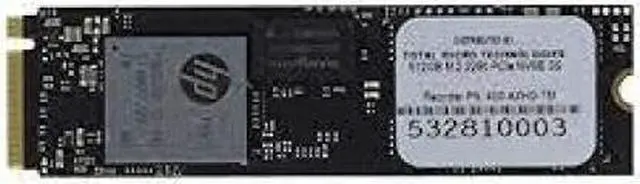
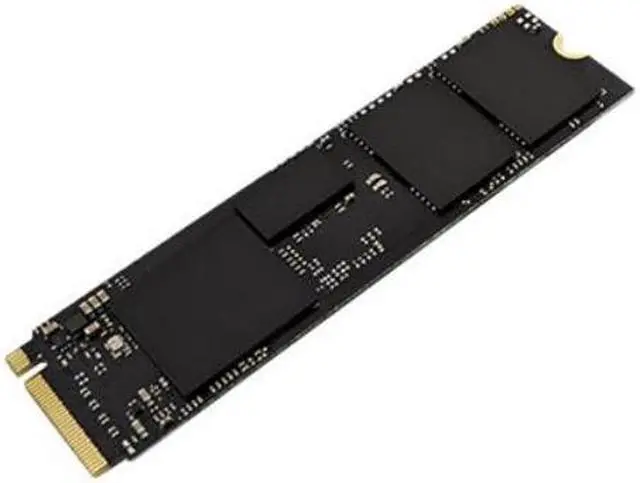
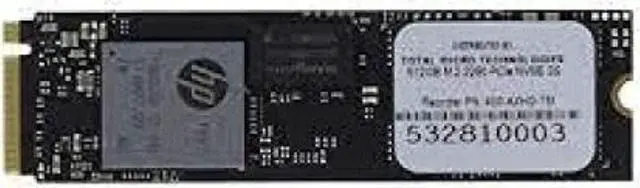
The Total Micro L62762001TM is a 512GB M.2 2280 PCIe NVMe SSD for consumers upgrading a compatible desktop or laptop that supports this drive format and interface.
| Attribute | Value |
|---|---|
| Best For | Consumer internal storage for desktop computers |
| Capacity | 512 GB of flash storage |
| Interface And Form Factor | M.2 2280 NVMe SSD with PCI Express x4 connectivity |
| Cache | No DRAM; SLC |
| Model Identifiers | Total Micro L62762001TM |
Q: Should I choose this 512GB SSD or a 256GB NVMe SSD for an HP EliteBook 840 G6?
A: Choose the Total Micro drive when you want twice the listed capacity and your EliteBook supports an M.2 2280 PCIe/NVMe drive. Choose 256GB if you mainly need a system drive and want less storage. HP lists both 256GB and 512GB PCIe SSD configurations for the EliteBook 840 G6; confirm your exact configuration before buying.
Q: Is this 512GB Total Micro SSD enough, or should I get a 1TB NVMe drive?
A: Choose this 512GB drive if that capacity fits your operating system, applications, and files. Choose a 1TB NVMe drive if you expect to keep larger game, media, or work libraries on the internal drive. HP lists both 512GB and 1TB PCIe SSD configurations for the EliteBook 840 G6, but this Total Micro model provides 512GB.
Q: Should I buy this PCIe NVMe SSD or an M.2 SATA SSD for my HP EliteBook 840 G6?
A: Choose this drive if your laptop configuration supports M.2 2280 PCIe/NVMe. Choose an M.2 SATA drive only if the exact laptop configuration requires or supports SATA; M.2 describes the form factor, not the interface. HP documents both PCIe and SATA SSD options for the EliteBook 840 G6, so check the service guide and your current drive before ordering.
Q: Will this SSD work in my laptop or desktop?
A: Only if the computer has an M.2 2280 slot that supports PCIe NVMe SSDs. The product details do not confirm compatibility with any specific computer model, so check the computer’s manual before buying.
Q: Can I add this as a second drive?
A: The SSD is an internal M.2 drive, but whether it can be added as a second drive depends on whether your computer has a compatible, unused M.2 PCIe NVMe slot. If not, installation may require replacing the existing drive.
Q: Is 512GB enough for everyday use and games?
A: A 512GB drive can hold an operating system, applications, and personal files, but space may become limited if you keep many large games or video files installed. The product listing does not specify usable capacity after formatting.
Q: Does it support the fastest NVMe speeds?
A: The listing identifies a PCIe NVMe interface but does not specify the PCIe generation or read and write speeds. It also lists no DRAM cache and an SLC cache, so the product information is not enough to assess its performance for speed-sensitive workloads.