

Your Browsing History



Meet Your Seller

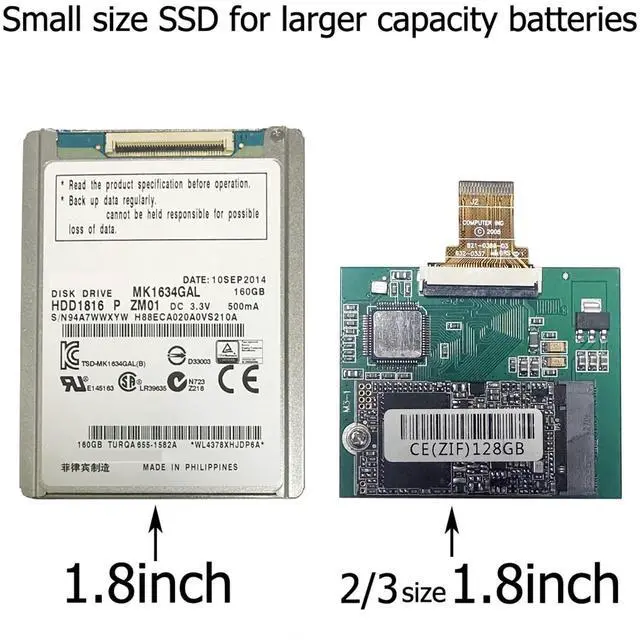
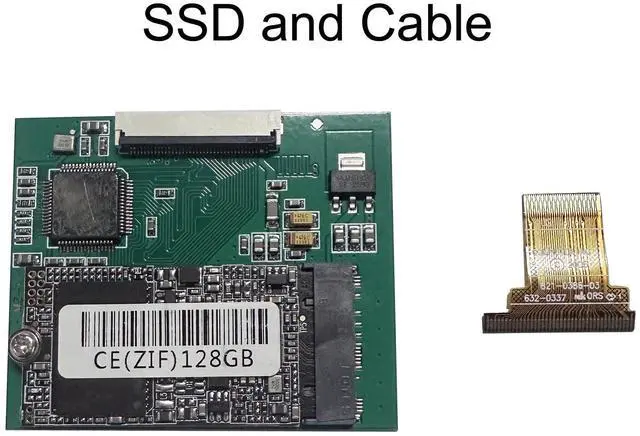


SELLTOONE 128GB SSD for iPod Classic 6th 7th iPod Video 5Gen 5.5th Replace HS081HA MK8010GAH MK8022GAA MK1634GAL MK1231GAL ZIF CE Solid State Drive (128GB)
- [Important note] This SSD can only be compatible with iPod Video or Classic. It cannot be suitable for any computer
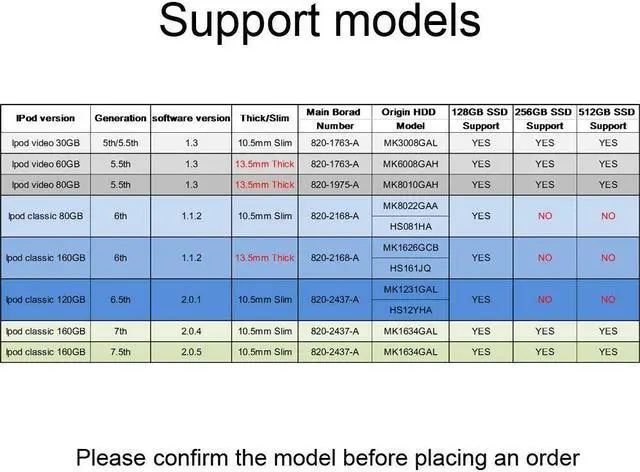
- [Compatible with] The 256GB and 512GB SSD can only fit in iPod Video (30GB,60GB,80GB) and 7th Generation iPod Classic(160GB). Because 80GB iPod Classic and 120GB iPod Classic the mainboard doesn't support to recognize more than 130GB hard drive.So they can only compatible with 128GB SSD. Please confirm according to the model support form in the pictures.
- [Don't forget] After installing the new SSD, the iPod must be restored through iTunes, otherwise it will not work.
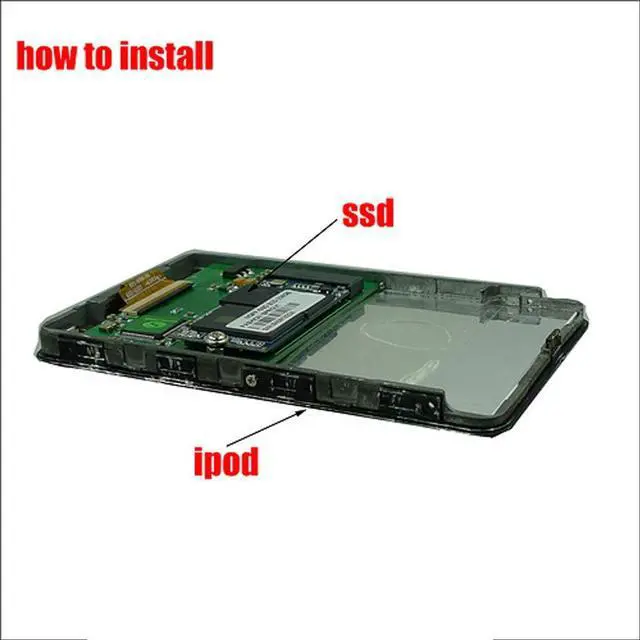
- If your iPod doesn't work properly after installing the SSD, try solving the problem by following these methods. 1. Replace the SSD cable with the one from your original hard drive. 2. Check if the SSD is installed correctly. Some customers may install it backwards. The correct installation method is shown in the pictures we provide, please refer to them. 3. Try changing the USB port and up
+
+
Overview
Specs
Reviews

Any questions? Our AI mode will help you find out quickly.
Try me now
[Important note] This SSD can only be compatible with iPod Video or Classic. It cannot be suitable for any computer
[Compatible with] The 256GB and 512GB SSD can only fit in iPod Video (30GB, 60GB, 80GB) and 7th Generation iPod Classic (160GB). Because 80GB iPod Classic and 120GB iPod Classic the mainboard doesn't support to recognize more than 130GB hard drive. So they can only compatible with 128GB SSD. Please confirm according to the model support form in the pictures.
[Don't forget] After installing the new SSD, the iPod must be restored through iTunes, otherwise it will not work.
[Solve some problems] If your iPod doesn't work properly after installing the SSD, try solving the problem by following these methods. 1. Replace the SSD cable with the one from your original hard drive. 2. Check if the SSD is installed correctly. Some customers may install it backwards. The correct installation method is shown in the pictures we provide, please refer to them. 3. Try changing the USB port and updating iTunes to the latest version.
[Compatible with] The 256GB and 512GB SSD can only fit in iPod Video (30GB, 60GB, 80GB) and 7th Generation iPod Classic (160GB). Because 80GB iPod Classic and 120GB iPod Classic the mainboard doesn't support to recognize more than 130GB hard drive. So they can only compatible with 128GB SSD. Please confirm according to the model support form in the pictures.
[Don't forget] After installing the new SSD, the iPod must be restored through iTunes, otherwise it will not work.
[Solve some problems] If your iPod doesn't work properly after installing the SSD, try solving the problem by following these methods. 1. Replace the SSD cable with the one from your original hard drive. 2. Check if the SSD is installed correctly. Some customers may install it backwards. The correct installation method is shown in the pictures we provide, please refer to them. 3. Try changing the USB port and updating iTunes to the latest version.
Warranty & Returns
Warranty, Returns, And Additional Information
Warranty
- Please contact the Seller directly for warranty information. Warranty information may also be found on the Manufacturer's website.
- CONTACT
Return Policies
- Return for refund within: 30 days
- Return for replacement within: 30 days
- This item is covered by Luhang Return Policy
Manufacturer Contact Info
- For a directory of all our manufacturers, please click below.
- Manufacturers Directory
LOADING...