• New
Department
Show More
Brands
Show More
Price
Show More
All Top Brands
Condition
Current Promotion
Useful Links
Customer Ratings
avatar

Any questions? Our AI beta will help you find out quickly.

Sort By:
View:
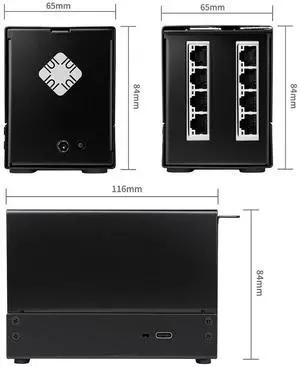
Quantum 8 Port Gigabit Ethernet Hub Via USB4 for Mac Mini M1 M2 M3 MacBook Pro Thunderbolt 3/4/5
Quick View
  •  
  • $598.99 
  • Free Shipping
Power Adapter for iMac 24-inch M1 M3 M4, 143W with Ethernet Cable (Blue)
Quick View
  •  
  • $163.99 
  • Free Shipping
Power Adapter for iMac 24-inch M1 M3 M4, 143W with Ethernet Cable, Blue
Quick View
  •  
  • $206.99 
  • Free Shipping
Mac Book Pro Charger - 120W USB C Fast Charger Power Adapter Compatible with MacBook Pro/Air 13 14 15 16 inch M1 M2 M3 M4 ipad Pro Galaxy and All Type C Device Include 6.6ft Charge Cable
Quick View
  •  
  • $56.78 
  • Free Shipping
  • $55.38 - $56.78
10ft Charger for MacBook Pro/Air 16 15 14 13 inch 2025 2024 2023 2022 2021 2020 M1 M2 M3 M4 96W USB C Power Adapter LED 100W USB-C Cable Charging as Fast as Original Quality
Quick View
  •  
  • $71.48 
  • Free Shipping
  • $70.08 - $71.48
100W Charger for MacBook Pro&MacBook Air(After 2017) Compatible with MacBook pro/Air16 15 14 13 inch(M1-M5) C-Type Interface
Quick View
  •  
  • $51.88 
  • Free Shipping
  • $50.48 - $51.88
Mac Book Pro Charger 118W USB C Charger Fast Charger with USB C to Type C Cables Compatible with MacBook Pro/Air M1 M2 M3 M4 M5 iPad Galax and More
Quick View
  •  
  • $54.33 
  • Free Shipping
  • $52.93 - $54.33
Dust Mesh Filter for Mac mini M4 / M4 Pro 2024, PVC Dustproof Net Stickers Anti Dust Proof Adhesive Cover for Mac mini 2024 only
Quick View
  •  
  • $15.87 
  • Free Shipping
M.2 NVMe SSD Convert Adapter Card for MacBook Air Pro Retina (Year 2013-2017), NVME/AHCI SSD Upgraded Kit for A1465 A1466 A1398 A1502
Quick View
M.2 NVMe SSD Convert Adapter Card for MacBook Air Pro Retina (Year 2013-2017), NVME/AHCI SSD Upgraded Kit for A1465 A1466 A1398 A1502

Limited time offer, ends 06/08

  • Color: Black
  • Specifications: Applications: 1. Make sure to move to High Sierra while still on your old drive, so that a newer firmware is installed that can handle NVMe. 2. Do a full backup to your TimeMachine. 3. Create a High Sierra Installer on a bootable USB stick. 4. Open the macbook and disconnect the battery while wsitching out the drive and make sure both adapter and new SSD sit snug. Finally reconnect the battery before closing the shell. 5. Insert the installer USB stick from step2, and press the option key while the machine starts. Once its up you can now go to the disk utils to format.
  • Package Contents: 1x M.2 NVMe SSD Adapter Card for Upgrade of Macbook 2013-2017.
  • Model #: NVMETMAC
  •  
  • $11.95 
  • Free Shipping
  • $9.50 - $11.95