




 here!
I’m your shopping assistant for PC builds, upgrades, and everything tech.
Got questions? Ask away!
Start a conversation
here!
I’m your shopping assistant for PC builds, upgrades, and everything tech.
Got questions? Ask away!
Start a conversation



Any questions? Ask CelesteSM will help you find out quickly.

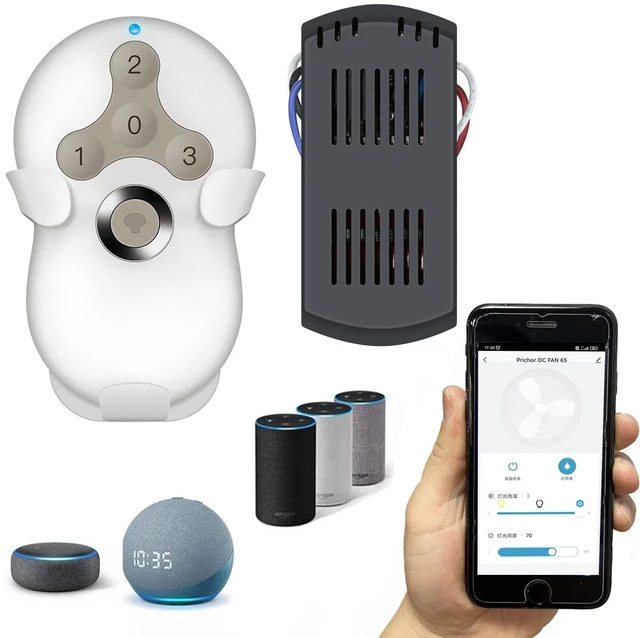
Say goodbye to single control to your ceiling fan light via pull chain or wall switch! Our smart ceiling fan remote control kit enables you to control your ceiling fan and light via RF remote control, smartphone app, and even voice control with Alexa or Google Assistant. It’s time to enjoy smart life with home automation.
Prichor Wi-Fi fan controller is suitable for most three speed ceiling fan light, like Hunter, Harbor Breeze, Westinghouse, Honeywell and Others well-known brands. Upgrade your pull chain ceiling fan or wall switch ceiling fan light with this smart controller in few steps.
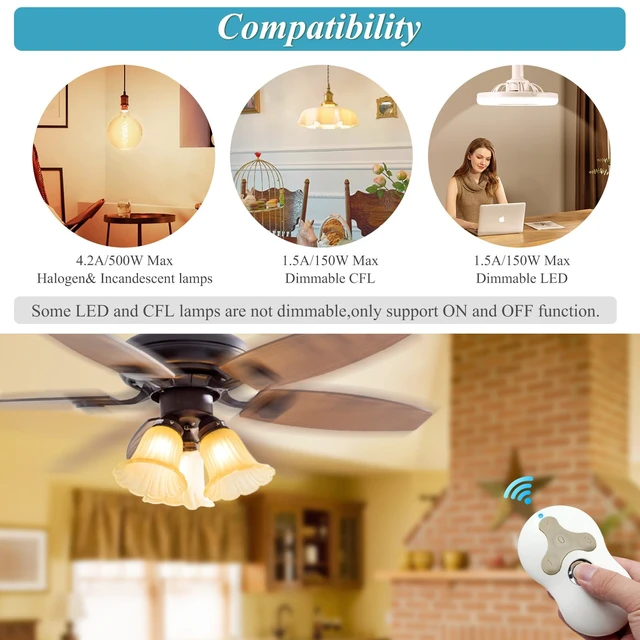
This ceiling fan & light remote control kit has the function of dimming.
The light dimmer compatible with incandescent light bulbs and some dimmable LED lamps.
Most LED lights and all CFL lights are non-dimmable, light dimmer only supports the ON/OFF function in that case, and it may cause to flicker when using the dimming function.
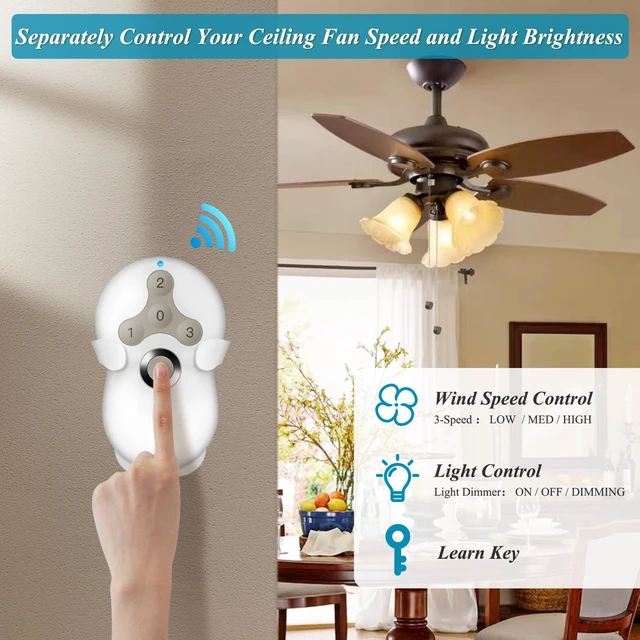
The smart ceiling fan control enables you to adjust the fan 3 speed, turn on/off light, light dimmer. Make your life easier and more convenient.

Auto Bluetooth Wifi Set Up
Turn on the smart phone or device’s Bluetooth function is ON. Ensure the smart phone or device’s network is fine.
Before connecting,please make sure your smart phone or device is connecting with your home WI-FI 2.4GHz successfully.It don't support 5GHz and 5.8GHz.
Open the application,click “+” to select “Auto Scan Mode”, and then start to automatically scan product that can be connected.
Once connected ,the App will prompt the connection,then click “Done”.

RF Remote Control & Phone APP Control
Simply adds this smart fan controller to your ceiling fan to have it wifi enabled and remote controllable. Change your fan speed or turn on/off light from anywhere with your smartphone or included RF remote.
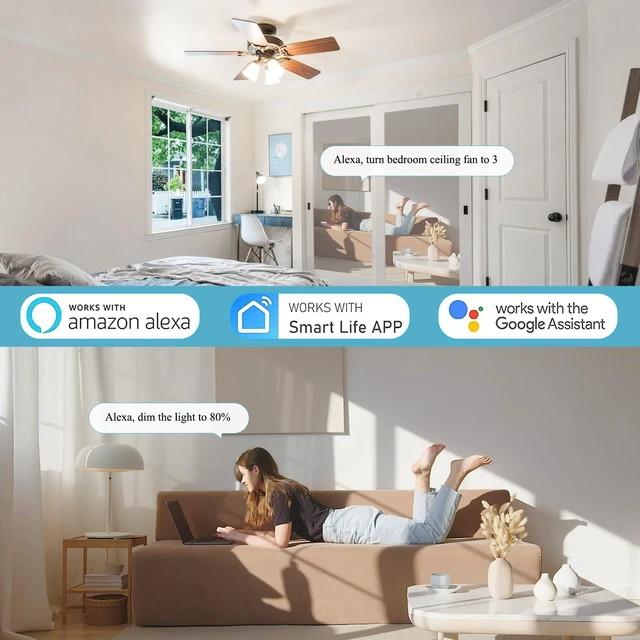
Compatible with Alexa/ Google Assistant
With Smart Life app, the wifi fan controller is easy to pair with the Alexa or Google Assistant. Just give voice command and enjoy hands-free control over your home.
Note:
If you can't use the voice control correctly, try to remove the device from Smart Life then reconfigure it again.
If it still doesn't work, confirm the individual device name for the fan and light in Smart Life is the same as the Alexa/Google Home APP.

The smart fan control offers 3 different fan speeds, each designed to provide optimal comfort without any distracting noise. Choose from low, medium, or high speeds to create the perfect atmosphere in any room.

With the Smart Life App, you can easily adjust the brightness of your lights to meet your daily needs. The dimming range of 1%-100% ensures that you have full control over the light intensity.

When you choose to connect to the router on the mobile App, please choose 2.4G network; do not choose 5G or 5.8G network. Otherwise the device may not be able to connect to the App.

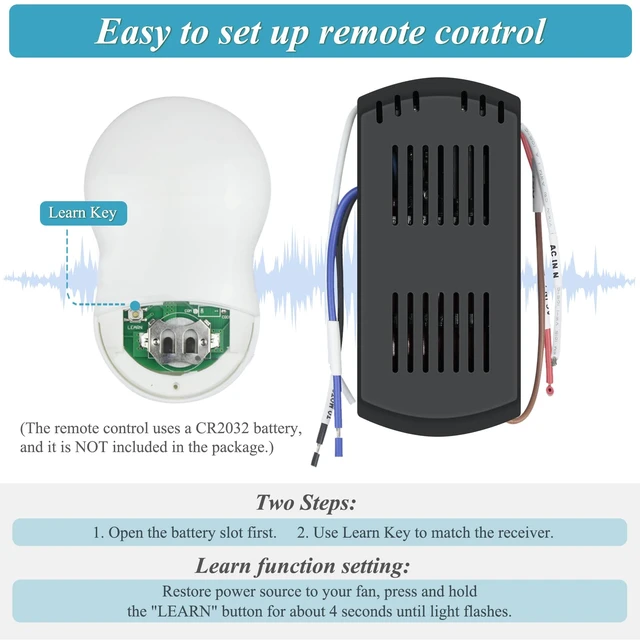
The production settings of this smart ceiling fan remote control kit have been configured and can be used directly. If it fails to work, please use the learn button to re-match.
How to set the function of learning button:
1. Disconnect the receiver's power cord and connect it again to restart the receiver.
2. Please press the "Study Button" (it is a small hole in the battery case, you need to use the needle to press it) of the remote control within 30 seconds and keep this action for 3-5 seconds.
3. If you hear your receiver making a beeping sound or the indicator light flashes a few times, the match is successful.

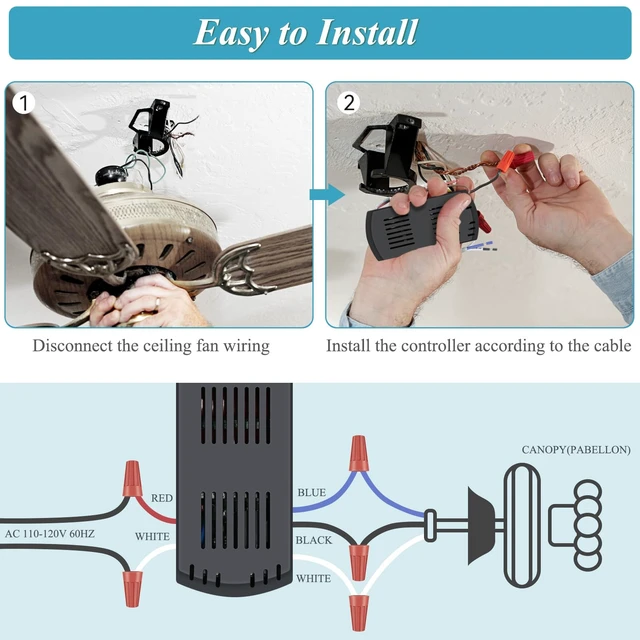
1. Remove ceiling fan canopy from the mounting bracket
NOTE: Remove power from the circuit.Otherwise power can cause serious injury or death.
2. Installing receiver in ceiling fan
The receiver wires are labelled, and the wires all have the correct color codes. Same color wire connects together Blue to Blue, Black to Black, White to White.
ATTENTION: Wire color maybe different in very old fans
3. LEARN KEY
Use the LEARN key to match the receivers.
4. Install a CR2032 battery
Install a CR2032 battery in the remote, and you can control your fan now.
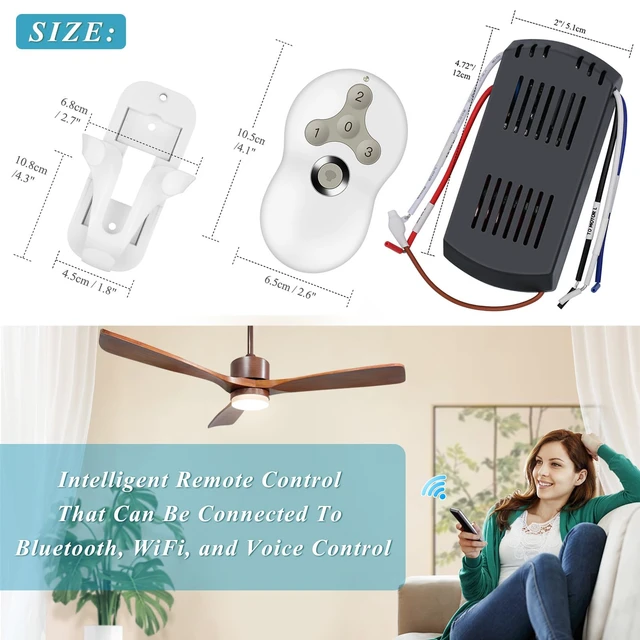
Please Note the Receiver Size Information
Please double check the size of receiver carefully before order to make sure there is enough space in the canopy of your fan.

1 x Remote Control
1 x Receiver
1 x Wall Mount
6 x Wiring Cap
2 x Screw
1 x User Manual

We supply high quality ceiling fan and ceiling fan remote control kit replacement and accessories.


Say goodbye to single control to your ceiling fan light via pull chain or wall switch! Our smart ceiling fan remote control kit enables you to control your ceiling fan and light via RF remote control, smartphone app, and even voice control with Alexa or Google Assistant. It’s time to enjoy smart life with home automation.
Prichor Wi-Fi fan controller is suitable for most three speed ceiling fan light, like Hunter, Harbor Breeze, Westinghouse, Honeywell and Others well-known brands. Upgrade your pull chain ceiling fan or wall switch ceiling fan light with this smart controller in few steps.
This ceiling fan & light remote control kit has the function of dimming.
The light dimmer compatible with incandescent light bulbs and some dimmable LED lamps.
Most LED lights and all CFL lights are non-dimmable, light dimmer only supports the ON/OFF function in that case, and it may cause to flicker when using the dimming function.
The smart ceiling fan control enables you to adjust the fan 3 speed, turn on/off light, light dimmer. Make your life easier and more convenient.
Auto Bluetooth Wifi Set Up
Turn on the smart phone or device’s Bluetooth function is ON. Ensure the smart phone or device’s network is fine.
Before connecting,please make sure your smart phone or device is connecting with your home WI-FI 2.4GHz successfully.It don't support 5GHz and 5.8GHz.
Open the application,click “+” to select “Auto Scan Mode”, and then start to automatically scan product that can be connected.
Once connected ,the App will prompt the connection,then click “Done”.
RF Remote Control & Phone APP Control
Simply adds this smart fan controller to your ceiling fan to have it wifi enabled and remote controllable. Change your fan speed or turn on/off light from anywhere with your smartphone or included RF remote.
Compatible with Alexa/ Google Assistant
With Smart Life app, the wifi fan controller is easy to pair with the Alexa or Google Assistant. Just give voice command and enjoy hands-free control over your home.
Note:
If you can't use the voice control correctly, try to remove the device from Smart Life then reconfigure it again.
If it still doesn't work, confirm the individual device name for the fan and light in Smart Life is the same as the Alexa/Google Home APP.
The smart fan control offers 3 different fan speeds, each designed to provide optimal comfort without any distracting noise. Choose from low, medium, or high speeds to create the perfect atmosphere in any room.
With the Smart Life App, you can easily adjust the brightness of your lights to meet your daily needs. The dimming range of 1%-100% ensures that you have full control over the light intensity.
When you choose to connect to the router on the mobile App, please choose 2.4G network; do not choose 5G or 5.8G network. Otherwise the device may not be able to connect to the App.
The production settings of this smart ceiling fan remote control kit have been configured and can be used directly. If it fails to work, please use the learn button to re-match.
How to set the function of learning button:
1. Disconnect the receiver's power cord and connect it again to restart the receiver.
2. Please press the "Study Button" (it is a small hole in the battery case, you need to use the needle to press it) of the remote control within 30 seconds and keep this action for 3-5 seconds.
3. If you hear your receiver making a beeping sound or the indicator light flashes a few times, the match is successful.
1. Remove ceiling fan canopy from the mounting bracket
NOTE: Remove power from the circuit.Otherwise power can cause serious injury or death.
2. Installing receiver in ceiling fan
The receiver wires are labelled, and the wires all have the correct color codes. Same color wire connects together Blue to Blue, Black to Black, White to White.
ATTENTION: Wire color maybe different in very old fans
3. LEARN KEY
Use the LEARN key to match the receivers.
4. Install a CR2032 battery
Install a CR2032 battery in the remote, and you can control your fan now.
Please Note the Receiver Size Information
Please double check the size of receiver carefully before order to make sure there is enough space in the canopy of your fan.
1 x Remote Control
1 x Receiver
1 x Wall Mount
6 x Wiring Cap
2 x Screw
1 x User Manual
We supply high quality ceiling fan and ceiling fan remote control kit replacement and accessories.


