
Your Browsing History


William T.
Joined on 06/14/11
0
0
product reviews
- 13
A mouse pad. The mouse moves on the pad.
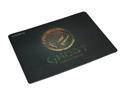
GIGABYTE GP-MP8000 Extreme Accuracy Gaming Mouse Pad
Pros: First, to all those that are complaining about it coming "faded" you need to look at the pictures more closely or get a better monitor. That's what it looks like. It appears they have color enhanced the photos a bit. Large but not too large. It comes in at 400 x 300 x 5mm / (15.75" x 11.81" x 0.2") which is about 2 to 2.5 times more surface area compared to a "standard" pad from businesses and computer companies. It is wooven fabric and the weave is tight. I've had it since October 2013 and it is showing a bit of fraying on the edges but is not coming apart. Definitely 1 egg off for that. The surface is smooth and accurate but given that I upgraded from one of those "business" mouse pads anything better would be better. I love the large size for gaming. The better surface when coupled to my MX 518 Logitech gaming mouse has improved precision and speed. I had to make adjustments to my mouse sensitivities after adopting this pad. The price was good as well and although Gigabyte waited the maximum amount of time I did finally get the rebate back. Total cost to me was $10.98 after rebate and shipping. For me it was worth it. I expect to get 2-3 years out of it and perhaps longer.
Cons: Two cons so far. 1) The fabric quality is a bit lower than I would like but for the price I paid I knew it was going to be not as good as others. However, at this point, I've owned it for 3 months and some of the edges were the mouse wire rubs and my arm makes regular contact are showing some signs of fraying. However, the fabric is not separating from the back. This appears to be an edge effect only. 2) The surface isn't as smooth as I had hoped for but for $15 I'm not going to take off a 2nd egg.
Overall Review: If you get it on sale and want a medium to large mouse pad this is a good choice.
1/18/2014See more detail
A hunk of Al and Cu with a fan
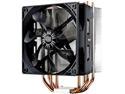
Cooler Master Hyper 212 Evo CPU Cooler, 4 CDC Heatpipes, 120mm PWM Fan, Aluminum Fins for AMD Ryzen/Intel LGA1200/1151
Pros: The Hyper 212 EVO improves on the 212+ in a slight but important way. See newegg video for explanation. The cooler goes on easy enough and performs well for under $40. I got it for $35 but it often can be found for less than that. I have an i5-2500k overclocked to 4.4 GHz at 1.36V. Temps stay below 70C when at full load and the GPU is maxed out and room temp is around 20C. Installation is relatively easy and will fit most cases. Just check your dimensions and RAM clearance. It's a good price to performance ratio.
Cons: The fan is a bit louder than I expected (louder than the stock Intel fan at maximum speed) but that can be fixed with an upgraded fan. However, the fan that is included is good and has good air flow.
Overall Review: Doesn't improve my game performance.
9/21/2013See more detail
Works well, overclocks well
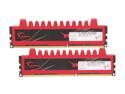
G.SKILL Ripjaws Series 8GB (2 x 4GB) 240-Pin PC RAM DDR3 1600 (PC3 12800) Desktop Memory Model F3-12800CL9D-8GBRL
Pros: The RAM is relatively inexpensive and runs well. The bright red color is good for those that are interested in that sort of thing. The RAM overclocks easily on my Gigabyte Z78UP-UD3 motherboard with an i5-2500k processor. No problems.
Cons: The heat spreaders are rather tall and they do pull heat away from the modules but exactly how much, well that test isn't available to be run except by the tech-perts. If I understand correctly, the technology in the modules themselves may be becoming a bit dated so those looking for RAM and want the best tech/$$ ratio might want to look deeper into the technology that is employed by their short list of possible RAM purchases
Overall Review: I have measured it and on my Gigabyte Main board a hyper 212 EVO will clear the RAM but I won't be able to add a second CPU fan on it. At the present time I'm on stock cooling so this isn't a problem.
3/6/2013See more detail
Made of rubber, easy to install, reduce sound, nuff said
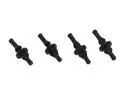
LOGISYS Computer BFB1 Buffer B1 Rubberized Fan Buffer - Fan Screw Replacement
Pros: They reduced the sound on my nosiest fan (120 mm 2000RPM) which is mounted on the door of my computer case. It still isn't silent but those fans are low pressure fans which means torque and torque will yield more noise at high speeds. They work but don't expect miracles.
Cons: They are not flat to the surface so when using on a surface that is on the outside of the case (like all fan mounts?) then part of the black rubber will stick through. You can trim with a knife a bit but don't cut too much or you will ruin it. Price is a bit high for 4 screw replacements. It is just molded rubber for crying out loud. I might try a home brew next time. They don't reduce sound to zero ;) The reality is that they are anti-vibration mounts.
12/18/2012See more detail
WD Black rocks
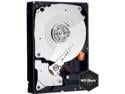
WD Caviar Black WD1002FAEX 1TB 7200 RPM 64MB Cache SATA 6.0Gb/s 3.5" Internal Hard Drive Bare Drive
Pros: Fast, fast and faster for a mechanical drive. Good score for a mechanical that isn't 10,000 RPM. So far hasn't given me one problem.
Cons: Bit noisier than the seagate barracuda it replaced (read head failed) but given how much I use it I wanted the good life expectancy. Some would call it too loud. It tells me it is working ;)
Overall Review: Still won't create and grade exams for my classes.
12/7/2012See more detail
Slim, nice fan
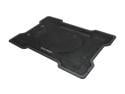
Cooler Master NotePal X-Slim - Ultra Slim Laptop Cooling Pad with 160 mm Fan
Pros: Works. 160 mm fan is silent. It moves air well. Now, if only notebook manufactures would build their laptops with more air inlets. It helps some but I didn't see large drops in the CPU/GPU temps. About 2-3 Celsius and that was after some mods (see below). The price was good at 17.99 when I bought it.
Cons: Doesn't help as much with cooling as I would like. That is probably more of a laptop design issue than this device. Watch the USB pass through plug. Mine had a sharp edge
Overall Review: Someone else on here suggested using some window/door sealing strips to create a partial seal between the cooler and the laptop. I do this and it help a bit but with our 17" HP laptop I had to be careful not to cover any of the intakes for the CPU/GPU fan which limited the total area I could "seal". It's not really a complete seal. I was hoping for more cooling at high loads on the CPU but no such luck. Then again it is a HP laptop. Their air intake design needs some real work. Take a look at the video youtube called "Clean the Fan". Warning: Be ready to fall out of your chair laughing.
12/7/2012See more detail