here!
here!
I’m your shopping assistant for PC builds, upgrades, and everything tech.
Got questions? Ask away!
Start a conversation
here!
I’m your shopping assistant for PC builds, upgrades, and everything tech.
Got questions? Ask away!
Start a conversationShipped by Newegg
 Top Rated






Any questions? Ask CelesteSM will help you find out quickly.
Overview
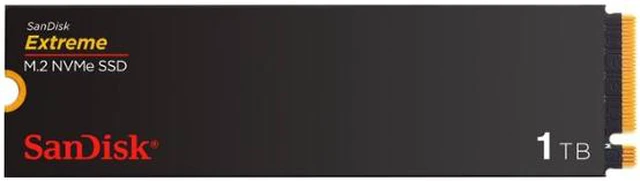
The SanDisk Extreme M.2 NVMe SSD is a 1TB internal solid state drive for consumer desktops and laptops. Its PCIe 4.0 interface and NVMe protocol support demanding work, editing, and play.
Key Features
Performance
The drive delivers maximum sequential read speeds of up to 5150 MBps and maximum sequential write speeds of up to 4900 MBps. PCIe Gen 4.0 performance helps minimize lag during data-intensive tasks.
Design
The M.2 2280 form factor measures 80mm in width, 22mm in depth, and 2.38mm in height. Product weight is 5.5g.
Connectivity & Compatibility
The drive uses a PCIe 4.0 x4 interface and NVMe protocol. PCIe Gen 4.0 storage technology requires a compatible motherboard and is backwards-compatible with PCIe Gen 3.0. It is compatible with Windows 10+ and fits many desktops and laptops with a PCIe Gen M.2 2280 slot.
Reliability & Durability
The drive has a rated endurance of 600TB terabytes written. Security is listed as Non-SED.
Software & Tools
The Western Digital Dashboard helps you stay updated on your drive's health.
Specifications
What's in the Box
The SanDisk Extreme SDSSDX3N-1T00-G26 is a 1TB M.2 2280 NVMe PCIe 4.0 internal SSD for desktop and laptop users with a compatible M.2 slot who want fast storage for demanding work, with sequential read speeds up to 5,150MB/s and write speeds up to 4,900MB/s.
| Attribute | Value |
|---|---|
| Best For | Consumer desktop and laptop users seeking internal storage for personal, multimedia, or business files in a compatible M.2 2280 system |
| Capacity | 1TB of solid-state storage |
| Interface And Form Factor | M.2 2280 internal SSD with a PCIe 4.0 interface and NVMe protocol |
| Read Write Performance | Sequential speeds up to 5,150 MB/s read and 4,900 MB/s write |
| Endurance | Rated for up to 600TB written |
| Physical Specifications | 80 × 22 × 2.38 mm; weighs 5.5 g |
| Model Identifiers | SanDisk Extreme, model SDSSDX3N-1T00-G26 |
Q: SanDisk Extreme M.2 vs WD_BLACK SN850X: which should I choose?
A: Choose the WD_BLACK SN850X if your work benefits from higher sequential speeds: its 1TB model is rated for up to 7,300 MB/s read, compared with 5,150 MB/s for the SanDisk Extreme. The SanDisk is a fit for a PCIe 4.0 upgrade when its lower peak rating meets your needs; compare current prices before deciding.
Q: Should I get the SanDisk Extreme M.2 or the WD Blue SN580?
A: The SanDisk Extreme has higher rated sequential speeds: up to 5,150/4,900 MB/s read/write, versus 4,150/4,150 MB/s for the 1TB WD Blue SN580. Choose the Extreme if you want its higher rated transfer speeds; consider the SN580 if it costs less and its performance suits your workload. Actual results depend on the system and task.
Q: SanDisk Extreme M.2 vs WD_BLACK SN770: is one faster?
A: Their published 1TB sequential-speed ratings match: up to 5,150 MB/s read and 4,900 MB/s write. Those figures alone do not establish that the drives perform identically in every workload. Compare price, availability, warranty, and independent testing of the specific models; choose the SanDisk when its offer is more attractive and those published specifications meet your needs.
Q: Is the SanDisk Extreme M.2 worth upgrading to from a WD Blue SN570?
A: The SanDisk Extreme has higher rated sequential speeds and uses a PCIe 4.0 interface; the 1TB WD Blue SN570 is a PCIe 3.0 drive rated for up to 3,500 MB/s read and 3,000 MB/s write. An upgrade is more relevant for large file transfers or a system that can use PCIe 4.0 speeds. For everyday use, consider the upgrade only if the extra performance or capacity is useful to you.
Q: Will this SSD work in my laptop or desktop?
A: It is a 1TB M.2 2280 NVMe PCIe 4.0 drive. It is suitable for a laptop or desktop only if the system supports an M.2 2280 PCIe NVMe SSD and has enough physical clearance. Check the device’s specifications before buying; an M.2 slot that supports only SATA may not be compatible.
Q: Will it run at full speed in a PCIe Gen 3 system?
A: The drive is designed for PCIe 4.0 and is rated for sequential reads up to 5,150 MB/s and writes up to 4,900 MB/s. In a compatible system with a slower PCIe generation, it may work but will not reach those rated maximum speeds; actual performance depends on the system.
Q: Does it need a heatsink?
A: The supplied product information does not specify whether a heatsink is included. Check the drive’s packaging details and your computer’s M.2 cooling setup before buying; laptop clearance and available motherboard cooling can affect what fits.
Q: Is it suitable as a boot drive and for demanding work?
A: It can suit a compatible PC used for an operating-system drive, applications, games, and file-heavy creative work. Its 1TB capacity and listed sequential speeds of up to 5,150 MB/s read and 4,900 MB/s write are relevant for those uses, but boot-drive support also depends on the computer’s motherboard and firmware.
Q: Is this SanDisk Extreme a reasonable 1TB choice for gaming?
A: It is a 1TB PCIe 4.0 NVMe drive rated for up to 5,150 MB/s reads and 4,900 MB/s writes. The Reddit discussion considers it among budget gaming-drive options, but does not provide a direct performance test; compare its price and warranty with other compatible drives before choosing.
Q: Does DRAM matter if I use this SSD mainly for games?
A: The Reddit discussion raises DRAM as a buying concern but does not confirm this model’s DRAM configuration or measure its gaming performance. The supplied specifications list sequential speeds and endurance, but not DRAM; verify that detail if it is important to your choice.
Q: Which M.2 slot should I use?
A: Install it in a motherboard slot that supports M.2 2280 NVMe. Slot bandwidth can differ, so check the motherboard manual; the drive’s PCIe 4.0 speed depends on the slot and system supporting that generation.
Q: Does it need a special driver or software to work?
A: The Reddit discussion describes this type of M.2 SSD as usable without a special driver, though a new drive may need to be initialized or formatted in the operating system. The supplied product information identifies Western Digital Dashboard as an optional tool for checking drive health.