




 here!
here!
I’m your shopping assistant for PC builds, upgrades, and everything tech.
Got questions? Ask away!
Start a conversation
here!
I’m your shopping assistant for PC builds, upgrades, and everything tech.
Got questions? Ask away!
Start a conversationShipped by Newegg








Any questions? Ask CelesteSM will help you find out quickly.


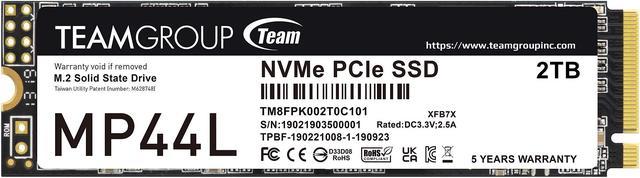
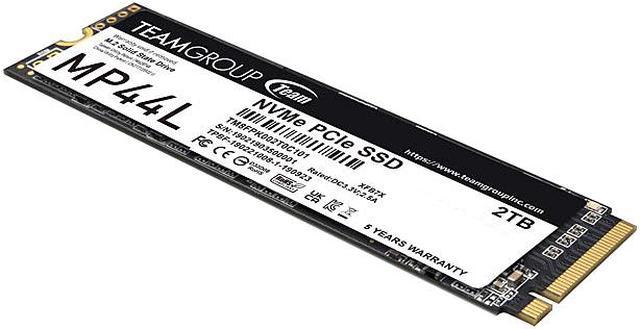
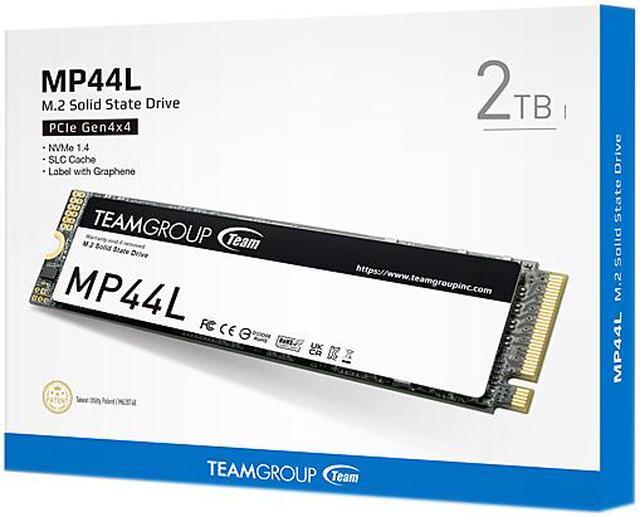
MP44L M.2 PCIe SSD is the first product to introduce conductive graphene coating on aluminum foil to the SSD label. Less than 1mm thick, the new label design eradicates mechanical interference when assembling. Moreover, together with the onboard M.2 heat sink, the heat dissipating performance is doubled!

MP44L M.2 PCIe SSD adopts the PCIe Gen4x4 interface and supports SLC Cache. It delivers read/write speeds of up to 5,000/4,500MB/s. Compared with the PCIe Gen3 interface, the performance is more than doubled, and drastically enhances work efficiency.

It supports Windows TRIM optimization option and Low Density Parity Check Code (LDPC), reducing wearing on SSD during high-speed read/write duties. It also features precise error correction capability, enabling MP44L M.2 PCIe SSD to operate at high speed with stability, durability, and reliability.

MP44L M.2 PCIe SSD supports the latest NVMe standards. Through NVM Sets, predictable latency mode (PLM), and the latest read recovery level (RRL) technology, wearing and latency on SSDs is reduced, expanding lifespan effectively.

The S.M.A.R.T. monitoring software exclusively developed by TEAMGROUP monitors product status at all times. Through fast and easy setting and inspection, it monitors product quality and performance.

MP44L M.2 PCIe SSD has been through rigorous testing and quality control procedures. It comes with a five-year warranty to ensure users of product quality.


The TEAMGROUP MP44L is a 2TB M.2 2280 PCIe 4.0 x4 NVMe SSD with sequential speeds up to 4,800 MB/s read and 4,400 MB/s write, suited to desktop or laptop users upgrading storage for everyday computing, games, and large files.
| Attribute | Value |
|---|---|
| Best For | Consumer internal storage for laptops and desktops, with Sony PlayStation 5 listed as a compatible console |
| Capacity | 2TB of solid-state storage |
| Interface And Form Factor | M.2 2280 drive using PCIe 4.0 x4 and NVMe 1.4 |
| Read And Write Performance | Sequential speeds up to 4,800 MB/s read and 4,400 MB/s write; 4KB random performance up to 525,000 IOPS read and 550,000 IOPS write |
| Cache And Drive Management | DRAM-less design with HMB; graphene-coated heat-dissipating label, S.M.A.R.T. monitoring, Windows TRIM support, and LDPC technology |
| Endurance And Reliability | Rated for 640TB written and 1,500,000 hours MTBF; maximum shock resistance of 1,500G/0.5ms and vibration resistance of 80Hz–2,000Hz/20G |
| Operating Environment | Operating temperature 0°C to +70°C and humidity up to 90% RH under 40°C; storage temperature −40°C to +85°C |
| Dimensions And Weight | 80 × 22 × 2.25 mm; 7 g |
| Model Identifiers | Team Group MP44L, model TM8FPK002T0C101 |
Q: Should I get the TEAMGROUP MP44L 2TB or WD Black SN770?
A: Choose the MP44L when 2TB capacity and a lower price are the priorities; it is a PCIe 4.0, DRAM-less SSD rated up to 4,800/4,400 MB/s for sequential reads and writes. Choose the SN770 if benchmarked transfer performance matters more: Tom’s Hardware found the SN770 among the top drives in its file-copy testing, while the MP44L was above average. Check current prices and compare drives at the same capacity before deciding.
Q: Is the MP44L 2TB faster than the older TEAMGROUP MP34 2TB?
A: The MP44L has higher rated sequential speeds: up to 4,800/4,400 MB/s versus the MP34’s 3,500/2,900 MB/s. Choose the MP44L for the newer PCIe 4.0 interface and higher rated throughput; the MP34 may still suit a system or upgrade where its PCIe 3.0 specification is the relevant match. Actual speed depends on the system and workload.
Q: Should I buy the MP44L 2TB or 1TB?
A: Choose the 2TB model for twice the capacity and a higher rated endurance of 640TBW; its rated sequential speeds are up to 4,800/4,400 MB/s. The 1TB model is rated slightly faster at up to 5,000/4,500 MB/s and 320TBW. For a large game or media library, favor capacity; if 1TB is enough and peak rated sequential speed is the priority, the 1TB version is the closer fit.
Q: Is the MP44L 2TB enough, or should I pay more for a high-end SSD like the WD Black SN850X?
A: For everyday computing and gaming, the MP44L is a reasonable fit if capacity and cost matter more than maximum benchmark performance. Consider a higher-tier drive such as the SN850X if you regularly move very large files or prioritize faster benchmark results and write performance. In PCWorld’s testing, the MP44L handled everyday transfers well, while the tested SN850X showed advantages in synthetic benchmarks and random writes.
Q: Will this SSD work in my desktop or laptop?
A: It can work in a system with an available M.2 2280 slot that supports PCIe NVMe SSDs. Check the computer or motherboard specifications first: an M.2 slot that supports SATA only, or a different drive length, may not be compatible. A PCIe 3.0 system may also limit the drive below its rated PCIe 4.0 speeds.
Q: Is this a good SSD for everyday computing and gaming?
A: It is a suitable capacity and interface for everyday computing, game storage, and general consumer use when the system supports PCIe NVMe. The 2TB capacity and listed speeds of up to 4,800 MB/s read and 4,400 MB/s write are peak specifications; actual performance depends on the system and workload. Its DRAM-less design uses Host Memory Buffer, so buyers prioritizing sustained, intensive workloads should check whether that design suits their needs.
Q: Will it fit in my laptop?
A: The MP44L is an M.2 2280 drive measuring 22 × 80 mm, but size alone does not confirm laptop compatibility. Verify that the laptop has an available M.2 2280 PCIe NVMe slot and enough clearance for the drive and its graphene label. Laptop-specific slot support and internal space vary by model.
Q: Does it need a separate heatsink?
A: The MP44L has a thin graphene heat-dissipating label, not a conventional full-size heatsink. Whether additional cooling is appropriate depends on the computer or device: check its installation and cooling requirements, and confirm that any added heatsink fits the available clearance.
Q: Is the MP44L a good choice for a gaming PC?
A: It is a reasonable budget gaming drive if your system supports M.2 2280 NVMe SSDs. Reddit discussions generally describe the difference in game loading between the MP44L and pricier high-end NVMe drives as small; the MP44L’s trade-off is lower peak performance than higher-tier models.
Q: Is the 2TB MP44L worth considering as a budget SSD?
A: It is worth considering when its price is competitive: Reddit users discuss it as a budget option for general storage and PC builds. This 2TB model uses HMB rather than onboard DRAM, so compare its price and workload needs with alternatives before buying.
Q: Should I choose the MP44L or the faster MP44?
A: Choose the MP44L if it costs less and its performance suits your use; Reddit discussions describe the MP44 as the faster model and caution against paying more for the MP44L when prices are equal. Check the current price and the exact model specifications before deciding.


