here!
here!
I’m your shopping assistant for PC builds, upgrades, and everything tech.
Got questions? Ask away!
Start a conversation
here!
I’m your shopping assistant for PC builds, upgrades, and everything tech.
Got questions? Ask away!
Start a conversationShipped by Newegg
 Hot Seller



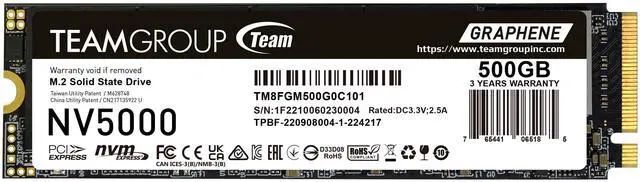
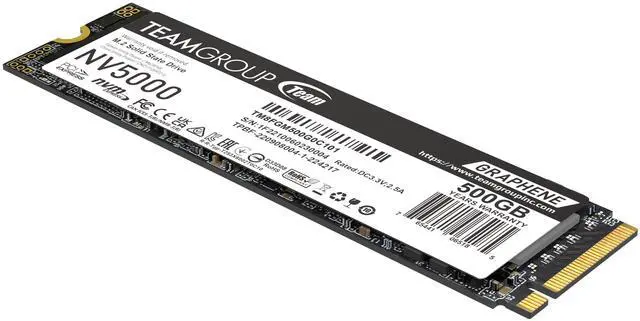
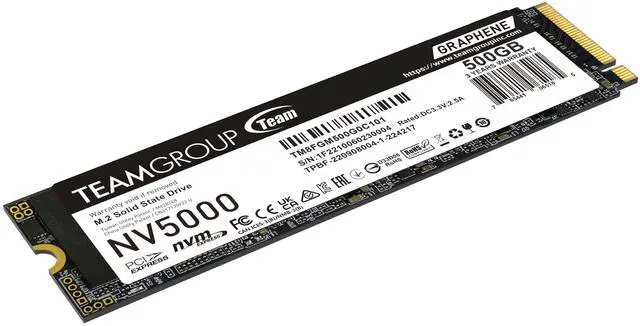


| Brand | Team Group |
|---|---|
| Series | NV5000 |
| Model | TM8FGM500G0C101 |
| Device Type | Internal Solid State Drive (SSD) |
| Used For | Consumer |
| Form Factor | M.2 2280 |
|---|---|
| Capacity | 500GB |
| Interface | PCIe 4.0 x4 with NVMe |
| Protocol | NVMe |
| Cache | No DRAM (HMB) |
| Max Sequential Read | Up to 4500 MBps |
|---|---|
| Max Sequential Write | Up to 1800 MBps |
| Terabytes Written (TBW) | 320TBW |
| MTBF | 2,000,000 hours |
| HeatSink | with HeatSink |
| Operating Temperature | 0°C ~ +70°C |
|---|---|
| Storage Temperature | -40°C ~ +85°C |
| Max Shock Resistance | 1,500G/0.5ms |
| Max Vibration Resistance | 80Hz~2,000Hz/20G |
| Height | 3.70mm |
|---|---|
| Width | 22mm |
| Depth | 80mm |
| Weight | 7g |
| First Listed on Newegg | March 26, 2026 |
|---|
The Team Group NV5000 is a 500GB M.2 2280 PCIe 4.0 x4 NVMe SSD with a heatsink and sequential speeds up to 4,500 MB/s read and 1,800 MB/s write, suited to consumer PC builders upgrading compatible systems for everyday computing and game storage.
| Attribute | Value |
|---|---|
| Best For | Consumer desktop systems needing an internal M.2 NVMe SSD |
| Capacity | 500GB |
| Interface And Form Factor | M.2 2280, PCIe 4.0 x4 with NVMe |
| Read Write Performance | Sequential speeds up to 4500 MB/s read and 1800 MB/s write |
| Drive Configuration | DRAM-less design with HMB and an included heatsink |
| Endurance And Reliability | Rated for 320TBW with a 2,000,000-hour MTBF |
| Operating Conditions And Durability | Operating temperature: 0°C to +70°C; storage temperature: -40°C to +85°C; shock resistance: 1,500G/0.5ms; vibration resistance: 80Hz–2,000Hz/20G |
| Physical Dimensions | 80 × 22 × 3.70mm; weighs 7g |
| Model Identifiers | Team Group NV5000; model TM8FGM500G0C101 |
Q: TeamGroup NV5000 500GB vs MP44L 500GB: which should I buy?
A: At similar prices, the MP44L 500GB has higher rated sequential speeds—up to 5,000/2,500 MB/s read/write versus 4,500/1,800 MB/s for the NV5000—and a longer 5-year limited warranty versus 3 years. Choose the NV5000 if it is meaningfully less expensive; choose the MP44L if its higher rated speeds and longer warranty matter more. TeamGroup lists 160TBW for the NV5000 500GB, although the supplied Newegg data says 320TBW, so confirm the applicable endurance rating before purchase.
Q: Should I get the NV5000 500GB or spend more for the 1TB version?
A: Choose the NV5000 1TB if you need twice the capacity or expect to write more data: TEAMGROUP rates it at 320TBW, compared with 160TBW for the 500GB model. Both are rated for up to 4,500 MB/s reads; the 1TB version is rated for up to 1,900 MB/s writes versus 1,800 MB/s for 500GB. The 500GB model is a fit when it meets your storage needs and costs less. Note: the supplied Newegg data lists 320TBW for the 500GB model, but TEAMGROUP’s specification sheet lists 160TBW.
Q: NV5000 500GB or MP44L 250GB for a budget PC upgrade?
A: Choose the NV5000 if you need 500GB of storage: it provides twice the capacity of the MP44L 250GB. The MP44L 250GB has higher rated sequential speeds—up to 4,650/1,900 MB/s read/write versus 4,500/1,800 MB/s for the NV5000 500GB. Choose the MP44L if 250GB is sufficient and its price or 5-year limited warranty is preferable; choose the NV5000 if the extra capacity better fits your storage needs.
Q: Will this SSD work in my laptop or desktop?
A: It requires an available M.2 2280 slot that supports PCIe NVMe. Check your computer or motherboard specifications for that exact support, and make sure the slot has clearance for the drive’s attached heatsink.
Q: Will I get the advertised read speed in my computer?
A: The drive is rated for sequential reads up to 4,500 MB/s. That is a maximum, not a guaranteed everyday speed; the host system, slot configuration, and workload can affect actual performance.
Q: Does this SSD include a heatsink, and will it fit my system?
A: Yes. The product specifications list an included heatsink and a height of 3.70 mm. Before buying, check whether your system has enough clearance and whether its M.2 slot uses a cover or heatsink that could interfere.
Q: Is 500GB enough for games, apps, and files?
A: 500GB can suit an operating system, everyday apps, and a modest collection of files or games. If you keep many large games or media files installed, you may need additional storage.
Q: Is the NV5000 worth choosing over another SSD?
A: It depends on the price of the same-capacity alternatives. This 500GB model is rated for up to 4,500 MB/s read and 1,800 MB/s write, but the supplied specifications do not identify its NAND type. Compare price, capacity, and NAND details before deciding.
Q: Is the 500GB NV5000 suitable for a gaming PC?
A: Its PCIe 4.0 x4 NVMe interface and stated speeds make it a candidate for game storage in a compatible PC. Whether 500GB is enough depends on how many games and other files you plan to keep installed; the supplied information does not include gaming benchmark results.
Q: Does the NV5000 have onboard DRAM?
A: No. The supplied specifications say this model has no DRAM and uses HMB. A Reddit comment describes the NV5000 as having DRAM, but that conflicts with the product information provided here.
Q: Can I use the PCIe 4.0 NV5000 on a PCIe 3.0 motherboard?
A: The supplied specifications list PCIe 4.0 x4, but do not state this model’s PCIe 3.0 compatibility or resulting speed. Check your motherboard’s manual for M.2 NVMe support and expected link speed; do not assume it will reach the listed 4,500 MB/s read speed on a PCIe 3.0 connection.