Auusda 16" Business Laptop, AMD Ryzen 5 3500U, 32GB RAM 1TB SSD, Backlit Keyboard, Fingerprint Unlock, Windows 11 Pro Computer, Black
  •  
  • $519.99 –
  • Save: 35%
  • $74.99
  • Free 30-day Returns
  • Price alert
    Shop it at NeweggBusiness.
    Get Educated

    Make informed decisions with expert advice. Learn More

    Timetec 32GB KIT(4x8GB) Compatible for Apple DDR3 1333MHz PC3-10600 CL9 for iMac (Mid 2010 27 inch, Mid 2011 21.5/27 inch) SODIMM Memory Module MAC RAM Upgrade for iMac 11,3 / iMac 12,1 / iMac 12, 2

    • 32GB (4 x 8GB)
    • 16GB (2 x 8GB)
    • 16GB (4 x 4GB)
    • 8GB
    • 8GB (2 x 4GB)
    • 4GB
    • DDR3 1333 (PC3 10600)
    • CAS Latency 9
    • 1.5V
    +
    +
    Overview
    Specs
    Reviews (7)

    Any questions? Ask CelesteSM will help you find out quickly.

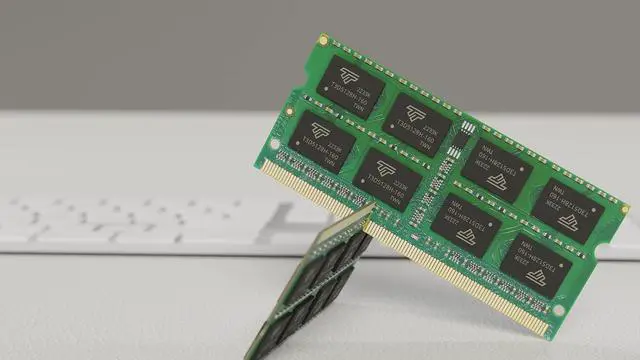
    MAC DDR3 SODIMM
    DDR3 MAC SODIMM
    Great Quality, Fast Speed, High Performance

    All Timetec modules are built from strict selected premium chip ICs for the high-performance potential to allow excellent stability and backed by Timetec advanced replacement program. All memory modules are engineered to perform in even the most extreme environments and rigorously worked to ensure that each module meets our stringent performance.

    Specifications
    Module Type DDR3 Non-ECC Unbuffered SODIMM
    Frequency 1333MHz
    CAS Latency CL9
    Capacity 8GB
    Voltage 1.5V
    Pins 204 Pin
    Dimensions 30(H) x 67.6(L)mm
    NP4 C list
    Increase Multitasking

    Timetec memory is engineered to maximize effectiveness and efficiency of your Mac system and increase your Mac multitasking capabilities.

    DDR3 SODIMM MAC bg1
    Easy Installation

    Just with a screwdriver and your owner's manual, you can upgrade your Mac System at home within a few minutes with the easy plug and play design.

    DDR3 MAC SODIMM bg2
    Strict Selected IC

    Timetec memory only use high quality IC which is engineered to maximize effectiveness.

    DDR3 MAC SODIMM bg3
    DDR3 1333MHz PC3-10600 204 Pin Unbuffered Non-ECC 1.5V CL9 Dual Rank 2Rx8 based 512x8
    Module Size: 8GB
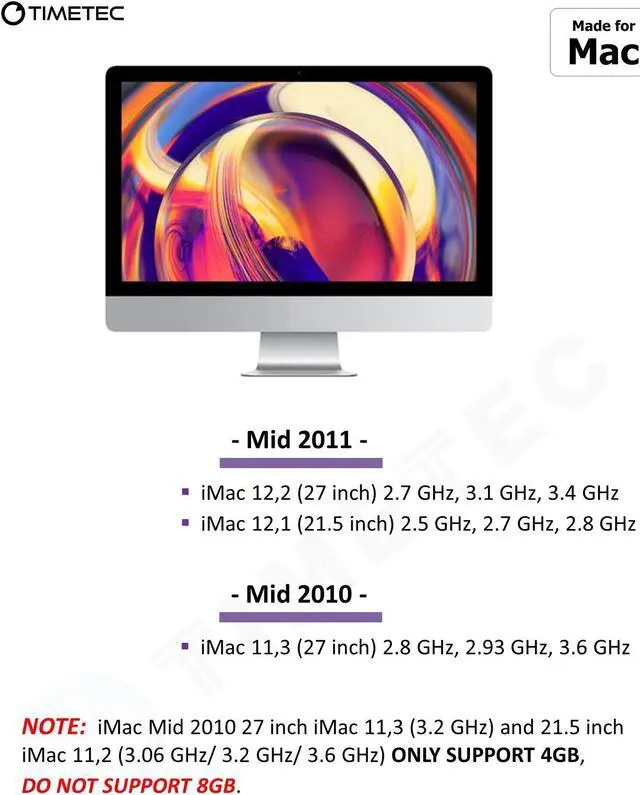
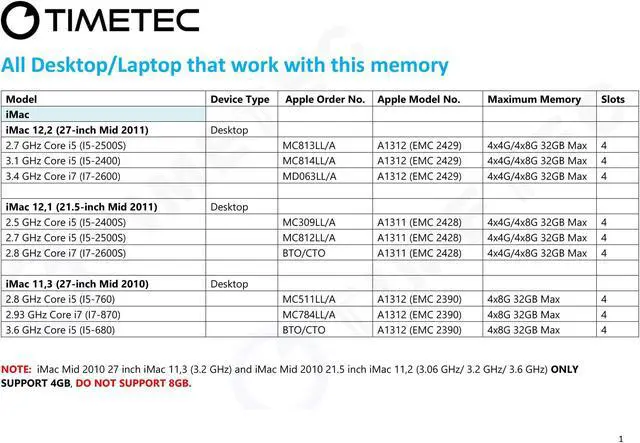
    Package: 4x8GB Designed for Apple iMac - 27 inch Mid 2010, 21.5 inch / 27 inch Mid 2011- iMac11, 3 iMac12, 1 iMac12, 2
    Model Number: A1311 A1312 -
    Part Number (s): MC511LL/A, MC784LL/A, MC309LL/A, MC812LL/A, MC813LL/A, MC814LL/A, MD063LL/A, BTO/CTO Supports
    CPU Processors: 2.5 GHz Core i5, 2.7 GHz Core i5, 2.8 GHz Core i5, 3.1 GHz Core i5, 3.6 GHz Core i5, 2.8 GHz Core i7, 2.93 GHz Core i7, 3.4 GHz Core i7 Guaranteed Lifetime warranty from Purchase Date Free technical support (support@timetecinc. com)

    Warranty & Returns

    Warranty, Returns, And Additional Information

    Warranty

    • Please contact the Seller directly for warranty information. Warranty information may also be found on the Manufacturer's website.
    • CONTACT

    Return Policies

    Manufacturer Contact Info

    LOADING...

    The Timetec 32GB (4×8GB) DDR3-1333 SO-DIMM kit upgrades memory in the 27-inch Mid 2010 iMac and 21.5- or 27-inch Mid 2011 iMac models listed, including iMac 11,3, 12,1, and 12,2.

    Recommended For

    • Owners of a compatible Mid 2011 21.5-inch or 27-inch iMac who run several apps at once or work with large Photoshop files; testing on a 2011 iMac found memory gains depended on workload and file size.
    • People upgrading a compatible 2011 iMac with a traditional hard drive who regularly multitask or handle large files; Macworld’s tests found some such tasks benefited from 32GB, though the overall benchmark improvement was modest.
    • Owners of a compatible 2011 iMac who want to expand memory for layered, multi-camera, or other demanding editing projects while keeping the existing computer; OWC identifies these iMacs as upgradeable to 32GB, but RAM alone does not update the computer’s other components.
    • Owners of a Mid 2010 27-inch iMac who have verified that their exact model supports this 4×8GB configuration; Apple’s published memory guidance for Mid 2010 iMacs specifies 1333MHz DDR3 SO-DIMMs, while its listed maximum is lower than this kit’s 32GB capacity.

    Real-World Use Scenarios

    • When a 2011 iMac is running short on memory, keeping Safari tabs, Mail, Photos, and a music app open together can leave more room for switching between them with less reliance on slower disk-based memory swapping. This helps most when the iMac is memory-constrained; it does not make every app faster.
    • For editing large Photoshop images on a low-memory 2011 iMac, extra RAM can give image data and other open apps more working space. Macworld’s tests found the benefit depended on file size, with larger Photoshop files gaining more than smaller ones.
    • When Photoshop, audio conversion, and file compression run at the same time on a 2011 iMac with a hard drive, additional memory may reduce delays if the original RAM is a bottleneck. In Macworld’s specific test, upgrading from 4GB to 32GB improved the Photoshop and zip-test times modestly; results will vary by workload and storage.
    • For older iMacs repurposed for video editing, extra RAM can provide more room for editing software and concurrent apps, particularly with layered or multi-camera projects. It does not remove CPU, graphics, or storage limits, so it should not be expected to make every edit or export faster.
    • When using a Windows virtual machine alongside Mac apps, more system memory can help if the guest workload and host apps compete for RAM. In a light virtual-machine test, Macworld saw little benefit from allocating more than 4GB to the virtual machine, so the gain depends on how demanding the guest workload is.