







Any questions? Our AI mode will help you find out quickly.
12-IN-1 WAVLINK Professional USB-C Triple Display Docking Station
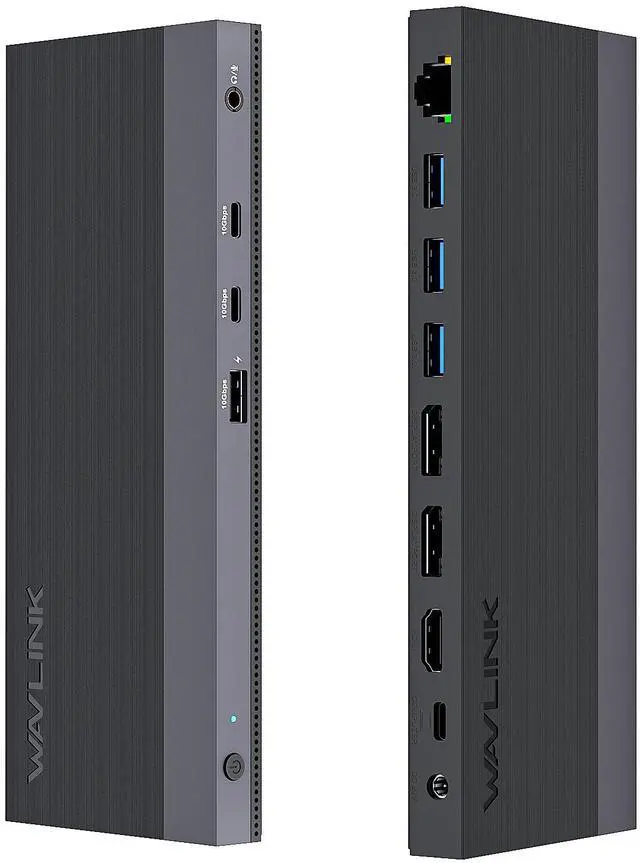
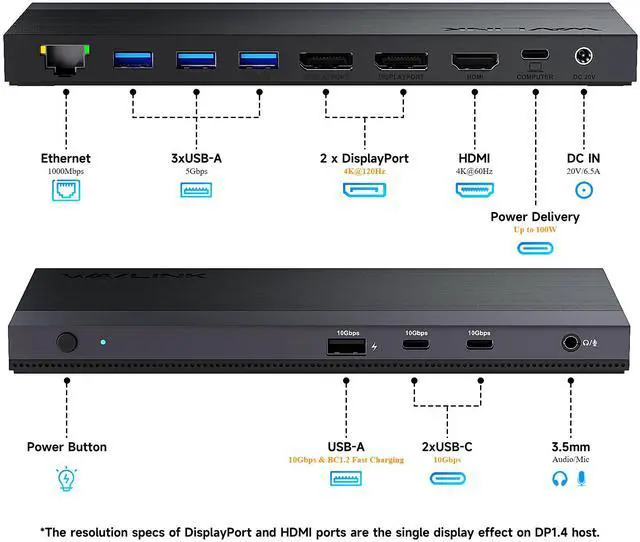
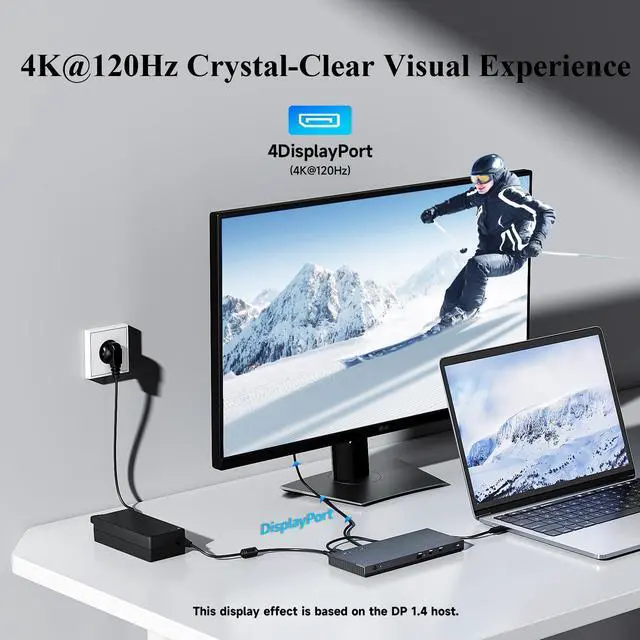
The WAVLINK USB-C Docking Station is equipped with 12 versatile ports, which could transform your laptop into a powerful workstation with a single USB-C port. Dual DP ports and an HDMI port allow you to connect up to 3 external monitors. When you connect only one display through the DP port, the resolution can reach 4K@120Hz(Under DP1.4 and DSC), giving you unparalleled visual enjoyment. With four USB 3.0 ports, you can easily connect multiple devices and peripherals, giving you the ultimate convenience and productivity. Whether you're streaming videos, gaming, or editing photos, WAVLINK USB-C docking station has everything you need for a great user experience.
100W High-Speed Charging
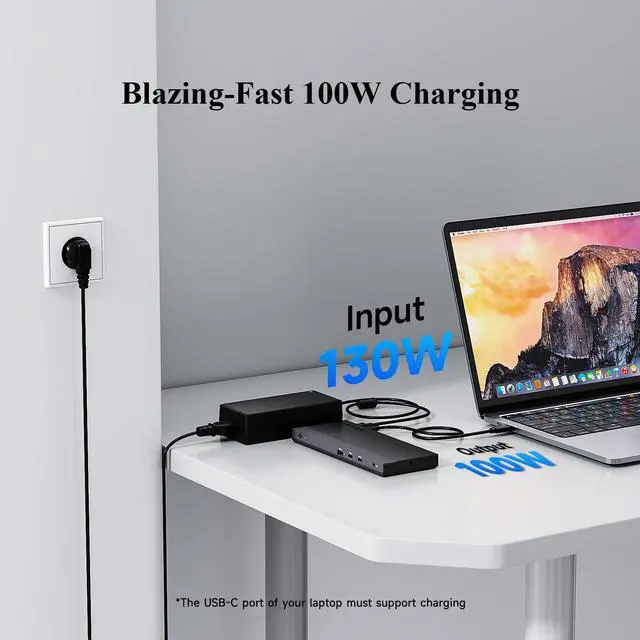
With 130W Input, the dock offers 100W to charge the PC on the upstream PD3.0 USB-C port and the left 30W is used to power the dock and other peripherals. This allows for a perfect solution to charge your laptop and add multiple displays or peripherals all at the same time.
Lightning-Fast Transmission
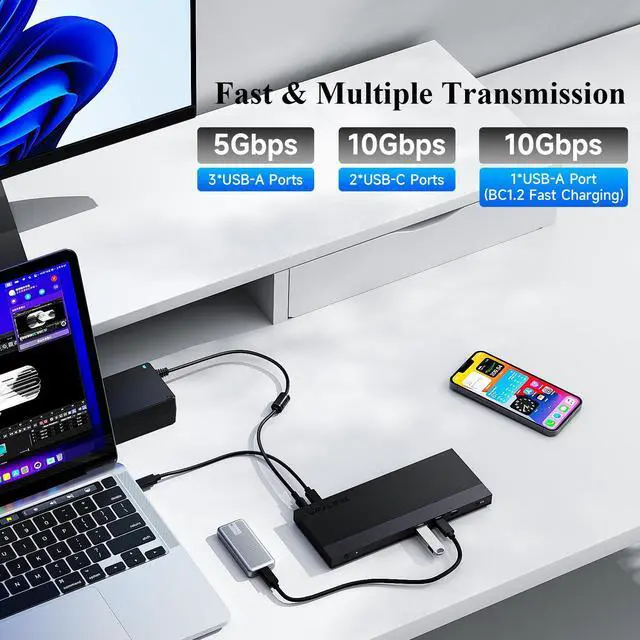
WAVLINK USB-C docking station is designed with three USB 3.2 Gen 2 ports that provides 10Gbps data transfer, 20 times faster than USB2.0, presenting you with efficient and faster data transmission. Three USB 3.0 ports that have a transfer rate of up to 5 Gbps, which is an ideal choice for device peripheral connections. The Gigabit Ethernet port brings up to 1000Mbps and stable Internet connection to you and is back compatible with 100/10Mbps.
Broad Compatibility & Driver Free
This docking station's upstream Type-C port makes it suitable for most computers as long as they have USB-C ports that support data transfer, charging, and video output, such as MacBook Pro/Air 2016-2022, Dell Latitude 5480, Lenovo Yoga 910, etc. For more compatible devices, please check the details page or contact our customer service. No driver required, just plug and play!
Exquisite and Smooth Images
Under DP1.4 and DSC, the resolution could achieve up to 4K@120Hz when you connect one monitor via DP port. The higher resolution and refresh rate make the picture in the monitor look smoother, giving you a better sensory experience while reducing the burden on your eyes, especially for gaming enthusiasts, video editors and more.
Considerate Details
WAVLINK is committed to making high-quality products in all aspects, and this is reflected in many details. The non-slip pad makes the dock more stable when placed on any surface. The Kensington lock hole allows you to keep your information secure by physical means. The power button can control all ports on the dock with one click, making it more convenient to use.
Enjoy HD Videos without Limitation
This USB-C dock supports HDCP, which means you can display some encrypted or protected content such as Blu-ray/Netflix/Prime/iTunes/Hulu, etc. with the help of the dock. And On both Windows and Mac OS, screen rotation and clamshell mode are available. Come and play your videos in varied ways!
Please Check Before Purchase
If the USB-C port of your laptop does not support charging and video output, this product will not be able to charge your laptop, and the 2xDP ports & HDMI port will not work properly. You can confirm if your laptop's USB-C port supports these two functions by the following steps:
Step 1: Please check the model of your laptop; it should be on the back of the label.
Step 2: Search brand + the model number of the device + manual in Google, for example: asus ux435 manual.
Step 3: Check the manual and navigate to the view and check the type-c specification, if it states it supports power delivery which means it supports charging. If it states the type-c port supports display which means it could support video output. If the specification state bandwidth the type-c port supports only, which means the type-c port might not support video output and charging. You could also contact the manufacturer to confirm that.
Compatible Systems
-Windows 10 or later
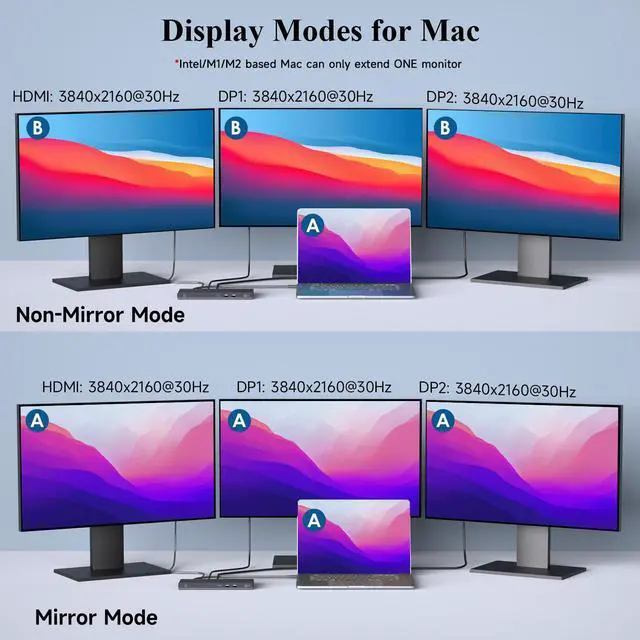
-Mac OS 10.15 or later(Can extend a different display ONLY)
-Chrome OS, Android, Harmony OS, iPadOS, Linux
Specification
- Model: WL-UMD01M Pro
- Ports: 1x DC IN(20V/6.5A, 130W), 1x USB-C(Host, 100W), 2x Displayport, 1x HDMI, 1x RJ45, 3 x USB-A(5Gbps),1x 4-pole phone jack, 1 x USB-A(10Gbps & BC1.2 fast charging),2 x USB-C(10Gbps)
- Product Dimension: 20.7*8.2*1.6cm/8.15x3.23x0.63in( L x W x H )
- Product Weight:330g/11.6oz
- Cable Length:
USB-C to C Cable: 100cm/39.4in
Power Adapter Cable(plug end): 150cm/59in
Power Adapter Cable(round port end): 120cm/47in
- Housing Material: ABS Plastic
- Shell Color: Black
- LED Indicator Color: Blue
Features
- The upstream USB-C port is compliant with USB Power Delivery specification revision 3.0 and supports up to 100W Power Delivery.
- One RJ45 Gigabit Ethernet port provides high-speed network and is backward compatible with 10/100Mbps network.
- Compatible with Laptop/PC that has full-functional USB 3.1 Type-C port.
- Single display up to 4K(3840x2160)@120Hz.
In the Box
1 x USB-C Triple Display Docking Station
1 x USB-C to USB-C Cable
1 x DC 130W Power Adapter
1 x AC Power Cable
1 x Quick Start Guide
1 x Driver Card
1 x Safety Notification
Multiple Display Resolution
Windows:
Single Display:
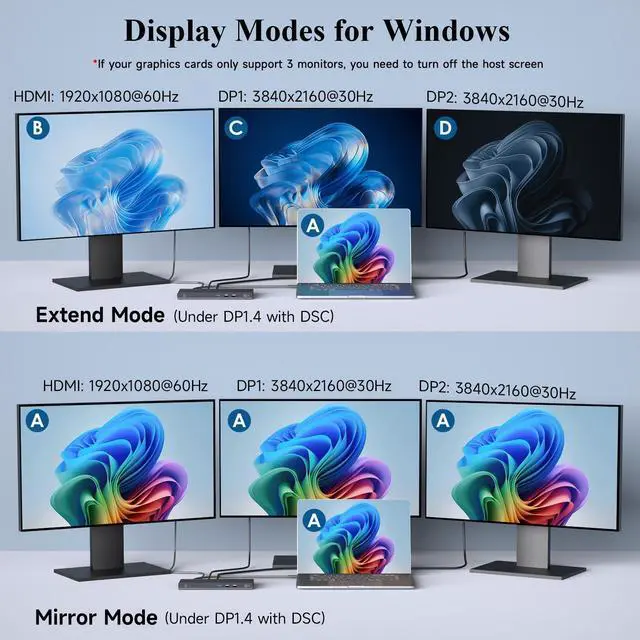
2xDP ports: 3840x2160@30Hz(DP1.2); 3840x2160@30Hz(DP1.4, without DSC); 3840x2160@120Hz(DP1.4, with DSC)
HDMI port: 3840x2160@30Hz(DP1.2); 3840x2160@60Hz(DP1.4, without DSC); 3840x2160@60Hz(DP1.4, with DSC)
Dual Display:
DP1+DP2: dual 1920x1080@60Hz(DP1.2); dual 2560x1440@60Hz(DP1.4, without DSC); dual 3840x2160@60Hz(DP1.4, with DSC)
DP1/2+HDMI: dual 1920x1080@60Hz(DP1.2); dual 2560x1440@60Hz(DP1.4, without DSC); dual 3840x2160@30Hz(DP1.4, with DSC)
Triple Display:
DP1+DP2+HD]MI: dual 1920x1080@30Hz + one 1280x720@60Hz(DP1.2); triple 1920x1080@60Hz(DP1.4, without DSC); dual 3840x2160@30Hz + one 1920x1080@60Hz(DP1.4, with DSC)
Mac OS:
Single Display:
DP1/2: 3840x2160@30Hz(DP1.2); 3840x2160@30Hz(DP1.4, without DSC); 3840x2160@120Hz(DP1.4, with DSC)
HDMI: 3840x2160@30Hz(DP1.2); 3840x2160@60Hz(DP1.4, without DSC); 3840x2160@60Hz(DP1.4, with DSC)
Dual Display:
DP1+DP2: dual 3840x2160@30Hz(DP1.2); dual 3840x2160@30Hz(DP1.4, without DSC); dual 3840x2160@30Hz(DP1.4, with DSC)
DP1/2+HDMI: dual 3840x2160@30Hz(DP1.2); dual 3840x2160@30Hz(DP1.4, without DSC); dual 3840x2160@30Hz(DP1.4, with DSC)
Triple Display:
DP1+DP2+HDMI: triple 3840x2160@30Hz(DP1.2); triple 3840x2160@30Hz(DP1.4, without DSC); triple 3840x2160@30Hz(DP1.4, with DSC)
Warm Tips:
- Please keep it connected to the power supply when using this docking station (power adapter included).
- Please confirm that the type-c port of your laptop supports charging and video output, or the product will not be able to charge your laptop, and the HDMI Alt Mode port will not work properly.
- For some graphics cards that only support 3 monitors, you need to turn off the host screen.
- MacOS does not support MST, the 3 external monitors will display the same content.
- If you want to achieve 4K