here!
here!
I’m your shopping assistant for PC builds, upgrades, and everything tech.
Got questions? Ask away!
Start a conversation
here!
I’m your shopping assistant for PC builds, upgrades, and everything tech.
Got questions? Ask away!
Start a conversation




Any questions? Ask CelesteSM will help you find out quickly.


The aluminum alloy and ABS fusion, enhances heat dissipation, safety, and extends the dock's lifespan.

The built-in 3.5mm port enables mic input and earphone output, compensating for missing notebook audio ports while ensuring high-quality sound.

The front LED indicators on the docking station show operational status, enhancing user convenience.

Enhance your security measures and safeguard your valuable devices with the inclusion of Kensington lock.


The aluminum alloy and ABS fusion, enhances heat dissipation, safety, and extends the dock's lifespan.
The built-in 3.5mm port enables mic input and earphone output, compensating for missing notebook audio ports while ensuring high-quality sound.
The front LED indicators on the docking station show operational status, enhancing user convenience.
Enhance your security measures and safeguard your valuable devices with the inclusion of Kensington lock.


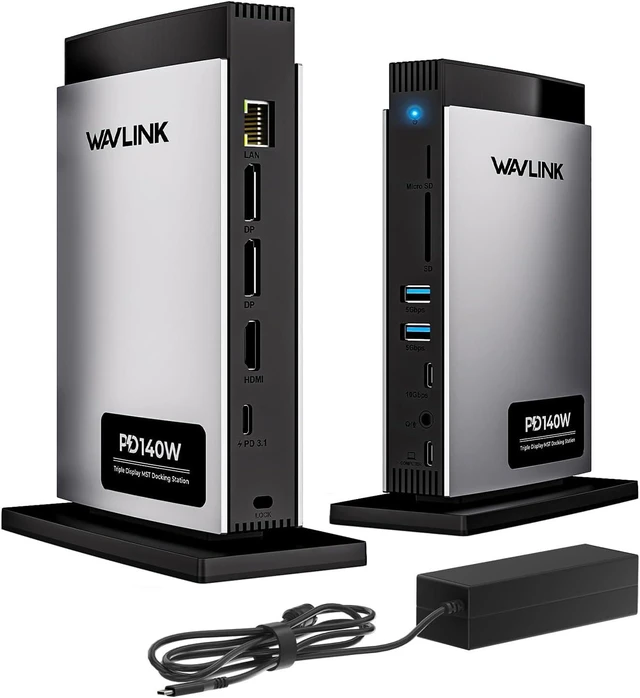
Industry Leader! ---- WAVLINK PD3.1 USB-C Triple Display Docking Station with 140W Power Delivery
Utilize the WAVLINK 11-in-1 8K docking station to unlock your laptop's full potential and elevate your workspace effortlessly. This dock is HDCP compliant, enabling playback of copyrighted UHD content on platforms like Blu-ray, Netflix, Prime, iTunes, Hulu, and more. Adapt to clamshell mode and rotation mode easily with this multi-functional docking station. Its upright design optimizes space and maintains your desks neatness. Enjoy hassle-free usage with no driver installations requiredsimply plug and play for smooth operation.
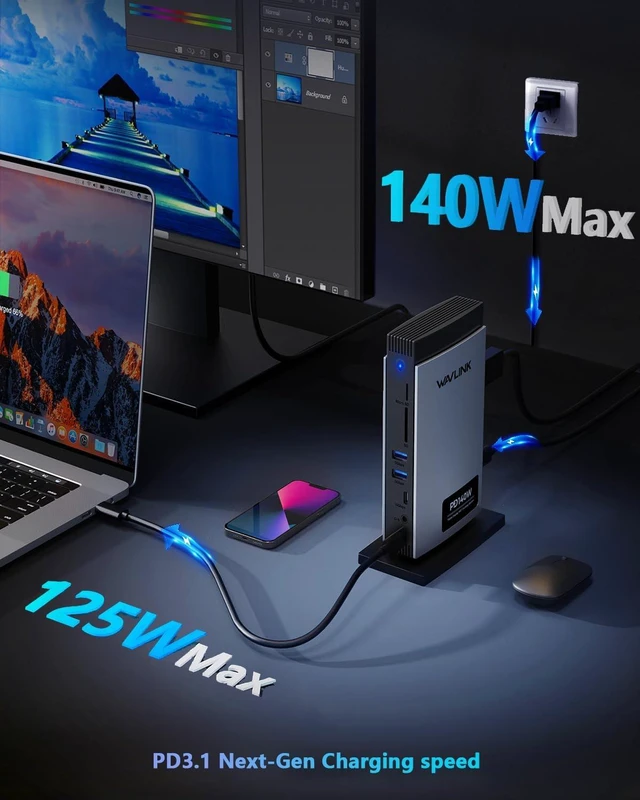
PD3.1 Powerful Charging
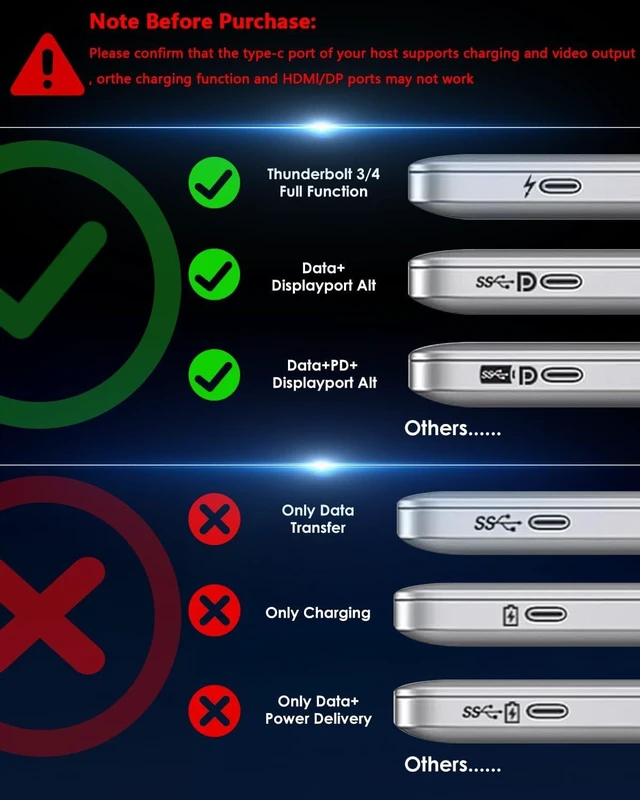
With support for up to 140W PD input, laptops can charge swiftly with 125W output, saving valuable charging time. Note: Please make sure the USB-C port of your PC supports charging.
Stunning Image Precision
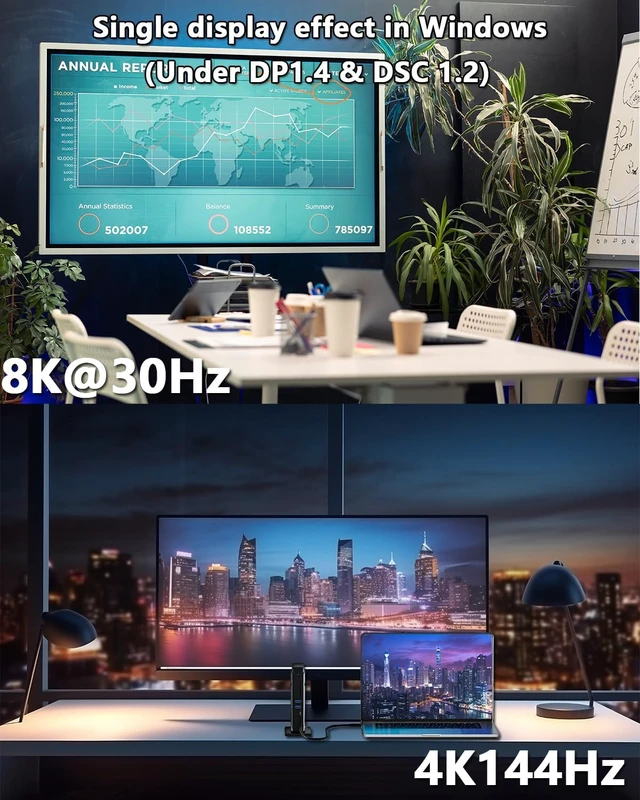
Achieve resolutions of up to 8K@30Hz/4K@144Hz on a single display (compatible with DP1.4&DSC on Windows), ideal for graphic designers and gaming enthusiasts. Note: Please make sure the USB-C port of your PC supports video output.
Expands up to Triple Display
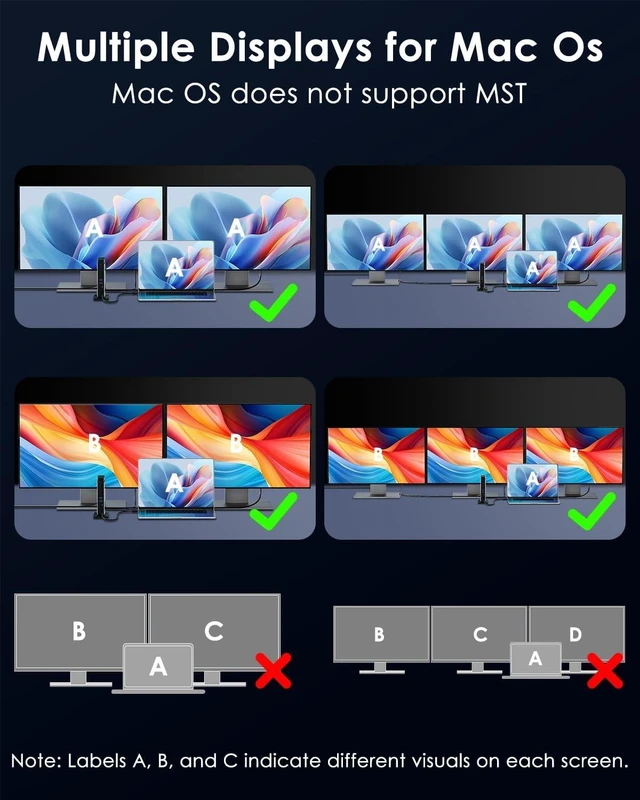
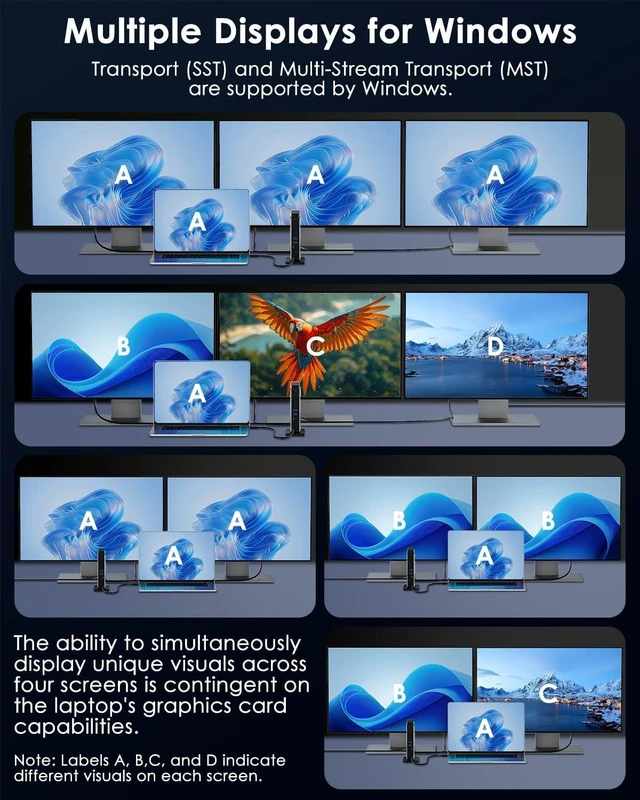
Featuring 2*DP and 1*HDMI ports, the dock enables Windows laptops to extend to three distinct screens (ABCD) and MacBooks to extend to one unique screen (ABBB) while mirroring content on the remaining displays. Note: Some Windows laptops may only support 3 monitors(including the host screen) due to their graphic card limitations.
2-IN-1 TRRS Phone Jack
The built-in 3.5mm audio/mic port facilitates microphone input and earphone output, addressing the absence of an audio port in notebooks while ensuring high-fidelity, detailed, and pristine audio quality.
Blue LED Indicator
The front side of this docking station features LED indicators that visually display the operational status, enhancing user-friendliness and convenience.
Kensington Security Lock
Enhance your security measures and safeguard your valuable devices with the inclusion of Kensington lock. The essential slot provides you with peace of mind, ensuring that your devices are protected against theft and loss wherever you may be.
Enhanced Dock Shell
The smart fusion of aluminum alloy and ABS not only earned the prestigious Red Dot Award but also facilitates efficient heat dissipation, ensuring safety, and extending the dock's lifespan.
Systems/ Devices Compatibility
Plug and play on Windows 11/10/8.1/8/7, Mac OS 11 or later, Chrome OS, Linux, iPad OS, Harmony OS, Android, iOS.
Works with your USB-C Desktop PCs, Laptops, Tablets/Mobile Phones(OTG function required).
How to Confirm if the Type-C Port of Your Laptop Supports Video Output and Charging?
Step 1: Please check the model of your laptop, it should be on the back of the label;
Step 2: Search brand + the model number of the device + manual in Google, for example: asus ux435 manual;
Step 3: Check the manual and navigate to the view and check the type-c specification, if it states it supports power delivery which means it supports charging. If it states the type-c port supports display which means it could support video output. If the specification states bandwidth the type-c port supports only, which means the type-c port might not support video output and charging. You could also contact the manufacturer to confirm that.
Multiple Display Resolution (Max. Resolution)
Notice: Please make sure the type-C port of your host supports video output.
For Windows OS(some laptops only support 3 monitors due to their graphic card limit)
1)Single Display (HDMI/DP1/DP2):
DP1.2: 3840x2160@30Hz
DP1.4: 3840x2160@60Hz
DP1.4 & DSC: 7680x4320@30Hz or 3840x2160@144Hz
2)Dual Display (HDMI+DP1/2 or Dual DP):
DP1.2: 1920x1080@60Hz+1920x1080@60Hz
DP1.4: 3840x2160@30Hz+1920x1080@60Hz
DP1.4 & DSC: 3840x2160@60Hz+3840x2160@60Hz
3)Triple Display (HDMI+DP1+DP2):
DP1.2: 1920x1080@60Hz+1920x1080@60Hz+lower than 1080P
DP1.4: 1920x1080@60Hz+1920x1080@60Hz+1920x1080@60Hz
DP1.4 & DSC: 3840x2160@60Hz+3840x2160@30Hz+3840x2160@30Hz
For Mac OS(only supports extend 1 external monitor with different content)
1)Single Display (HDMI/DP1/DP2):
DP 1.2/ DP1.4/ DP1.4 & DSC1.2: 3840x2160@60Hz
2)Dual Display (HDMI+DP1/2 or Dual DP):
DP 1.2/ DP1.4/ DP1.4 & DSC1.2: 3840x2160@60Hz+3840x2160@60Hz
3)Triple Display (HDMI+DP1+DP2):
DP 1.2/ DP1.4/ DP1.4 & DSC1.2: 3840x2160@60Hz+3840x2160@60Hz+3840x2160@60Hz
Specification:
1.Model: WL-UMM28 Pro
2.Ports: Front: 1x TF Card Slot, 1x SD Card Slot, 2 x USB-A 5Gbps, 1 x USB-C 10Gbps, 1 x 4-Pole Phone Jack, 1x USB-C (Host, PD125W);
Rear: 1x RJ45(10/100/1000Mbps), 2 x 8K DisplayPort, 1 x 8K HDMI(Alt. Mode), 1x USB-C IN(PD140W MAX), 1 x Kensington Lock
3.Unit Size: 12.3x6.6x17.2cm/4.8x2.6x6.8in (LxWxH)
4.USB-C to C Cable Length: 100cm/39.4in
5.Unit Weight: 445g/15.7oz
6.Housing Material: Aluminum + ABS Plastic
8.Power LED: Blue
Features
- Three video ports(1*HDMI+2*DisplayPort)work for triple display, and the resolution is up to single 8K(7680x4320)@30Hz or 4K(3840x2160)@144Hz.
- One USB-C PD 3.1 IN provides 140W power delivery for the dock, and supports 125W upstream charging for the host.
- One Gigabit Ethernet port provides a stable and high-speed network, and is backward compatible with 10/100Mbps network.
- Two USB-A transfer speed up to 5Gbps and are backward compatible with USB 2.0/1.1.
- One USB-C transfers speed up to 10Gbps and is backward compatible with USB 3.0/2.0/1.1.
- One integrated TRRS 4-pole phone jack works for microphone input and earphone output.
- One combo built-in USB 3.0 SD/TF Card Reader transfers speed up to 104MB/s.
In the Box
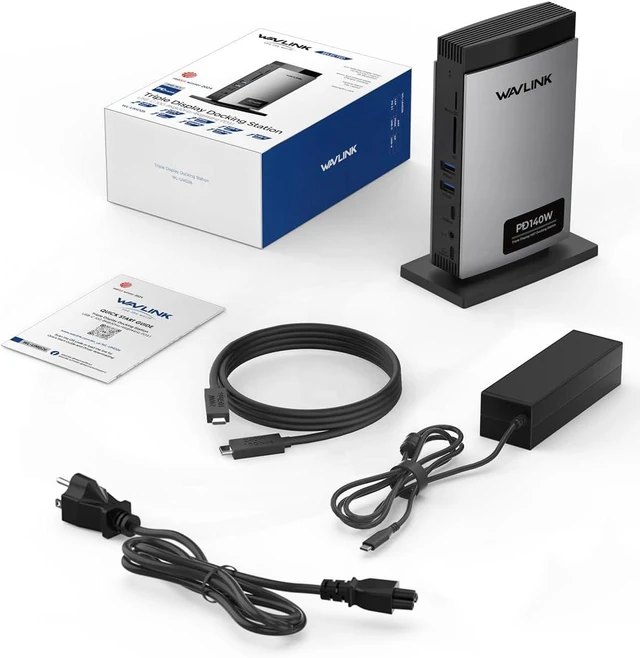
1 x Triple Display Docking Station
1 x PD3.1 240W USB-C to USB-C Cable with E-Mark
1 x AC Power Cable
1 x PD3.1 140W GaN Power Adapter
1 x Quick Start Guide
Warm Tips:
-The type-C port of your host should support video output and charging to enjoy the full function of this docking station.
-For Windows-based computer, please make sure that your computer graphics card supports four monitors, or you might have to disable the built-in monitor.
-Windows extends to three different screens (ABCD); Mac extends to one different screen (ABBB) while mirroring content on the others.
-Rotation Mode and Clamshell Mode are supported on both Windows and Mac OS.
-Supports HDCP; suitable for intensive tasks like gaming and video editing.
-Your USB-C phones/tablets should support the OTG function.
USB-C Devices Compatibility List (Partial):
Note: Please check the compatibility list below before purchasing. If your device is not on the list, please let us know and we will be glad to help you check with it.
Apple: Mac Studio 2022, iMac(2017, 2019, 2020), MacBook Pro 16-inch (2019, 2021),MacBook Air 13-inch (2018, 2019, 2020), MacBook Pro 13-inch (2016, 2017, 2018, 2019, 2020),MacBook Pro 14-inch 2021, MacBook Pro 15-inch (2016, 2017, 2018, 2019);
Dell: XPS 13 7390 2-in-1 (Ice Lake), XP