




 here!
here!
I’m your shopping assistant for PC builds, upgrades, and everything tech.
Got questions? Ask away!
Start a conversation
here!
I’m your shopping assistant for PC builds, upgrades, and everything tech.
Got questions? Ask away!
Start a conversation




Any questions? Ask CelesteSM will help you find out quickly.


Systems/ Devices Compatibility
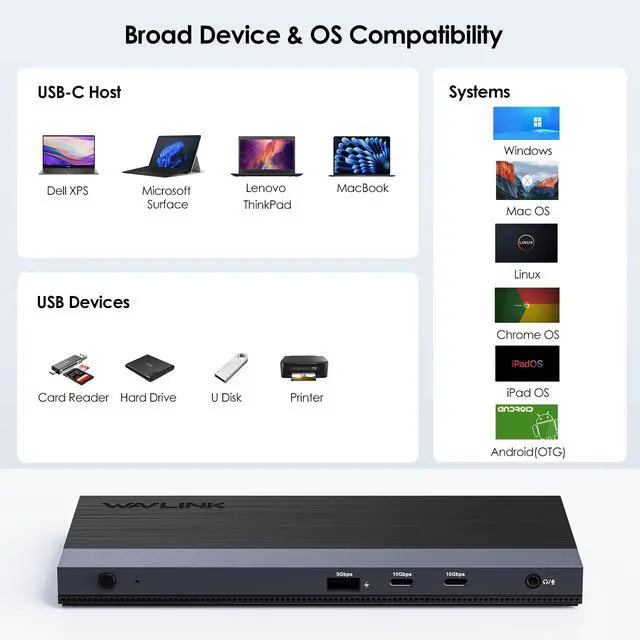
Windows 10 or later
Mac OS 10.15 or later (Can extend a different only)
CPU i5 or higher, RAM 8GB or above
Requires that laptop supports PD 3.0 Laptop with full-funtional USB-C Port (PD+DP Alt Mode+Data)
Multiple Display Resolution (Max. Resolution)
Notice: Please make sure the type-C port of your host supports video output. Win:
Single Display: DP 1.2
DP/HDMI 1/HDMI 2:4K @30Hz
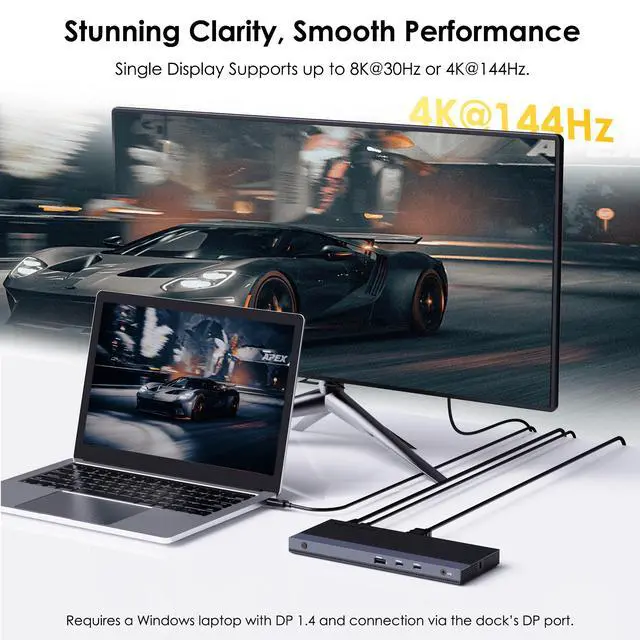
DP 1.4 DP:8K @30Hz OR 4K @144Hz
HDMI 1/HDMI 2:4K @60Hz
Dual Display:
DP 1.2
DP + HDMI 1 / HDMI 2:dual 1080p @60Hz
HDMI 1 + HDMI 2:dual 1080p @60Hz
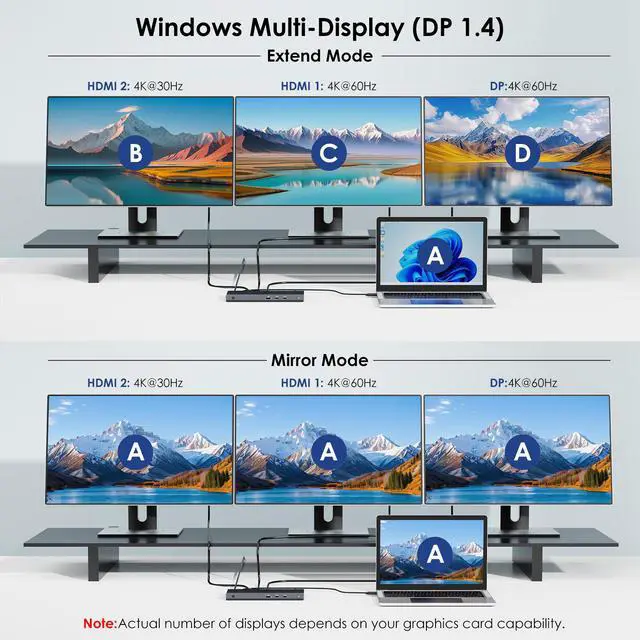
DP 1.4 DP + HDMI 1 / HDMI 2:4K @75Hz + 4K @60Hz
HDMI 1 + HDMI 2:dual 4K @60Hz Triple Display DP 1.2 DP + HDMI 1 + HDMI 2:1920×1080 @60Hz+1920×1080 @24Hz+1600×900 @60Hz DP 1.4 DP + HDMI 1 + HDMI 2:4K @60Hz+4K @60Hz+4K @30Hz macOS: Single Display: DP1.2 DP/HDMI 1/HDMI 2:4K @30Hz
DP1.4 DP/HDMI 1/HDMI 2:4K @60Hz
Dual Display
DP 1.2
HDMI 1 + HDMI 2:dual 4K @30Hz
DP + HDMI 1 / HDMI 2:dual 4K @30Hz
DP 1.4
DP + HDMI 1 / HDMI 2:dual 4K @60Hz
HDMI 1 + HDMI 2:dual 4K @60Hz Triple Display DP 1.2
DP + HDMI 1 + HDMI 2:triple 4K @30Hz
DP 1.4
DP + HDMI 1 + HDMI 2:triple 4K @60Hz
Specification:
1.Model: WL-UMD05M Pro
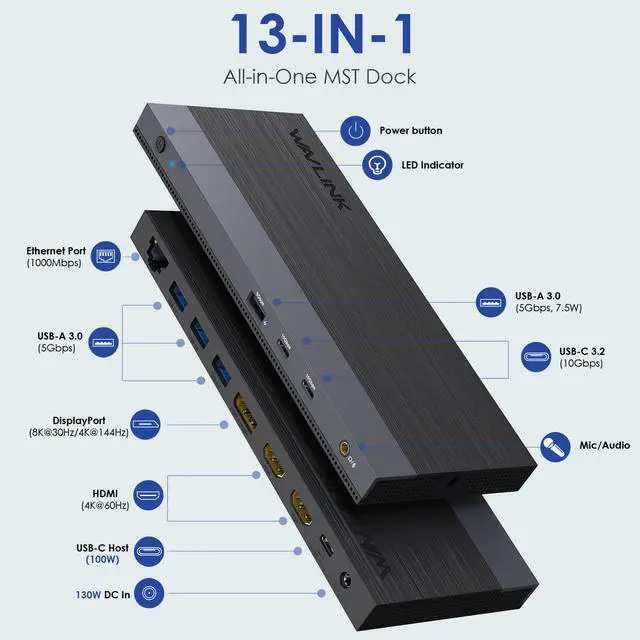
2.Ports: Front: 1×RJ45 Gigabit Ethernet Port; 3×USB-A (5Gbps); 1×DP; 2×HDMI; USB-C Upstream (Host, PD100W); 1×Power Port (20V,6.5A)
Rear: Power Button; 1×USB-A (5Gbps,7.5W); 2×USB-C (10Gbps); 4-pole jack
3.Unit Size: LxW×H: 207*83*17mm/8.1*3.3*0.7inches
5.Unit Weight: 325g/11.5oz
6.Material: ABS 7.USB-C Cable Length: 100cm/39.4in
8.Power Adapter Cable(plug end): 150cm/59in
9.Power Adapter Cable(round port end): 120cm/47in
Features
-One DP and two HDMI work for triple video output, supporting single DP Max. 4K@144Hz/8K@30Hz and dual 4K@60Hz.
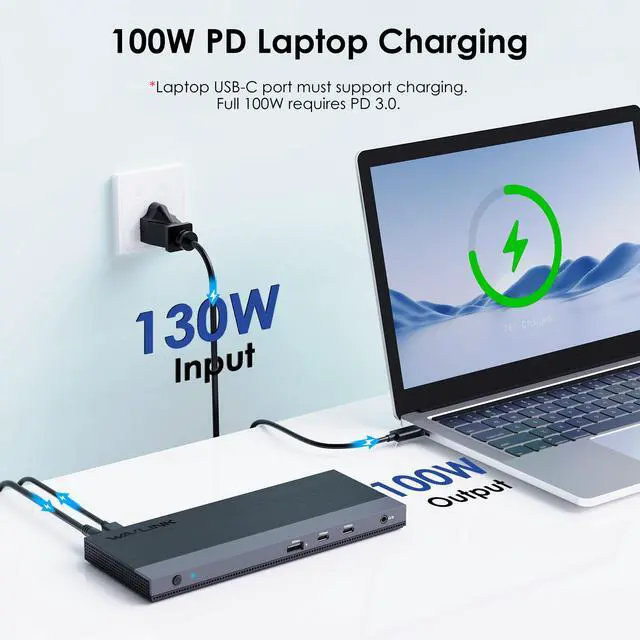
-One PD3.0 USB-C upstream port provides 100W upstream charging for the laptop.
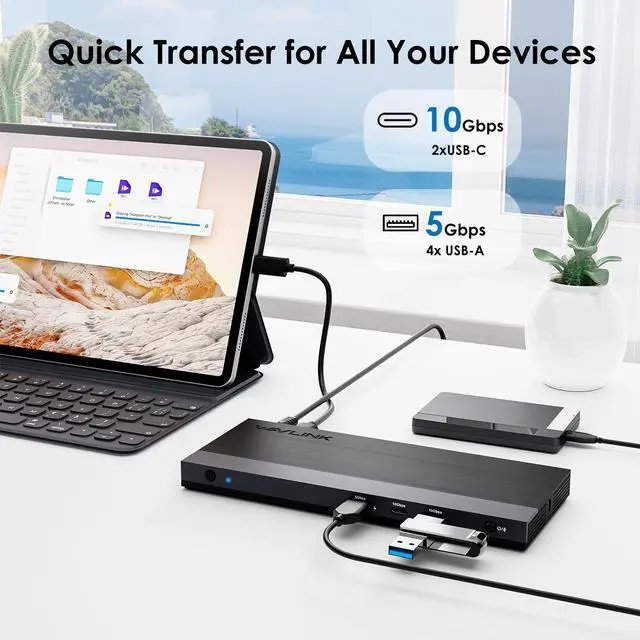
-Two USB-C transfer speed up to 10Gbps, and are backward compatible with USB 3.0/2.0.
-Four USB-A transfer speed up to 5Gbps, one of them supports B
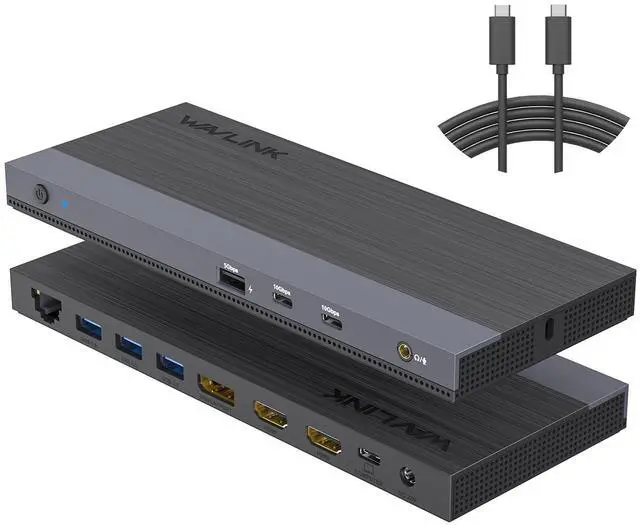
The WAVLINK WL-UMD05MPRO is a 13-in-1 USB-C docking station for users who want a single-cable desk setup with triple-monitor support, 100W laptop charging, fast USB expansion, Gigabit Ethernet, and audio for Windows or macOS laptops with full-featured USB-C.
| Attribute | Value |
|---|---|
| Best For | Users who need a single-cable laptop workstation with triple-monitor support, 100W charging, multiple high-speed USB ports and wired Ethernet; Triple independent display is supported on Windows 10/11 systems only (requires DP 1.4+ graphics card with DSC). On macOS, this dock supports mirror mode across external displays—all monitors show the same content. It is not a replacement for a DisplayLink-based solution if you need multiple independent extended displays on Mac |
| Display Output | One DisplayPort plus two HDMI for up to three external monitors; single-display modes up to 8K@30Hz or 4K@144Hz and dual-display support up to 4K@60Hz, with highest modes dependent on host video output capability |
| Power And Charging | Upstream USB-C PD 3.0 provides up to 100W charging to the host; dock uses an external power input rated 20V, 6.5A and requires a laptop USB-C port that supports PD for full charging |
| Ports And Connectivity | Comprehensive port set including 1× DisplayPort, 2× HDMI, USB-C upstream (host, PD100W), 2× USB-C downstream (10Gbps), 4× USB-A (5Gbps) with one BC1.2 fast-charge/7.5W port, 1× RJ45 Gigabit Ethernet, 1× 3.5mm 4‑pole audio jack, external power port and a power button |
| Data Transfer Speeds | Two USB-C ports up to 10Gbps (backward compatible with USB 3.0/2.0) and four USB-A ports up to 5Gbps (backward compatible with USB 2.0/1.1), suitable for fast external drives and peripherals |
| Wired Networking | Gigabit Ethernet (RJ45) with backward compatibility to 100/10 Mbps for a stable wired network connection |
| Audio | Single 3.5mm 4‑pole jack providing combined audio output and input for headsets and speakers |
| Compatibility And System Requirements | Supports Windows 10 or later and Mac OS 10.15 or later; requires a laptop with a full-functional USB-C port (PD + DP Alt Mode + Data); recommended CPU i5 or higher and 8GB RAM or above for intended use |
| Model Identifiers | Wavlink WL-UMD05MPRO, color Black/Gray |
Q: Should I choose this WAVLINK dock or a typical dual-monitor USB-C dock?
A: Choose the WAVLINK WL-UMD05MPRO if you want native-style USB-C video over DisplayPort Alt Mode with more display flexibility than a standard dual-monitor dock. It supports up to three display outputs, up to 4K144 on a single DisplayPort connection, dual 4K60, 100W host charging, 10Gbps USB-C data, Gigabit Ethernet, and audio in one dock. A typical dual-monitor USB-C dock is the simpler fit if your setup only needs one or two external displays and fewer peripherals. The main trade-off is compatibility planning: this WAVLINK model depends on a full-featured USB-C or Thunderbolt host with DisplayPort Alt Mode, and on macOS, all external monitors will display mirrored content only (not independent desktops.
Q: Is this WAVLINK dock a better choice than a DisplayLink triple-monitor dock?
A: This WAVLINK dock is the better choice if you want the dock to use your laptop's native USB-C DisplayPort Alt Mode path instead of relying primarily on DisplayLink software. That usually makes it the more direct fit for higher-refresh single-display use such as 4K144 and for users who prefer fewer software dependencies. A DisplayLink dock is the better fit when your laptop or Mac cannot natively drive the number of external displays you want from one cable. The trade-off is that DisplayLink docks are often chosen for compatibility breadth, while Alt Mode docks like this one are chosen for native video behavior and simpler signal handling. Note: On macOS, this dock only supports mirror mode across all external displays—each additional monitor will duplicate the content of the first.
Q: Should I buy this WAVLINK dock or move up to a Thunderbolt dock like the CalDigit TS4?
A: Buy the WAVLINK dock if your priority is strong monitor support and everyday desk expansion at the USB-C dock tier. It already covers triple-display output, 100W charging(requires included 130W adapter and host PD 3.0 support), 10Gbps USB-C, multiple USB-A ports, Gigabit Ethernet, and audio. Move up to a Thunderbolt dock such as the CalDigit TS4 if you need a broader high-end I/O platform, including more total ports, Thunderbolt downstream expansion, faster 2.5Gb Ethernet, and a design aimed at heavier multi-device workflows. In short: the WAVLINK is the practical choice for display-focused productivity, while a Thunderbolt dock is the better fit for users building around premium expansion and higher-end host connectivity.
Q: Is this dock a good upgrade from a basic portable USB-C hub?
A: Yes, if you are moving from a travel hub to a permanent desk setup. This WAVLINK dock is a clear upgrade when you need dedicated power input, up to 100W laptop charging(requires included 130W adapter and host PD 3.0 support), three display outputs, more USB ports, wired Ethernet, and a stable one-cable workstation layout. A compact portable hub is still the better choice if you mainly need light travel convenience, one display, and a smaller accessory footprint. The decision is less about speed alone and more about whether you want a desk dock or a carry-everywhere adapter. For Windows users, this dock supports up to three independent displays; for macOS, only mirrored displays are supported.
Q: Is this WAVLINK dock a better fit for Windows or for Mac?
A: It is generally a better fit for Windows users who want multi-monitor expansion through MST, because docks in this class are commonly positioned around DisplayPort Alt Mode plus MST behavior. For macOS, this dock is fundamentally different: macOS does not support MST, so all external monitors will mirror the same content. Mac users will only get one extended display; additional monitors will duplicate it. Choose this WAVLINK dock for Mac only if you are comfortable with mirror mode and primarily need the dock's port expansion and charging features. Choose a DisplayLink-based or Thunderbolt-focused alternative if your Mac workflow depends on true single-cable multi-display extension, which standard USB-C MST docks cannot provide on mac OS.
Q: Is this a good choice if I need a simple triple-monitor dock for Windows office work?
A: Yes, if your laptop has a full-featured USB-C or Thunderbolt port with DisplayPort Alt Mode and Power Delivery. This dock is well suited to desk-based office work because it combines three external display outputs, Gigabit Ethernet, multiple USB ports, audio, and up to 100W laptop charging in one connection. The main limitation is that the highest display modes depend on the host laptop: the advertised 8K@30Hz or 4K@144Hz single-display mode requires a compatible Windows system with DP 1.4 support. On macOS, only mirror mode is supported across all external monitors.
Q: Will it work well with a MacBook for three external monitors?
A: On macOS, the dock does not support independent multi-display extension. Based on the product specifications, macOS support is more limited than Windows: the dock is compatible with macOS 10.15 or later, but macOS does not support MST—all external monitors will display mirrored content (identical image on every screen). If you want the most predictable multi-monitor experience on a Mac, a DisplayLink-based dock is the recommended alternative. For Windows users, this dock is the safer choice for true multi-screen productivity with up to three independent extended displays.
Q: Is it worth buying for travel or hot-desk use?
A: Usually no, unless you specifically need a full desktop dock away from home. This model is better as a permanent workstation dock than as a travel accessory because its value comes from connecting several monitors, Ethernet, USB peripherals, audio, and charging at once. For travel, a smaller USB-C hub is typically easier to carry; for a fixed desk setup, this dock is more practical.
Q: Who is this dock best suited for?
A: It is best suited for Windows users who want a single-cable desk setup for spreadsheets, multitasking, meetings, browser-heavy work, or general office productivity. It also fits users who need more ports than a basic hub provides, including Ethernet, multiple USB-A devices, USB-C accessories, and audio. It is less ideal for buyers who only need one monitor, want a very small travel hub, or need multi-display capability on macOS (as macOS only supports mirror mode with this dock, not independent extended desktops).
Q: What is the main trade-off versus a similar competitor dock?
A: The main trade-off is platform behavior rather than port count. Compared with similar triple-display docks from Plugable or j5create, this WAVLINK model offers competitive connectivity and charging for the price class, but buyers should focus on how their specific laptop handles video output. If you want the best chance of straightforward triple-monitor use, Windows compatibility and port capabilities matter more than the brand name alone.
Q: Is this WAVLINK dock a good fit for a triple-monitor work setup?
A: Yes, if your laptop’s USB-C port supports both DisplayPort Alt Mode and Power Delivery. Reddit and YouTube discussions around this WAVLINK-style triple-display dock repeatedly focus on using it for desk setups with multiple monitors, and the product specs match that use case: up to three displays, Gigabit Ethernet, several USB ports, audio, and up to 100W laptop charging. It is most suitable for fixed workstation use rather than for users who only need a simple single-monitor travel hub.
Q: Is this dock a good choice for Mac users?
A: It can work for Mac as a port expansion hub, but it is a more conditional buy than for Windows. Community discussion repeatedly highlights that Mac external display behavior is more limited and can differ from Windows, especially for multi-monitor setups. Based on the product data, it supports macOS 10.15 or later, but macOS does not support MST—all external monitors will mirror the same content. Mac users will get one extended display; additional monitors will duplicate that display. It is a better fit for Mac users who specifically need a dock with broad port expansion and are comfortable with mirror mode rather than needing independent extended desktops. For true multi-display extension on macOS, a DisplayLink-based dock is recommended.
Q: What are the main trade-offs before buying this dock?
A: The main trade-off is that the headline display specs only matter if your laptop and monitor support them. This dock is strongest for users who want many ports and multiple displays from one cable, but it is less ideal if your laptop has a limited USB-C implementation, if you need guaranteed high-refresh support across several monitors at once, or if you want the simplest possible compatibility across mixed devices. In short: good port value and workstation convenience, but not a universal fix for every laptop-monitor combination.
Q: Who is this dock most suitable for?
A: It is most suitable for Windows users building a permanent home-office or productivity desk with two or three external displays and several wired accessories. The included Ethernet, multiple USB-A and USB-C ports, audio jack, and up to 100W PD (requires included 130W adapter and host PD 3.0 support) make it practical for laptops that need one-cable desk connectivity. It is less suitable for users who mainly want a compact travel accessory or who only need basic charging and one display, or who need independent multi-display extension on macOS (mirror mode only on Mac).


