• In Stock
  • Sold by Newegg
  • Make an Offer
  • New
Brands
Show More
Price
Show More
WiFi Generation
Wireless Data Rates
Antenna
Show More
Interface
Sold by
All Top Brands
Availability
Condition
Current Promotion
Discount
Useful Links
Customer Ratings
  • Wi-Fi 7 Access Points
  • Wi-Fi 7 Access Points
  • Likewize Home Tech Protect
  • Featured Brands

    See Deals from HPE Networking Instant OnSee Deals from Netgear Inc.See Deals from TP-Link
Sort By:
View:
Ubiquiti Networks UAP-AC-HD 802.11ac MU MIMO Enterprise Wi-Fi Access Point
Quick View
Ubiquiti Networks UAP-AC-HD 802.11ac MU MIMO Enterprise Wi-Fi Access Point
  • Wireless Data Rates: Up to 1.7Gbps
  • Frequency Band: 2.4 GHz / 5 GHz
  • Interface: 2 x 10/100/1000 Ethernet Ports
  • Brand: Ubiquiti Networks
  • Model #: UAP-AC-HD
  •  
  • $356.61 –
GRANDSTREAM WP820 Enterprise Portable Wi-Fi Phone
Quick View
  •  
  • $165.00 –
  • Free Shipping
Tycon Systems POE-MSPLT-4824 POE Splitter - 24V DC 12W
Quick View
  •  
  • $139.99 –
  • Free Shipping
Aruba AP-220-MNT-W3 Wall Mount for Wireless Access Point (jy706a)
Quick View
  •  
  • $30.00 –
  • Free Shipping
Mikrotik hAP ac lite (RB952Ui-5ac2nD-US) Dual-concurrent 11ac Access Point, provides Wifi coverage for 2.4GHz and 5GHz frequencies at the same time
Quick View
  •  
  • $65.00 –
  • Free Shipping
TP-Link EAP225 AC1200 Wireless Dual Band Gigabit Ceiling Mount Access Point
Quick View
TP-Link
TP-Link EAP225 AC1200 Wireless Dual Band Gigabit Ceiling Mount Access Point
  • Wireless Data Rates: AC1200
  • Frequency Band: 2.4 GHz / 5 GHz
  • Interface: RJ-45
  • Standards: IEEE 802.11ac, IEEE 802.11a/b/g/n
  • Model #: EAP225
International Version HPE Aruba AP-555 (RW) JZ356A - 1 x HPE Smart Rate - RJ-45 Campus - wireless access point
Quick View
HPE Networking Instant On
International Version HPE Aruba AP-555 (RW) JZ356A - 1 x HPE Smart Rate - RJ-45 Campus - wireless access point
  • Part Number: JZ356A
  • Features: International Version JZ356A AP-555 (RW)
  • Model #: JZ356A
Ubiquiti Networks airMAX PowerBeam 5AC (PBE-5AC-Gen2)
Quick View
Ubiquiti Networks airMAX PowerBeam 5AC (PBE-5AC-Gen2)
  • Frequency Band: Operating Frequency (MHz) Worldwide 5150-5875 MHz USA U-NII-1 U-NII-2A U-NII-2C U-NII-3 5150-5250 MHz 5250-5350 MHz 5240-5725 MHz 5725-5850 MHz Management Radio (MHz) Worldwide 2412 - 2472 MHz US/CA 2412 - 2462 MHz
  • Power Supply: Power method Passive PoE 2-pair (4, 5+; 7, 8 return) Max. power consumption 8.5W Supported voltage range 20—27V DC Power supply 24V, 0.5A gigabit PoE adapter (Included) ESD/EMP protection Air/contact: ± 24 kV
  • Temperature: -40 to 70 C (-40 to 158 F)
  • Humidity: 5 to 95% noncondensing
  • Model #: PBE-5AC-Gen2
MikroTik - RBD25G-5HPACQD2HPND - MikroTik Audience Tri-Band 2.4GHz High/Low 5GHz Home Access Point INTL
Quick View
MikroTik - RBD25G-5HPACQD2HPND - MikroTik Audience Tri-Band 2.4GHz High/Low 5GHz Home Access Point INTL
  • Wireless Data Rates: AC3100
  • Interface: RJ-45
  • Model #: RBD25G-5HPACQD2HPND
  •  
  • $202.00 –
  • Free Shipping
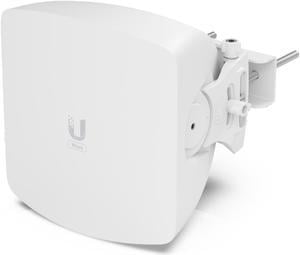
Ubiquiti Wave AP (Wave-AP)
Quick View
Ubiquiti Wave AP (Wave-AP)
  • WiFi Generation: Wi-Fi 6
  • Frequency Band: RF Operating frequency* 57–71 GHz *Depends on regulatory region. Channel bandwidth 2160, 1080, 540* MHz *FW version 3.3.0 and later. Operating channels* 58320, 59400, 60480, 61560, 62640, 63720, 64800, 65880, 66960, 68040, 69120, 70200 MHz *Depends on regulatory region. Modulation 16QAM, QPSK Antenna gain 24 dBi Polarization Vertically linear Beamwidth Azimuth: 3 dB 30° Elevation: 3 dB 3° Electrical downtilt 0° Back-Up RF WiFi standard 802.11ax (WiFi 6) Operating frequency* US/ CA Worldwide U-NII-1 5150 - 5250 MHz U-NII-2A 5250 - 5350 MHz U-NII-2C 5470 - 5725 MHz U-NII-3 5725 - 5850 MHz 5150 - 5875 MHz *Depends on regulatory region. Channel bandwidth 20, 40, 80 MHz Modulation BPSK (1/2), QPSK (1/2), QPSK (3/4), 16QAM (1/2), 16QAM (3/4), 64QAM (2/3), 64QAM (3/4), 64QAM (5/6), 256QAM (3/4), 2...
  • Model #: WAVE-AP
Ubiquiti Networks AC Mesh Pro (UAP-AC-M-PRO) Access Point
Quick View
Ubiquiti Networks AC Mesh Pro (UAP-AC-M-PRO) Access Point
  • Wireless Data Rates: 802.11a 6, 9, 12, 18, 24, 36, 48, 54 Mbps 802.11b 1, 2, 5.5, 11 Mbps 802.11g 6, 9, 12, 18, 24, 36, 48, 54 Mbps 802.11n 6.5 Mbps to 450 Mbps (MCS0 - MCS23, HT 20/40) 802.11ac 6.5 Mbps to 1.3 Gbps (MCS0 - MCS9 NSS1/2/3, VHT 20/40/80)
  • Interface: (2) GbE RJ45 ports
  • Standards: 802.11a/b/g/n/ac
  • Security: WEP, WPA-PSK, WPA-Enterprise (WPA/WPA2, TKIP/AES)
  • Model #: UAP-AC-M-PRO-US
  •  
  • $439.99 –
  • Free Shipping
TP-LINK EAP225 IEEE 802.11ac 1.32 Gbit/s Wireless Access Point
Quick View
  •  
  • $99.99 –
  • Free Shipping
ubiquiti unifi dream machine se (udm-se)
Quick View
ubiquiti unifi dream machine se (udm-se)
  • Part Number: UDM-SE
  • Dimensions: 17.4 in x 11.2 in x 1.7 in
  • Weight: 10.91 lbs
  • Model #: RNAB09QZBBRRS
  •  
  • $606.76 –
  • Free Shipping
MikroTik hAP ac2 Dual-Concurrent 2.4/5GHz Access Point 802.11ac, 5 Gigabit Ethernet Ports (RBD52G-5HacD2HnD-TC-US)
Quick View
  •  
  • $85.29 –
  • Free Shipping
  • $83.50 - $85.29
Ubiquiti Networks UAP-AC-PRO-3-US UniFi AC Pro Access Point, Pack of 3
Quick View
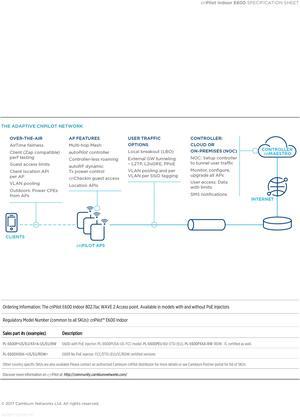
Cambium Networks - PL-E600X00A-US - cnPilot Enterprise E600 802.11ac Wave 2 Dual Band Wi-Fi MU-MIMO 4x4 Beamforming
Quick View
Cambium Networks - PL-E600X00A-US - cnPilot Enterprise E600 802.11ac Wave 2 Dual Band Wi-Fi MU-MIMO 4x4 Beamforming
  • Wireless Data Rates: 1.73 Gbps
  • Frequency Band: 2.4 GHz / 5 GHz
  • Interface: Two (2) x 1 Gigabit Ethernet (10/100/1000 Mbps)
  • Brand: Cambium Networks
  • Model #: PL-E600X00A-US
MikroTik RB4011iGS+5HacQ2hnD-IN-US & 5150-5875MHz Dual-Band SFP+ 4 Chain 10 Gigabit Ports L5
Quick View
  •  
  • $288.00 –
  • Free Shipping
Ubiquiti Networks - LAP-120 - Ubiquiti LiteAP ac 5 GHz, 2x2 MIMO airMAX AC Sector AP
Quick View
  •  
  • $209.99 –
  • Free Shipping

Learn about Wireless Access Points (APs)

Reliable Wi-Fi Coverage for Homes, Offices & Campuses

Wireless Access Points extend fast, secure Wi-Fi where routers can’t reach. Browse Newegg’s Wireless AP catalog for indoor ceiling-mount models, outdoor weatherproof units, mesh nodes, and controller-managed enterprise APs. Pair with PoE switches or PoE injectors for clean single-cable installs.

Popular Types of Access Points

Indoor APs: Low-profile, ceiling/wall mount units optimized for density and roaming in offices, classrooms and hospitality.

Outdoor APs: Rugged, weather-sealed models for campuses, warehouses and venues—see outdoor access points.

Mesh Systems: Easy, scalable whole-home/whole-office coverage with seamless roaming—explore mesh Wi-Fi.

Controller-Managed APs: Centralized configuration, RF tuning, guest portals, and monitoring—shop wireless LAN controllers.

Speed & Standards

Upgrade to modern standards for capacity and latency: Wi-Fi 6 (802.11ax) boosts efficiency with OFDMA and MU-MIMO, Wi-Fi 6E adds the clean 6 GHz band for lower interference, and emerging Wi-Fi 7 targets multi-gigabit throughput and ultra-low jitter.

Installation & Power

For tidy installs, ceiling-mount APs with mounting brackets and keystone jacks keep cabling discrete. Power APs via PoE from a PoE switch or adapter, and use quality Ethernet cables for best performance.

Performance tip: For multi-gig backhaul to an AP, use 2.5 GbE/5 GbE switches and Cat6/Cat6a cabling; enable band steering, WPA3 and airtime fairness to improve client experience.

How to Choose the Right Access Point

Size your APs by client count and application mix. High-density offices benefit from Wi-Fi 6/6E with OFDMA, while outdoor venues need weatherproof enclosures and directional antennas. For multi-site IT, choose controller-managed APs with centralized updates, guest captive portal and role-based policies.

Quick Comparison

Ceiling-Mount AP
Best roaming, discreet look, PoE power.
Outdoor AP
Weatherproof, long-range, directional options.
Mesh Node
Simple expansion, wireless backhaul.
Enterprise AP
Controller-managed, VLANs, WPA3, QoS.

Helpful Links

Shop Wireless Access Points – Explore APs for home, office, and outdoor coverage.

Wireless Routers – Choose routers for fast and secure Wi-Fi networks.

Mesh Wi-Fi Systems – Get whole-home coverage without dead zones.

LAN Switches – Expand your wired network connections.

Frequently Asked Questions

Do I need Wi-Fi 6E or is Wi-Fi 6 enough?

Wi-Fi 6 fits most offices and homes. Choose 6E if you want the 6 GHz band for lower interference and more channels for high-density or latency-sensitive work.

How many APs do I need for whole-home coverage?

Start with one per floor and add more for concrete walls or large areas. Mesh systems make expansion simple without running new cables.

Is PoE required for ceiling-mount APs?

Not required, but recommended—PoE powers the AP over Ethernet for cleaner installs and easier placement away from outlets.

Bestselling Wireless AP Reviews:

Anonymous
9/12/2025 2:05:20 PM
Excellent access point; stands alone, or mounts to wall

“ A very good Wifi 6 AP for the Omada ecosystem ”

TP-Link Omada EAP650-Desktop AX3000 Desktop Wi-Fi 6 Access Point