




 here!
I’m your shopping assistant for PC builds, upgrades, and everything tech.
Got questions? Ask away!
Start a conversation
here!
I’m your shopping assistant for PC builds, upgrades, and everything tech.
Got questions? Ask away!
Start a conversation
Make informed decisions with expert advice. Learn More


Any questions? Ask CelesteSM will help you find out quickly.
| Best Seller Ranking | #33 in Media Players & TV Tuners |
|---|
| Brand | Blackmagicdesign |
|---|---|
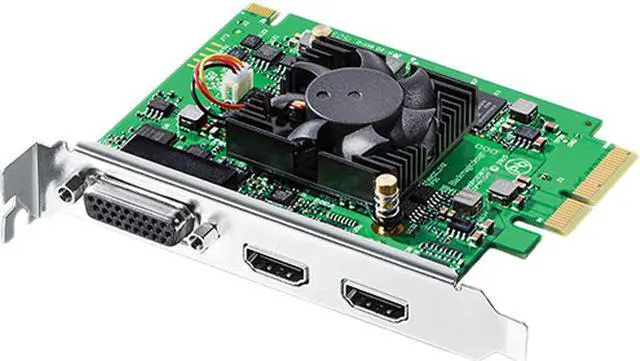
| Model | Intensity Pro 4K (BINTSPRO4K) |
| Type | Video Capture & Editing |
|---|---|
| Specifications | Connections: Multiple Rate Support: HDMI video connections are switchable between SD, HD and Ultra HD. Component analog video connections are switchable between SD and HD. Supported Codecs: AVC-Intra, AVCHD, Canon XF MPEG2, Digital SLR, DV-NTSC, DV-PAL, DVCPRO50, DVCPROHD, DPX, HDV, XDCAM EX, XDCAM HD, XDCAM HD422, DNxHR & DNxHD, Apple ProRes 4444, Apple ProRes 422 HQ, Apple ProRes 422, Apple ProRes LT, Apple ProRes 422 Proxy, Uncompressed 8-bit 4:2:2, Uncompressed 10-bit 4:2:2, Uncompressed 10-bit 4:4:4. Software Software Included: DaVinci Resolve, Media Express, Disk Speed Test, LiveKey, Blackmagic Desktop Video Utility and Blackmagic driver on Mac OS and Windows. Media Express, Blackmagic Desktop Video Utility and Blackmagic driver on Linux. Internal Software Upgrade: Firmware built into software driver. Loaded at system start or via updater software. Physical Installation: PCI Express 4 lane, compatible with 4, 8 and 16 lane PCI Express slots on Mac OS, Windows and Linux. Mac OS systems require a Mac Pro computer with PCI Express slots. Please check the Support pages to see the full system requirements. Processing: Ultra HD/HD Down Conversion: Software based down conversion during video playback. HD Up Conversion: Real time SD to 1080HD and 720HD during video capture. Real Time Effects: DaVinci Resolve, Final Cut Pro X internal effects. Adobe Premiere Pro CC Mercury Playback Engine effects. Avid Media Composer internal effects. Power Requirements: Power Consumption: 17 Watts EMC Certifications: FCC, CE and C-Tick. Environmental Specifications: Operating Temperature: 5~40 celsius degree Storage Temperature: -20~45 celsius degree Relative Humidity: 0% to 90% non-condensing |
| Interface | PCI Express 4 lane, compatible with 4, 8 and 16 lane PCI Express slots. |
|---|---|
| Video System | Video Standards: SD Video Standards: 525i59.94 NTSC, 625i50 PAL. HD Video Standards: 720p50, 720p59.94, 720p60, 1080p23.98, 1080p24, 1080p25, 1080p29.97, 1080p30, 1080p50, 1080p59.94, 1080p60, 1080i50, 1080i59.94, 1080i60. Ultra HD Video Standards: 2160p23.98, 2160p24, 2160p25, 2160p29.97, 2160p30. Audio Sampling: Television standard sample rate of 48kHz and 24-bit. Color Space: REC 601, REC 709. HDMI Video Sampling: 4:4:4, 4:2:2 & 4:2:0. HDMI Color Precision: 8, 10-bit (Deep Color) RGB 4:4:4 in all modes up to 1080p60, 8, 10-bit YUV 4:2:2 in all modes. HDMI Configuration: HDMI 1.4b supports Deep Color and automatically configures to connected display. Copy Protection: HDMI input is unable to capture from copy protected HDMI sources. Always confirm copyright ownership before capture or distribution of content. |
| Ports In | HDMI Video Inputs: 1 x HDMI type A connector. Analog Video Inputs: Component, Composite or S-Video. HDMI Audio Inputs: 8 Channels embedded in SD, HD and Ultra HD. Analog Audio Inputs: 2 Channels RCA HiFi audio in 24-bit. |
| Ports Out | HDMI Video Outputs: 1 x HDMI type A connector. Analog Video Outputs: Component, Composite or S-Video. HDMI Audio Outputs: 8 Channels embedded in SD, HD and Ultra HD. Analog Audio Outputs: 2 Channels RCA HiFi audio in 24-bit. |
| Mac Compatible | Yes |
|---|---|
| System Requirements | Operating Systems: Mac OS X 10.11 El Capitan, macOS 10.12 Sierra, macOS 10.13 High Sierra or later Windows 7, 8.1 and 10, all 64-bit Linux |
| Features | Intensity Pro 4K lets you capture and playback on PCIe Mac, Windows and Linux computers. Featuring HDMI and analog breakout connections, Intensity Pro 4K works with NTSC/PAL, HD and Ultra HD video with or without compression and is compatible with all popular video editing, audio, and streaming software. DaVinci Resolve Lite and Media Express software are included free so you get professional editing, grading and media management without having to buy extra software! |
|---|
| Package Contents | Intensity Pro 4K SD card with software and manual Breakout Cable |
|---|
| First Listed on Newegg | November 14, 2018 |
|---|
The Blackmagic Design Intensity Pro 4K is a PCIe video capture and playback card for editors, streamers, and creators who need to connect HDMI or analog video sources to a Mac, Windows, or Linux computer. It supports Ultra HD capture and playback up to 30 fps and 1080p up to 60 fps.


