




 here!
I’m your shopping assistant for PC builds, upgrades, and everything tech.
Got questions? Ask away!
Start a conversation
here!
I’m your shopping assistant for PC builds, upgrades, and everything tech.
Got questions? Ask away!
Start a conversation


Make informed decisions with expert advice. Learn More


Any questions? Ask CelesteSM will help you find out quickly.
If the capacity is not available, a larger capacity drive can be used to replace a TeraStation hard drive. For example, if replacing a 500 GB hard drive in a TeraStation, customers can use a 1 TB model. Hard drive capacities and availability change from time to time, so in some cases a larger hard drive must be used as a replacement. If a larger hard drive is used in a RAID configuration, it will appear as the same size as the other hard drives in the array.
Buffalo Storage Arrays:
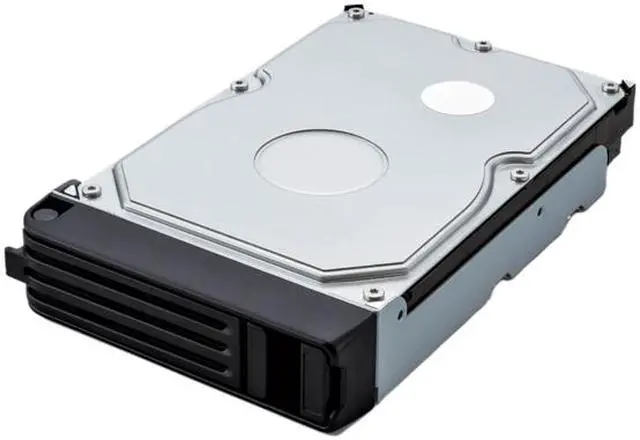
The BUFFALO OP-HD3.0T/4K-3Y is a 3TB, 3.5-inch SATA 3.0Gb/s internal hard drive designed for Buffalo TeraStation storage arrays, including the ES, III, III iSCSI, Pro, and Pro WSS series. It is suited to owners of these systems seeking a compatible drive for storage or replacement.
| Attribute | Value |
|---|---|
| Best For | Internal 3TB mechanical-drive replacement or addition for compatible Buffalo TeraStation ES, III, III iSCSI, Pro, and Pro WSS storage arrays |
| Capacity | 3TB (3000GB) |
| Interface And Form Factor | Internal SATA drive with a 3.5-inch form factor; SATA interface rated at 3.0Gb/s |
| Model Identifiers | BUFFALO OP-HD3.0T/4K-3Y |
Q: Buffalo OP-HD3.0T/4K-3Y vs OP-HD2.0T/4K-3Y: which should I choose?
A: Choose the OP-HD3.0T/4K-3Y when the exact TeraStation model is listed as compatible and you want 3TB per drive; choose the OP-HD2.0T/4K-3Y when its 2TB capacity and model-specific compatibility match your replacement need. Buffalo lists different supported TeraStation models for these capacity variants, so check the exact model before ordering. ([buffaloamericas.com](https://buffaloamericas.com/products/replacement-hard-drives-for-terastation-drivestation-quad-and-linkstation-p?utm_source=openai))
Q: Should I get the 3TB 4K-sector drive or Buffalo’s standard OP-HD3.0T?
A: Choose based on the TeraStation’s required physical sector format, not capacity: Buffalo identifies the “/4K” models as 4K-byte-sector drives and advises matching the replacement drive’s sector size for TeraStation WSS systems. Confirm the exact drive format listed for your system before choosing. ([buffalo.jp](https://www.buffalo.jp/product/detail/op-hd3.0t.html?utm_source=openai))
Q: Buffalo OP-HD3.0T/4K-3Y vs OP-HD1.0T/4K-3Y: is the 3TB version worth choosing?
A: Choose the 3TB version when Buffalo lists it as a direct replacement for your TeraStation model and you want more capacity per drive; choose the 1TB version when that part number is the listed match for your system. Buffalo provides separate compatibility lists for the 1TB and 3TB models, so verify the exact TeraStation model. ([buffaloamericas.com](https://buffaloamericas.com/products/replacement-hard-drives-for-terastation-drivestation-quad-and-linkstation-p?utm_source=openai))
Q: Will this drive work with my TeraStation?
A: It is listed for Buffalo TeraStation ES, TeraStation III, TeraStation III iSCSI, TeraStation Pro, and TeraStation Pro WSS models. Check your exact model and, for a Pro WSS unit, confirm the replacement drive’s sector format matches the drive already installed.
Q: Can I use it in a laptop or desktop PC?
A: This is a 3.5-inch internal SATA drive, so it is not a laptop-sized or portable drive. A desktop would need a compatible 3.5-inch bay, SATA data and power connections, and support for the drive’s sector format. It is specifically listed as a TeraStation replacement drive, so confirm PC compatibility before using it outside a supported array.
Q: Can I use this 3TB drive to replace a smaller drive in a RAID array?
A: A larger drive may be used as a replacement in some TeraStation arrays, but the array may not gain usable capacity: Newegg notes that a larger replacement in a RAID configuration can appear to be the same size as the other drives. Confirm your TeraStation model’s compatibility and replacement procedure before installing it.
Q: Will this fit my Buffalo TeraStation?
A: It is a 3TB, 3.5-inch SATA drive listed for Buffalo TeraStation ES, III, III iSCSI, Pro, and Pro WSS arrays. Check your exact TeraStation model and its required sector format before buying; compatibility can vary by model.
Q: Can I use a regular third-party drive instead of a Buffalo replacement?
A: Some TeraStation owners report using other drives, but compatibility and capacity limits depend on the NAS model and firmware. This Buffalo drive is the specified replacement for the models listed in the product data; don’t assume a generic SATA drive will work the same way.
Q: Will replacing a smaller drive with this 3TB model increase usable storage?
A: Not necessarily. Usable capacity depends on the TeraStation model and RAID configuration; Reddit discussions note that larger replacement drives may not make their extra capacity available in an existing array. Check the NAS model’s limits and your RAID setup before treating this as a capacity upgrade.


