
Shopping for a gaming laptop does not start and end with the processor. The display, graphics hardware, memory, storage, battery capacity, and overall portability all affect how a laptop fits into your routine. This ranked guide highlights five current options, ranging from affordable systems for light gaming to slim models with integrated Intel Arc or AMD Radeon graphics.
There is one important caveat: these are mainstream laptops, not dedicated gaming systems with discrete NVIDIA or AMD graphics. They are best suited to casual games, esports at sensible settings, cloud gaming, and everyday productivity. If you want to play demanding AAA titles at high settings, look for a laptop with a dedicated GPU instead.
How We Picked
We compared the documented specifications of each laptop with the needs of real-world buyers. Since standardized gaming benchmark results were not provided, these rankings do not promise measured frame rates.
- Gaming capability: Integrated Intel Arc, Intel UHD, or AMD Radeon graphics indicate the likely range of gaming flexibility.
- Display quality: Resolution, panel type, refresh rate, brightness, and color coverage affect gaming, streaming, and creative work.
- Everyday performance: Processor cores, memory capacity, and SSD storage influence multitasking and load times.
- Mobility and value: Battery capacity, weight, connectivity, and the overall specification balance help determine how practical each laptop is to own.
#1 Best Overall: ASUS Vivobook S 16
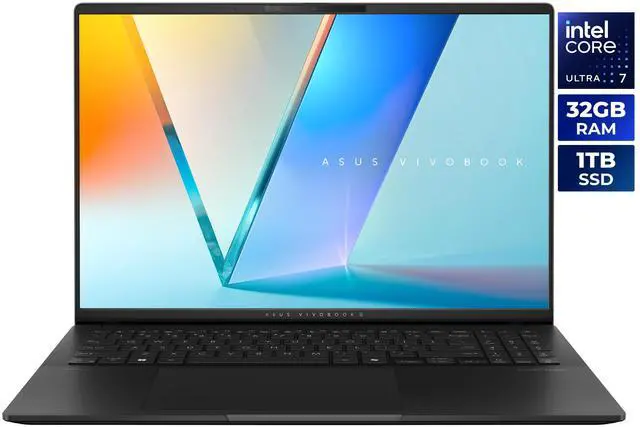
For shoppers looking for a single laptop that can handle light gaming, school, work, entertainment, and content creation, the ASUS Vivobook S 16 S5606CA-NS79 is the most well-rounded choice. Its Intel Core Ultra 7 255H features 16 cores and 24MB of L3 cache. Combined with 32GB of LPDDR5X-7500 memory and a 1TB PCIe 4.0 SSD, that is an unusually generous configuration for a thin-and-light laptop.
The 16-inch OLED display is the main attraction, delivering 2880 x 1800 resolution, a 120Hz refresh rate, 400-nit peak HDR brightness, and 100% DCI-P3 coverage. Intel Arc integrated graphics can handle casual gaming and Intel XeSS-compatible workloads, although demanding games will call for reduced settings. A 75Wh battery, 3.31-pound weight, Wi-Fi 7, and two Thunderbolt 4 ports make this ASUS especially versatile.
Best for Maximum CPU and Touchscreen Productivity
The MSI Venture 16 AI A2HMTG-015US is built for buyers who prioritize multitasking and a responsive touchscreen. Its Intel Core Ultra 9 285H works alongside 32GB of DDR5-5600 memory and a 1TB NVMe SSD, making it a sensible option for office applications, coding, and light gaming.
The 16-inch 1920 x 1200 IPS panel uses a useful 16:10 aspect ratio, while Intel Arc integrated graphics provide entry-level gaming potential. At 4.19 pounds with a 55Wh battery, it is less convenient to carry than the ASUS Vivobook S 16. In return, the MSI provides gigabit Ethernet, Wi-Fi 6E, HDMI 2.1, and a 90-watt adapter.
Best Budget Pick: BiTECOOL 15.6-inch Laptop
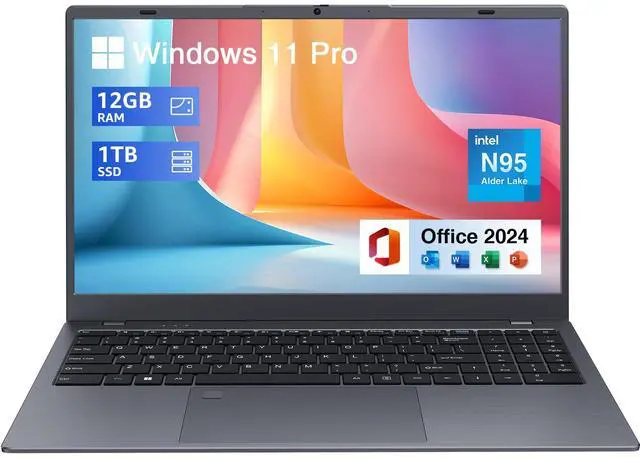
For basic computing and casual gaming at a value-oriented price, the BiTECOOL 15.6-inch laptop is the budget pick. Its four-core Intel Celeron N95 reaches up to 3.4GHz and is paired with 12GB of LPDDR5-4800 memory and a 1TB NVMe SSD.
The 1920 x 1080 IPS display runs at 60Hz and includes low-blue-light features. With Intel UHD Graphics and the N95 processor, this laptop is a better match for older games, browser gaming, and streaming than for modern demanding releases. The listed specifications also indicate that its HDMI 2.1 output supports up to 4K at 60Hz.
Best for Students and Light Gaming
The Ningmei NL150 is aimed at students and everyday users who need a straightforward system for documents, web browsing, video calls, and light gaming. It combines an Intel Processor N150 with 16GB of memory and a 512GB SSD. Its four-core platform is intended for everyday workloads rather than high-end 3D performance.
Three USB ports, HDMI, and a 3.5mm combo jack make it convenient for classroom, home, or hybrid use. However, the supplied specifications do not list a panel resolution, refresh rate, battery capacity, or detailed graphics configuration. That makes its gaming performance less predictable than the other recommendations.
Best for AI Features on a Moderate Budget
Shoppers interested in local AI features should consider the ASUS VivoBook 16 M1607KA-NS76. It uses the AMD Ryzen AI 7 350, an 8-core, 16-thread processor with an AMD XDNA NPU rated up to 50 TOPS. Integrated AMD Radeon graphics are suitable for casual gaming, while the Copilot+ PC positioning adds appeal for AI-focused users.
The 16-inch WUXGA display offers 1920 x 1200 resolution, 300-nit sustained brightness, and a 60Hz refresh rate. The configuration also includes 16GB of DDR5 memory, a 512GB PCIe 4.0 SSD, Wi-Fi 6, USB-C display and power-delivery support, and a listed battery life of up to 10 hours.
Quick Comparison
Looking at the key specifications makes it easier to match each laptop with the right kind of buyer.
- Best overall: ASUS Vivobook S 16, with a 120Hz OLED panel, 32GB RAM, and a 75Wh battery.
- Best CPU and touch: MSI Venture 16, with Core Ultra 9, 32GB DDR5, and a touchscreen.
- Best budget: BiTECOOL, with 12GB RAM and a 1TB NVMe SSD.
- Best student value: Ningmei NL150, with 16GB memory and a compact 512GB SSD configuration.
- Best AI-focused choice: ASUS VivoBook 16, with Ryzen AI 7 350 and up to 50 TOPS NPU performance.
Final Recommendation
The ASUS Vivobook S 16 is the easiest recommendation for most shoppers because it combines a high-quality display, generous memory and storage, portability, and light-gaming capability. Choose the MSI Venture 16 if CPU headroom and touchscreen input are your top priorities. On a tighter budget, the BiTECOOL and Ningmei models are better suited to basic gaming and productivity, while the ASUS VivoBook 16 is the strongest alternative for buyers who want AI-focused features.
Frequently Asked Questions
Can these laptops run modern AAA games?
These models use integrated Intel or AMD graphics rather than dedicated gaming GPUs, so they are best for casual games, esports, older titles, and cloud gaming. Modern AAA games may require low settings, reduced resolution, or a different laptop with a dedicated NVIDIA or AMD graphics card.
Which laptop offers the best value for school and everyday work?
The ASUS Vivobook S 16 offers the strongest overall balance with 32GB of memory, a 1TB SSD, a high-resolution 120Hz OLED display, and a relatively light design. The Ningmei NL150 may be a better fit for buyers who only need basic documents, browsing, video calls, and light gaming.
Which model has the best display for gaming and content creation?
The ASUS Vivobook S 16 stands out with its 16-inch 2880 x 1800 OLED panel, 120Hz refresh rate, HDR brightness, and 100% DCI-P3 color coverage. Its display is better suited to media consumption and creative work than the 60Hz panels on the budget-oriented models.
Are these laptops suitable for multitasking and demanding productivity apps?
The ASUS Vivobook S 16 and MSI Venture 16 are the best choices for heavier multitasking because both configurations include 32GB of memory. The MSI adds a Core Ultra 9 processor and touchscreen, while the ASUS is lighter and offers a larger battery.
Should I check availability and warranty details before buying?
Yes, inventory, pricing, seller information, return policies, and warranty coverage can vary by configuration and retailer. Verify the exact model number, operating system, included accessories, shipping status, and warranty terms on the product page before placing an order.
Read More
- ASUS Vivobook S 16 S5606CA-NS79 Product Page — Review the listed specifications for the top-ranked ASUS Vivobook S 16, including its OLED display, memory, storage, and battery.
- MSI Venture 16 AI A2HMTG-015US Product Page — See the detailed configuration for MSI’s productivity-focused laptop with a Core Ultra 9 processor, touchscreen, and integrated Intel Arc graphics.
- BiTECOOL 15.6-inch Laptop Product Page — Check the budget laptop’s processor, memory, storage, display, and connectivity details before comparing it with other entry-level options.
- Ningmei NL150 Product Page — Explore the listed specifications for this student-oriented laptop designed for everyday productivity and light gaming.
- ASUS VivoBook 16 M1607KA-NS76 Product Page — Learn more about the AMD Ryzen AI-powered ASUS VivoBook 16, including its integrated Radeon graphics, NPU, display, and battery claims.
Related Posts
- Best Laptops for Performance, Battery Life, Portability, and Value
- Best Affordable Budget PC Guide: What to Buy, Check, and Upgrade
- ASUS ProArt Motherboards Explained: For Creators — and Surprisingly Affordable Home AI Workstations
- Intel Xeon 600 Series Redefines the Professional Workstation
- What PC Hardware Do You Need for 1440p Gaming?