
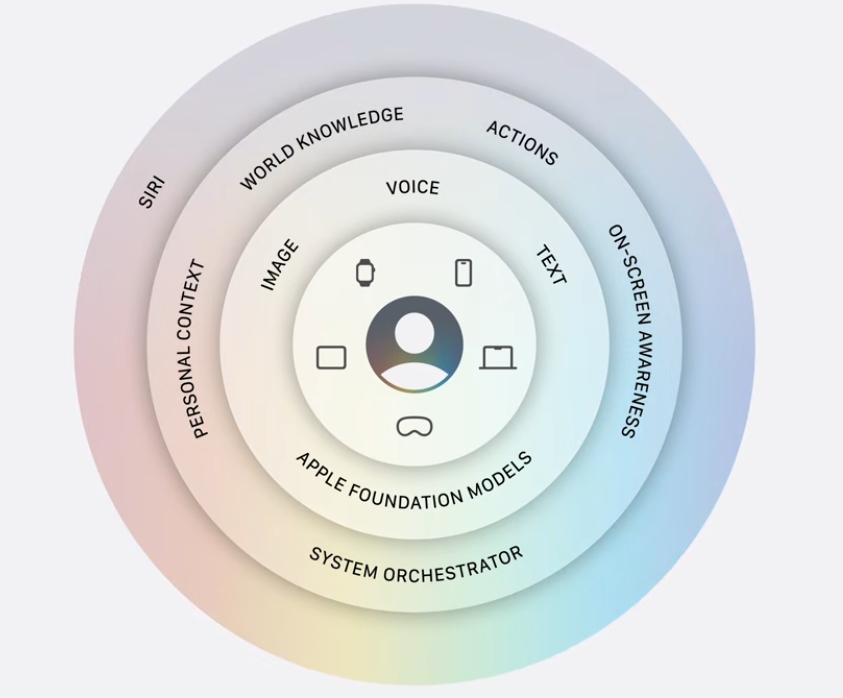
The biggest Apple Intelligence features at WWDC 2026 center on a rebuilt Siri, smarter photo editing, and AI that works across the apps you already use. At its June 8 keynote, Apple leaned hard into AI after a rocky first attempt, this time with help from Google’s Gemini models. This guide breaks down the new Apple Intelligence features, the all-new Siri, and which devices can actually run them.
Quick summary: the headline changes
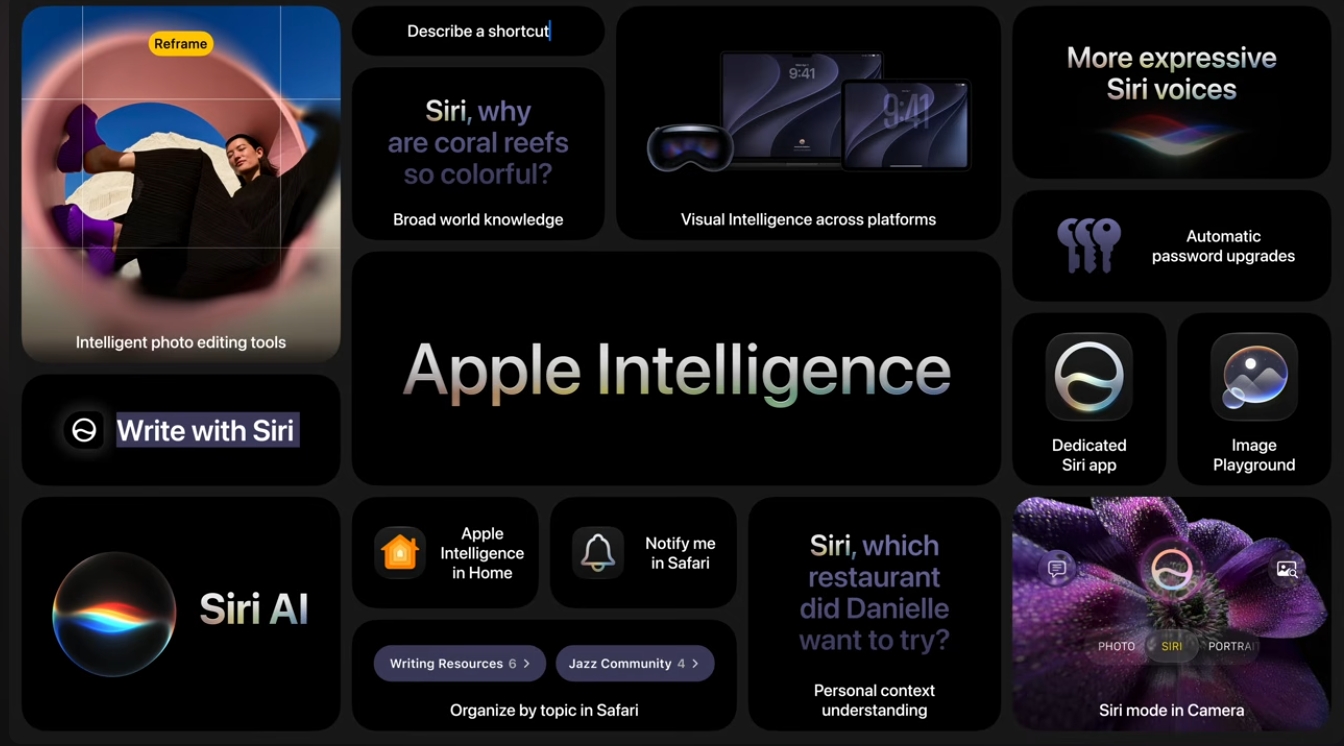
Apple built this year’s keynote around three pillars, and Apple Intelligence and Siri took the largest share. The company reworked Siri from the ground up, expanded AI photo tools, and pushed AI into Photos, Passwords, Shortcuts, and more.
Here is the short version of the new Apple Intelligence features.
- A rebuilt Siri AI with system-wide context and on-screen awareness
- A standalone Siri app for iPhone, iPad, and Mac
- Visual Intelligence that reads what is on your screen
- New Photos editing tools: Clean Up, Extend, and Reframe
- An agentic Passwords app that fixes weak passwords for you
These features ship across iOS 27, iPadOS 27, and macOS Golden Gate this fall.
The all-new Siri AI
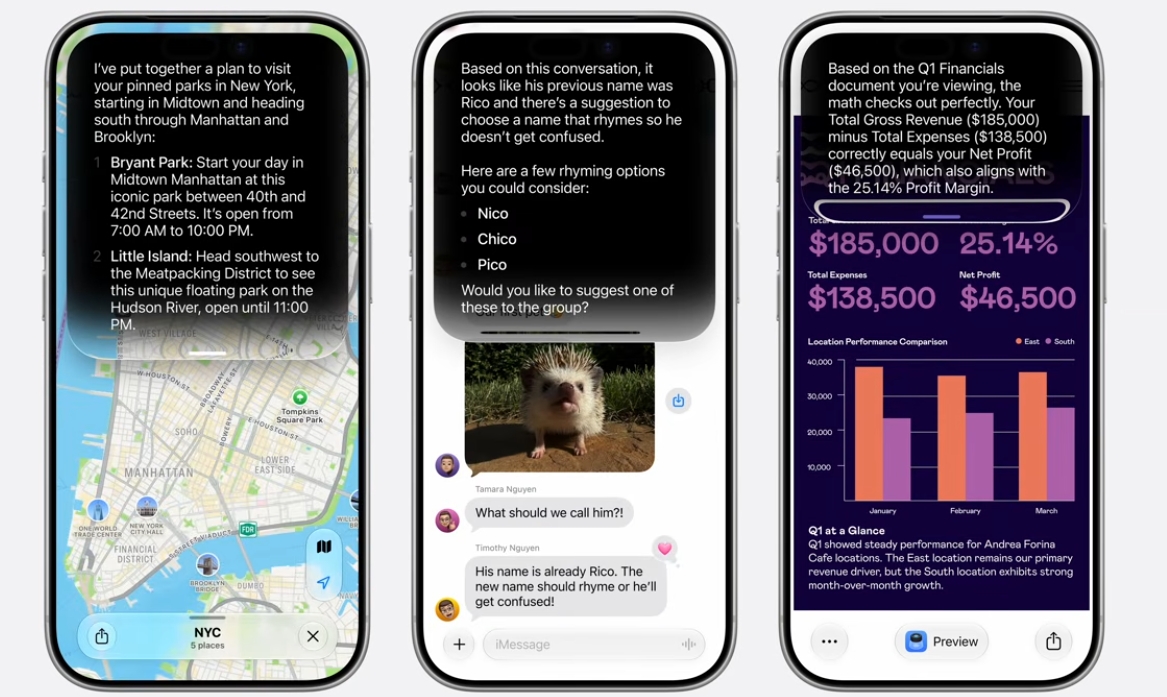
The star of WWDC 2026 is a completely rebuilt Siri AI. Apple redesigned the assistant to understand personal context and to see what is on your screen, so it can handle multi-step tasks across different apps instead of answering one question at a time.
Behind the scenes, Apple now leans on Google’s Gemini technology to power the smarter responses. The company calls its cloud-based system Apple Foundation Models on Cloud, with a top-tier model aimed at the most demanding tasks. This partnership marks a big shift after Apple’s first AI rollout fell short.
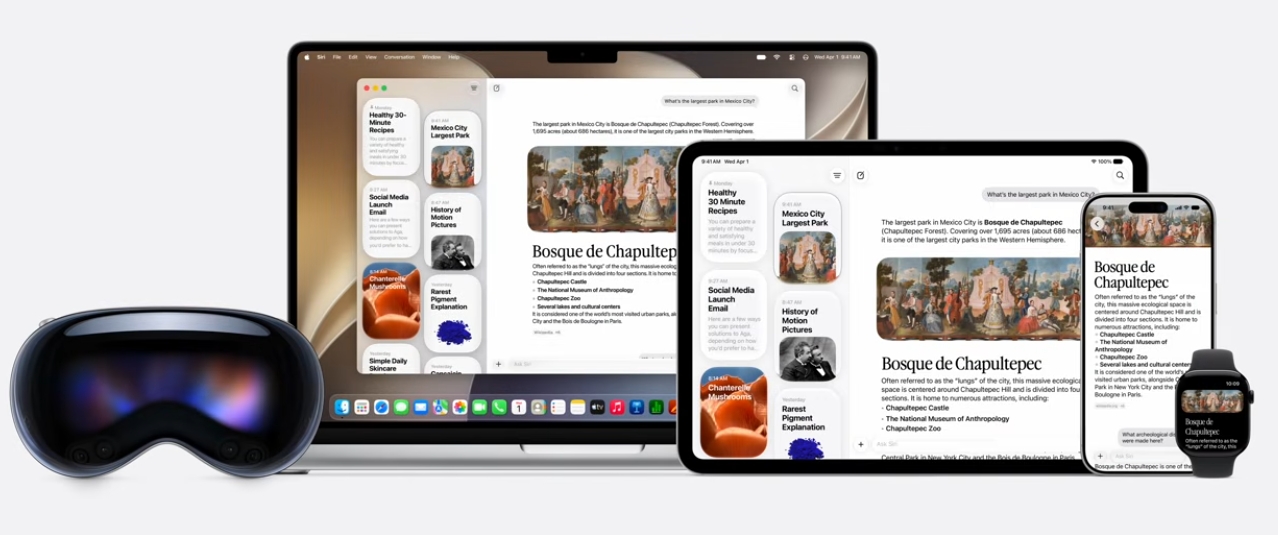
There is also a new standalone Siri app. You can chat with Siri, revisit old conversations, and pull up past results, much like a dedicated AI chatbot. The app works on iPad and Mac too, so the assistant follows you across devices.
On a laptop, you can ask Siri about images and text on your screen. That turns the assistant into a research helper that understands the page in front of you, not just your spoken words.
One caveat for some readers: Apple said Siri AI will not be available in the European Union on iOS and iPadOS at launch. Availability may change later, but the rollout starts elsewhere.
Visual Intelligence reads your screen
Visual Intelligence is one of the most useful new Apple Intelligence features. It used to live only in the Camera app, but now it works inside Siri and across the system. Point it at the world or your screen, and it identifies what it sees.
The tool also got smarter. It can recognize nutrition labels, pull contact information, and understand natural language requests about an image. Ask it to change something in a photo using plain words, and it follows along.
This is the kind of feature that quietly changes daily habits. Snap a flyer and save the date. Scan a label and check the details. The phone becomes a tool that reads context, not just text.
Smarter photo editing in the Photos app
The Photos app gained three AI editing tools that bring desktop-grade edits to your phone. Each one targets a common frustration, and together they cover most quick fixes.
Clean Up removes unwanted objects or people from a shot, leaving a natural-looking background. Extend adds more to an image beyond the original frame, and you choose how much to add and where. Reframe, sometimes shown as Spatial Reframing, shifts the perspective of a photo after you take it, as if you had moved the camera.
You can also generate new wallpapers and lock-screen images with AI. Describe the look you want, and the system creates it.
One responsible touch stands out. Photos edited with Apple Intelligence carry a hidden SynthID watermark, a signal that AI shaped the image. That helps keep AI edits traceable as these tools spread.
AI that acts: the new Passwords app
The most forward-looking of the new Apple Intelligence features is an agentic Passwords app. It uses Apple Intelligence and Safari to act on your behalf, visiting each website to change and fix insecure passwords for you.
This is a real example of an AI “agent,” a program that completes a task in the background rather than just giving advice. Instead of telling you which passwords are weak, it goes and fixes them. That saves the tedious work of logging into dozens of sites one by one.
Apple also improved everyday helpers. The Shortcuts app got a major upgrade, scheduling tools got smarter, and phone-call assistance improved. The theme is consistent: AI woven into apps you already use, not a separate chatbot you must remember to open.
Which devices run Apple Intelligence
The new Apple Intelligence features need capable hardware. Apple lists support for the iPhone 15 Pro and later, the full iPhone 16 line and later, the iPad mini with A17 Pro, any iPad with an M1 chip or later, and any Mac with an M1 chip or later. Apple Watch support includes the Series 10, Ultra 2, and SE 3.
Notice the gap. A standard iPhone 15 does not make the list, while the 15 Pro does. If your device is older or a non-Pro model from a couple of years ago, you may get iOS 27’s speed gains but not the full AI suite.
That hardware line is worth checking before you expect these features. The basic operating system reaches back to the iPhone 11, but Apple Intelligence draws a much newer line.
How Apple’s AI compares to Windows AI PCs
Apple’s renewed AI push lands in a year when Windows AI PCs are everywhere. Copilot+ machines ship with dedicated AI chips called NPUs, and they run their own on-device AI features for search, image editing, and writing.
The two camps take different paths. Apple tunes its AI tightly to its own chips and now blends in Google’s Gemini for heavy lifting. Windows spreads across many brands, chips, and price points, which gives shoppers more choice and more confusion.
If you want to see how the Windows side handles AI, browse the current range of Copilot+ AI PCs. Creators who lean on local power for editing and rendering can compare gaming laptops with strong CPUs and graphics. To weigh AI laptops by price and specs, the Newegg Laptop Finder narrows the field fast.
Getting the most from these features
A few practical notes help you use the new Apple Intelligence features well. First, confirm your device is on the support list before you plan around the AI tools. The speed gains are universal, but the AI is not.
Second, give the new Siri real tasks, not just trivia. Its strength is multi-step work across apps, so ask it to draft, find, and organize rather than only to set timers. That is where the rebuild pays off.
Finally, watch your storage and memory if you run AI tools often. On-device AI leans on both, and a cramped machine slows down. On a laptop, adding more memory or a roomier NVMe SSD keeps AI features responsive.
Frequently asked questions
What powers the new Siri AI? Apple rebuilt Siri and now uses Google’s Gemini technology through its Apple Foundation Models on Cloud system to handle complex, multi-step requests.
Which devices support Apple Intelligence? Support includes iPhone 15 Pro and later, iPhone 16 and later, iPad mini with A17 Pro, iPad with M1 or later, and Mac with M1 or later, plus recent Apple Watches.
What are the new Photos editing tools? Clean Up removes objects, Extend adds beyond the frame, and Reframe shifts a photo’s perspective after capture. AI edits carry a hidden SynthID watermark.
What does the new Passwords app do? It acts as an AI agent, using Apple Intelligence and Safari to visit websites and fix insecure passwords on your behalf.
Is Siri AI available everywhere? Not at launch. Apple said Siri AI will not be available in the European Union on iOS and iPadOS when it ships.
The bottom line on Apple Intelligence features
The new Apple Intelligence features mark Apple’s most serious AI effort yet. A rebuilt Siri with on-screen awareness, Gemini-powered cloud models, system-wide Visual Intelligence, fresh Photos editing, and an agentic Passwords app add up to AI woven through daily use rather than bolted on.
The catch is hardware. The AI suite needs an iPhone 15 Pro or newer, or an M-series iPad or Mac. If your device misses the line and you want on-device AI today, compare options with the Newegg Laptop Finder, or browse the latest Copilot+ AI PCs to see how the Windows side stacks up.
Related Posts
- Apple Parental Controls at WWDC 2026: The New Child Account Tools Explained
- iOS 27 Performance Boost: Every Speed and Design Change Apple Showed at WWDC 2026
- Sales Tax Holiday 2026: Save on PC Components, Peripherals, Laptops, Desktops, and Workstations at Newegg
- Intel’s Fastest Gaming Desktop CPUs Are Almost Here: A Complete Look at the Core Ultra 270K/250K/250KF Plus Arrow Lake Refresh
- NVIDIA GTC 2026, Part 3: The OpenClaw Revolution, Self-Driving Ubers, and Jensen’s Annual Tradition of the Perfect Finale