
An all-in-one desktop answers one question better than any other kind of PC: what do you buy when the desk is small and you would rather not own two boxes and five cables? The monitor is the computer. You take it out of one carton, plug in one power cord, and you are working. That convenience has a price in flexibility, and this guide is honest about where it bites. Here are the best all-in-one desktops on Newegg right now, from a fanless entry machine to a 27-inch touchscreen, plus the specifications that actually matter when the screen cannot be replaced later.

Why an All-in-One Makes Sense

Dell’s own student guidance makes the case plainly: an all-in-one folds the monitor and the PC into one unit, which saves desk space and cuts both cable clutter and setup time. In a dorm room, a shared apartment or a small home office, that is not a minor benefit. It is also a genuinely tidy machine to live with, because there is no tower under the desk collecting dust and no second power brick.
What Dell recommends students look for is worth repeating: a 21.5 to 27-inch screen at Full HD or higher, several USB ports plus HDMI output, Wi-Fi and Bluetooth for peripherals, and at least a current Core i5 or Ryzen 5 class processor with 8GB of memory as the floor.
What You Give Up Versus a Tower
Two things, and it is better to know now. Upgradeability is partial. Memory and M.2 storage are the components most often serviceable — the AOC model below lists an upgradeable memory slot, the Lenovo ThinkCentre lists upgradeable SO-DIMM slots, and HP’s OmniStudio listing notes its seal is opened for upgrades. But the processor, the graphics and the panel itself are fixed. And “upgradeable” is per model, not per brand: Lenovo’s A100 lists a single memory slot with none free, and ASUS states the V400’s memory is not user-upgradeable. Check the specific configuration before you assume.
Repairability is harder. A tower opens with a thumbscrew. An all-in-one usually routes service through a technician, and on the most integrated designs the display is held by adhesive rather than screws. Tom’s Guide is blunt that all-in-ones are not easily repairable.
One more thing worth checking before you buy: an all-in-one’s HDMI port is almost always an output, not an input, so most of these machines cannot double as a monitor for a console or a laptop. A few models in the wider market do offer HDMI input, but it has to be stated on the spec sheet — none of the eight here verifiably does.
The Field at a Glance
| System | Screen | Processor | Best for |
|---|---|---|---|
| Lenovo A100 | 23.8″ FHD IPS | Intel N100 | Simplest, quietest desk PC |
| HP OmniStudio | 23.8″ FHD matte | Intel N150 | Bundle with dock and storage |
| AOC Business AIO | 23.8″ FHD matte | Ryzen 5 3500U | Height-adjustable stand |
| Dell Pro 24 | 23.8″ FHD 100Hz | Core i5-14500T | Everyday office work |
| MSI PRO 27″ | 27″ FHD IPS 100Hz | Core i5-14400 | Big screen, wireless desk |
| Lenovo ThinkCentre M90a Gen 6 | 23.8″ FHD | Core Ultra 5 225 | Serviceability and VESA |
| HP EliteStudio 8 AiO G1i | 23.8″ FHD touch | Core Ultra 7 265 | Modern platform, Wi-Fi 7 |
| ASUS V400 | 27″ FHD touch | Core i7-13620H | Large touchscreen |
Simplest and Quietest: Lenovo A100
If the machine only needs to run a browser, a word processor and video calls, the Lenovo A100 23.8-inch is enough computer. It pairs a four-core Intel N100 with 8GB of DDR5, a 256GB NVMe drive and a 23.8-inch Full HD IPS panel covering 99% of sRGB, with a 5MP webcam, dual microphones, 2.5G Ethernet and Wi-Fi 6. Note the single memory slot with none free — upgrading means replacing the module, up to 32GB.
Best Bundle: HP OmniStudio 23.8-inch
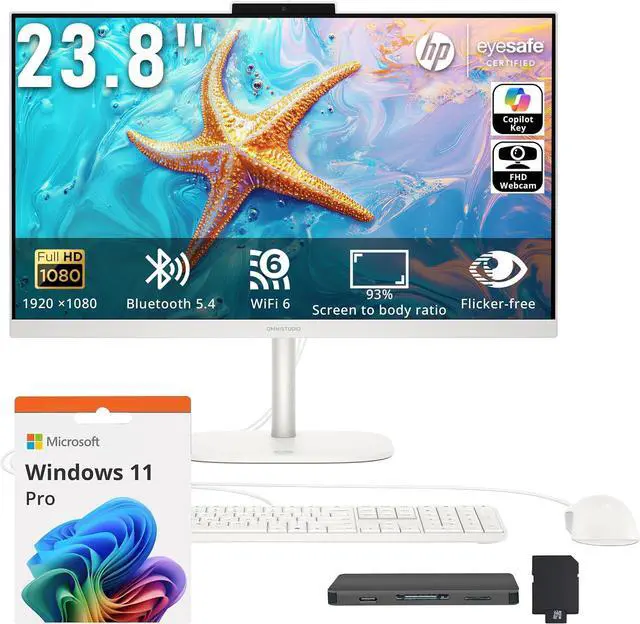
The HP OmniStudio 23.8-inch takes an Intel N150 and 8GB of DDR5 and adds the things you would otherwise buy separately: a keyboard and mouse, a seven-in-one hub with a 1TB docking-station drive and a 32GB microSD card. Its 23.8-inch Full HD panel is anti-glare, which matters more than it sounds in a bright room, and the camera is 1080p. Wi-Fi 6 and Windows 11 Pro round it out.
Best Ergonomics: AOC 23.8-inch Business AIO
Most all-in-one stands tilt and nothing more, which is why the AOC 23.8-inch Business All-in-One is worth singling out: it advertises an adjustable angle and height stand. Inside is a Ryzen 5 3500U with Radeon Vega 8 graphics, 16GB of upgradeable DDR4 and a 512GB SSD, behind an anti-glare Full HD panel with dual speakers and a bundled keyboard and mouse.
Best for Everyday Office Work: Dell Pro 24
The Dell Pro 24 All-in-One uses a 14-core Core i5-14500T with 8GB of DDR5 and a 256GB TLC drive behind a 23.8-inch Full HD panel that runs at 100Hz — an unusual and welcome touch on a business machine, since it makes everyday scrolling noticeably smoother. It ships with Windows 11 Pro and an FHD HDR camera.
Best Big Screen Without Touch: MSI PRO 27-inch
For a larger canvas, the MSI PRO 27-inch All-in-One puts a 10-core Core i5-14400, 16GB of DDR5 and a 512GB NVMe drive behind a 27-inch IPS Full HD 100Hz panel, with an IR webcam for Windows Hello face sign-in, Wi-Fi 6E and a wireless keyboard and mouse. Its port selection is the strongest here: USB-C, three USB 3.2 Type-A, two USB 2.0, HDMI, DisplayPort and Ethernet.
Best for Serviceability: Lenovo ThinkCentre M90a Gen 6
If you expect to keep the machine for years, the Lenovo ThinkCentre M90a Gen 6 is the pick. It uses a Core Ultra 5 225 with upgradeable SO-DIMM memory, a 256GB SSD, an optical drive and — uniquely in this group — a VESA mount included in the box, which is the practical fix for a stand that does not adjust in height.
Best Modern Platform: HP EliteStudio 8 AiO G1i
The HP EliteStudio 8 AiO G1i is the most current machine here: a Core Ultra 7 265 with 16GB of DDR5, a 512GB SSD, a 23.8-inch touchscreen, Wi-Fi 7 and six USB ports including Thunderbolt 4 and a 20Gbps USB-C. If you want an all-in-one that will still feel modern in four years, this is the one to look at.
Best Large Touchscreen: ASUS V400 27-inch
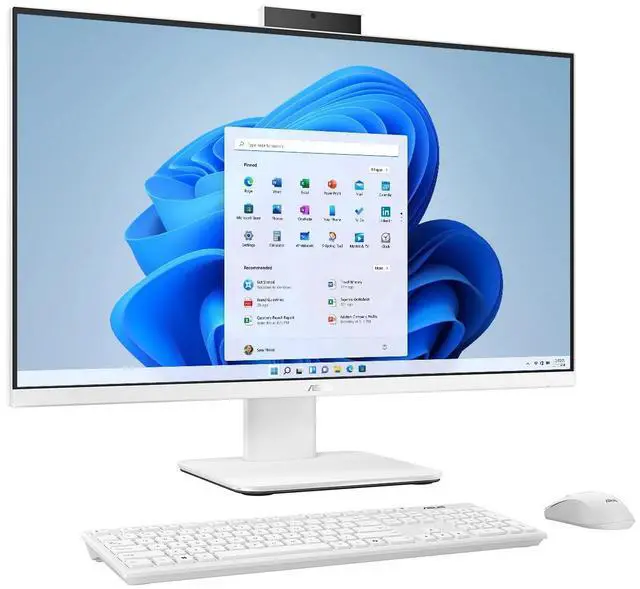
The ASUS V400 27-inch combines a 10-core Core i7-13620H with Iris Xe graphics, 16GB of DDR5, a 1TB PCIe 4.0 drive and a 27-inch Full HD touchscreen rated at 300 nits and 100% of sRGB, with a retractable privacy camera and Wi-Fi 6E. The memory is not user-upgradeable, so buy the configuration you want.
The Verdict
For most students and home offices, the MSI PRO 27-inch is the sweet spot — a big 100Hz screen, a real port selection and a wireless desk. Choose the HP OmniStudio if you want everything in one carton, the AOC if a height-adjustable stand matters to your neck, the ThinkCentre M90a if you want to service it yourself, and the EliteStudio 8 or ASUS V400 if you want the newest platform or the biggest touchscreen. One buying note for 2026: memory prices have been climbing as AI infrastructure absorbs manufacturing capacity, and because many all-in-ones ship with one occupied memory slot, buying enough RAM up front matters more this year than usual. Compare current models in Newegg’s all-in-one desktop listings.
Frequently Asked Questions
Can you upgrade an all-in-one desktop? Partly. Memory and M.2 storage are often serviceable, and several models here list upgradeable slots. The processor, graphics and display are fixed. Crucially it varies by model rather than by brand — Lenovo’s A100 has one memory slot with none free, and ASUS states the V400’s memory is not user-upgradeable, so check the specific configuration.
Is an all-in-one good for a dorm room? Yes, and it is one of the strongest use cases. It replaces a monitor plus a tower with one unit, cutting desk space, cables and setup time. Prioritize a Full HD or higher panel at 23.8 to 27 inches, a 1080p webcam for video classes, an anti-glare coating if the room is bright, and enough memory from the start.
Can I use an all-in-one as a monitor for my console or laptop? Usually not. The HDMI port on nearly every all-in-one is an output, not an input. A handful of models in the wider market do offer HDMI input, but it must be stated explicitly on the spec sheet, and none of the machines in this guide verifiably has one.
IPS or VA, and does 27 inches at Full HD look soft? IPS is the better fit for an all-in-one because these machines are shared and viewed off-axis, and IPS holds color and contrast at wide angles. On size: the same 1920×1080 panel spread across 27 inches has lower pixel density than across 23.8 inches, so text looks slightly softer at the same viewing distance — which is why 27-inch models benefit from a higher-resolution panel when one is available.
Read More
- Tom’s Guide: The Best All-in-One PCs — A regularly updated round-up with hands-on picks and honest advice on webcams, ports and AIO upgrade limits.
- Dell: Best All-in-One Desktops for Students — A manufacturer’s own checklist of screen size, ports and baseline specifications for student machines.
- iFixit: All-in-One Repair Guides — Teardowns and display-removal walkthroughs that show how serviceable a sealed AIO chassis really is.
- RTINGS: IPS vs VA Panels — What the two panel technologies actually change in viewing angle and contrast.
- Newegg: All-in-One Desktops — Filter current models by screen size, processor and memory.