
Memory is the part of a build nobody thinks about until it is the part everyone is talking about. That is roughly where we are now. Analysts have spent the last few weeks warning that memory and storage cost pressure will push PC prices up through the end of the year and possibly into next, and the forum threads have shifted from “which kit” to “should I buy now.”
I am not going to tell you what to do with that. What I can do is narrow the field, because the number of DDR5 kits on a listing page is genuinely absurd and most of the differences between them do not matter.
Why Memory Got Complicated
With DDR4, the advice fit in one line: 3200 or 3600, CL16, done. DDR5 broke that habit because the speed range is wider, the latency numbers look alarming next to DDR4, and the sweet spot moved depending on which platform you are on.
The short version for 2026: on AM5, DDR5-6000 remains the reliable target because it usually lines up with the memory controller running in its 1:1 mode. Going faster often means the controller drops to a divided ratio and you give back some of what you gained. On Intel’s LGA 1851, the official support tops out higher, and 6400 kits are comfortable there.
What I Actually Check
Capacity before speed. 32GB is the current default for gaming. 64GB is for people who run virtual machines, work with large project files, or keep an unreasonable number of browser tabs open while playing. 128GB is a workstation decision.
The profile it ships with. Kits carry AMD EXPO, Intel XMP 3.0, or both. A kit with only XMP will still run on an AMD board, just not at its rated speed without manual tuning. Check this before you order, not after.
Voltage. The kits below sit at either 1.35V or 1.40V. Nothing dramatic either way, but 1.35V kits run a little cooler in a cramped case, which matters more than the RGB does.
The Field at a Glance
| Kit | Capacity | Speed | Timing | Voltage | Profile |
|---|---|---|---|---|---|
| G.SKILL Trident Z5 Neo RGB | 32GB (2 x 16GB) | DDR5-6000 | 30-38-38-96 | 1.35V | EXPO + XMP 3.0 |
| G.SKILL Trident Z5 Neo | 32GB (2 x 16GB) | DDR5-6000 | 30-36-36-96 | 1.35V | EXPO + XMP 3.0 |
| CORSAIR Vengeance | 32GB (2 x 16GB) | DDR5-6000 | 38-48-48-96 | 1.35V | EXPO + XMP 3.0 |
| CORSAIR Dominator Titanium | 64GB (2 x 32GB) | DDR5-6000 | 30-36-36-76 | 1.40V | EXPO + XMP 3.0 |
| Kingston FURY Beast | 64GB (2 x 32GB) | DDR5-6400 | 32-39-39 | 1.40V | XMP 3.0 + EXPO |
| G.SKILL Trident Z5 RGB | 64GB (2 x 32GB) | DDR5-6400 | 32-39-39-102 | 1.40V | XMP 3.0 |
| CORSAIR Vengeance RGB | 64GB (2 x 32GB) | DDR5-6400 | 32-40-40-40-84 | 1.40V | XMP 3.0 |
| G.SKILL Ripjaws S5 | 128GB (2 x 64GB) | DDR5-6400 | 36-44-44-102 | 1.35V | XMP 3.0 |
The Kit I Would Put in Most Builds
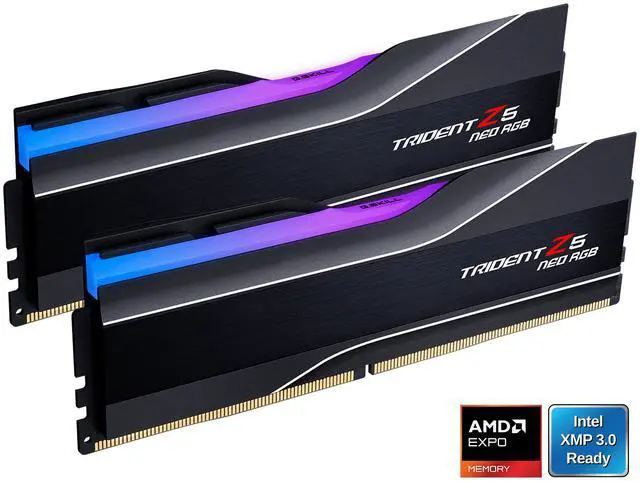
The G.SKILL Trident Z5 Neo RGB 32GB is DDR5-6000 at CL30, timings of 30-38-38-96, 1.35V, and it carries both AMD EXPO and Intel XMP 3.0 profiles. That last part is why I keep recommending it: it will do its rated speed on either platform with one BIOS toggle.
If you would rather not have lights in your case, the G.SKILL Trident Z5 Neo 32GB in white is the same speed and CAS latency with marginally tighter secondaries at 30-36-36-96, no RGB, same 1.35V and same dual-profile support. Functionally identical, quieter looking.
The CORSAIR Vengeance 32GB is the one to grab when the G.SKILL kits are out of stock. It is also DDR5-6000 at 1.35V with both profiles, but at CL38 with 38-48-48-96 timings. Looser than the others, and you will see a small difference in memory-sensitive workloads, though not one you will feel in most games.
When 64GB Starts Making Sense
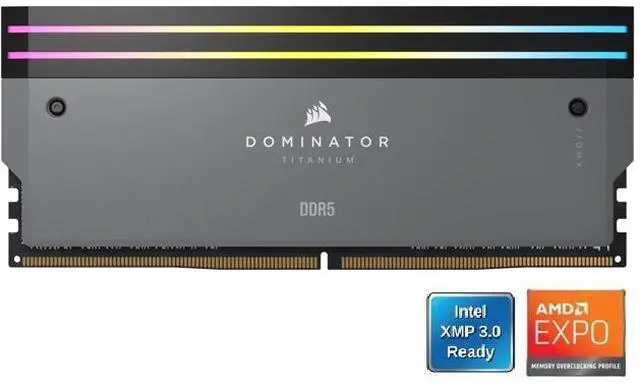
The CORSAIR Dominator Titanium 64GB is the standout in this tier: DDR5-6000 at CL30 with 30-36-36-76 timings, 1.40V, and both EXPO and XMP 3.0. Getting CL30 at 64GB is not a given, and on AM5 it keeps you at the frequency the platform likes.
At 6400, the Kingston FURY Beast 64GB runs CL32 at 32-39-39, 1.40V, with both XMP 3.0 and EXPO profiles, which makes it the more flexible of the fast 64GB kits.
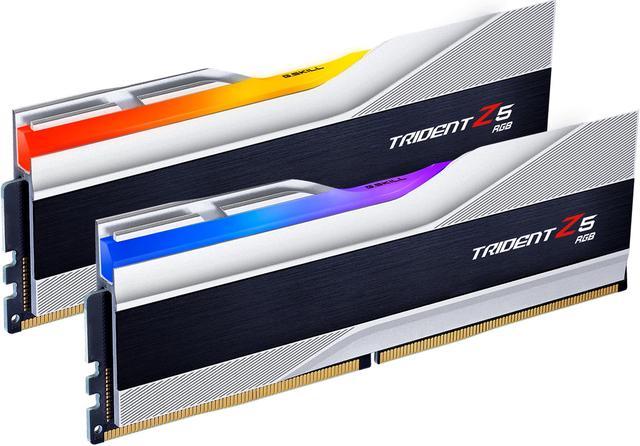
The G.SKILL Trident Z5 RGB 64GB and the CORSAIR Vengeance RGB 64GB both run DDR5-6400 CL32 at 1.40V with XMP 3.0 only. On an Intel board they are excellent. On AM5 you would be tuning them by hand, so I would steer AMD builders to the Dominator or the Kingston instead.
Above that, the G.SKILL Ripjaws S5 128GB is two 64GB modules at DDR5-6400 CL36, 36-44-44-102, at a relatively gentle 1.35V. Two sticks rather than four is the right way to reach 128GB, because four dense modules put real strain on the memory controller.
How I Would Choose
Gaming, AM5: Trident Z5 Neo 32GB at 6000 CL30. Gaming, LGA 1851: the same kit, or a 6400 CL32 kit if you want the extra headroom. Creative work or virtualisation: Dominator Titanium 64GB on AMD, FURY Beast or Trident Z5 RGB on Intel. Anything genuinely memory-hungry: Ripjaws S5 128GB, in two sticks.
And on the timing question that started this: I would not panic-buy, but if a kit you already planned on is available and you are building this quarter, there is not much argument for waiting. The current range is in Newegg’s DDR5-6000 memory listings.
Frequently Asked Questions
Why is DDR5-6000 still the recommendation on AM5? Because at that speed the memory controller generally runs in a 1:1 ratio with the memory clock, which keeps latency low. Push much higher and the controller commonly falls back to a divided ratio, which adds latency and can cancel out the bandwidth gain. Faster kits are not wasted on AM5, they just tend not to pay off the way the number suggests.
Do I need EXPO, or will an XMP-only kit work on my AMD board? An XMP-only kit will boot and run on an AM5 board, but usually at a JEDEC default speed rather than its rated one, unless you enter the timings yourself. Several kits here carry both profiles, including the Trident Z5 Neo, CORSAIR Vengeance, Dominator Titanium and Kingston FURY Beast. If you would rather not tune anything, pick one of those.
Is 32GB still enough for gaming in 2026? Yes, for gaming alone it remains comfortable. The case for 64GB is everything happening alongside the game: recording software, virtual machines, large photo or video projects, or a browser you never close. If none of that describes you, put the difference toward storage or a better graphics card.
Should I buy two sticks or four? Two, almost always. Populating all four slots on a consumer board increases the load on the memory controller and often forces a lower stable speed, particularly with high-capacity modules. That is why the 128GB kit here is two 64GB sticks rather than four 32GB ones.
Does CAS latency matter more than frequency? They work together, and the useful comparison is the actual latency in nanoseconds rather than either number alone. DDR5-6000 CL30 and DDR5-6400 CL32 land close to each other. Where you can see a difference is between CL30 and CL38 at the same speed, which is the gap between the G.SKILL and CORSAIR 32GB kits above.
Read More
- Tom’s Hardware: RAM Reviews and Buying Guides — Memory reviews and buying advice organised by platform and capacity.
- TechPowerUp: Ryzen 7 9800X3D Memory Performance Scaling — Measured results showing where faster memory stops helping on AM5.
- AMD: EXPO Memory Profiles — What EXPO does and how it differs from XMP on AMD platforms.
- G.SKILL: Trident Z5 Neo RGB — Manufacturer specifications and the full timing table for the series.
- Newegg: DDR5-6000 Memory — Filter current kits by capacity, latency and supported profile.