
Every few weeks someone on r/buildapc posts a version of the same thread: they have a card that still works, they were planning to upgrade, and the numbers no longer make sense to them. The replies are usually split between “wait” and “the waiting has not helped anyone yet”.
I do not think either answer is wrong. What has changed this year is where the pain sits. The complaints are loudest at the bottom of the stack, not the top, which inverts how buying advice used to work. The budget tier used to be where you got out cheap. Right now it is the tier that has moved the most.
Who This Is Actually For
If your card still runs what you play at the settings you accept, this is not your year to upgrade, and nothing below will change that. The people who should be reading are the ones with a dead card, a new monitor, or a build that has not happened yet.
For those cases, the useful move is to stop shopping by tier name and start shopping by resolution and VRAM. A card with 16GB at a modest clock will age better than a faster card with 8GB, and that has been true for long enough now that I no longer treat it as a prediction.
Scenario One: 1080p, and You Want Out Cheaply
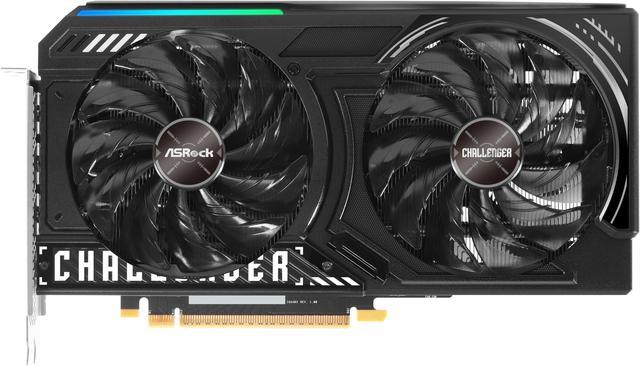
The ASRock Challenger Arc B580 is still the card I bring up first here, and the reason is the memory. Twelve gigabytes of GDDR6 on a 192-bit bus, a 2740MHz core clock, one HDMI 2.1 and three DisplayPort 2.1 outputs with DSC, a single 8-pin connector, 249mm long and two slots wide, with a 650W supply recommended. It runs on a PCI Express 4.0 x8 link, so it is happiest in a reasonably modern board.
The GIGABYTE Gaming Radeon RX 9060 XT 16GB is the other one I keep coming back to, and on paper it is the better long-term bet: 16GB of GDDR6, 2048 stream processors, a 3320MHz boost clock, 20Gbps memory on a 128-bit bus, triple fans, one 8-pin, and a 450W recommended supply. That last figure is the quietly useful part — it drops into older systems without a power supply conversation.
Scenario Two: 1440p, and You Plan to Keep It Three Years
This is where most people actually are, and where the 16GB rule matters most.
The ASUS Dual GeForce RTX 5060 Ti 16GB is the compact option: 4608 CUDA cores, 16GB of GDDR7 running at 28Gbps on a 128-bit bus, a single 8-pin, 229mm long, 2.5 slots, 550W recommended. At 229mm it fits cases that most current cards do not, which is worth more than it sounds if you are reusing a small chassis.
The GIGABYTE Gaming Radeon RX 9070 GRE 12GB trades that for a wider 192-bit bus and a 2920MHz boost clock, with two HDMI 2.1b and two DisplayPort 2.1b outputs and a 288mm length. Two HDMI ports is unusual and genuinely handy if a TV is part of your setup.
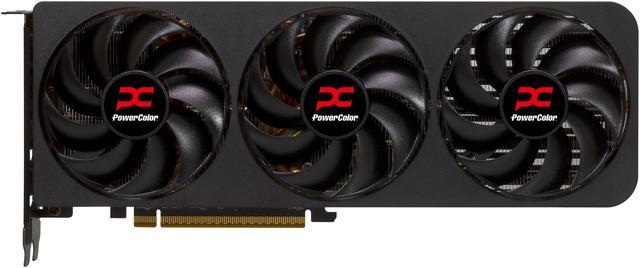
Step up once more and the PowerColor Reaper Radeon RX 9070 XT is the card I would buy with my own money at this resolution. 16GB of GDDR6 on a 256-bit bus at 20Gbps, 4096 stream processors, a 2970MHz boost, a 304W board power, two 8-pin connectors, 289mm long, and only two slots wide despite the triple-fan cooler. AMD asks for a 750W supply.
On the NVIDIA side, the MSI Gaming GeForce RTX 5070 Trio OC brings 6144 CUDA cores, 12GB of GDDR7 at 28Gbps on a 192-bit bus, a 250W board power and a 650W recommended supply. Measure before you order: it is 338mm long, which is longer than several mid-tower cases will take.
Scenario Three: 4K, or You Just Want It Over With
The GIGABYTE WindForce GeForce RTX 5070 Ti is the sensible top of this list: 8960 CUDA cores, 16GB of GDDR7 at 28Gbps on a 256-bit bus, a single 16-pin connector, 304mm and 2.5 slots, 750W recommended. It is the point where 4K stops being a compromise.
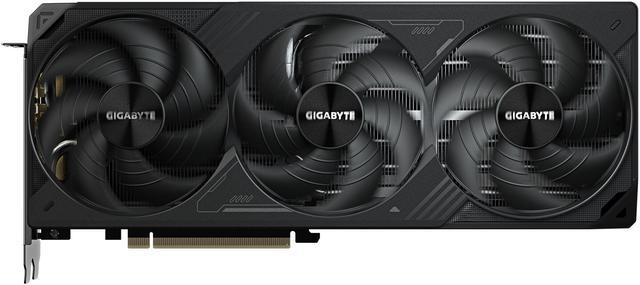
Above it, the GIGABYTE WINDFORCE GeForce RTX 5080 runs 10752 CUDA cores with 16GB of GDDR7 at 30Gbps, a 2670MHz core clock, one 16-pin connector, the same 304mm length and 2.5-slot width, and an 850W recommended supply. It is a lot of card. It is not a sensible card, and I would only suggest it to someone who already knows that.
One Thing Worth Checking Before You Order
Two of the cards here run on an x8 link rather than x16 — the Arc B580 on PCI Express 4.0 x8 and the RTX 5060 Ti on PCI Express 5.0 x8. In a current system that is fine. Drop either one into an older PCI Express 3.0 board and you are running eight third-generation lanes, which is genuinely limiting and produces exactly the kind of inconsistent frame pacing that gets blamed on the card. If you are putting a new GPU into a machine you built some years ago, check what your motherboard’s primary slot actually supports before you choose between these and something on a full x16 link.
The other thing I would check is the monitor. A card that comfortably drives 1440p at high refresh can look underwhelming on a 4K panel, and the reverse is also true — people upgrade the card, keep a 60Hz screen, and see nothing change. If both the card and the screen are due, the screen is usually the upgrade that gets noticed first.
What I Would Do Right Now
Buy for the resolution and the memory, not the model number. Check the length against your case and the recommended wattage against your power supply before anything else, because those two mistakes cost more than picking the wrong tier. And if your current card is fine, let this year go past. The current graphics card listings will still be there.
Frequently Asked Questions
Is 8GB of VRAM still enough in 2026? At 1080p with settings turned down, usually yes. At 1440p with high textures, increasingly not, and the symptom is not a lower average frame rate but sudden stutters when the card runs out of memory. Every card in this guide carries at least 12GB for that reason, and if you are choosing between a faster 8GB card and a slower 16GB one at the same resolution, I would take the memory.
Should I wait for the next generation of graphics cards? Community speculation about next-generation timing has been moving around all year and none of it is confirmed by either manufacturer. If your card still works, waiting costs you nothing. If it does not, waiting for an unannounced product with an unknown launch price is not really a plan.
Do I need a new power supply for a modern graphics card? Check the recommended wattage on the card you want against your current unit, and check which connector it uses. The cards here range from a 450W recommendation on the RX 9060 XT to 850W on the RTX 5080, and some use a single 16-pin connector while others use one or two 8-pins. A supply that is comfortably rated and has the right cable is cheaper than troubleshooting random shutdowns.
How do I know if a card will physically fit? Look up your case’s maximum GPU clearance and compare it with the card’s listed length and slot width. Lengths in this guide run from 229mm to 338mm, which is a very wide range, and slot width matters too because a 2.5-slot card can block the expansion slot below it. Both numbers are on the Newegg specification tab.
Does PCI Express 5.0 matter for gaming? Barely, for most cards. What matters more is lane count: a card on an x8 link in an older PCI Express 3.0 board has meaningfully less bandwidth than the same card in a current system. If you are pairing a newer x8 card with an older motherboard, that is worth checking before you buy.
Read More
- Tom’s Hardware: GPU Benchmarks Hierarchy — A ranked performance table across resolutions, useful for comparing cards that never appear in the same review.
- GamersNexus: GPU Megacharts — Standardised benchmark results for current cards run on the same test bench.
- AMD: Radeon Desktop Graphics — Official product pages for the RX 9000 series, including recommended system power.
- NVIDIA: GeForce RTX 50 Series — Manufacturer specifications for the RTX 5060 Ti through RTX 5080, including memory configuration.
- Newegg: Graphics Cards — Filter by memory size, length, power connector and recommended wattage.