Grand Theft Auto VI arrives on November 19, 2026, for PlayStation 5 and Xbox Series X|S, and the digital preload opens a week earlier at local midnight on November 12. That leaves a short window to sort out your GTA 6 storage before the download starts. Rockstar has not announced a file size yet. However, every player will download the game, because even the boxed version ships with a download code instead of a disc. This guide explains how much free space to plan for, how to pick and install an M.2 SSD on PS5, and how the Xbox expansion card compares with a USB drive. It also covers how to clear room without losing saves. By the end, you will know exactly what your console needs before preload night.

How Much GTA 6 Storage Space Do You Need?
Plan for roughly 150-200 GB or more of free space, because Rockstar has not confirmed the official file size. Figures of 150 GB, 200 GB, and even 300 GB circulate online, but all of them remain unconfirmed rumors as of October 2026. Big open-world games also tend to grow after launch. Patches, updates, and added content can push an install well past its day-one size. For that reason, most players should treat 200 GB as a practical floor rather than a ceiling. Next, compare that target with what your console can actually use. The operating system reserves part of every internal drive, so the usable number sits well below the label on the box:
PS5 (original, 825 GB): about 667 GB usable
PS5 Slim or PS5 Pro (1 TB or 2 TB): roughly 850 GB to 1.8 TB usable
Xbox Series X (1 TB): about 800 GB usable
Xbox Series S (512 GB): about 360 GB usable
The Series S stands out here. A single 150-200 GB install could take half of its usable space, so Series S owners face the tightest squeeze. On the other hand, a PS5 owner with a few large games installed may also discover less room than expected. Either way, check your numbers now rather than on November 11.
Check Your Free Space Before the November 12 Preload
Open your console's storage menu today and note how many gigabytes are free. The preload unlocks at local midnight on November 12, and a full drive means a stalled download while everyone else starts installing. On PS5, go to Settings, then Storage, then Console Storage. The screen shows free space and sorts games by size. On Xbox Series X|S, press the Xbox button, open Settings, then System, then Storage devices. Both menus make it easy to spot the largest installs. Next, decide which of three paths fits you. If you already have 200 GB or more free, you only need light housekeeping. If you have 100-200 GB free, a cleanup session may get you there. However, if you sit under 100 GB, or you own a Series S, an upgrade to your GTA 6 storage makes the most sense. Timing matters as well. Shipping, installation, and moving existing games all take time. For example, transferring 500 GB of games to a new drive can take an hour or more. Ordering a drive in October leaves comfortable room to install and test it well before preload night. Finally, remember the download itself. A large file on a slow connection can take many hours, so the preload window is valuable. The companion article on network prep covers routers and wired connections, and a simple Cat 6 Ethernet cable often speeds up big console downloads over Wi-Fi.
Why the Boxed Copy Still Needs GTA 6 Storage Space
The boxed version of GTA 6 contains a download code, not a disc, so physical buyers need the same free space as digital buyers. No one gets to skip the download or install from a disc. This changes the math for a few groups. First, owners of a PS5 Digital Edition or an all-digital Xbox lose nothing by choosing the box, since no disc drive comes into play. Second, anyone planning to buy the box for a faster install should reconsider. The code simply unlocks the same download from the PlayStation Store or Microsoft Store. The box still makes sense as a gift or a retail purchase. In addition, some buyers like having a physical item on the shelf. Just treat it as a voucher rather than a storage shortcut. Preload behavior also differs by purchase type. Digital preorders can download automatically once the November 12 preload opens, as long as your console has room and automatic downloads are on. By contrast, a boxed code usually needs redemption before the download can start. If your box arrives early, redeem the code as soon as the preload window allows. Digital preorders also include one free month of GTA+, which renews as a paid subscription unless you cancel it. Preorders also include the Vintage Vice City Pack bonus. For edition details, the series article on consoles and editions breaks down Standard at $79.99 versus Ultimate at $99.99. Whichever version you buy, GTA 6 storage planning looks the same.

Choosing the Right SSD for GTA 6 Storage on PS5
A PS5 needs an M.2 PCIe Gen4 x4 NVMe SSD with sequential reads of 5,500 MB/s or faster, ideally with a heatsink. Start with the interface. The slot accepts PCIe Gen4 NVMe drives, so SATA M.2 drives will not work. However, Gen5 drives run at Gen4 speeds in the console and add cost without a benefit. Browse PCIe Gen4 NVMe SSDs and filter by read speed.
Capacity and fit
Next, pick a capacity between Sony's supported 250 GB and 8 TB:
1 TB: fits GTA 6 plus a few other big games
2 TB: the most popular balance of price and space
4 TB: for players who never want to delete anything
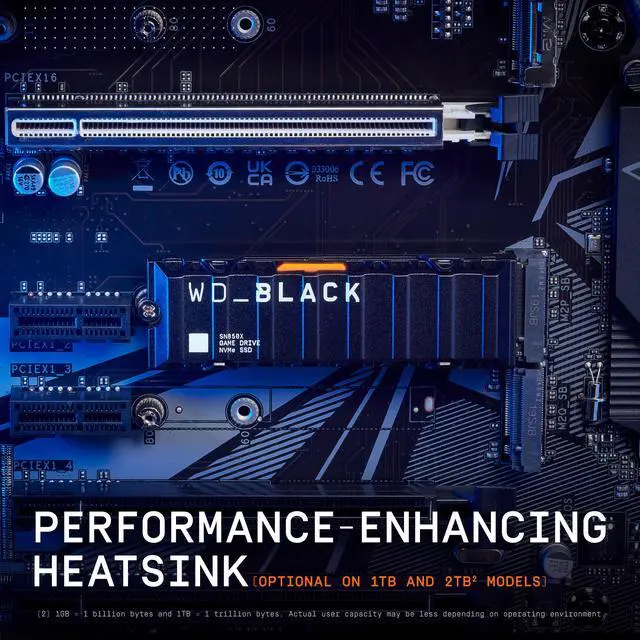
For example, a 2 TB NVMe SSD roughly triples the free space on an original PS5. Collectors can choose 4 TB NVMe drives instead. Then check the fit. The slot supports 2230 through 22110 lengths, and 2280 is the most common. Many drives ship as PS5-ready SSDs with heatsinks. Otherwise, add a low-profile M.2 SSD heatsink that fits under the slot cover.
How to Install a PS5 M.2 SSD Step by Step
Installing a PS5 M.2 SSD takes about 15-30 minutes with a small Phillips screwdriver. First, update the console's system software, since the PS5 needs current firmware to set up the drive. A precision screwdriver set helps because the slot screw is small. In addition, an anti-static wrist strap adds peace of mind.
Installation steps
Turn the PS5 fully off, not into Rest Mode, and unplug every cable.
Let it cool, then place it on a soft, flat surface.
Remove the cover panel using Sony's instructions for your model.
Unscrew the metal expansion slot cover.
Remove the slot screw and move the spacer to match your drive length.
Insert the SSD at a slight angle, connector first, then press it flat.
Secure the drive with the screw.
Replace both covers and reconnect power.
When the PS5 boots, it prompts you to format the drive and then runs a quick speed test. Next, go to Settings, then Storage, then Installation Location. Set PS5 games to install to the M.2 SSD, and the GTA 6 preload will land there. Finally, move existing games across in a batch to free internal space.
Xbox Series X|S GTA 6 Storage: Expansion Card vs USB Drive
On Xbox Series X|S, only the internal SSD or an official Storage Expansion Card can run Series X|S-optimized games such as GTA 6. A USB drive can store those games, but you must move them back before you play. The Storage Expansion Card plugs into a slot on the back of the console with no tools or screws. Because it matches the internal SSD's speed, games run from it exactly as they do internally. Shop Xbox Series X|S storage expansion cards and confirm the card is officially licensed.
Where USB drives fit
By contrast, a USB 3.1 external drive costs less per terabyte but has limits. It plays backward-compatible Xbox One and Xbox 360 games directly. However, Series X|S-optimized titles only sit there in cold storage. Most Xbox owners should combine both. Move older games to USB and keep internal space for GTA 6. For example, an external hard drive holds a big back catalog cheaply. Meanwhile, a USB external SSD shuffles games faster. Series S owners benefit most from the card. With only about 360 GB usable, a 1 TB card nearly quadruples room for current-generation games. Therefore, for GTA 6 storage on Series S, the card is the most direct fix.

GTA 6 Storage Options Compared
For playing GTA 6, choose a Gen4 M.2 SSD on PS5 or an expansion card on Xbox; use USB drives only for storing other games. The table below summarizes the trade-offs.
| Option | Console | Can run GTA 6 from it | Install effort | Relative cost per TB | Best for |
|---|---|---|---|---|---|
| M.2 PCIe Gen4 NVMe SSD (5,500 MB/s+, heatsink) | PS5, PS5 Slim, PS5 Pro | Yes | Screwdriver, 15-30 min | Moderate | Main GTA 6 install drive |
| Storage Expansion Card | Xbox Series X|S | Yes | Plug in, under 1 min | Highest | Series S owners, no-tools upgrade |
| USB external SSD | PS5 and Xbox | No (storage only) | Plug in | Moderate | Fast shuffling of games |
| USB external hard drive | PS5 and Xbox | No (storage only) | Plug in | Lowest | Archiving older games |
The pattern stays consistent across both platforms. Current-generation games must run from fast internal-class storage. Meanwhile, older games and archived installs can live on cheaper USB storage. On PS5, USB extended storage works much like it does on Xbox. PS4 games play directly from a USB drive, while PS5 games can only be stored there and must be copied back before launch. For general browsing across every interface, Newegg's full solid state drive lineup lets you filter by form factor and speed. In short, buy one fast drive for GTA 6 and, if needed, one inexpensive drive for everything else. That split keeps costs down without slowing the game.
How to Clear Space Without Losing Your Saves
Back up saves to the cloud, move older games to USB storage, then delete only what you can redownload. That order frees GTA 6 storage room without risking progress. First, protect your saves. On Xbox, saves sync to the cloud automatically for every player. On PS5, cloud saves require a PlayStation Plus membership. Without one, copy saves to a USB drive through Settings, then Saved Data. Confirm the backup before you delete anything. Next, move instead of delete where possible. Moving a game to external storage takes minutes, while redownloading it can take hours. A spare portable hard drive works well as a parking spot for games you plan to revisit. Then clear the hidden clutter. Captured video clips and screenshots pile up quietly, especially at 4K. Delete or transfer them, and remove leftover add-ons or demos you no longer use. In addition, check for duplicate installs, such as both PS4 and PS5 versions of the same game. Finally, sort the remaining games by size and delete the largest ones you have finished. Most digital purchases stay in your library, so you can always download them again later. The goal is a cushion of at least 200 GB, plus extra room for future patches.

Pre-Launch GTA 6 Storage Checklist
Before November 12, confirm at least 200 GB free on a drive that can run current-generation games, and set it as your default install location. Run through this short list to stay on track:
Check free space in the console storage menu.
Back up saves to the cloud or a USB drive.
Install and format any new M.2 SSD or expansion card.
Set the new drive as the default install location for PS5 or Series X|S games.
Move older games to USB storage.
Update the console's system software.
Redeem a boxed download code once the preload window opens.
Leave the console in Rest Mode or an energy-saving mode that allows downloads overnight.
After preload night, watch for a launch-day update on November 19, 2026. Large games often receive patches close to release, so a little extra headroom helps. Once the download finishes, the game is ready to play the moment it unlocks.

Frequently Asked Questions
How big is the GTA 6 file size?
Rockstar has not announced an official file size. Rumored figures of 150 GB, 200 GB, and 300 GB remain unconfirmed. Plan your GTA 6 storage around at least 150-200 GB of free space, plus room for future updates.
Can I play GTA 6 from a USB external drive?
No. On PS5 and Xbox Series X|S, current-generation games must run from internal storage, a PS5 M.2 SSD, or an Xbox Storage Expansion Card. USB drives can store those games but cannot run them.
Does the boxed version of GTA 6 come on a disc?
No. The boxed version contains a download code instead of a disc. Every player downloads the full game, so physical buyers need the same free space and internet bandwidth as digital buyers.
Do I need a heatsink for a PS5 SSD?
Sony recommends one. Many M.2 drives ship with a slim heatsink that fits the PS5 slot. If your drive has none, add a low-profile heatsink that fits under the slot cover.
When can I start downloading GTA 6?
The digital preload starts at local midnight on November 12, 2026. The game launches on November 19, 2026. Free up space and finish any drive upgrades before the preload opens.
More from the GTA 6 Ready series: "The Best Router for GTA 6: Network Setup Guide for PS5 and Xbox"; "Best Console for GTA 6: PS5, PS5 Pro, Series X or Series S, Plus Which Edition to Buy"; "Best TV for GTA 6: 4K 120 Hz, HDMI 2.1 and HDR Explained".
Conclusion: Get Your GTA 6 Storage Ready Early
Sorting out GTA 6 storage now saves you from a stalled download on November 12. Plan for roughly 150-200 GB or more of free space, since Rockstar has not confirmed the final size. On PS5, a Gen4 M.2 NVMe SSD rated at 5,500 MB/s or faster, with a heatsink, gives the most room for the money. On Xbox Series X|S, an official expansion card handles the game, while a USB drive holds everything else. Remember that the boxed copy is a download code, so every player needs the space. Back up saves, move older games, and set your new drive as the default install location before the preload opens. To compare capacities and speeds in one place, browse NVMe SSDs for PS5, or look through GTA 6 preorders and accessories to finish your launch-night setup.