here!
here!
I’m your shopping assistant for PC builds, upgrades, and everything tech.
Got questions? Ask away!
Start a conversation
here!
I’m your shopping assistant for PC builds, upgrades, and everything tech.
Got questions? Ask away!
Start a conversation

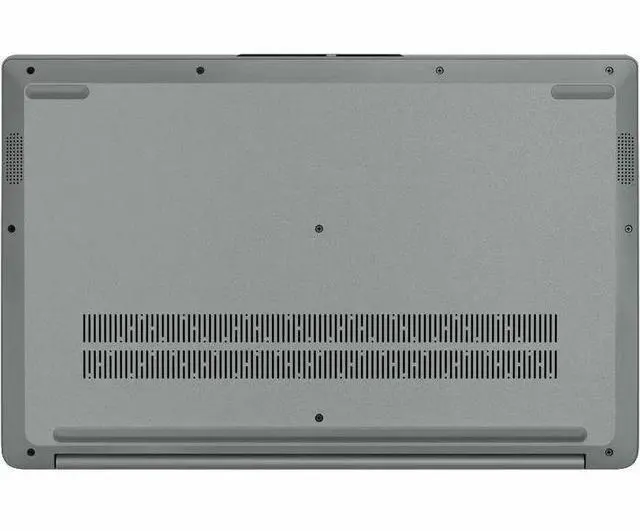
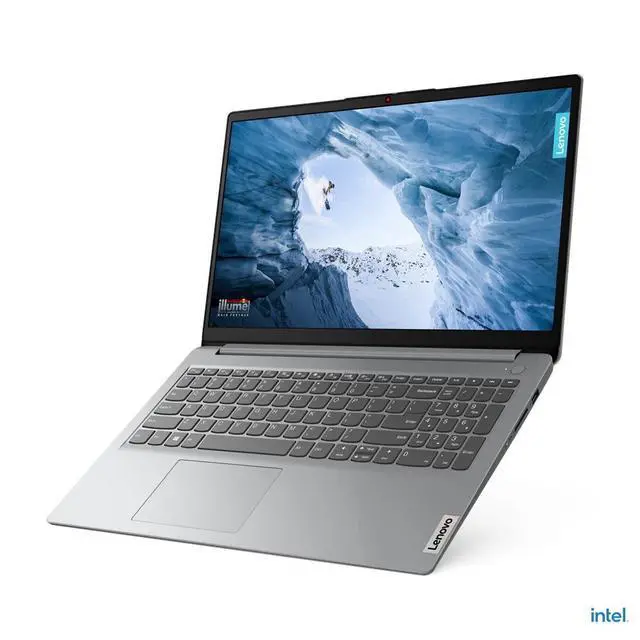



Combo Up Savings Up To $250+
The more you add, the more you'll save!
Any questions? Ask CelesteSM will help you find out quickly.
Overview
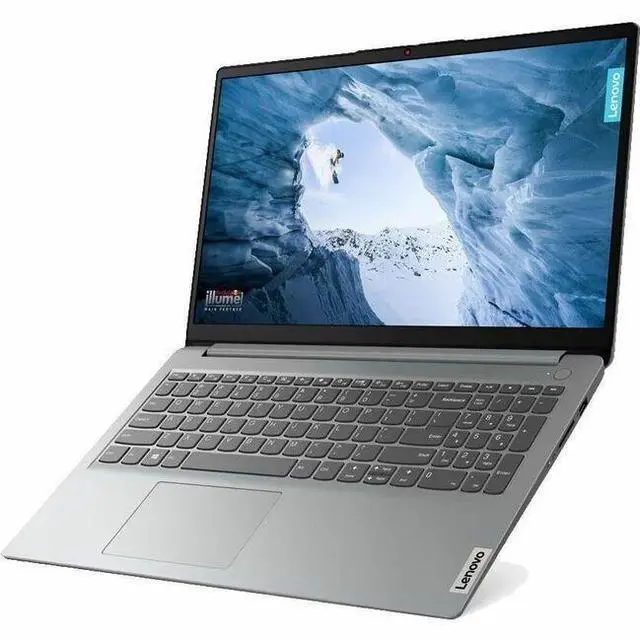
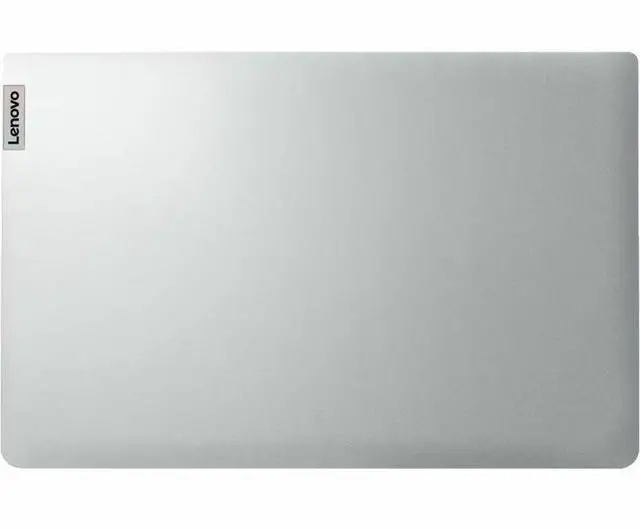
The Lenovo IdeaPad 1 15IJL7 is a thin and light 15.6" laptop for home, personal, and mainstream use. It combines an Intel Pentium Silver N6000 processor, 4GB memory, 128GB eMMC 5.1 storage, and Windows 11 in S mode in a Cloud Grey design.
Key Features
A 15.6" Full HD non-touch display provides 1920 x 1080 resolution. The laptop includes an HD 720p webcam with Privacy Shutter, stereo speakers with Dolby Audio, and an integrated Intel UHD Graphics solution. Its non-backlit keyboard and thin and light form factor support everyday home and personal computing.
Performance
The quad-core Intel Pentium Silver N6000 processor includes 4 MB L3 cache. The system has 4GB onboard DDR4 2933 memory and 128GB eMMC 5.1 storage. Integrated Intel UHD Graphics uses shared system memory.
Design
The Cloud Grey laptop measures 14.18" x 9.29" x 0.7" and weighs 3.42 lbs. It has a 15.6" TN panel, a non-touch screen, a non-backlit keyboard, stereo speakers rated at 1.5W x2, and a 42Wh battery.
Connectivity & Compatibility
Wireless connectivity includes 802.11ax Wireless LAN with Wi-Fi 6 and Bluetooth 5.2. Ports include 1 x USB 2.0/1.1, 1 x USB 3.2 Gen 1 Type-A, 1 x USB 3.2 Gen 1 Type-C, 1 x HDMI 1.4b, and 1 x Headphone/Microphone Combo Jack.
Specifications
The Lenovo IdeaPad 1 15IJL7 is a 15.6-inch Full HD Windows 11 laptop with an Intel Pentium Silver N6000, 4GB RAM, and 128GB flash storage, making it a practical fit for students, home users, and anyone focused on web browsing, email, documents, and everyday streaming on a larger screen.
| Attribute | Value |
|---|---|
| Best For | Everyday home/personal use — 15.6" Full HD Windows 11 notebook with an Intel Pentium Silver N6000, 4 GB RAM and 128 GB flash storage; suited for web browsing, media playback and basic productivity |
| Processor And Core Count | Intel Pentium Silver N6000 single-processor configuration, base 1.1 GHz with a maximum turbo up to 3.3 GHz, 4 MB L3 cache |
| GPU And VRAM | Integrated Intel UHD Graphics (integrated/video processor) using shared system memory |
| Display Spec | 15.6" Full HD 1920 x 1080 TN LCD (native 1920x1080) with reported maximum brightness 220 Nit |
| Memory Configuration | 4 GB DDR4 memory (2933 MHz) installed; maximum listed memory 4 GB |
| Storage And Expansion | 128 GB flash storage (eMMC) — listed as 128 GB flash / 128 GB hard-drive size, 0 RPM, PC Card interface |
| Ports And Connectivity | 3 total USB ports (no USB 3.0 reported, USB 2.0 listed as 0), 1 HDMI port, 0 Thunderbolt ports, 1 x 3.5 mm headphone/microphone combo jack |
| Wired And Wireless Networking | Wi‑Fi 6 wireless and Bluetooth 5.2 support; connectivity technologies listed as Wi‑Fi, Bluetooth and USB |
| Webcam And Privacy | Built-in webcam with a privacy e-shutter |
| Audio Setup | 2 x 1.5 W speakers with Dolby Audio and support for audio recording |
| Battery And Power | Installed lithium battery with listed energy content 4000 mAh; battery/cell info includes lithium_ion and Lithium Polymer cell type, 3 cells reported, 1 battery, battery weight 250 grams; batteries are included and required and are packed with equipment |
| Portability | Gray 15.6" notebook (notebook form factor); item display weight listed as 3.4 Pounds and item/package weight listed as 4.25 Pounds; product dimensions reported as '21 L x 2.85 W x 13 TH inches' and package dimensions 21 L x 13.1 W x 2.9 H inches |
| Model Identifiers | IdeaPad 1 15IJL7 (model 82LX00G1US) by Lenovo Group Limited / Lenovo; edition 1 15IJL7; version for United States; target region North America; model year 2026 |
| Box Contents | Package lists IdeaPad 1 15IJL7 notebook, lithium ion battery and AC adapter included |
Q: Should I choose this Lenovo IdeaPad 1 over a Celeron N4500 budget laptop?
A: Choose this IdeaPad 1 if you want a little more headroom for everyday Windows use. The Pentium Silver N6000 has 4 cores, while the Celeron N4500 has 2 cores, and benchmark references consistently show the N6000 ahead in multi-tasking and general responsiveness. That makes this Lenovo the better fit for web browsing, Office apps, streaming, and light school or home use when several tabs or apps may be open. A Celeron N4500 model can still make sense for very basic single-task use, but this configuration is the safer choice for day-to-day Windows workloads.
Q: Is this IdeaPad 1 enough, or should I move up to an Intel Core i3-N305 laptop?
A: Choose this IdeaPad 1 if your priority is low cost and your workload is limited to basic tasks such as email, documents, streaming, and light browsing. Move up to a Core i3-N305 laptop if you expect heavier browser use, larger spreadsheets, more frequent multitasking, or you want the system to feel quicker for longer. Benchmark sources show the i3-N305 is a clear step up from the Pentium Silver N6000, especially in multi-core performance, so the higher-tier option is the better fit for performance-first buyers.
Q: Should I buy this 4GB/128GB IdeaPad 1 or spend more for an 8GB version?
A: Choose this 4GB/128GB configuration if you mainly need a simple Windows laptop for one task at a time and you value lower upfront cost. Spend more for 8GB if you expect regular multitasking, many browser tabs, or longer-term everyday use. The processor is entry-level, but in real use the 4GB memory limit is often the bigger constraint on Windows 11 than storage capacity alone. The 128GB storage is more workable than 64GB-class budget systems, but 8GB RAM is the better choice for smoother day-to-day use.
Q: Is this Windows IdeaPad 1 a better buy than a Chromebook for basic use?
A: Choose this IdeaPad 1 over a Chromebook if you need full Windows compatibility for desktop apps, local file handling, or school and work software that expects Windows. Choose a Chromebook instead if your use is mostly browser-based and you want a simpler, lighter-maintenance experience. For basic tasks, both can work, but this Lenovo makes more sense when software flexibility matters, while a Chromebook usually makes more sense when portability, simplicity, and web-first use matter more than app compatibility.
Q: Is this a good laptop for note-taking, web browsing, Zoom meetings, and basic Office work?
A: Yes, it is suitable for basic school and office tasks such as note-taking, web browsing, email, video meetings, and light document work. The main limits are its 4 GB of RAM and 128 GB eMMC storage, so it is better for light multitasking than for heavy workloads or many apps open at once.
Q: Who is this laptop actually suitable for?
A: This model fits buyers who want a low-cost Windows laptop for everyday personal use: homework, online classes, email, streaming, and simple productivity. It is not a strong fit for power users, creators, or anyone who needs fast performance for large files, advanced multitasking, or demanding software.
Q: Can this laptop handle gaming or heavier programs like AutoCAD and SketchUp?
A: No, this is not a good choice for gaming or demanding creative and technical software. Its Pentium Silver N6000 processor, integrated UHD graphics, 4 GB memory, and entry-level storage are designed for basic computing, not for 3D apps, AAA games, or consistently smooth performance in heavier workloads.
Q: What are the main trade-offs versus a better budget laptop with 8 GB RAM and an SSD?
A: The trade-off is price versus headroom. This IdeaPad 1 gives you a 15.6-inch Full HD screen and basic Windows usability at the low end, but 4 GB RAM and 128 GB eMMC are noticeably more limiting than 8 GB RAM plus an SSD. A stronger budget alternative will usually feel faster in multitasking, app installs, updates, and long-term everyday use.
Q: Can you upgrade the RAM or storage later?
A: RAM may be expandable on some 15IJL7 configurations because Lenovo lists one soldered-memory setup with an additional SODIMM slot, but storage is more restrictive on eMMC versions like this one. For the 128 GB eMMC model, buyers should assume limited upgrade flexibility and confirm the exact sub-model before buying if upgradeability matters.
Q: Is the Lenovo IdeaPad 1 15IJL7 worth buying for basic schoolwork and everyday use?
A: It can work for very light use such as web browsing, documents, note-taking, email, and video calls, but it is a budget-only choice. The Pentium Silver N6000 and Full HD screen are acceptable for simple tasks, but 4 GB of RAM and 128 GB of storage are the main limits. It is best for buyers who need a low-cost Windows laptop and can tolerate slower multitasking.
Q: Who is this laptop actually suitable for?
A: This model is most suitable for basic home or student use: writing, spreadsheets, browser-based school portals, streaming, and simple office tasks. It is not a good fit for users who keep many apps open, store lots of files locally, or need fast performance for heavier work.
Q: What are the main trade-offs of this configuration?
A: The main trade-offs are memory and storage. With 4 GB RAM, performance can drop quickly when multitasking, using many browser tabs, or running apps like Zoom alongside other programs. The 128 GB drive is enough for basic use, but it leaves limited room for large apps or media files. The benefit is a simple, low-cost Windows laptop with a 15.6-inch Full HD display.
Q: Is 4 GB of RAM enough on this Lenovo IdeaPad 1?
A: 4 GB is enough only for light, single-purpose use. If you mainly use a browser, documents, and occasional streaming, it may be workable. If you expect smoother multitasking or want the laptop to feel less constrained over time, 4 GB is a major compromise and one of the biggest reasons to choose a higher-spec model instead.
Q: Can this laptop handle gaming or heavier programs?
A: No, this is not a good choice for gaming or demanding software. Its Pentium Silver N6000, integrated UHD Graphics, and 4 GB RAM are aimed at entry-level productivity, not creative workloads, modern games, or sustained heavy multitasking.