

Your Browsing History


Meet Your Seller



MacBook Docking Station Dual Monitor 4K@60Hz for MacBook Pro/Air M5/M4 | Vertical Laptop Dock Stand with M.2 NVMe SSD Enclosure, 2 HDMI, 10Gbps USB A/C, Ethernet, PD for Home & Office, Black
Limited time offer, ends 09/17 By FiveMacro Store
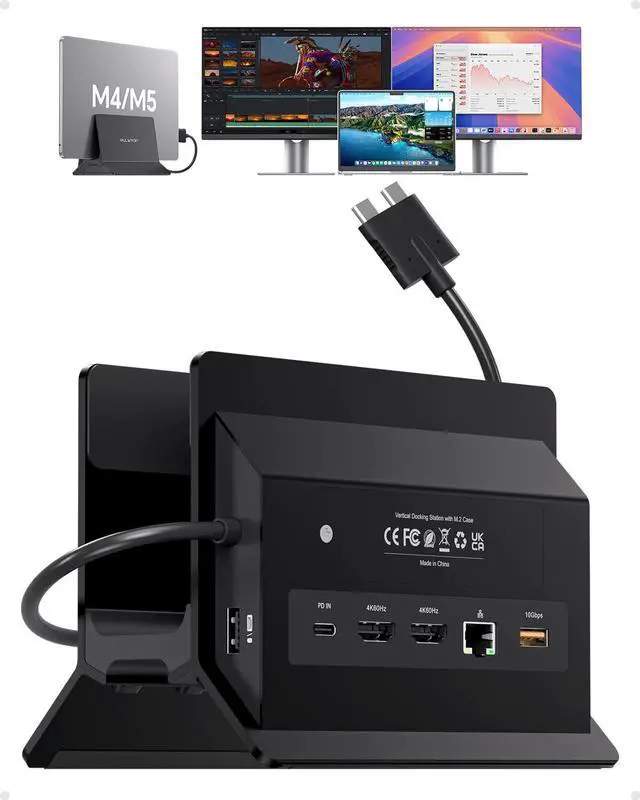
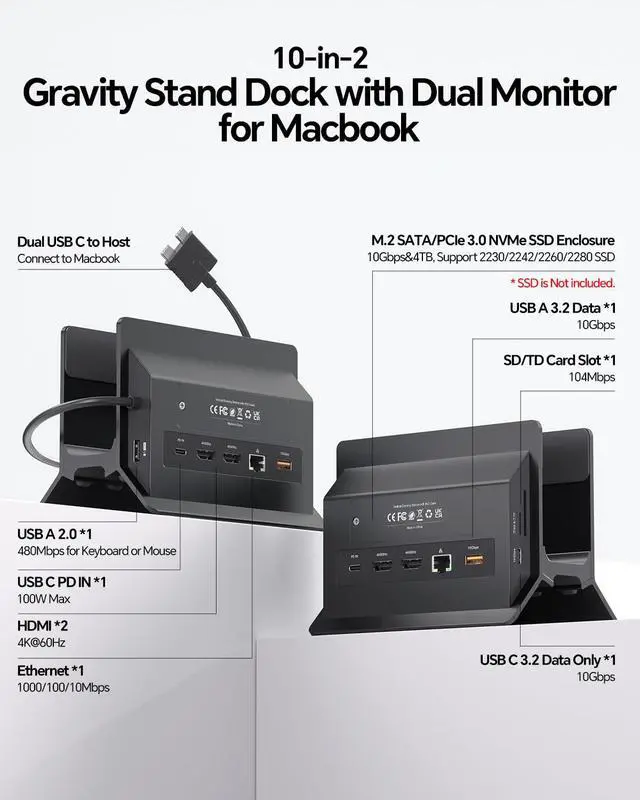
- 11-in-2 Docking Station with Vertical Stand: This dual monitor docking station includes an M.2 NVMe SSD enclosure (supports up to 4TB), dual 4K@60Hz HDMI ports, 100W PD (requires a 65W+ or greater power supply, not included), 10Gbps USB-A and USB-C (data only), Gigabit Ethernet RJ45, USB 2.0, and SD/TF card slots. The vertical laptop stand design conserves desk space and enhances airflow. One dock replaces several adapters for a tidy, organized, and productive setup. Dual 4K@60Hz Display: Extend your MacBook Pro or MacBook Air to two 4K monitors via dual HDMI for ultra-clear visuals, perfect for editing, coding, and presentations. Compatible with M4/M5 base chips, M1M5 Pro/Max, and Intel-based MacBooks (20162020). Note: M1, M2, and M3 base chips support a single monitor only. Incompatible with Windows PCs, MacBook Neo, or iPad. No driver neededplug and play. Up to 4TB M.2 SSD Expansion: The built-in M.2 NVMe enclosure adds up to 4TB of high-speed storage. Transfer large videos, photo libraries, and backups at 10Gbps. Ideal for editors, photographers, and analysts who need fast storage without external drive clutter. (SSD not included; NVMe only, not SATA.) Gigabit Ethernet & 10Gbps Data Transfer: The built-in RJ45 port provides stable, lag-free internet for video conferences and large downloads. 10Gbps USB-C and USB-A ports allow lightning-fast file transfers for video editing and coding. Engineered for professional users who demand speed and reliability. Steps for Clams
+
+
Overview
Specs
Reviews

Any questions? Our AI mode will help you find out quickly.
Try me now
11-in-2 Docking Station with
Vertical Stand: This dual monitor docking station includes an M. 2 NVMe SSD enclosure (supports up to 4TB), dual 4K@60Hz HDMI ports, 100W PD (requires a 65W+ or greater power supply, not included), 10Gbps USB-A and USB-C (data only), Gigabit Ethernet RJ45, USB 2.0, and SD/TF card slots. The vertical laptop stand design conserves desk space and enhances airflow. One dock replaces several adapters for a tidy, organized, and productive setup.
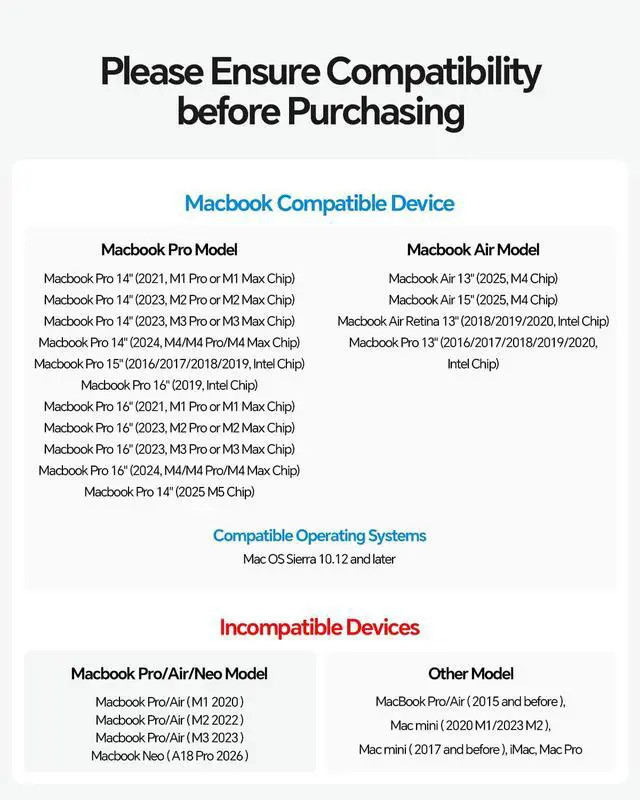
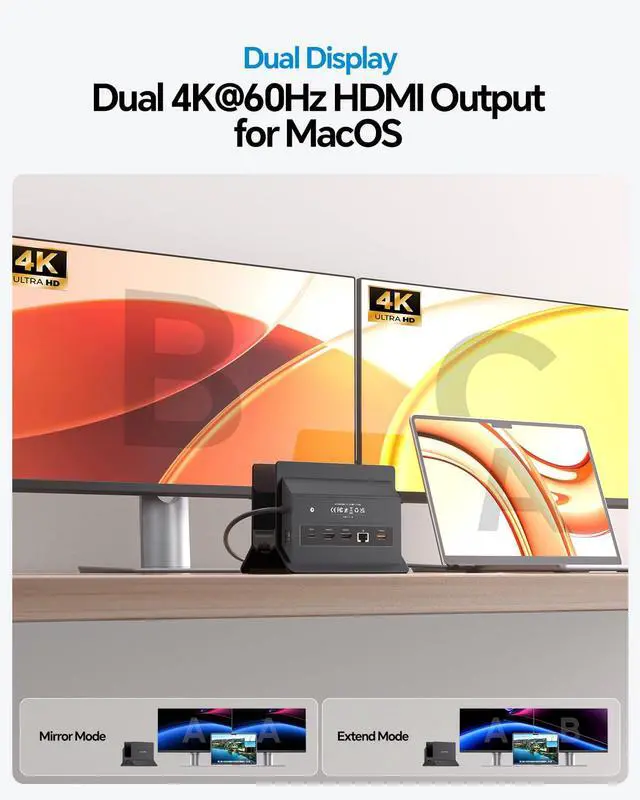
Dual 4K@60Hz Display: Extend your MacBook Pro or MacBook Air to two 4K monitors via dual HDMI for ultra-clear visuals, perfect for editing, coding, and presentations. Compatible with M4/M5 base chips, M1M5 Pro/Max, and Intel-based MacBooks (20162020).
Note: M1, M2, and M3 base chips support a single monitor only. Incompatible with Windows PCs, MacBook Neo, or iPad. No driver neededplug and play. Up to 4TB M.
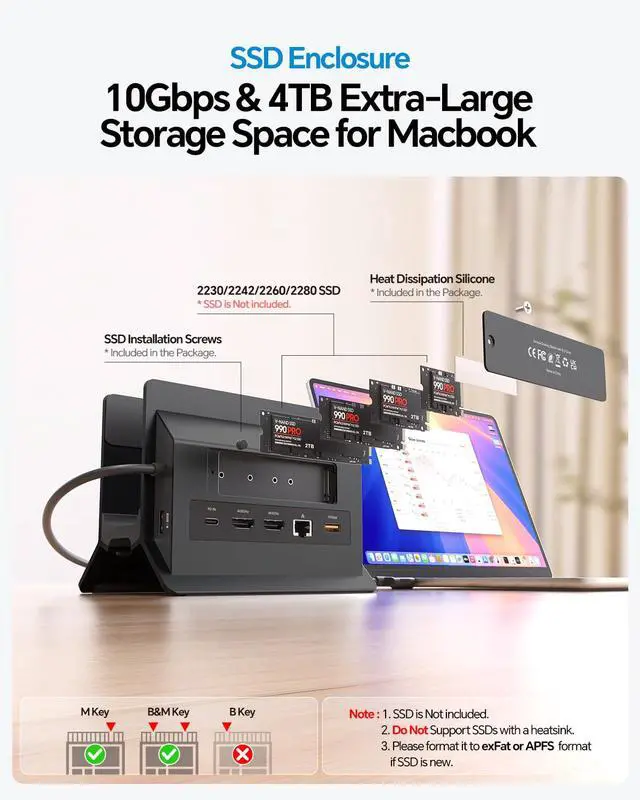
2 SSD Expansion: The built-in M. 2 NVMe enclosure adds up to 4TB of high-speed storage. Transfer large videos, photo libraries, and backups at 10Gbps. Ideal for editors, photographers, and analysts who need fast storage without external drive clutter. (SSD not included; NVMe only, not SATA. ) Gigabit Ethernet & 10Gbps
Data Transfer: The built-in RJ45 port provides stable, lag-free internet for video conferences and large downloads. 10Gbps USB-C and USB-A ports allow lightning-fast file transfers for video editing and coding. Engineered for professional users who demand speed and reliability.
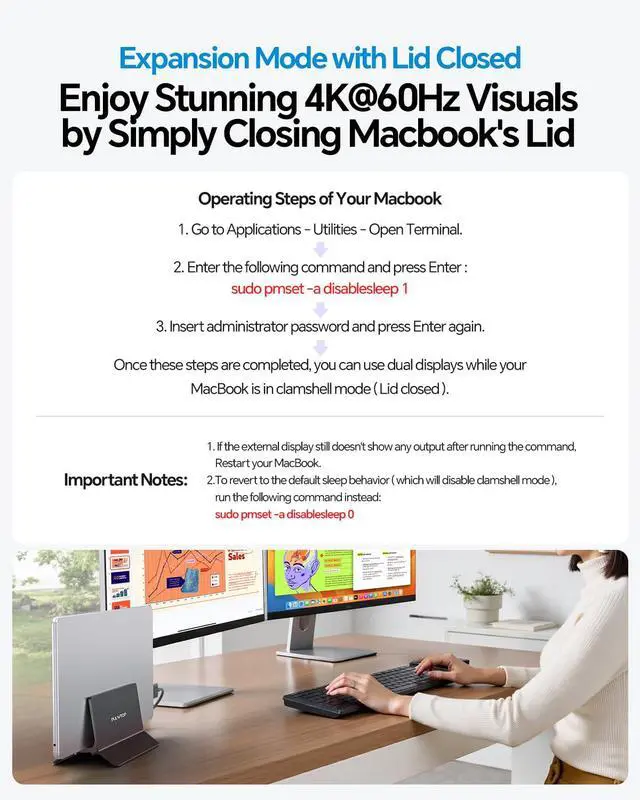
Steps for Clamshell Mode:
1. Navigate to Applications Utilities and open Terminal.
2. Enter the command and press
Enter: sudo pmset -a disablesleep 1
3. Insert your administrator password and press Enter again. Once completed, you can use dual displays while your MacBook is in clamshell mode (lid closed).
Important Notes:
1. If the external display shows no output after running the command, restart your MacBook.
2. To revert to the default sleep behavior (disabling clamshell mode), run
this command instead: sudo pmset -a disablesleep 0
Vertical Stand: This dual monitor docking station includes an M. 2 NVMe SSD enclosure (supports up to 4TB), dual 4K@60Hz HDMI ports, 100W PD (requires a 65W+ or greater power supply, not included), 10Gbps USB-A and USB-C (data only), Gigabit Ethernet RJ45, USB 2.0, and SD/TF card slots. The vertical laptop stand design conserves desk space and enhances airflow. One dock replaces several adapters for a tidy, organized, and productive setup.
Dual 4K@60Hz Display: Extend your MacBook Pro or MacBook Air to two 4K monitors via dual HDMI for ultra-clear visuals, perfect for editing, coding, and presentations. Compatible with M4/M5 base chips, M1M5 Pro/Max, and Intel-based MacBooks (20162020).
Note: M1, M2, and M3 base chips support a single monitor only. Incompatible with Windows PCs, MacBook Neo, or iPad. No driver neededplug and play. Up to 4TB M.
2 SSD Expansion: The built-in M. 2 NVMe enclosure adds up to 4TB of high-speed storage. Transfer large videos, photo libraries, and backups at 10Gbps. Ideal for editors, photographers, and analysts who need fast storage without external drive clutter. (SSD not included; NVMe only, not SATA. ) Gigabit Ethernet & 10Gbps
Data Transfer: The built-in RJ45 port provides stable, lag-free internet for video conferences and large downloads. 10Gbps USB-C and USB-A ports allow lightning-fast file transfers for video editing and coding. Engineered for professional users who demand speed and reliability.
Steps for Clamshell Mode:
1. Navigate to Applications Utilities and open Terminal.
2. Enter the command and press
Enter: sudo pmset -a disablesleep 1
3. Insert your administrator password and press Enter again. Once completed, you can use dual displays while your MacBook is in clamshell mode (lid closed).
Important Notes:
1. If the external display shows no output after running the command, restart your MacBook.
2. To revert to the default sleep behavior (disabling clamshell mode), run
this command instead: sudo pmset -a disablesleep 0
Warranty & Returns
Warranty, Returns, And Additional Information
Warranty
- Please contact the Seller directly for warranty information. Warranty information may also be found on the Manufacturer's website.
- CONTACT
Return Policies
- Return for refund within: 30 days
- Return for replacement within: 30 days
- This item is covered by FiveMacro Store Return Policy
Manufacturer Contact Info
- For a directory of all our manufacturers, please click below.
- Manufacturers Directory
LOADING...