

Your Browsing History


Meet Your Seller


MacBook Docking Station 3 Monitors, Displaylink Laptop Docking Stations with 130W Power Supply,15 in 1 USB C Triple 4K Display Dock for MacBook Pro/Air and USB-C/A Port Computer (3 HDMI, 2 DP)
Limited time offer, ends 09/17 By FiveMacro Store
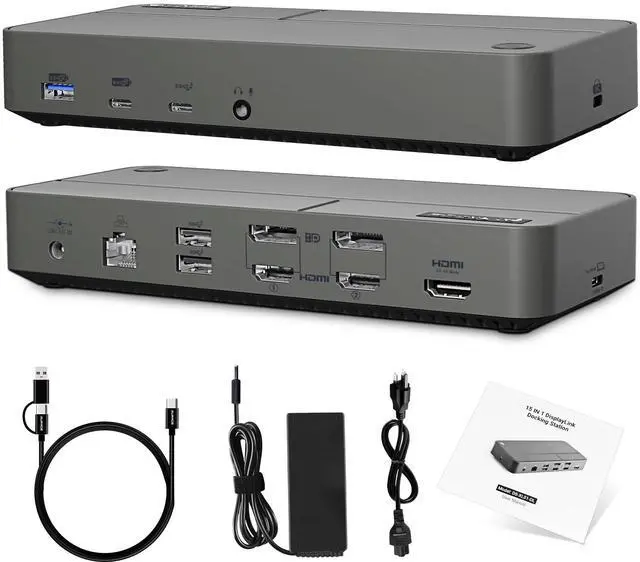
- This laptop docking station incorporates a built-in DisplayLink chip and supports Mac MST. It enables all macOS systems (including M4, M3, M2, M1, and Intel) and Windows system laptops to expand to three additional monitors. This USB-C dock can also overcome the video output limitation of computers with USB 2.0/3.0 Type-A ports via its internal DisplayLink chip to extend to two monitors. Streamline your laptop connectivity with this 15-in-1 USB docking station. It can expand your laptop through a single USB-A or USB-C (Version 2.0/3.0) port, providing 3x 4K/60Hz HDMI ports, 2x 4K/60Hz DisplayPorts, 2x USB 3.2 Gen 2 (10Gbps) ports, 3x USB 3.0 (5Gbps) ports, a 3.5mm audio/mic jack, and a LAN port. It comes equipped with a USB-C to USB-C cable and a USB-A converter head, eliminating the need for troublesome cable changes and addressing video signal limitations of various USB ports. Featuring 3 HDMI ports and 2 DisplayPorts, this dock offers four display combination options for macOS to extend to triple 4K monitors: 1) HDMI 1 + HDMI 2 + HDMI 3; 2) DP 1 + DP 2 + HDMI 3; 3) HDMI 1 + DP 2 + HDMI 3; 4) HDMI 2 + DP 1 + HDMI 3. Enjoy an ultra-HD and vivid visual experience. Note: When connected to a host laptop with a USB 2.0/3.0 Type-A/C port (versions without DP Alt Mode protocol), it only supports extending to two external monitors (HDMI 3 will not function). This docking station includes a 130W AC power supply for charging both your laptop and the dock. Multiple protection system
+
+
Overview
Specs
Reviews

Any questions? Our AI mode will help you find out quickly.
Try me now
This laptop docking station incorporates a built-in DisplayLink chip and supports Mac MST. It enables all macOS systems (including M4, M3, M2, M1, and Intel) and Windows system laptops to expand to three additional monitors. This USB-C dock can also overcome the video output limitation of computers with USB 2.0 / 3.0 Type-A ports via its internal DisplayLink chip to extend to two monitors. Streamline your laptop connectivity with this 15-in-1 USB docking station. It can expand your laptop through a single USB-A or USB-C (Version 2.0 / 3.0 ) port, providing 3x 4K/60Hz HDMI ports, 2x 4K/60Hz DisplayPorts, 2x USB 3.2 Gen 2 (10Gbps) ports, 3x USB 3.0 (5Gbps) ports, a 3.5 mm audio/mic jack, and a LAN port.
It comes equipped with a USB-C to USB-C cable and a USB-A converter head, eliminating the need for troublesome cable changes and addressing video signal limitations of various USB ports. Featuring 3 HDMI ports and 2 DisplayPorts, this dock offers four display combination options for macOS to extend to triple 4K monitors: 1) HDMI 1 + HDMI 2 + HDMI 3; 2) DP 1 + DP 2 + HDMI 3; 3) HDMI 1 + DP 2 + HDMI 3; 4) HDMI 2 + DP 1 + HDMI 3. Enjoy an ultra-HD and vivid visual experience.
Note: When connected to a host laptop with a USB 2.0 / 3.0 Type-A/C port (versions without DP Alt Mode protocol), it only supports extending to two external monitors (HDMI 3 will not function). This docking station includes a 130W AC power supply for charging both your laptop and the dock. Multiple protection systems, such as OCP and OVP, along with charge protection and fast charging, are designed to safeguard your devices. Experience super-speed data transfer with a USB-A 3.2 Gen 2 port and a USB-C 3.2 Gen 2 port, each providing up to 10Gbps speed, plus 3x USB 5Gbps ports. Transfer videos and large files within seconds. It supports connecting multiple USB devices simultaneously, such as smartphones, SSDs, flash drives, and HDD external storage. A Gigabit LAN port ensures a stable and secure wired network connection
It comes equipped with a USB-C to USB-C cable and a USB-A converter head, eliminating the need for troublesome cable changes and addressing video signal limitations of various USB ports. Featuring 3 HDMI ports and 2 DisplayPorts, this dock offers four display combination options for macOS to extend to triple 4K monitors: 1) HDMI 1 + HDMI 2 + HDMI 3; 2) DP 1 + DP 2 + HDMI 3; 3) HDMI 1 + DP 2 + HDMI 3; 4) HDMI 2 + DP 1 + HDMI 3. Enjoy an ultra-HD and vivid visual experience.
Note: When connected to a host laptop with a USB 2.0 / 3.0 Type-A/C port (versions without DP Alt Mode protocol), it only supports extending to two external monitors (HDMI 3 will not function). This docking station includes a 130W AC power supply for charging both your laptop and the dock. Multiple protection systems, such as OCP and OVP, along with charge protection and fast charging, are designed to safeguard your devices. Experience super-speed data transfer with a USB-A 3.2 Gen 2 port and a USB-C 3.2 Gen 2 port, each providing up to 10Gbps speed, plus 3x USB 5Gbps ports. Transfer videos and large files within seconds. It supports connecting multiple USB devices simultaneously, such as smartphones, SSDs, flash drives, and HDD external storage. A Gigabit LAN port ensures a stable and secure wired network connection
Warranty & Returns
Warranty, Returns, And Additional Information
Warranty
- Please contact the Seller directly for warranty information. Warranty information may also be found on the Manufacturer's website.
- CONTACT
Return Policies
- Return for refund within: 30 days
- Return for replacement within: 30 days
- This item is covered by FiveMacro Store Return Policy
Manufacturer Contact Info
- For a directory of all our manufacturers, please click below.
- Manufacturers Directory
LOADING...