

Your Browsing History


Meet Your Seller




MacBook Docking Station Dual Monitor 4K@60Hz, PD100W, Audio for Home Office | Vertical Laptop Stand with 2 HDMI, 10Gbps USB-C/A, Ethernet, SD/TF, USB C Dock for MacBook Pro/Air M4/M5 Midnight
Limited time offer, ends 09/17 By FiveMacro Store
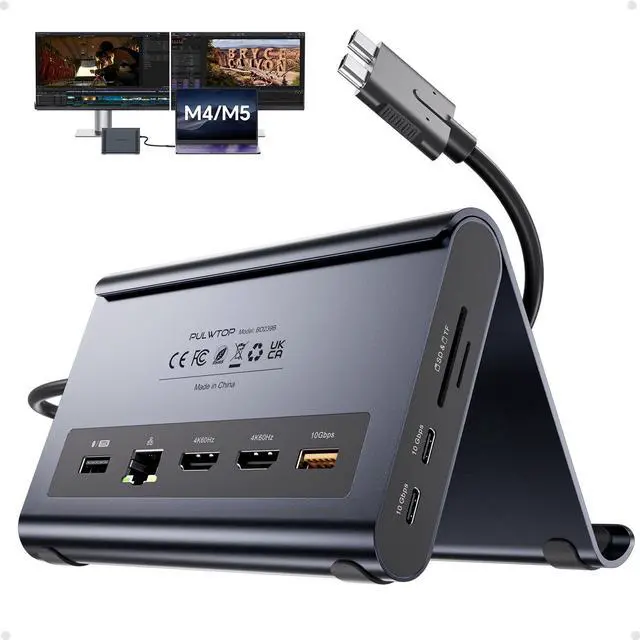
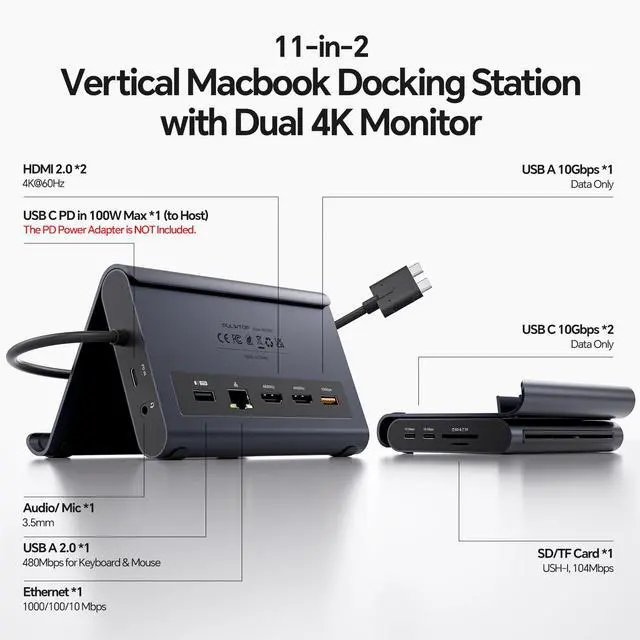
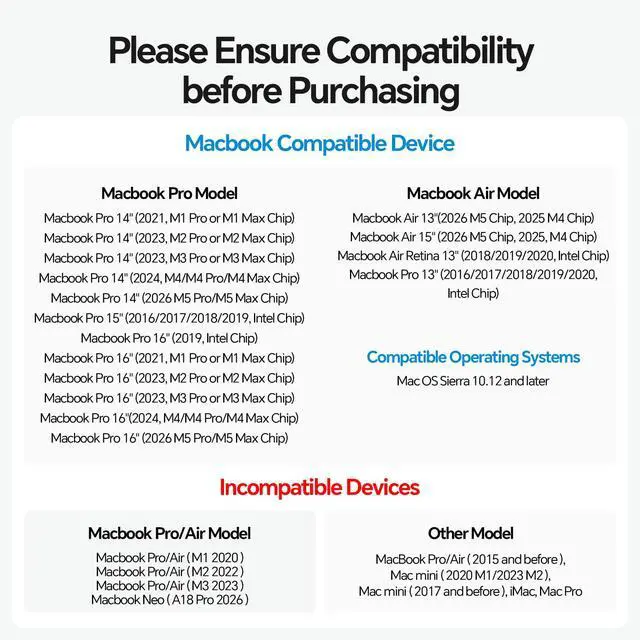
- This 2-in-1 docking station and vertical stand combines a laptop dock with a robust laptop stand. It securely holds your MacBook in the stand and also functions as a holder for tablets and phones. The dock provides 2x 4K@60Hz HDMI, 2x USB-C 10Gbps, 1x USB-A 10Gbps, 1x USB-A 2.0, SD/TF card readers, a 3.5mm Audio jack, Gigabit Ethernet (RJ45), and 100W PD input (PD adapter not included). This docking station delivers stunning 4K@60Hz video output via dual HDMI ports excellent for video editing and creative workflows. Transform your MacBook into a powerful dualmonitor workstation for mirroring or extending displays, enjoying ultrasmooth visuals and seamless multitasking. This docking station is precision-engineered for MacBook Pro and MacBook Air models from 2016 to 2026, including those with Intel chips, M1 Pro/Max, M2 Pro/Max, M3 Pro/Max, M4 Base Chip, M4 Pro/Max, m5 Base Chip, and M5 Pro/Max chipsets. It is NOT compatible with MacBooks featuring M1, M2, or M3 Base chips. It is also incompatible with Windows laptops and the MacBook Neo. Please verify your model before purchase. This docking station delivers 2×10Gbps USB-C ports and 1×10Gbps USB-A port (for data only, no video or charging). Move massive 4K videos, photo libraries, or backups in seconds, making it perfect for video editors and designers. A dedicated USB-A 2.0 port keeps your mouse and keyboard responsive for smooth, lagfree precision. This docking station supports a maximum 100W PD input and 95W output t
+
+
Overview
Specs
Reviews

Any questions? Our AI mode will help you find out quickly.
Try me now
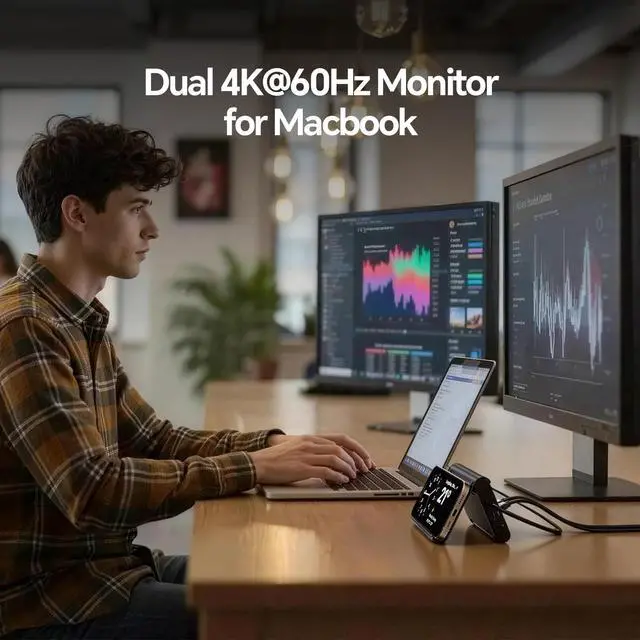
This 2-in-1 docking station and vertical stand combines a laptop dock with a robust laptop stand. It securely holds your MacBook in the stand and also functions as a holder for tablets and phones. The dock provides 2x 4K@60Hz HDMI, 2x USB-C 10Gbps, 1x USB-A 10Gbps, 1x USB-A 2.0, SD/TF card readers, a 3.5 mm Audio jack, Gigabit Ethernet (RJ45), and 100W PD input (PD adapter not included). This docking station delivers stunning 4K@60Hz video output via dual HDMI ports excellent for video editing and creative workflows. Transform your MacBook into a powerful dualmonitor workstation for mirroring or extending displays, enjoying ultrasmooth visuals and seamless multitasking.
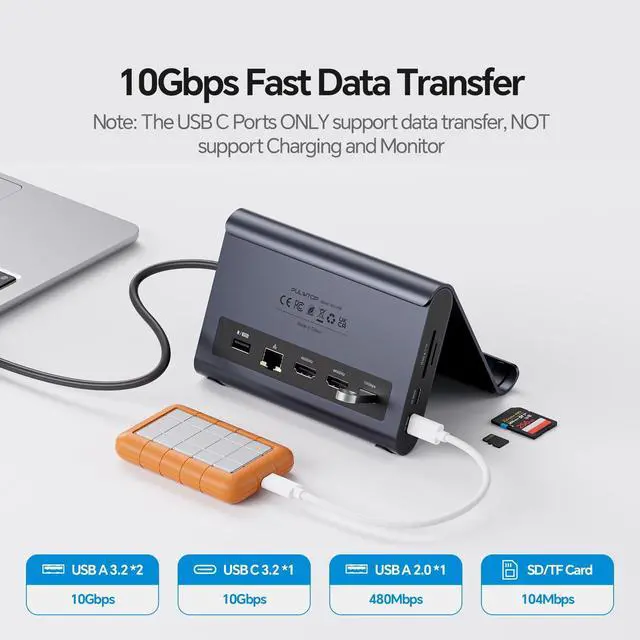
This docking station is precision-engineered for MacBook Pro and MacBook Air models from 2016 to 2026, including those with Intel chips, M1 Pro/Max, M2 Pro/Max, M3 Pro/Max, M4 Base Chip, M4 Pro/Max, m5 Base Chip, and M5 Pro/Max chipsets. It is NOT compatible with MacBooks featuring M1, M2, or M3 Base chips. It is also incompatible with Windows laptops and the MacBook Neo. Please verify your model before purchase. This docking station delivers 2×10Gbps USB-C ports and 1×10Gbps USB-A port (for data only, no video or charging).
Move massive 4K videos, photo libraries, or backups in seconds, making it perfect for video editors and designers. A dedicated USB-A 2.0 port keeps your mouse and keyboard responsive for smooth, lagfree precision. This docking station supports a maximum 100W PD input and 95W output to charge your MacBook Pro or Air at full speed, even under heavy loads like Final Cut Pro or when driving dual monitors. The builtin Gigabit Ethernet ensures stable, lagfree Zoom calls. No battery anxiety, no WiFi drops. A true docking station that keeps you productive all day.
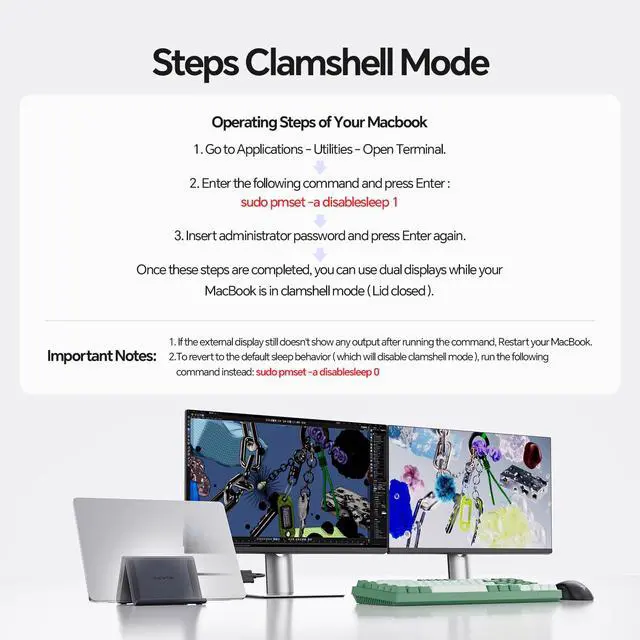
Steps for
Clamshell Mode: 1. Go to Applications Utilities and open Terminal. 2. Enter the following command and press
Enter: `sudo pmset -a disablesleep 1` 3. Insert your administrator password and press Enter again. Once these steps are completed, you can use dual displays while your MacBook is in clamshell mode (lid closed).
Important Notes: 1. If the external display still doesn't show any output after running the command, restart your MacBook. 2. To revert to the default sleep behavior (which will disable clamshell mode), run
the following command instead: `sudo pmset -a disablesleep 0`
This docking station is precision-engineered for MacBook Pro and MacBook Air models from 2016 to 2026, including those with Intel chips, M1 Pro/Max, M2 Pro/Max, M3 Pro/Max, M4 Base Chip, M4 Pro/Max, m5 Base Chip, and M5 Pro/Max chipsets. It is NOT compatible with MacBooks featuring M1, M2, or M3 Base chips. It is also incompatible with Windows laptops and the MacBook Neo. Please verify your model before purchase. This docking station delivers 2×10Gbps USB-C ports and 1×10Gbps USB-A port (for data only, no video or charging).
Move massive 4K videos, photo libraries, or backups in seconds, making it perfect for video editors and designers. A dedicated USB-A 2.0 port keeps your mouse and keyboard responsive for smooth, lagfree precision. This docking station supports a maximum 100W PD input and 95W output to charge your MacBook Pro or Air at full speed, even under heavy loads like Final Cut Pro or when driving dual monitors. The builtin Gigabit Ethernet ensures stable, lagfree Zoom calls. No battery anxiety, no WiFi drops. A true docking station that keeps you productive all day.
Steps for
Clamshell Mode: 1. Go to Applications Utilities and open Terminal. 2. Enter the following command and press
Enter: `sudo pmset -a disablesleep 1` 3. Insert your administrator password and press Enter again. Once these steps are completed, you can use dual displays while your MacBook is in clamshell mode (lid closed).
Important Notes: 1. If the external display still doesn't show any output after running the command, restart your MacBook. 2. To revert to the default sleep behavior (which will disable clamshell mode), run
the following command instead: `sudo pmset -a disablesleep 0`
Warranty & Returns
Warranty, Returns, And Additional Information
Warranty
- Please contact the Seller directly for warranty information. Warranty information may also be found on the Manufacturer's website.
- CONTACT
Return Policies
- Return for refund within: 30 days
- Return for replacement within: 30 days
- This item is covered by FiveMacro Store Return Policy
Manufacturer Contact Info
- For a directory of all our manufacturers, please click below.
- Manufacturers Directory
LOADING...