

Your Browsing History


Meet Your Seller

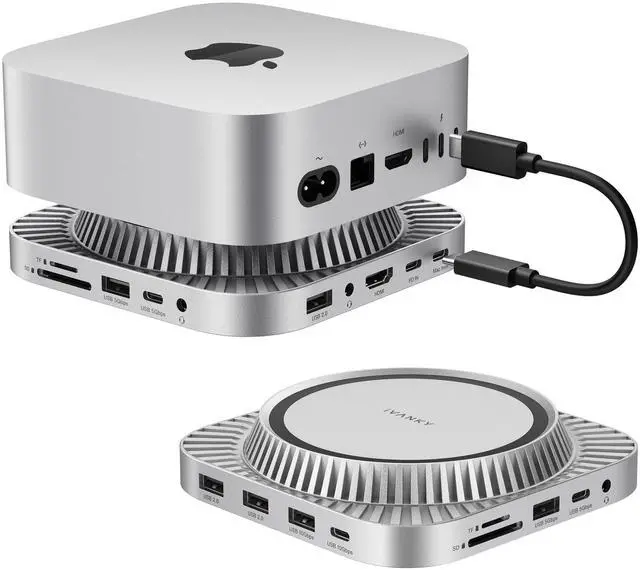

13-in-1 Mac mini M4 &M4 Pro (2024) Dock, 4K@144Hz HDMI,10Gbps USB | Dual Extended Displays Docking Station Stand for M5, with M.2 NVMe SSD Enclosure Hub, SD/TF, Audio Ports*2, 20W PD Adapter*1
Limited time offer, ends 09/17 By FiveMacro Store
- Ultra 13-in-1: This Docking Station for Mac Mini M4 provides 13 functional ports to enhance your work efficiency, containing: 4K@144Hz HDMI, 10 Gbps USB-A×1 & 10 Gbps USB-C×1, 5 Gbps USB-A×1 & 5 Gbps USB-C×1, USB-A 2.0×3, SD/TF 3.0×1, Dual Audio Ports, and an M.2 NVMe SSD Enclosure (10 Gbps) supporting both NVMe and SATA M.2 SSDs. Expanded Storage Capacity: The Docking Station accommodates drives up to 8TB in capacity and fits virtually all standard M.2 SSD form factors (2230/2242/2260/2280), offering rapid data transfer speeds of up to 10Gbps. Please note: SSD is not included. This makes it a superb selection for your home office arrangement and creative content production, particularly for OpenClaw, Clawdbot, and Moltbot users aiming to utilize the latest trends for Mac Mini M4. Smooth 4K@144Hz Visual Experience: Crafted for professionals and creators, this docking station provides crisp 4K @144Hz refresh rate through its HDMI interface. Whether you are editing high-resolution footage, designing graphics, hosting client presentations, or engaging in fast-paced gaming sessions, experience fluid motion and sharp detail. Ideal for multitaskersextend your workflow across dual displays by linking the docks HDMI port to your Macs Thunderbolt port, upgrading your setup into a productivity center. Note: Some high-refresh-rate monitors require Game Mode/Signal Enhancement Mode to be enabled. 10Gbps Data Fast-transfer: Achieve rapid speeds with dedicated 10Gbps USB-A and 10Gbps
+
+
Overview
Specs
Reviews

Any questions? Our AI mode will help you find out quickly.
Try me now
Ultra 13-in-1: This Docking Station for Mac Mini M4 provides 13 functional ports to enhance your work efficiency, containing: 4K@144Hz HDMI, 10 Gbps USB-A×1 & 10 Gbps USB-C×1, 5 Gbps USB-A×1 & 5 Gbps USB-C×1, USB-A 2.0 ×3, SD/TF 3.0 ×1, Dual Audio Ports, and an M. 2 NVMe SSD Enclosure (10 Gbps) supporting both NVMe and SATA M. 2 SSDs.
Expanded Storage Capacity: The Docking Station accommodates drives up to 8TB in capacity and fits virtually all standard M. 2 SSD form factors (2230/2242/2260/2280), offering rapid data transfer speeds of up to 10Gbps.
Please note: SSD is not included. This makes it a superb selection for your home office arrangement and creative content production, particularly for OpenClaw, Clawdbot, and Moltbot users aiming to utilize the latest trends for Mac Mini M4.
Smooth 4K@144Hz Visual Experience: Crafted for professionals and creators, this docking station provides crisp 4K @144Hz refresh rate through its HDMI interface. Whether you are editing high-resolution footage, designing graphics, hosting client presentations, or engaging in fast-paced gaming sessions, experience fluid motion and sharp detail. Ideal for multitaskersextend your workflow across dual displays by linking the docks HDMI port to your Macs Thunderbolt port, upgrading your setup into a productivity center.
Note: Some high-refresh-rate monitors require Game Mode/Signal Enhancement Mode to be enabled.
10Gbps Data Fast-transfer: Achieve rapid speeds with dedicated 10Gbps USB-A and 10Gbps USB-C portsexcellent for high-performance drives, quick HDD access, and demanding peripherals. At the same time, connect daily accessories (keyboards, mice) via three dependable 5Gbps USB-A ports. Work quicker, wait less.
Note: Actual transfer speed is influenced by whether your host device supports high-speed data transfer. Operating multiple functional ports (USB/SD/TF, etc. ) concurrently will also affect the product's transfer speed. This is a typical occurrence.
Ample Power Supply: The 13-in-1 Dock includes a 20W PD power adapter. When linking multiple high-power devicessuch as external hard drives or charging peripheralsemploying this external power adapter ensures notably enhanced power stability. It fully prevents issues caused by inadequate power supply, maintaining your devices operational.
Upgraded Cooling System: The M4 Mac Mini Dock features a top-vent design that complements the Macs appearance. Its slight elevation generates space for cooling airflow, protecting the Mac Minis bottom fan. Experience consistent performance even during multitasking.
What You Get: Fusion Dock 3 for connecting the power adapter to the Fusion Dock 3) and a 25cm USB-C cable (for connecting the Fusion Dock 3 to your M4). Please link with the corresponding cable; using an incorrect one may prevent the docking station from delivering power to the Mac mini.
Note: Fusion Dock 3 is specifically engineered for the Mac mini M4. If you plan to use it with other devices, two
restrictions exist: 1) the cable may be too short; 2) dual-screen functionality is not supported. All other functions will operate normally
Expanded Storage Capacity: The Docking Station accommodates drives up to 8TB in capacity and fits virtually all standard M. 2 SSD form factors (2230/2242/2260/2280), offering rapid data transfer speeds of up to 10Gbps.
Please note: SSD is not included. This makes it a superb selection for your home office arrangement and creative content production, particularly for OpenClaw, Clawdbot, and Moltbot users aiming to utilize the latest trends for Mac Mini M4.
Smooth 4K@144Hz Visual Experience: Crafted for professionals and creators, this docking station provides crisp 4K @144Hz refresh rate through its HDMI interface. Whether you are editing high-resolution footage, designing graphics, hosting client presentations, or engaging in fast-paced gaming sessions, experience fluid motion and sharp detail. Ideal for multitaskersextend your workflow across dual displays by linking the docks HDMI port to your Macs Thunderbolt port, upgrading your setup into a productivity center.
Note: Some high-refresh-rate monitors require Game Mode/Signal Enhancement Mode to be enabled.
10Gbps Data Fast-transfer: Achieve rapid speeds with dedicated 10Gbps USB-A and 10Gbps USB-C portsexcellent for high-performance drives, quick HDD access, and demanding peripherals. At the same time, connect daily accessories (keyboards, mice) via three dependable 5Gbps USB-A ports. Work quicker, wait less.
Note: Actual transfer speed is influenced by whether your host device supports high-speed data transfer. Operating multiple functional ports (USB/SD/TF, etc. ) concurrently will also affect the product's transfer speed. This is a typical occurrence.
Ample Power Supply: The 13-in-1 Dock includes a 20W PD power adapter. When linking multiple high-power devicessuch as external hard drives or charging peripheralsemploying this external power adapter ensures notably enhanced power stability. It fully prevents issues caused by inadequate power supply, maintaining your devices operational.
Upgraded Cooling System: The M4 Mac Mini Dock features a top-vent design that complements the Macs appearance. Its slight elevation generates space for cooling airflow, protecting the Mac Minis bottom fan. Experience consistent performance even during multitasking.
What You Get: Fusion Dock 3 for connecting the power adapter to the Fusion Dock 3) and a 25cm USB-C cable (for connecting the Fusion Dock 3 to your M4). Please link with the corresponding cable; using an incorrect one may prevent the docking station from delivering power to the Mac mini.
Note: Fusion Dock 3 is specifically engineered for the Mac mini M4. If you plan to use it with other devices, two
restrictions exist: 1) the cable may be too short; 2) dual-screen functionality is not supported. All other functions will operate normally
Warranty & Returns
Warranty, Returns, And Additional Information
Warranty
- Please contact the Seller directly for warranty information. Warranty information may also be found on the Manufacturer's website.
- CONTACT
Return Policies
- Return for refund within: 30 days
- Return for replacement within: 30 days
- This item is covered by FiveMacro Store Return Policy
Manufacturer Contact Info
- For a directory of all our manufacturers, please click below.
- Manufacturers Directory
LOADING...