

Your Browsing History


Meet Your Seller




MacBook Docking Station Dual Monitor 4K@60Hz for MacBook Pro/Air M4/M5 | Macbook Pro Stand USB C Dock with 2 HDMI, Gigabit Ethernet, 3 USB 10Gbps, SD/TF, Audio, PD for Home & office, Black
Limited time offer, ends 09/17 By FiveMacro Store
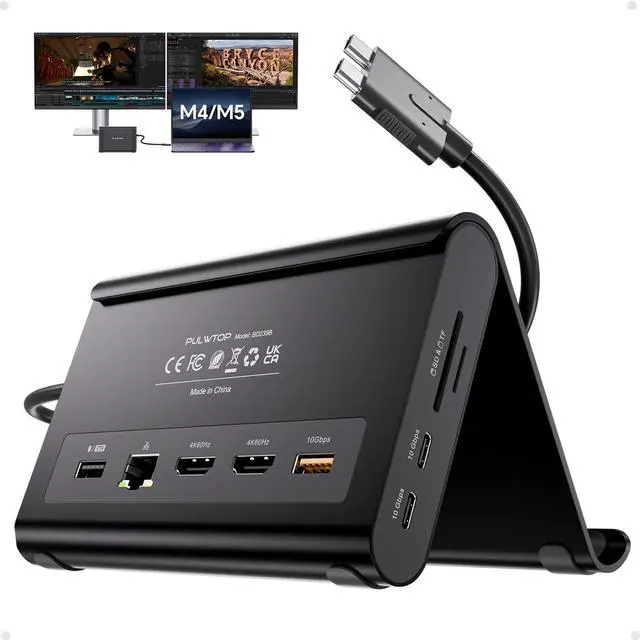
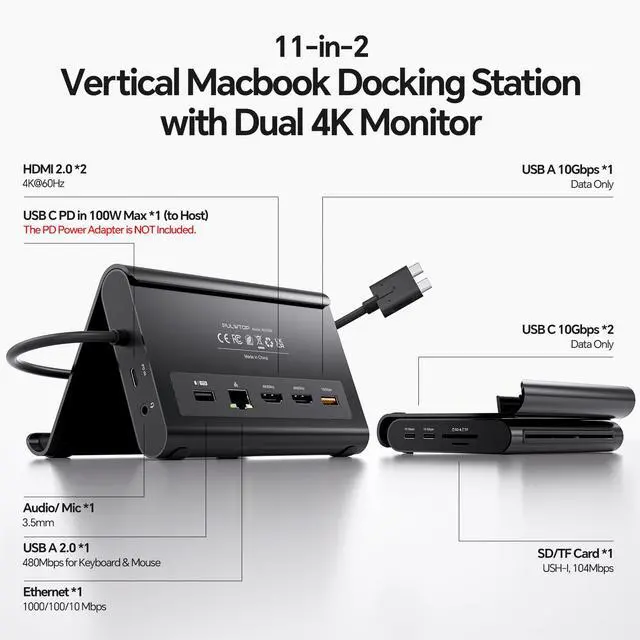
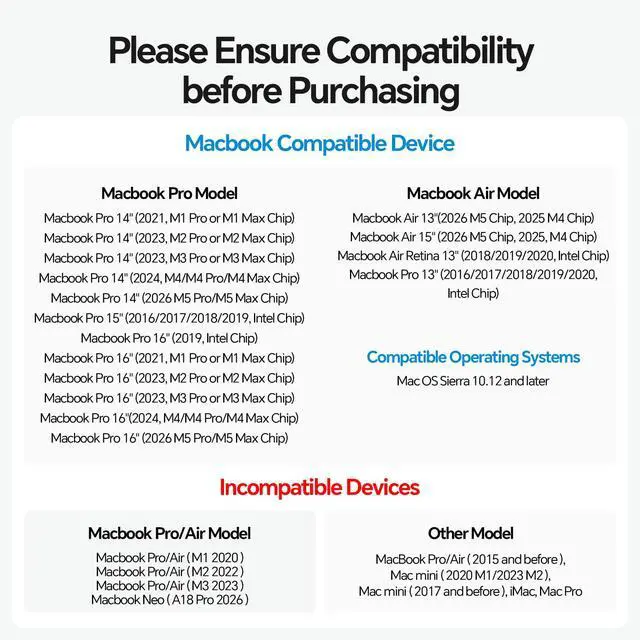
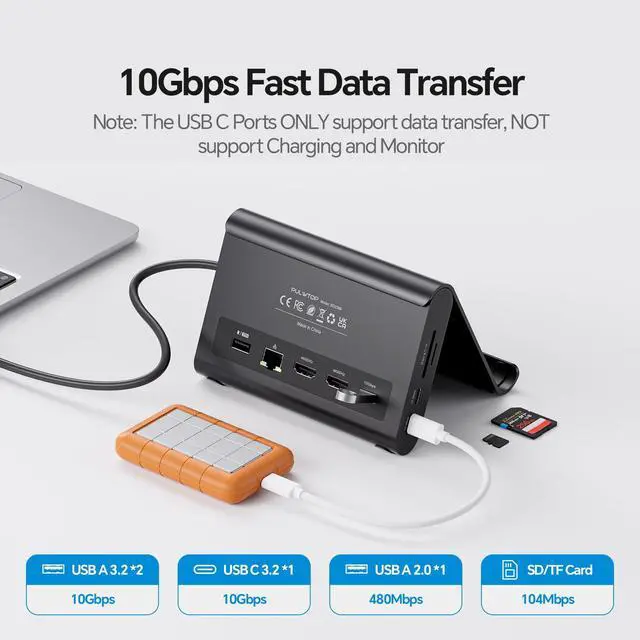
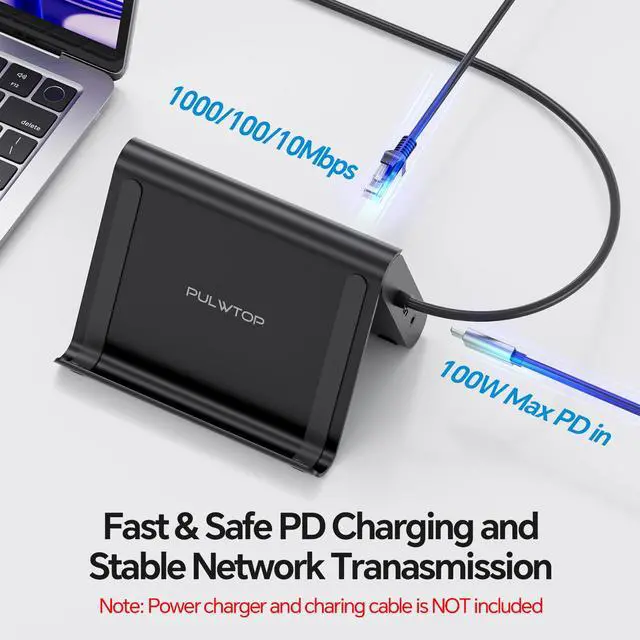
- 2-in-1 Stand & Dock ComboThis docking station serves as both a robust stand and a multiport hub elevate your laptop, tablet, or phone for improved ergonomics and airflow while gaining essential ports: 2× HDMI 4K@60Hz, 2× USBC 10Gbps, 1× USBA 10Gbps, 1× USBA 2.0, SD/TF, 3.5mm audio, and Gigabit Ethernet. Supports 100W PD passthrough (power adapter not included). 4K Dual Monitor Docking StationAchieve a true experience with sharp 4K@60Hz output. This dock enables dual monitor output for up to 2× 4K@60Hz displays. Whether watching movies, attending meetings, or multitasking, it manages everything effortlessly. Exclusive CompatibilityThis dual monitor docking station is designed for MacBook Pro/Air 20162026 (Intel, M1M5 Pro/Max, M4/M5 base chips). It is not compatible with M1/M2/M3 MacBook (base chips) for dual display. It is not for MacBook Neo A18 Pro, Windows, or Chrome. High-Speed Data Transfer, 100W PD & Gigabit EthernetThis dock provides 2× 10Gbps USB-C ports, 1× 10Gbps USB-A port, plus 1x USB-A 2.0 port for lag-free mouse/keyboard. Charge via 100W Power Delivery (adapter required) and experience stable wired Gigabit Ethernet. A true dock for power users who require speed, reliability, and all-in-one connectivity. Steps for Clamshell Mode Go to Applications Utilities and open Terminal. Enter the command: sudo pmset -a disablesleep 1 and press Enter. Insert administrator password and press Enter again. You can use dual displays while your MacBook
+
+
Overview
Specs
Reviews

Any questions? Our AI mode will help you find out quickly.
Try me now
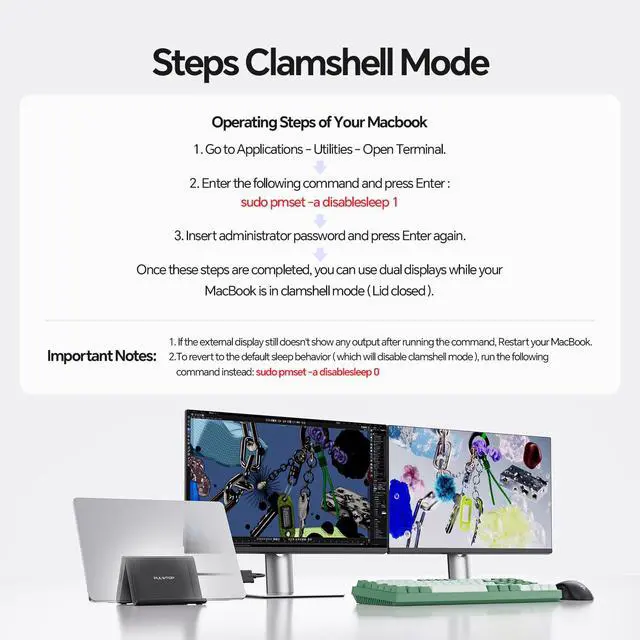
2-in-1 Stand & Dock ComboThis docking station serves as both a robust stand and a multiport hub elevate your laptop, tablet, or phone for improved ergonomics and airflow while gaining essential ports: 2× HDMI 4K@60Hz, 2× USBC 10Gbps, 1× USBA 10Gbps, 1× USBA 2.0, SD/TF, 3.5 mm audio, and Gigabit Ethernet. Supports 100W PD passthrough (power adapter not included). 4K Dual Monitor Docking StationAchieve a true experience with sharp 4K@60Hz output. This dock enables dual monitor output for up to 2× 4K@60Hz displays. Whether watching movies, attending meetings, or multitasking, it manages everything effortlessly. Exclusive CompatibilityThis dual monitor docking station is designed for MacBook Pro/Air 20162026 (Intel, M1M5 Pro/Max, M4/M5 base chips). It is not compatible with M1/M2/M3 MacBook (base chips) for dual display. It is not for MacBook Neo A18 Pro, Windows, or Chrome. High-Speed Data Transfer, 100W PD & Gigabit EthernetThis dock provides 2× 10Gbps USB-C ports, 1× 10Gbps USB-A port, plus 1x USB-A 2.0 port for lag-free mouse/keyboard. Charge via 100W Power Delivery (adapter required) and experience stable wired Gigabit Ethernet. A true dock for power users who require speed, reliability, and all-in-one connectivity. Steps for Clamshell Mode Go to Applications Utilities and open Terminal.
Enter the command: sudo pmset -a disablesleep 1 and press Enter. Insert administrator password and press Enter again. You can use dual displays while your MacBook is in clamshell mode (lid closed).
Important Notes: If the external display still doesn't show any output after running the command, restart your MacBook. To revert to the default sleep behavior (which will disable clamshell mode), run
the command instead: sudo pmset -a disablesleep 0
Enter the command: sudo pmset -a disablesleep 1 and press Enter. Insert administrator password and press Enter again. You can use dual displays while your MacBook is in clamshell mode (lid closed).
Important Notes: If the external display still doesn't show any output after running the command, restart your MacBook. To revert to the default sleep behavior (which will disable clamshell mode), run
the command instead: sudo pmset -a disablesleep 0
Warranty & Returns
Warranty, Returns, And Additional Information
Warranty
- Please contact the Seller directly for warranty information. Warranty information may also be found on the Manufacturer's website.
- CONTACT
Return Policies
- Return for refund within: 30 days
- Return for replacement within: 30 days
- This item is covered by FiveMacro Store Return Policy
Manufacturer Contact Info
- For a directory of all our manufacturers, please click below.
- Manufacturers Directory
LOADING...