

Your Browsing History


Meet Your Seller

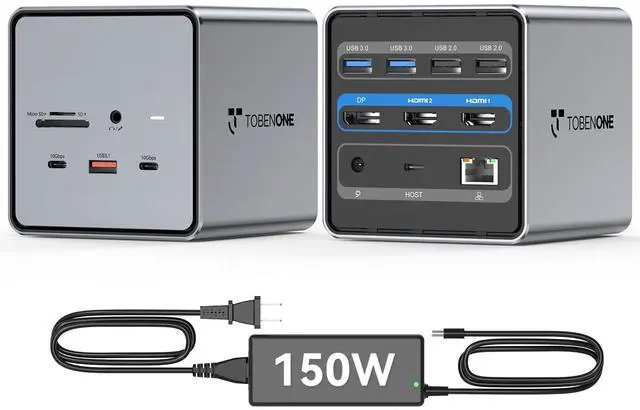


USB C Docking Station Dual/Triple Monitors with 150W Power Adapter | 2 HDMI, DP, 5 USB, Ethernet, SD/Micro SD 4.0, Fast Data Transfer, Dell/HP/Lenovo, for Stock Traders and Financial Analysts
Limited time offer, ends 09/17 By FiveMacro Store
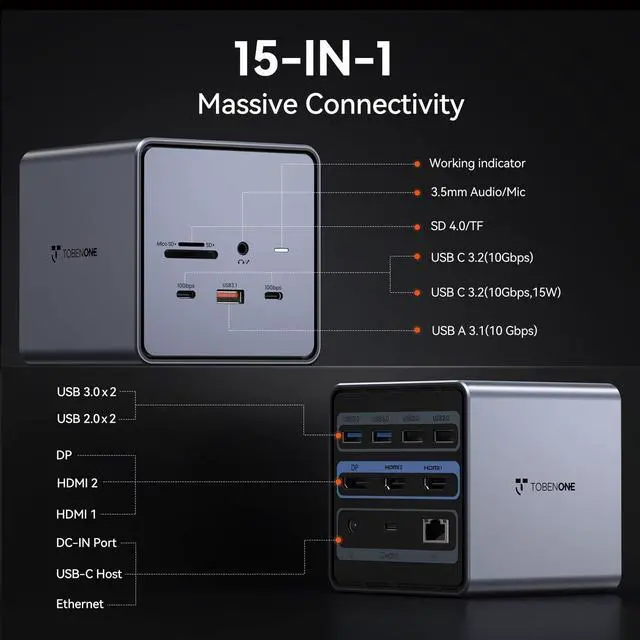
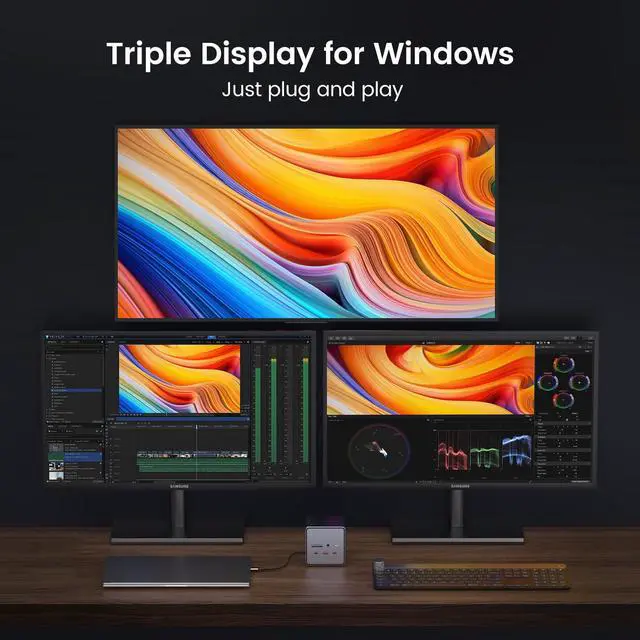
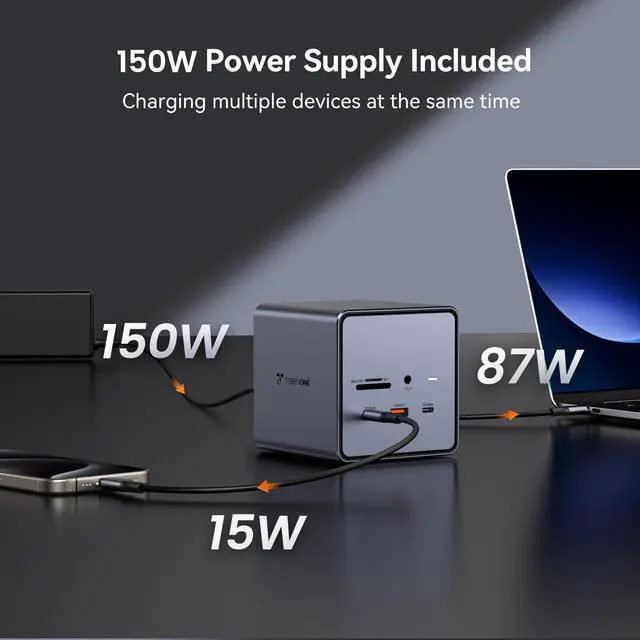
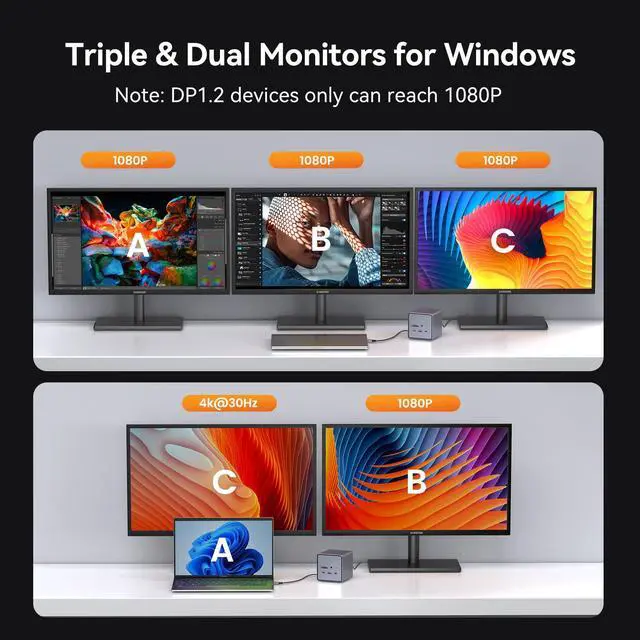
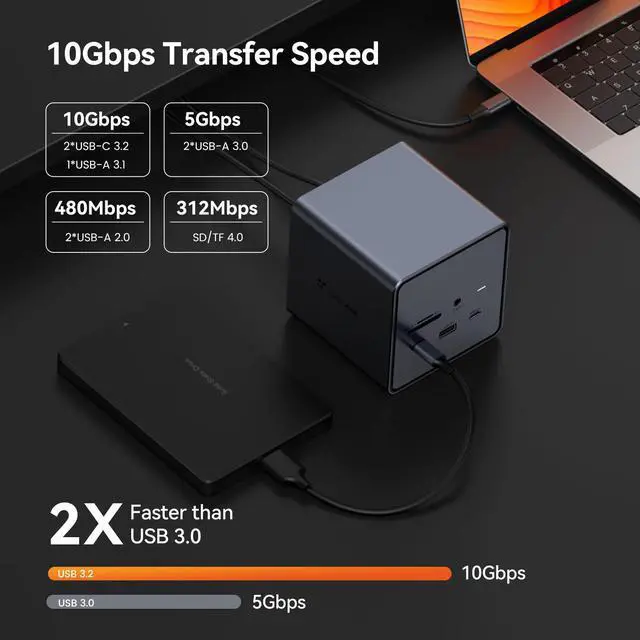
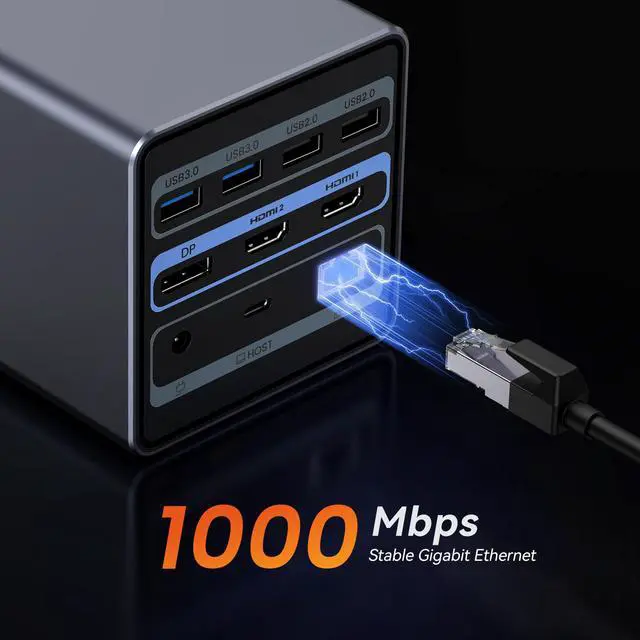
- Extend Dual/Triple Monitor Docking Station: This USB-C docking station expands your USB-C Windows laptop to multiple screens. It supports single monitor output up to 4K@60Hz (DP1.4 source), dual monitors with mixed resolution (4K@30Hz + 1080P), or triple monitors at 1080P (laptop lid closed). Perfect for traders, designers, and multitaskers, it enlarges your desktop area to simplify workflows, minimize window switching, and enhance overall productivity. A USB-C port concurrently provides 15W charging for your phone or mobile devices. It can efficiently address the issue of inadequate power in demanding work situations, enabling you to concentrate on tasks without disruption. All The Ports You Need: Boasting an extensive 15-port layout including 2x HDMI, 1x DP, Gigabit Ethernet, 2x USB-C 3.2 (10Gbps), 3x USB 3.0, 2x USB 2.0, SD card reader, and 3.5mm Mic/Audio port. This comprehensive design consolidates all your connectivity requirements into one dock. It tidies your workspace, removes the necessity for multiple adapters, and offers a stable connection hub for all your peripherals. 10 Gbps Fast Data Transfer Docking Station: The docking station's 2 × USB-C 3.2 and 1 USB-A 3.2 port deliver a data transfer speed reaching up to 10Gbps for tablets, smartphones, flash drives, and any compatible external storage. The time needed to transfer a 20G file is only about 16.4s, greatly boosting workflow efficiency. Note: USB-C ports are for data transfer only, not for video display. St
+
+
Overview
Specs
Reviews

Any questions? Our AI mode will help you find out quickly.
Try me now
Extend Dual/Triple
Monitor Docking Station: This USB-C docking station expands your USB-C Windows laptop to multiple screens. It supports single monitor output up to 4K@60Hz (DP 1.4 source), dual monitors with mixed resolution (4K@30Hz + 1080P), or triple monitors at 1080P (laptop lid closed). Perfect for traders, designers, and multitaskers, it enlarges your desktop area to simplify workflows, minimize window switching, and enhance overall productivity. A USB-C port concurrently provides 15W charging for your phone or mobile devices. It can efficiently address the issue of inadequate power in demanding work situations, enabling you to concentrate on tasks without disruption. All The
Ports You Need: Boasting an extensive 15-port layout including 2x HDMI, 1x DP, Gigabit Ethernet, 2x USB-C 3.2 (10Gbps), 3x USB 3.0, 2x USB 2.0, SD card reader, and 3.5 mm Mic/Audio port. This comprehensive design consolidates all your connectivity requirements into one dock. It tidies your workspace, removes the necessity for multiple adapters, and offers a stable connection hub for all your peripherals. 10 Gbps Fast Data Transfer Docking Station: The docking station's 2 × USB-C 3.2 and 1 USB-A 3.2 port deliver a data transfer speed reaching up to 10Gbps for tablets, smartphones, flash drives, and any compatible external storage. The time needed to transfer a 20G file is only about 16.4 s, greatly boosting workflow efficiency.
Note: USB-C ports are for data transfer only, not for video display.
Strong Compatibility USB-C Computer Dock: This computer docking station is compatible with all Windows/ChromeOS laptops with thunderbolt3/4/USB-C (supports Power Delivery, Data transfer, and Display Alt mode) port, such as Dell Latitude 5530, 5431, 5531, 7330, 7420, 7430, 7530, 9420, 9430; Dell Inspiron; Dell Vostro; XPS 13, 15, 17; HP Elitebook Zbook g7, g8; HP Probook; Lenovo t14s; Yoga 720, 910, 920, 930; Thinkpad; Surface Pro 8, 7, X, Go, Laptop 3, and others. (MacBook can only extend one monitor)
Monitor Docking Station: This USB-C docking station expands your USB-C Windows laptop to multiple screens. It supports single monitor output up to 4K@60Hz (DP 1.4 source), dual monitors with mixed resolution (4K@30Hz + 1080P), or triple monitors at 1080P (laptop lid closed). Perfect for traders, designers, and multitaskers, it enlarges your desktop area to simplify workflows, minimize window switching, and enhance overall productivity. A USB-C port concurrently provides 15W charging for your phone or mobile devices. It can efficiently address the issue of inadequate power in demanding work situations, enabling you to concentrate on tasks without disruption. All The
Ports You Need: Boasting an extensive 15-port layout including 2x HDMI, 1x DP, Gigabit Ethernet, 2x USB-C 3.2 (10Gbps), 3x USB 3.0, 2x USB 2.0, SD card reader, and 3.5 mm Mic/Audio port. This comprehensive design consolidates all your connectivity requirements into one dock. It tidies your workspace, removes the necessity for multiple adapters, and offers a stable connection hub for all your peripherals. 10 Gbps Fast Data Transfer Docking Station: The docking station's 2 × USB-C 3.2 and 1 USB-A 3.2 port deliver a data transfer speed reaching up to 10Gbps for tablets, smartphones, flash drives, and any compatible external storage. The time needed to transfer a 20G file is only about 16.4 s, greatly boosting workflow efficiency.
Note: USB-C ports are for data transfer only, not for video display.
Strong Compatibility USB-C Computer Dock: This computer docking station is compatible with all Windows/ChromeOS laptops with thunderbolt3/4/USB-C (supports Power Delivery, Data transfer, and Display Alt mode) port, such as Dell Latitude 5530, 5431, 5531, 7330, 7420, 7430, 7530, 9420, 9430; Dell Inspiron; Dell Vostro; XPS 13, 15, 17; HP Elitebook Zbook g7, g8; HP Probook; Lenovo t14s; Yoga 720, 910, 920, 930; Thinkpad; Surface Pro 8, 7, X, Go, Laptop 3, and others. (MacBook can only extend one monitor)
Warranty & Returns
Warranty, Returns, And Additional Information
Warranty
- Please contact the Seller directly for warranty information. Warranty information may also be found on the Manufacturer's website.
- CONTACT
Return Policies
- Return for refund within: 30 days
- Return for replacement within: 30 days
- This item is covered by FiveMacro Store Return Policy
Manufacturer Contact Info
- For a directory of all our manufacturers, please click below.
- Manufacturers Directory
LOADING...