

Your Browsing History


Meet Your Seller


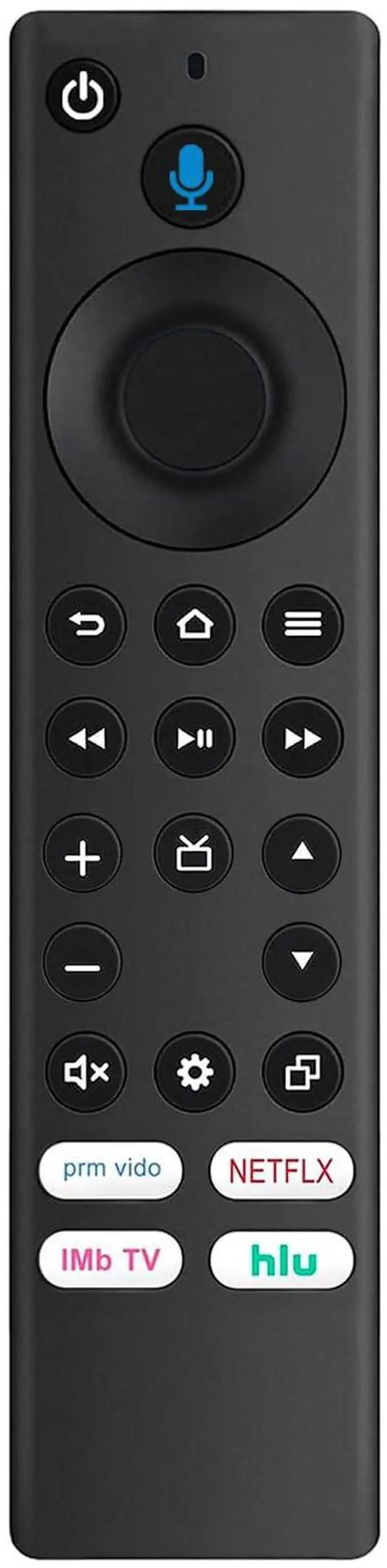

NS-RCFNA-21 Replacement Voice Remote fit for Insignia Smart TV NS-24F202NA22 NS-55F501NA22 NS-65F501NA22 NS-50F501NA22 NS-32F201NA22 NS-55F301NA22 NS-50F301NA22 NS-43F301NA22 NS-32F202NA22
Limited time offer, ends 09/29 By JadeEssence Shop
- New NS-RCFNA-21 NSRCFNA21 replacement voice remote control intended for Insignia smart TV devices, featuring shortcut apps for Prime Video, Netflix, IMDb TV, and Hulu. Works with the following Insignia smart TV models: F20, F30, and F50 series, including NS-50F301NA22, NS-58F301NA22, NS-75F301NA22, NS-70F501NA22, NS-24F202NA22, NS-55F501NA22, NS-65F501NA22, NS-50F501NA22, NS-32F201NA22, NS-55F301NA22, NS-50F301NA22, NS-43F301NA22, NS-32F202NA22, NS-42F201NA22, NS-65DF710NA21, NS-70DF710NA21, NS-43DF710NA21, NS-39DF310NA21, NS-24DF310NA21, NS-50DF710NA21, NS-50DF711SE21, NS-55DF710NA21, NS-24DF311SE21, NS-58DF620NA20, NS-32DF310NA19, NS-24DF310NA19, NS-39DF510NA19, NS-43DF710NA19, NS-50DF710NA19, and NS-55DF710NA19. Also compatible with models: NS24F202NA22, NS55F501NA22, NS65F501NA22, NS50F501NA22, NS32F201NA22, NS55F301NA22, NS50F301NA22, NS43F301NA22, NS32F202NA22, NS42F201NA22, NS65DF710NA21, NS70DF710NA21, NS43DF710NA21, NS39DF310NA21, NS24DF310NA21, NS50DF710NA21, NS50DF711SE21, NS55DF710NA21, NS24DF311SE21, NS58DF620NA20, NS32DF310NA19, NS24DF310NA19, NS39DF510NA19, NS43DF710NA19, NS50DF710NA19, and NS55DF710NA19. To pair the remote: Press and hold the Home button for approximately 30 seconds, then release. Wait for about 60 seconds (entering pairing mode), and the remote should automatically pair with your TV. The TV will show a pairing success message. Note: Only the known model numbers are listed
+
+
Overview
Specs
Reviews

Any questions? Our AI mode will help you find out quickly.
Try me now
New NS-RCFNA-21 NSRCFNA21 replacement voice remote control intended for Insignia smart TV devices, featuring shortcut apps for Prime Video, Netflix, IMDb TV, and Hulu. Works with the following Insignia smart
TV models: F20, F30, and F50 series, including NS-50F301NA22, NS-58F301NA22, NS-75F301NA22, NS-70F501NA22, NS-24F202NA22, NS-55F501NA22, NS-65F501NA22, NS-50F501NA22, NS-32F201NA22, NS-55F301NA22, NS-50F301NA22, NS-43F301NA22, NS-32F202NA22, NS-42F201NA22, NS-65DF710NA21, NS-70DF710NA21, NS-43DF710NA21, NS-39DF310NA21, NS-24DF310NA21, NS-50DF710NA21, NS-50DF711SE21, NS-55DF710NA21, NS-24DF311SE21, NS-58DF620NA20, NS-32DF310NA19, NS-24DF310NA19, NS-39DF510NA19, NS-43DF710NA19, NS-50DF710NA19, and NS-55DF710NA19.
Also compatible with models: NS24F202NA22, NS55F501NA22, NS65F501NA22, NS50F501NA22, NS32F201NA22, NS55F301NA22, NS50F301NA22, NS43F301NA22, NS32F202NA22, NS42F201NA22, NS65DF710NA21, NS70DF710NA21, NS43DF710NA21, NS39DF310NA21, NS24DF310NA21, NS50DF710NA21, NS50DF711SE21, NS55DF710NA21, NS24DF311SE21, NS58DF620NA20, NS32DF310NA19, NS24DF310NA19, NS39DF510NA19, NS43DF710NA19, NS50DF710NA19, and NS55DF710NA19.
To pair the remote: Press and hold the Home button for approximately 30 seconds, then release. Wait for about 60 seconds (entering pairing mode), and the remote should automatically pair with your TV. The TV will show a pairing success message.
Note: Only the known model numbers are listed
TV models: F20, F30, and F50 series, including NS-50F301NA22, NS-58F301NA22, NS-75F301NA22, NS-70F501NA22, NS-24F202NA22, NS-55F501NA22, NS-65F501NA22, NS-50F501NA22, NS-32F201NA22, NS-55F301NA22, NS-50F301NA22, NS-43F301NA22, NS-32F202NA22, NS-42F201NA22, NS-65DF710NA21, NS-70DF710NA21, NS-43DF710NA21, NS-39DF310NA21, NS-24DF310NA21, NS-50DF710NA21, NS-50DF711SE21, NS-55DF710NA21, NS-24DF311SE21, NS-58DF620NA20, NS-32DF310NA19, NS-24DF310NA19, NS-39DF510NA19, NS-43DF710NA19, NS-50DF710NA19, and NS-55DF710NA19.
Also compatible with models: NS24F202NA22, NS55F501NA22, NS65F501NA22, NS50F501NA22, NS32F201NA22, NS55F301NA22, NS50F301NA22, NS43F301NA22, NS32F202NA22, NS42F201NA22, NS65DF710NA21, NS70DF710NA21, NS43DF710NA21, NS39DF310NA21, NS24DF310NA21, NS50DF710NA21, NS50DF711SE21, NS55DF710NA21, NS24DF311SE21, NS58DF620NA20, NS32DF310NA19, NS24DF310NA19, NS39DF510NA19, NS43DF710NA19, NS50DF710NA19, and NS55DF710NA19.
To pair the remote: Press and hold the Home button for approximately 30 seconds, then release. Wait for about 60 seconds (entering pairing mode), and the remote should automatically pair with your TV. The TV will show a pairing success message.
Note: Only the known model numbers are listed
Warranty & Returns
Warranty, Returns, And Additional Information
Warranty
- Please contact the Seller directly for warranty information. Warranty information may also be found on the Manufacturer's website.
- CONTACT
Return Policies
- Return for refund within: 30 days
- Return for replacement within: 30 days
- This item is covered by JadeEssence Shop Return Policy
Manufacturer Contact Info
- For a directory of all our manufacturers, please click below.
- Manufacturers Directory
LOADING...