

Your Browsing History

- Free 30-day Returns
$53.99

Meet Your Seller

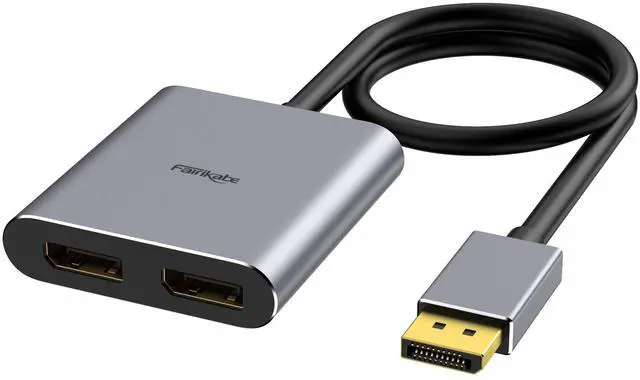



DisplayPort to Dual DisplayPort Splitter Adapter 4K60Hz | for Dual Monitor Display, MST Display Port Adapter Extend Display 1 in 2 Out, displayport Hub for Desktop PC Laptop
Limited time offer, ends 09/29 By JadeEssence Shop
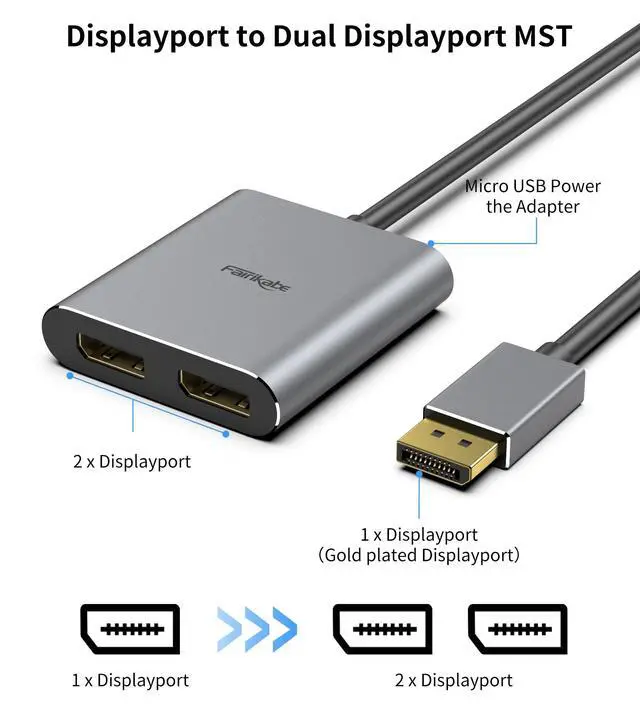
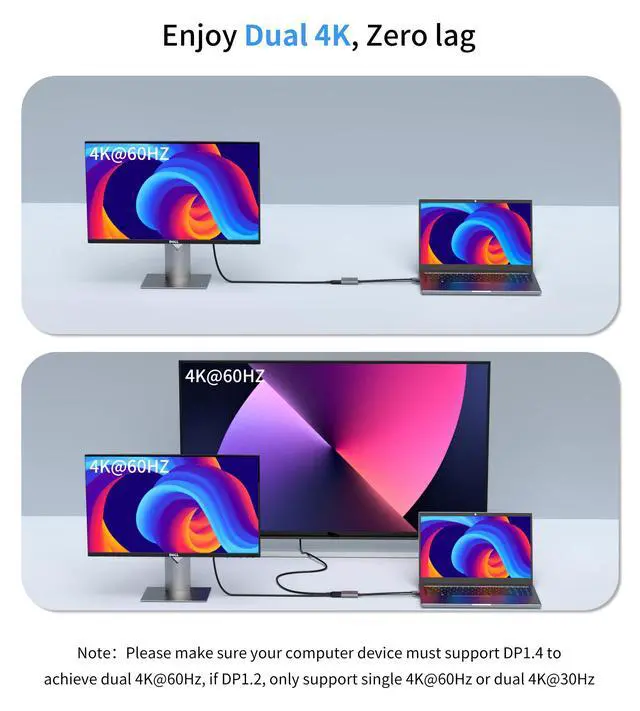
- This DisplayPort to Dual DisplayPort splitter adapter enables resolutions up to 4K 60Hz, allowing you to connect two DisplayPort monitors to a PC, laptop, or desktop with a DisplayPort output. It is ideal for multi-stream presentations in educational settings, meeting rooms, houses of worship, and retail stores, delivering ultra-high-definition content. To achieve the maximum resolution of 4K 60Hz for both monitors, please note that the dual DisplayPort monitors must support DSC and 4K 60Hz, and the computer's DP output port must be DP 1.4. This dual DisplayPort splitter (1 input, 2 outputs) supports both extended and mirrored display modes. It is designed to add dual DisplayPort monitors to a DisplayPort-equipped desktop or laptop with a discrete graphics card (most integrated graphics only support ABB display mode). Windows OS supports MST and SST, while macOS only supports SST (mirror mode AAA/ABB). It is not suggested for use with other DP docks or hubs. This product is not compatible with the Dell Optiplex 790. This DisplayPort to Dual DisplayPort splitter supports dual monitors at 4K@60Hz. Requirements: 1. A DisplayPort 1.4 output port on the PC or laptop; 2. Two DisplayPort input monitors that both support 4K@60Hz resolution and DSC. This DisplayPort monitor splitter can be widely used with display devices featuring DP ports, such as computers, laptops, or graphics cards with DisplayPort output ports. This DisplayPort dual monitor adapter contains one micro USB cable
+
+
Overview
Specs
Reviews

Any questions? Our AI mode will help you find out quickly.
Try me now
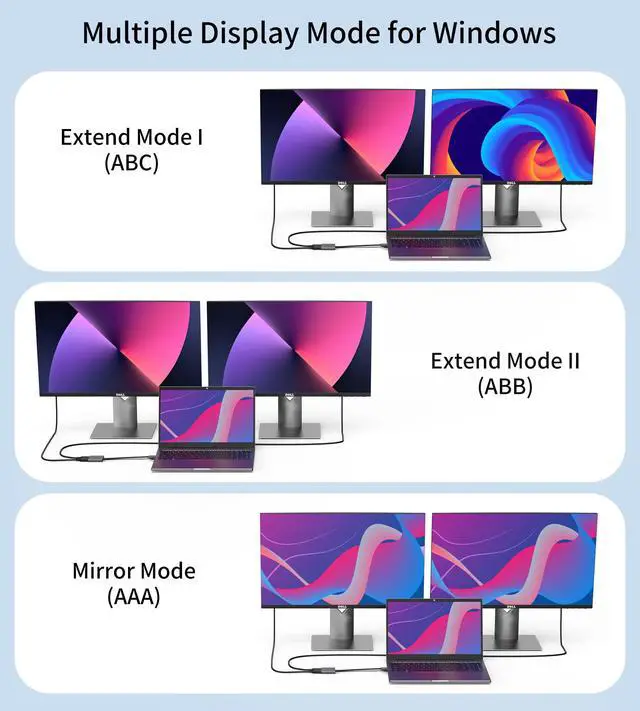
This DisplayPort to Dual DisplayPort splitter adapter enables resolutions up to 4K 60Hz, allowing you to connect two DisplayPort monitors to a PC, laptop, or desktop with a DisplayPort output. It is ideal for multi-stream presentations in educational settings, meeting rooms, houses of worship, and retail stores, delivering ultra-high-definition content. To achieve the maximum resolution of 4K 60Hz for both monitors, please note that the dual DisplayPort monitors must support DSC and 4K 60Hz, and the computer's DP output port must be DP 1.4. This dual DisplayPort splitter (1 input, 2 outputs) supports both extended and mirrored display modes.
It is designed to add dual DisplayPort monitors to a DisplayPort-equipped desktop or laptop with a discrete graphics card (most integrated graphics only support ABB display mode). Windows OS supports MST and SST, while macOS only supports SST (mirror mode AAA/ABB). It is not suggested for use with other DP docks or hubs. This product is not compatible with the Dell Optiplex 790. This DisplayPort to Dual DisplayPort splitter supports dual monitors at 4K@60Hz.
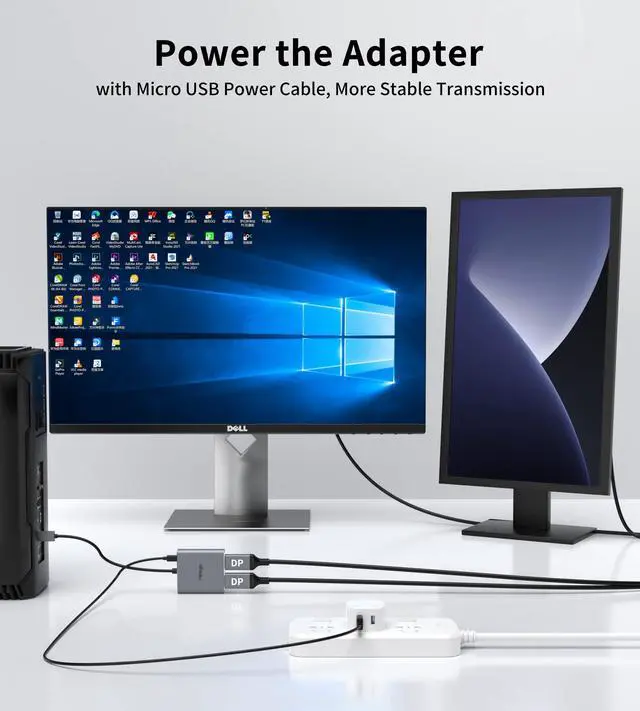
Requirements: 1. A DisplayPort 1.4 output port on the PC or laptop; 2. Two DisplayPort input monitors that both support 4K@60Hz resolution and DSC. This DisplayPort monitor splitter can be widely used with display devices featuring DP ports, such as computers, laptops, or graphics cards with DisplayPort output ports. This DisplayPort dual monitor adapter contains one micro USB cable. The micro USB power supply cable must be connected to a USB port on the PC or to a power adapter before use to ensure stable operation of the DisplayPort hub. Easy to use, plug and play, no drivers required.
Packing list: 1 x DisplayPort Splitter, 1 x Micro USB cable.
Note: Compatible with Dedicated Graphics Cards Only This product supports discrete (independent) graphics cards only. It may not function properly when used with integrated graphics cards. Set Both Displays to the Same Resolution When connecting two monitors, ensure both displays are set to the same resolution for proper operation. Maximum Resolution 4K@60Hz The resolution must not exceed 4K@60Hz to ensure stable performance
It is designed to add dual DisplayPort monitors to a DisplayPort-equipped desktop or laptop with a discrete graphics card (most integrated graphics only support ABB display mode). Windows OS supports MST and SST, while macOS only supports SST (mirror mode AAA/ABB). It is not suggested for use with other DP docks or hubs. This product is not compatible with the Dell Optiplex 790. This DisplayPort to Dual DisplayPort splitter supports dual monitors at 4K@60Hz.
Requirements: 1. A DisplayPort 1.4 output port on the PC or laptop; 2. Two DisplayPort input monitors that both support 4K@60Hz resolution and DSC. This DisplayPort monitor splitter can be widely used with display devices featuring DP ports, such as computers, laptops, or graphics cards with DisplayPort output ports. This DisplayPort dual monitor adapter contains one micro USB cable. The micro USB power supply cable must be connected to a USB port on the PC or to a power adapter before use to ensure stable operation of the DisplayPort hub. Easy to use, plug and play, no drivers required.
Packing list: 1 x DisplayPort Splitter, 1 x Micro USB cable.
Note: Compatible with Dedicated Graphics Cards Only This product supports discrete (independent) graphics cards only. It may not function properly when used with integrated graphics cards. Set Both Displays to the Same Resolution When connecting two monitors, ensure both displays are set to the same resolution for proper operation. Maximum Resolution 4K@60Hz The resolution must not exceed 4K@60Hz to ensure stable performance
Warranty & Returns
Warranty, Returns, And Additional Information
Warranty
- Please contact the Seller directly for warranty information. Warranty information may also be found on the Manufacturer's website.
- CONTACT
Return Policies
- Return for refund within: 30 days
- Return for replacement within: 30 days
- This item is covered by JadeEssence Shop Return Policy
Manufacturer Contact Info
- For a directory of all our manufacturers, please click below.
- Manufacturers Directory
LOADING...