here!
here!
I’m your shopping assistant for PC builds, upgrades, and everything tech.
Got questions? Ask away!
Start a conversation
here!
I’m your shopping assistant for PC builds, upgrades, and everything tech.
Got questions? Ask away!
Start a conversation



Limited time offer, ends 10/22
Limited time offer, ends 10/24
Limited time offer, ends 10/22
Limited time offer, ends 10/24
Limited time offer, ends 10/25
Limited time offer, ends 10/25
Limited time offer, ends 10/22
Limited time offer, ends 10/25
Limited time offer, ends 10/25

Limited time offer, ends 10/24
Limited time offer, ends 11/11
Limited time offer, ends 10/25
Limited time offer, ends 10/25
Limited time offer, ends 10/25
Limited time offer, ends 10/25
Limited time offer, ends 10/25
Limited time offer, ends 10/25
Limited time offer, ends 10/24
Limited time offer, ends 11/10
Limited time offer, ends 10/25
Limited time offer, ends 10/25
Limited time offer, ends 10/25
Limited time offer, ends 10/25
Limited time offer, ends 10/25
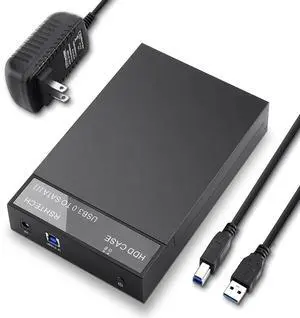
![RSHTECH Hard Drive Enclosure USB 3.0 to SATA Aluminum External Hard Drive Dock Case for 3.5 inch HDD SSD up to 10TB Drives [Support UASP]](https://c1.neweggimages.com/productimage/nb300/A7U1_1_20191205984391566.jpg "RSHTECH Hard Drive Enclosure USB 3.0 to SATA Aluminum External Hard Drive Dock Case for 3.5 inch HDD SSD up to 10TB Drives [Support UASP]")
Limited time offer, ends 10/25
For users looking to convert internal hard drives or SSDs into portable external storage, this page offers a range of enclosures designed to safeguard your data, simplify upgrades, and minimize hardware costs. Browse options including SATA SSD enclosures and HDD external caddies compatible with USB 3.0 and more.
Selecting the right hard drive or SSD enclosure depends on several important factors that affect compatibility, speed, and durability. Keep these key features in mind when shopping:
The interface type is often the single most critical aspect when choosing a hard drive enclosure, as it governs how quickly data moves between your external drive and computer. Newer USB standards significantly boost transfer rates and convenience.
For general use, USB 3.0 Type-C provides a dependable 5Gbps connection suitable for everyday tasks.
When handling large multimedia files or active editing workflows, stepping up to USB 3.1 Gen 2 Type-C or USB 3.2 Gen 2 Type-C enclosures can cut down large transfers and backups massively.
For professional-grade throughput, especially with NVMe drives, USB 4.0 (40Gbps) (USB-C) brings blazing-fast PCIe support, perfect for maximizing SSD performance without bottlenecks.
For developers, system integrators, and storage professionals, hard drive and SSD enclosures unlock powerful capabilities beyond basic external storage. Using multiple enclosures allows for flexible RAID setups, external disk cloning, or rapid troubleshooting of SATA and NVMe drives outside traditional desktops.
Leading-edge enclosures combining USB 3.2 Gen 2 10Gbps Type C support empower mobile developers and creative professionals to edit large video files or databases directly from the enclosure with negligible lag.
Integrating with other components from Components & Storage can further tailor custom enclosure setups for superior thermal management, cable routing, and power delivery in demanding environments.
Newegg shopping tip: Before picking a hard drive enclosure, check what connection type it supports—USB 3.0, USB-C, or Thunderbolt—to match your device for the best transfer speeds. Also, confirm it fits your drive’s size and interface, like 2.5” SATA or M.2 SSD, to avoid compatibility hiccups.
Connect any SATA SSD or HDD with USB 3.0 Type-C for up to 5Gbps speeds—perfect for budget builds needing reliable, plug-and-play external storage.
Speed up your data transfers with USB 3.1 Type-C enclosures offering 10Gbps throughput—great for handling large files without bottlenecks.
Get cutting-edge 10Gbps bandwidth with USB 3.1 Gen 2 Type-C, ideal for NVMe SSDs demanding fast, efficient data pipelines.
If you’re new to hard drive enclosures, think of them as a protective case that turns an internal HDD or SSD into a portable external drive. This allows you to expand your storage, back up important files, or even retrieve data from an old laptop drive. Many enclosures support both 2.5” and 3.5” SATA drives, making them versatile for backup or DIY projects. To begin, identify your drive’s size and interface, then match it to the appropriate enclosure that fits your needs. For a straightforward, budget-friendly option, consider models featuring USB 3.0 Type-C connectivity, which offers easy plug-and-play setup on most computers.
Hard drive enclosures serve as vital tools for content creators who need fast, portable storage solutions to handle large video files and project libraries. Look for enclosures designed to house high-performance NVMe SSDs with interfaces like USB 3.2 Gen 2 Type-C or USB 3.1 Gen 2 Type-C to provide blistering read/write speeds and seamless editing on the go. These enclosures allow you to efficiently offload, archive, or share footage without bottlenecks, ensuring your workflow stays smooth under tight deadlines.
If you have older SATA hard drives piling up or want to salvage data from a desktop or notebook drive, a hard drive enclosure is a straightforward solution. Many Hard Drive enclosures support standard SATA connections, making it possible to reuse your legacy drives as external backups or cloning targets without opening your PC again. These models are ideal for tech DIYers looking for cost-effective storage extensions or a simple way to transfer data during system upgrades.
Research more: Choosing the right hard drive enclosure depends on your drive type, connection needs, and portability preferences. For detailed comparisons and installation tips, check out the Newegg Insider buying guides to make a well-informed choice.
Last Updated: October 2026 | Newegg Hard Drive / SSD Enclosures Buying Guide
USB 3.1 enclosures offer much faster data transfer speeds, up to 10 Gbps, while USB 2.0 tops out at 480 Mbps. If you’re moving large files or using an SSD, USB 3.1 will save you a lot of time.
Yes, 2.5-inch drive enclosures are smaller and usually designed for SSDs or laptop HDDs, while 3.5-inch enclosures are bigger and meant for desktop hard drives. Make sure you pick the right size for your drive.
Most enclosures are made for either SATA or NVMe drives, so you'll need to check the specs carefully. They’re not usually interchangeable because the connectors and protocols differ.
Transfer speeds mainly depend on the enclosure’s interface, like USB 3.0 or Thunderbolt, and the drive inside. For example, a USB 3.1 enclosure with an SSD can hit speeds up to 10 Gbps, but a mechanical HDD will be slower overall.
Check the form factor of your drive—most common are 2.5-inch for laptops or 3.5-inch for desktops. Matching the enclosure size ensures a proper fit and good connectivity.
If your computer supports USB-C, it’s usually a better choice because it offers faster data transfer and future compatibility. USB-A can still work fine, but it might bottle neck your drive’s speed.
Most good enclosures offer solid physical protection and steady connections, but frequent shocks or drops can still risk data loss. Look for reviews that mention durability and drive retention when used on the go.
Buyers often mention problems like overheating, slow transfer speeds, or compatibility glitches. Checking reviews for real-world testing of temperature and drive compatibility is key before picking one.
First, open the enclosure carefully, insert your hard drive or SSD into the right slot, and connect it securely. Then, close the case and plug the enclosure into your computer via USB or another interface to access the drive.
Yes, as long as the drive is formatted with a file system both computers can read, like exFAT for Windows and Mac compatibility, you can use the enclosure with multiple devices without needing to reformat.
“ Have 2 different models of enclosures and have never had an issue with any of them from this brand. ”
ORICO M.2 NVMe SSD Enclosure, USB 3.1 Gen 2 (10 Gbps) PCIe External Adapter NVMe Case for 2230/2242/2260/2280 M.2 SSD up to 8TB, UASP Supported - M2PV“ Im very pleased with this enclosure. Highly recommend this product. ”
Sabrent USB 3.0 to SATA External Hard Drive Lay-Flat Docking Station for 2.5 or 3.5in HDD, SSD (EC-DFLT)“ The enclosure itself works great ”
ORICO Aluminum M.2 NVMe SSD Enclosure , Tool-Free 10Gbps USB C Adapter, USB 3.2 M.2 NVMe Reader, External SSD Case Thunderbolt 3 Compatible, Supports 4TB 2230/2242/2260/2280 PCIe M-Key SSDs-PWM2-BK“ even if I have a few issues transferring between two drives in the enclosure. ”
WAVLINK 4-Bay Hard Drive Enclosure for 3.5" and 2.5'' SATA HDD/SSD Featuring 10Gbps USB-C 3.2, Max 88TB Capacity, Built-in Temp-Controlled Cooling Fans, 4K HDMI Stunning Video Output, Aluminum Shell“ Aluminum enclosure will be good for heat dissipation. ”
ORICO 3.5 Inch Hard Drive Enclosure with Removable Case, External USB 3.1 Gen 1 to SATA 3.0 Adapter for SATA 3.5 Inch HDD with 12 V 2A Power Supply (20 TB Max)“ Overall, I would definitely make the purchase again and how they suggested to anyone who was looking for a enclosure for their SSD ”
ORICO Aluminum M.2 NVMe SSD Enclosure , Tool-Free 10Gbps USB C Adapter, USB 3.2 M.2 NVMe Reader, External SSD Case Thunderbolt 3 Compatible, Supports 4TB 2230/2242/2260/2280 PCIe M-Key SSDs-PWM2-BK“ I have their 5.25 enclosure and it just works. ”
VANTEC NexStar HX NST-387S3-BK Aluminum / ABS Plastic 3.5" Black SATA I/II/III USB 3.0 3.5" SATA III Hard Drive Enclosure USB 3.0 With Fan“ I would definitely recommend the WavLink 4-bay Non-Raid enclosure to any HDD enthusiast. ”
WAVLINK 4-Bay Hard Drive Enclosure for 3.5" and 2.5'' SATA HDD/SSD Featuring 10Gbps USB-C 3.2, Max 88TB Capacity, Built-in Temp-Controlled Cooling Fans, 4K HDMI Stunning Video Output, Aluminum Shell